A salon human handoff script is the difference between "the AI got stuck" and "the owner has everything needed to protect a premium booking." In a high-touch salon, the most valuable calls are rarely the simplest ones. They include VIP clients, preferred stylist requests, long color work, extensions, bridal parties, deposit exceptions, repeat-client notes, and clients who need reassurance before they commit.
The AI receptionist should not try to finish those conversations alone. It should collect the right details, set a calm expectation, and move the request to the right person with enough context that the client does not have to start over.
This guide gives salon owners a practical salon human handoff script for premium appointments: intake fields, escalation triggers, exact client-facing phrases, staff opening lines, and an owner-review checklist. Use it when you want automation to protect chair time without flattening the personal service that keeps clients loyal.
If you are building the workflow in Solvea, start from the salon AI receptionist use case, then connect the rules below to your service menu, policies, calendar, call reports, and staff follow-up process.
Quick Answer: What Should a Salon Human Handoff Script Do?
A salon human handoff script should do four jobs:
- 1.Tell the client why a person is taking over.
- 2.Capture the appointment details staff need before they respond.
- 3.Set a specific next step or callback expectation.
- 4.Give the owner, manager, or stylist a short summary they can act on.
Use this rule: the AI can handle repeatable booking work, while staff handle relationship-heavy or judgment-heavy work.
| Booking moment | AI can usually continue | Human should take over |
|---|---|---|
| Simple appointment | Known service, available time, normal duration, no special notes | Client is unsure which service fits the result |
| Preferred stylist | Stylist is available and the service is routine | Stylist is unavailable, waitlist needed, or client is a VIP |
| Premium color | Consultation flow is documented | Color correction, major transformation, extensions, or uncertain timing |
| Deposit policy | Approved rule is clear | Exception, refund, transfer, card issue, or upset client |
| Group booking | Small documented service bundle | Bridal, event, group, off-site, or multi-stylist coordination |
| Repeat client | Usual service and stylist are clear | Client wants a major change or has sensitive notes |
| Complaint | Basic acknowledgement | Re-do, refund, dissatisfaction, or owner review |
That split makes the salon human handoff script feel premium instead of defensive.
The Salon Human Handoff Script Framework
Use one structure for every handoff so staff know where to look.
| Step | Client-facing line | Internal note to staff |
|---|---|---|
| Acknowledge | "I want to make sure we handle this carefully." | Caller is moving out of routine booking |
| Explain | "This appointment needs a quick review by our team before we confirm it." | Reason: VIP, complex service, policy question, complaint, or unclear duration |
| Collect | "I will take a few details so you do not have to repeat everything." | Capture fields from the intake table below |
| Set expectation | "The team will follow up by [timeframe] with the next step." | Callback owner and deadline |
| Close | "I have sent this to the team with your notes." | Ticket, call summary, or row created |
The exact wording can be warm, luxury, direct, or neighborhood-friendly. The structure should stay consistent.
Intake Fields to Capture Before Handoff
The handoff is only useful if the note is complete. A stylist who gets "client wants color" still has to call back cold. A manager who gets the fields below can respond with authority.
| Field | Why staff need it | Example prompt |
|---|---|---|
| Client name | Confirms who the request belongs to | "Can I get your full name for the appointment note?" |
| Best callback channel | Prevents missed follow-up | "Do you prefer a call or text for the next step?" |
| New or returning client | Changes context and expectations | "Have you visited us before?" |
| Client status | Flags premium, VIP, member, or frequent client | "Are you booking as a returning member or using a gift card/package?" |
| Requested service | Prevents vague premium booking notes | "Which service are you hoping to schedule?" |
| Desired result | Gives the stylist useful context | "What result are you hoping for?" |
| Preferred stylist | Protects client relationships | "Do you have a stylist you want to see?" |
| Date/time windows | Speeds up callback | "Which days or times are easiest for you?" |
| Backup windows | Avoids another round of scheduling | "If that time is not available, what is your second choice?" |
| Event or deadline | Flags urgency | "Is this for an event or specific date?" |
| Service history | Helps staff judge fit | "Have you had this service with us before?" |
| Policy question | Separates booking from exception handling | "Is your question about deposit, cancellation, late arrival, or something else?" |
| Handoff reason | Makes the internal note scannable | VIP, preferred stylist, complex color, extension, group, policy, complaint |
| Owner | Prevents orphaned follow-up | Stylist, manager, owner, front desk, or booking coordinator |
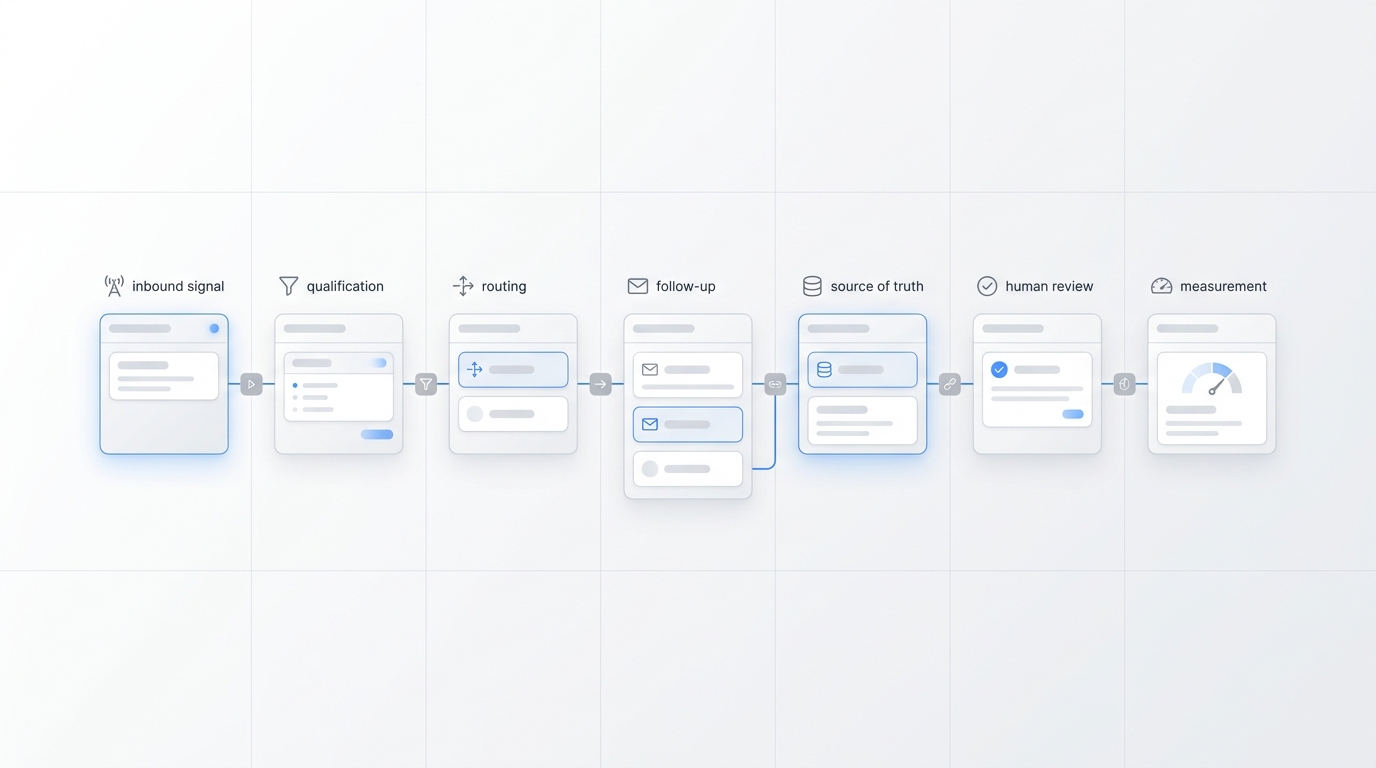
For Solvea, this matters because the call is only the first step. A booking request can turn into a calendar action, a new Google Sheets record, or an Inbox ticket for follow-up. If the caller needs help from a person, Agent Transfer gives the team the context they need without digging through raw call notes. That makes the workflow easier to manage across Google Calendar, Google Sheets, and the Solvea Inbox.
Script 1: AI to Client, Before Staff Takes Over
Use this when the AI decides the request needs a person.
"I can help collect the details, but I want our team to review this before confirming because it may need the right stylist, timing, or policy approval. I will take a few notes now so you do not have to repeat yourself."
Then ask:
- "Which service are you hoping to book?"
- "Is there a specific stylist you would like?"
- "Do you have a date, event, or deadline in mind?"
- "What is the best phone number or text number for follow-up?"
- "Is there anything the stylist or manager should review before calling you back?"
Close with:
"Thank you. I have sent this to the team as a priority handoff. They will follow up with the next step by [timeframe]."
This salon human handoff script works because it does not apologize for the handoff. It frames the human review as part of the service.
Script 2: Staff Opening Line After the AI Handoff
The human response should prove that the handoff worked. The client should not hear, "So what did you need?"
Use this:
"Hi [client name], this is [staff name] from [salon]. I saw your note about [service/request], your preferred time around [window], and [special detail]. I am taking over so we can get this right."
Then choose the next line:
| Scenario | Staff line |
|---|---|
| Preferred stylist | "Let me check [stylist]'s schedule and the right appointment length before we confirm." |
| VIP client | "I am going to personally review the best timing and make sure your notes are attached." |
| Complex service | "Before we book, I want to make sure we choose the right service length and consultation path." |
| Deposit question | "I saw your policy question. I can walk through what applies to this appointment." |
| Complaint | "I am sorry this needs extra attention. I have the summary and want to understand what would feel like the right next step." |
That opening line is the most important part of the salon human handoff script. It shows continuity.
Script 3: VIP or Preferred Stylist Request
VIP and preferred-stylist requests need a higher-touch script because they are relationship moments.
AI line:
"I see this is a preferred stylist request. I will send this to the team so they can review the best time with [stylist] and confirm the right appointment length."
Staff line:
"Hi [client name], I saw you would like to see [stylist] for [service]. I am checking the schedule and any notes before confirming, so we protect enough time for the appointment."
Internal note:
Handoff reason: Preferred stylist / premium client
Client: [name]
Contact: [phone/email]
Requested service: [service]
Preferred stylist: [stylist]
Ideal window: [date/time]
Backup window: [date/time]
Client status: [VIP/member/returning/new]
Decision needed: confirm slot / offer waitlist / suggest consultation
Owner: [staff name]
Follow-up deadline: [time]
Use this salon human handoff script when client relationship matters more than instant booking speed.
Script 4: Complex Color, Extensions, or Transformation
Do not let the AI guess at technical beauty work. It can collect context and route the appointment.
AI line:
"For that type of color or extension appointment, the team should review the details before confirming the service and timing. I can collect the main notes now."
Ask:
- "What result are you hoping for?"
- "Is this a new look, maintenance, correction, or extension service?"
- "Have you had color, lightener, extensions, or chemical services recently?"
- "Is there a specific event date?"
- "Are you open to a consultation before the full appointment?"
Staff line:
"I saw your request for [result]. Before we book the full appointment, I want to confirm the right service path, timing, and whether a consultation is needed."
Internal note:
Handoff reason: Complex service review
Desired result: [client words]
Current service history: [known/unknown]
Preferred stylist: [name/open]
Event deadline: [date/none]
Photos requested: [yes/no if this is part of your process]
Likely next step: consultation / quote review / full booking
This is a core salon human handoff script for premium appointments because it prevents the calendar from looking full while the actual service is mis-scoped.
Script 5: Deposit, Cancellation, or Policy Exception
The AI can repeat approved policy. Staff should handle exceptions, refund questions, disputes, and edge cases.
AI line:
"I can share the approved policy, but because you have a question about an exception, I will send this to the team for review."
Staff line:
"I saw your note about [deposit/cancellation/late arrival/refund]. I can review what applies to this appointment and confirm the next step with you."
Internal note:
Handoff reason: Policy exception
Appointment/service: [service/date if known]
Policy topic: [deposit/cancellation/refund/late arrival]
Client question: [short summary]
Urgency: [same day / before appointment / general]
Decision needed: explain rule / approve exception / manager review
For a deeper policy asset, link this workflow to your salon cancellation policy message template. The policy script and the salon human handoff script should use the same language.
Script 6: Bridal, Group, or Event Booking
Group bookings are usually premium because timing, deposits, multiple services, and staff coordination matter.
AI line:
"For bridal or group appointments, our team reviews the details before confirming. I will collect the event information and send it to the right person."
Ask:
| Field | Prompt |
|---|---|
| Event date | "What is the event date?" |
| Group size | "How many people need services?" |
| Service mix | "Which services are you considering?" |
| Location | "Will this be in salon or off-site if your salon offers that?" |
| Timing | "What time does everyone need to be ready?" |
| Coordinator | "Who should we contact for planning?" |
| Decision stage | "Are you ready to book, or comparing options?" |
Staff line:
"I saw the event date, group size, and services you are considering. I will review staffing and timing before we confirm what is possible."
This salon human handoff script avoids promising availability before the team checks the real schedule.
Script 7: Upset Client, Re-Do, or Service Concern
Complaint handoff needs empathy, not speed.
AI line:
"I am sorry this needs attention. I will send this to a person who can review it properly. I will take a few details so they can follow up with context."
Ask:
- "What appointment or service is this about?"
- "When did the appointment happen?"
- "What would you like the team to review?"
- "What is the best way to reach you?"
Staff line:
"Hi [client name], this is [staff name]. I saw your note about [issue]. I am sorry this was not a smooth experience, and I want to review the details with you."
Internal note:
Handoff reason: Complaint / service concern
Appointment date: [date]
Service/stylist: [known]
Client concern: [short summary]
Desired next step: [callback / review / re-do discussion]
Owner: [manager/owner/stylist]
Do not let the AI debate, diagnose, blame, or promise a refund. The salon human handoff script should create a clean path to a person.
Owner-Review Checklist
Before you launch the script, review it like an operating procedure.
| Check | Pass when |
|---|---|
| Handoff triggers are written down | Staff agree which requests need a person |
| Intake fields are complete | A stylist can call back without asking the client to repeat basic details |
| Owner is assigned | Every handoff type has a responsible role |
| Callback expectation is specific | The client hears a timeframe, not "someone will call" |
| Calendar path is clear | Routine bookings can check availability before confirming |
| Policy path is clear | Deposits, cancellations, refunds, and exceptions have approved wording |
| Knowledge base is current | Services, durations, prep notes, and stylist rules are loaded |
| Ticket or row is created | Staff can find handoffs by phone number, status, channel, or owner |
| Repeat-client notes are bounded | Sensitive details are not read aloud or overused |
| Weekly review is scheduled | The owner checks missed, delayed, and wrongly routed handoffs |
This checklist is where a salon human handoff script becomes a repeatable workflow instead of a document no one follows.
How to Build Handoff Rules in Solvea
Solvea can support this workflow when the salon defines what the AI should answer, what it should log, and when a person should take over.
Use this setup path:
- Add your service menu, appointment lengths, prep notes, cancellation policy, deposit policy, stylist specialties, and VIP rules to the knowledge base. The Knowledge documentation supports uploaded documents and website-synced content, and a structured knowledge base helps the agent retrieve accurate answers.
- Create direct-book and handoff categories. Direct-book examples include haircut, blowout, manicure, or simple maintenance when rules are clear. Handoff examples include color correction, extensions, bridal, complaints, VIPs, and policy exceptions.
- Connect Google Calendar if you want the agent to check availability, create events, update events, or support rescheduling/cancellation workflows where approved.
- Use Google Sheets or call reports for structured fields such as client status, requested service, preferred stylist, deposit status, urgency, and owner.
- Use Inbox tickets for human follow-up. The current Inbox docs describe phone-call tickets, conversation history, customer context, and an Agent Transfer view for tickets that need human support.
- Review the first week of handoffs daily. Look for missing fields, unclear owner assignment, delayed callback, or calls that should have stayed with the AI.
If you already use appointment reconfirmation or self-service rescheduling, keep the same service names and policy wording across those workflows. The client should hear one salon voice.
A Simple Rule Set to Start With
Start with these handoff rules, then adjust after real calls.
| Trigger phrase or condition | Handoff owner | AI action |
|---|---|---|
| "I only want [stylist]" and no matching slot is available | Front desk or stylist | Collect preferred windows and waitlist note |
| Color correction, extensions, big change, or "I am not sure what I need" | Stylist | Collect desired result and event deadline |
| Bridal, group, or event | Manager | Collect event date, group size, service mix, and coordinator |
| Deposit refund, cancellation exception, charge question | Manager | Repeat approved policy only, then route |
| Complaint, re-do, upset caller | Owner or manager | Acknowledge and collect context |
| VIP, member, influencer, high-value regular | Owner or senior staff | Flag client status and requested treatment |
| Medical, allergy, irritation, or sensitivity concern | Staff | Route without giving advice beyond approved prep notes |
| Client asks for a human | Front desk | Transfer or create callback ticket |
The best version of the salon human handoff script is the one your team will actually review every day.
Your AI Receptionist, Live in Minutes.
Scale your front desk with an AI that never sleeps. Solvea handles unlimited multi-channel inquiries, books appointments into your calendar automatically, and ensures zero missed opportunities around the clock.
FAQ
What is a salon human handoff script?
A salon human handoff script is the wording and internal workflow used when an AI receptionist or front desk assistant passes a salon client to a stylist, manager, owner, or booking coordinator. It tells the client what is happening and gives staff the details needed to continue smoothly.
When should an AI receptionist hand off a salon appointment to staff?
It should hand off premium appointments, VIP clients, preferred-stylist issues, color correction, extensions, bridal or group bookings, unclear services, complaints, deposit exceptions, refund questions, and anything that needs professional judgment.
What should the AI collect before a salon handoff?
The AI should collect client name, callback channel, requested service, desired result, preferred stylist, timing windows, event deadline, service history, policy question, handoff reason, urgency, and the staff owner.
How do you make a salon human handoff script feel premium?
Make the handoff sound intentional. Say the team wants to review the appointment carefully, summarize what has already been captured, set a clear callback timeframe, and make sure the staff opening line references the client's request.
Can Solvea support salon handoff workflows?
Yes. Solvea's public materials support phone answering, appointment booking, service questions, reminders, Google Calendar and Sheets workflows, shared inbox tickets, and human follow-up. Salons still need to define their own service rules, policy language, and handoff owners.
Should the AI collect deposits before a handoff?
Only if your approved payment workflow supports it. Safer default behavior is for the AI to explain the approved deposit policy, capture deposit status or questions, and hand off exceptions, refunds, disputes, or card-specific issues to staff.
Final Recommendation
A salon human handoff script should protect the moments that make your salon premium: trusted stylists, complex services, event bookings, VIP clients, and sensitive policy conversations. Let the AI handle the repeatable intake. Let people handle the relationship.
Build the rules in Solvea with your service menu, booking logic, knowledge base, Calendar/Sheets workflow, and Inbox follow-up. Then review real handoffs every week until the notes are clean, the owners are clear, and clients feel like the salon remembered them from the first sentence.
Build handoff rules in Solvea and connect them to the premium appointment moments your team already handles by hand.