Most small business owners write their FAQ page the same way: open a blank document, stare at it for 20 minutes, write five generic questions, and move on. Three months later, the same questions are still filling up the inbox.
The problem isn't effort — it's starting from scratch every time. A structured Microsoft Word FAQ template gives you a tested format with the right question categories already blocked out. You replace the placeholders with your actual policies, add a few questions specific to your business, and you're done. No blank-page paralysis, no missed categories.
This article includes a free FAQ template formatted for Microsoft Word, organized by the question categories that matter most for small businesses. You'll also find a section on real questions customers actually ask (and why AI often gets them wrong), and a note on how to connect your FAQ to an AI system that answers those questions automatically.
TL;DR
What it is | A free, copy-ready FAQ template for Microsoft Word |
Sections included | General, Pricing & Payment, Appointments, Shipping, Returns, Support |
Who it's for | Small business owners, office managers, and CS teams |
Formats covered | Microsoft Word (.docx), adaptable to Google Docs and Notion |
Setup time | 10–20 minutes to customize with your business details |
Your AI Receptionist, Live in Minutes.
Scale your front desk with an AI that never sleeps. Solvea handles unlimited multi-channel inquiries, books appointments into your calendar automatically, and ensures zero missed opportunities around the clock.
What Is a Small Business FAQ Page?
A FAQ page is a structured list of common customer questions with pre-written answers. Think of it as a decision tree that handles the questions your team answers on repeat — so your staff can focus on the ones that actually need a human.
The difference between an FAQ page and a full knowledge base: an FAQ page covers surface-level questions with direct answers. A knowledge base goes deeper — it includes product documentation, troubleshooting guides, internal processes. For most small businesses, a well-organized FAQ page is enough to cut response volume by 40–60%.
The key word is organized. A page with 50 questions in random order is harder to use than a page with 25 questions grouped by topic. The template below uses six categories that cover 90% of what customers ask before and after a purchase.
Free Microsoft Word FAQ Template for Small Business
Copy the sections below into a new Word document. Replace every [bracket] with your actual information. Add or remove questions based on your business type.
How to use in Word: Paste into a new document. Use Heading 2 style for section headers (Q headers) and Normal style for answers. This makes the document navigable using Word's built-in Document Map.
Section 1: General Business Questions
Q: What are your business hours?
A: We are open [Monday–Friday, 9 AM–6 PM] and [Saturday, 10 AM–4 PM]. We are closed on [major holidays]. Outside of business hours, you can [leave a message / reach us via our website chat / email us at [address]].
Q: Where are you located?
A: We are located at [full street address, city, state, ZIP code]. [Optional: parking is available on [side], or we are two blocks from [transit stop].]
Q: How can I contact you?
A: You can reach us by phone at [number], by email at [address], or via the live chat on our website. We respond within [X hours] during business hours.
Q: Do you offer virtual or remote [services / consultations]?
A: [Yes / No]. [If yes: All virtual sessions are conducted via [Zoom / Google Meet / phone]. You'll receive a link after booking.] [If no: We are available in-person only at our [location] office.]
Q: Are you accepting new [clients / customers / patients]?
A: [Yes, we are currently accepting new clients. You can book your first appointment at [link] or call [number].] [If no: We are at capacity right now. Join our waitlist at [link] and we'll reach out when a spot opens.]
Section 2: Products & Services
Q: What services / products do you offer?
A: We offer [brief list of core services or product categories]. For a full list, visit [your services page URL] or call us at [number].
Q: How do I get started?
A: [Step 1: [action, e.g., book a consultation, create an account, place an order].] [Step 2: [what happens next].] [Step 3: [delivery / completion timeline].]
Q: Do you offer a free consultation / estimate / sample?
A: [Yes — your first [consultation / estimate] is free. Book at [link] or call [number].] [No — we charge $[amount] for [initial consultation], which is applied toward your first [service/purchase].]
Q: What areas do you serve?
A: We serve [city/region/zip codes]. [If delivery-based: We deliver to [states / countries].] [If remote: We work with clients anywhere in [US / worldwide].]
Section 3: Pricing & Payment
Q: How much does [your main service or product] cost?
A: Prices start at $[amount] for [service/product description]. For a full breakdown, see our [pricing page URL]. [Optional: Custom pricing is available for [large orders / ongoing contracts] — contact us at [email] for a quote.]
Q: What payment methods do you accept?
A: We accept [Visa, Mastercard, Amex / PayPal / bank transfer / cash / check]. [Online payments are processed securely via [Stripe / Square / PayPal].]
Q: Do you require a deposit?
A: [Yes — we require a [X%] deposit to confirm your [booking / order]. The remainder is due [on delivery / at time of service / net-30].] [No deposit required. Full payment is due [at time of service / on invoice due date].]
Q: Do you offer payment plans?
A: [Yes — we offer [X]-month payment plans with [X%] down. Contact us at [email] to set one up.] [Not currently. All payments are due in full at [time].]
Q: Do you offer discounts for [referrals / repeat customers / nonprofits]?
A: [Yes — [describe discount: e.g., 10% off for referrals, 15% for nonprofits with valid ID].] [We don't offer general discounts, but we run seasonal promotions. Sign up for our newsletter at [link] to stay informed.]
Section 4: Appointments & Bookings
Q: How do I book an appointment?
A: You can book online at [booking URL], by calling [number], or by emailing [address]. We confirm all appointments within [X hours].
Q: What is your cancellation policy?
A: Cancellations made at least [24 / 48] hours in advance are free. Late cancellations are subject to a [X%] fee. No-shows are charged the full appointment cost.
Q: Can I reschedule my appointment?
A: Yes. Contact us at [phone / email] at least [X hours] before your appointment and we'll find a new time that works.
Q: What should I bring to my appointment / what do I need to prepare?
A: Please bring [documents / ID / items]. [Any pre-appointment preparation instructions.] If you have questions, call us at [number] before your visit.
Section 5: Shipping & Delivery
(Remove this section if your business is service-only.)
Q: How long does shipping take?
A: Standard shipping takes [X–Y business days]. Expedited shipping ([X–Y business days]) is available for an additional $[amount]. Orders placed before [time] on business days ship the same day.
Q: How much does shipping cost?
A: Standard shipping is $[amount] or free on orders over $[amount]. See our [shipping policy page] for full rate details.
Q: Do you ship internationally?
A: [Yes — we ship to [countries/regions]. International orders typically arrive within [X–X weeks]. Import duties and taxes are the responsibility of the recipient.] [No — we currently ship within [US / your region] only.]
Q: How do I track my order?
A: Once your order ships, you'll receive a confirmation email with a tracking number. Use that number at [carrier website URL] or reply to your confirmation email.
Q: My order hasn't arrived. What should I do?
A: First, check the tracking link in your confirmation email. If your order shows as delivered but hasn't arrived, or if tracking hasn't updated in [X] days, contact us at [email] with your order number and we'll investigate.
Section 6: Returns & Refunds
Q: What is your return policy?
A: We accept returns within [X days] of [purchase / delivery]. Items must be [unused, in original packaging, with tags attached — adjust for your business]. [Exceptions: [list any non-returnable items].]
Q: How do I request a return or refund?
A: Email [support email] with your order number and reason for return. We'll send return instructions within [X business days]. [Who pays for return shipping: us / you / depends on the reason.]
Q: How long does a refund take?
A: Once we receive and inspect your return, we process refunds within [X business days]. Refunds appear on your original payment method within [3–7] additional business days depending on your bank.
Q: Can I exchange an item instead of returning it?
A: [Yes — contact us at [email] with your order number and the item you'd like instead. We'll process the exchange as soon as we receive your return.] [We don't currently offer direct exchanges. Return your item for a full refund and place a new order.]
Section 7: Support & Troubleshooting
Q: I have a problem with my [order / service / product]. What should I do?
A: Contact us as soon as possible at [support email] or [phone number]. Include your [order number / booking reference] and a description of the issue. We typically respond within [X hours] during business hours.
Q: Do you offer a warranty?
A: [Yes — all [products / services] come with a [X]-[month / year] warranty covering [manufacturing defects / workmanship issues]. See our full warranty terms at [link].] [We don't offer a formal warranty, but we stand behind our work. Contact us within [X days] if you're not satisfied and we'll make it right.]
Q: Where can I find [instructions / documentation / tutorials]?
A: Visit our [help center / resource page] at [URL]. You can also email [address] and we'll send the relevant documentation directly.
Real Questions Small Business Customers Actually Ask
The template above covers the structural categories. But the questions customers search for — and the ones AI assistants most often fail to answer — tend to be more specific.
Here are the high-frequency questions that show up repeatedly in small business support queues (sourced from r/smallbusiness and r/ecommerce):
"Do you price match?"
Common in retail and e-commerce. If you don't have an explicit answer in your FAQ, customers assume you do — then feel misled when you say no. Add a clear one-line answer either way.
"Can I talk to someone right now?"
This comes up after business hours, during peak periods, and whenever the automated response doesn't answer the question. If your answer is "no," explain the fastest alternative (email response window, chat hours, callback form).
"What if [product] doesn't work for me?"
Customers want to know the risk before they buy. A clear, specific answer — not "satisfaction guaranteed" vagueness — converts better and generates fewer disputes.
"Why is my [order / appointment / project] taking so long?"
Timeline questions come in when expectations weren't set upfront. The fix is simple: add specific timelines to every relevant FAQ answer. "Ships in 2–4 business days" beats "ships promptly."
"Is this legit?"
Phrased differently in your inbox, but the underlying question is trust. Adding your physical address, phone number, and a short "about us" paragraph to your FAQ page directly addresses this.
Why does AI often get these wrong? Because most FAQ documents list categories without specifics. An AI reading "Contact us for pricing" can't give a useful answer. An AI reading "Prices start at $149 for a 60-minute session" can. Specificity in your FAQ isn't just good for customers — it directly determines how useful any automated system built on top of it will be.
How to Customize This FAQ Template in Word
Step 1: Copy the template
Select all the content from the sections above, paste into a new Word document.
Step 2: Replace all bracketed placeholders
Use Ctrl+H (Find & Replace) in Word to find every [ and work through the brackets systematically. Every placeholder should be replaced with real information — no vague fill-ins.
Step 3: Delete sections that don't apply
Remove the entire Shipping section if you're a service business. Remove the Appointments section if you don't take bookings. A focused FAQ with 20 relevant questions is more useful than a padded one with 40 generic ones.
Step 4: Add 3–5 questions specific to your business
Every business has questions that no generic template covers. What makes your pricing structure unusual? What do new customers always ask before their first visit? What do people misunderstand about your service? These questions belong in your FAQ.
Step 5: Apply Word styles
Format section headers as Heading 2 and answers as Normal body text. This enables Word's Navigation Pane (View → Navigation Pane) so anyone reading the document can jump between sections. It also preserves formatting if you later paste the content into a website CMS.
Step 6: Save as a template
File → Save As → Word Template (.dotx). This lets you create new versions for different audiences (customer-facing FAQ, internal team FAQ) from the same base.
How to Use This Microsoft Word FAQ Template
In Microsoft Word
Open a new document, paste the template content, and format using the styles described above. To make it customer-facing: add your company logo to the header, apply your brand colors to the section headers, and save as PDF for embedding in email signatures or printing.
For a web-ready version: File → Save As → Web Page (.htm), then paste the HTML into your website editor.
In Google Docs
Paste the template into a new Google Doc. Format section headers using the Heading 2 style from the Format dropdown. Share the document with a view-only link and embed it on your website, or copy the content section by section into your site's FAQ page editor.
In Notion
Create a new Notion page. Paste the Q&A pairs using Notion's toggle block format (type /toggle before each question). This lets customers expand only the answers they need. Group sections using H2 headers.
For any of these platforms, the core content is the same. The formatting is just presentation.
Beyond Templates: Let Your AI Receptionist Handle FAQs Automatically
A FAQ document answers the customers who find it and read it. That's a small fraction of the customers who have those same questions.
Most people don't browse a FAQ page. They send a message, make a call, or open the chat widget — at whatever hour they happen to need the answer. If your FAQ only exists in a Word document on your desktop, it doesn't help the customer who calls at 8 PM on a Friday.
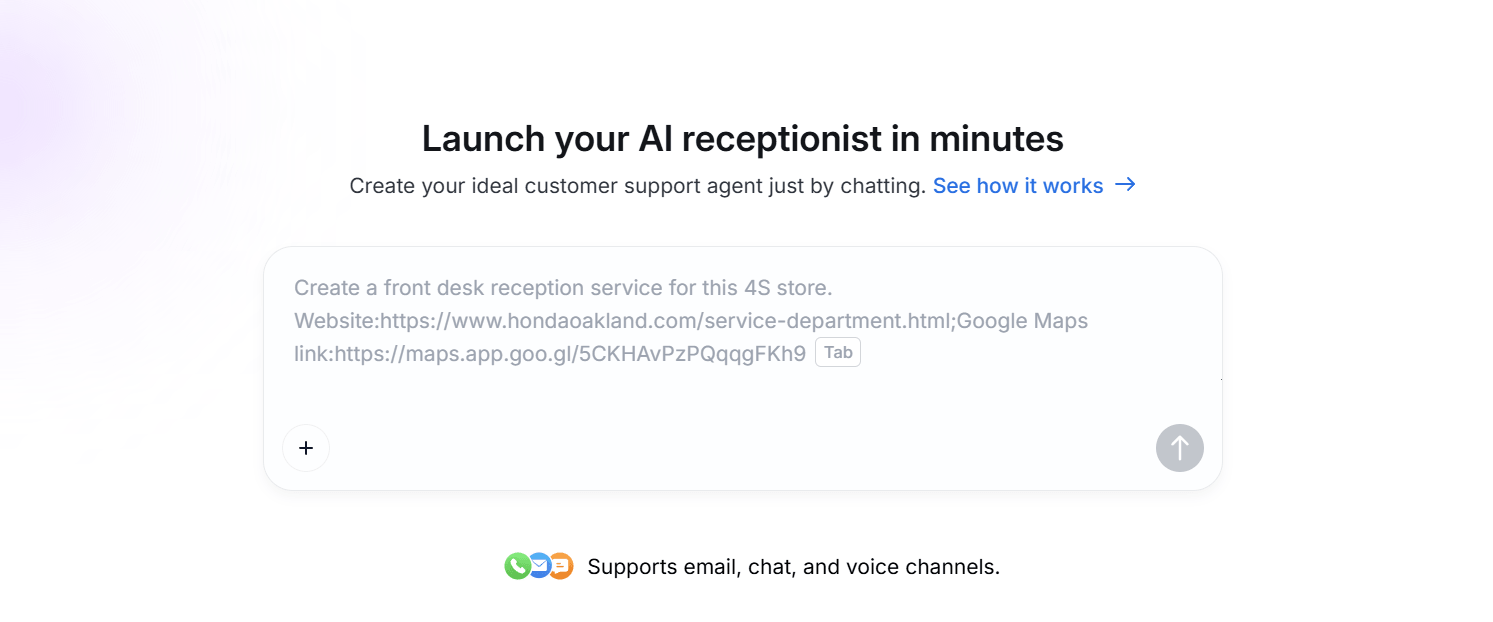
This is where an AI receptionist changes the math. You upload the FAQ document you just finished — Word, PDF, or plain text — and the AI reads it, indexes every question and answer, and starts responding to customer questions based on that content. The same document you wrote for your website now handles calls, chat messages, and emails automatically.
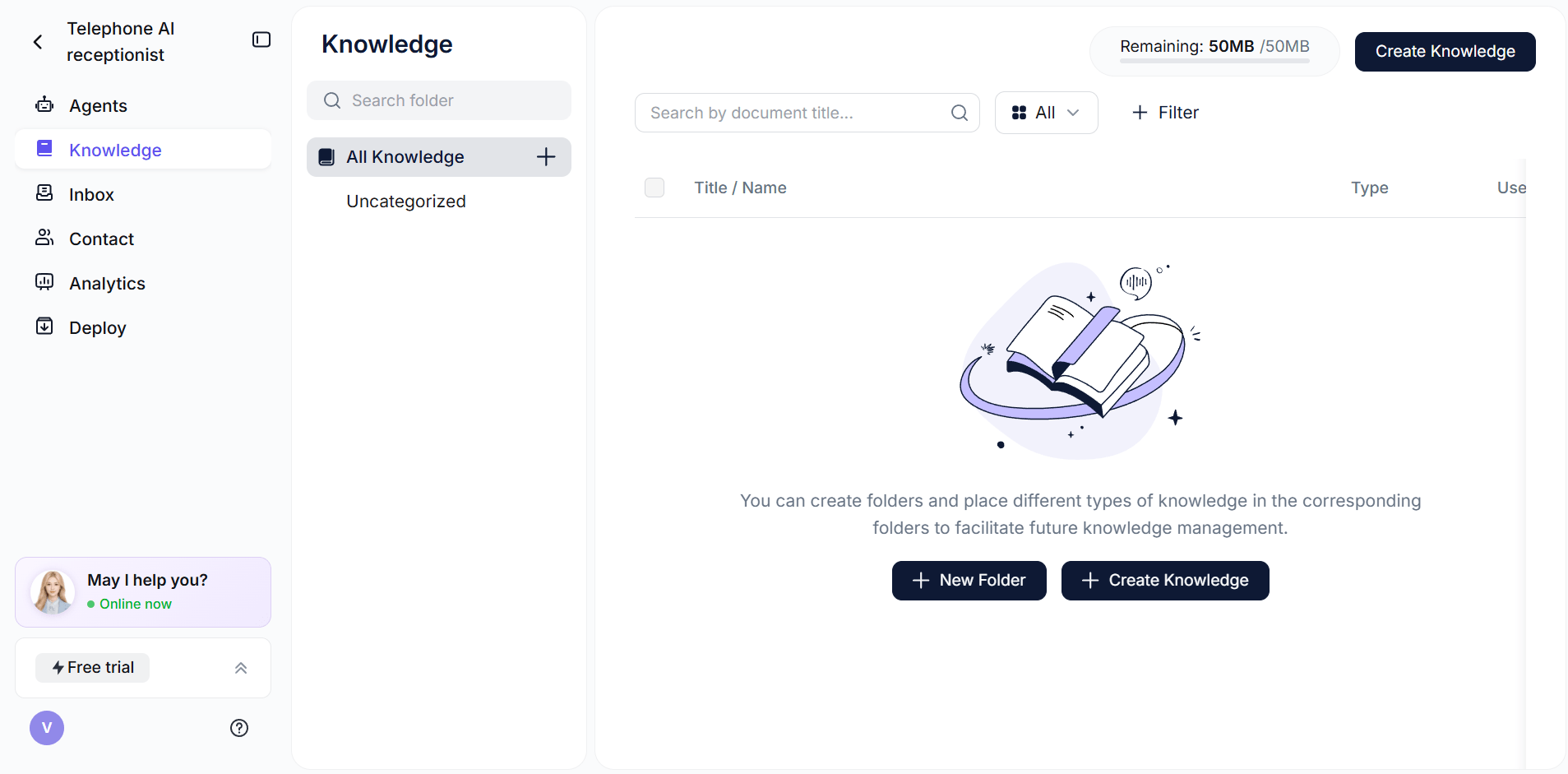
With Solvea, the setup takes under 3 minutes:
- Create a free account at solvea.cx
- Go to Knowledge Base → Upload Document
- Upload your Word FAQ file
- The AI is immediately ready to answer questions from it
The gap between "having a FAQ" and "automatically answering FAQ questions across every channel" used to require a developer and weeks of setup. Most customers prefer self-service tools for simple questions — but only when those tools actually work. An AI that answers accurately from your own FAQ document works better than any generic bot.
Can't decide which questions to include? Use the AI FAQ generator tool — it ranks them by likely search demand.
Solvea customer stories consistently show the same pattern: the businesses that see the fastest ROI are the ones that had a good FAQ already — they just connected it to an AI that could use it.
Frequently Asked Questions
What questions should I include in a small business FAQ template?
Start with the 10–15 questions your team answers most often by phone or email. At minimum, cover: business hours, pricing, how to book or order, your return or cancellation policy, and how to reach support. Add questions specific to your business — these are often the ones customers ask before their first purchase.
How many FAQ questions should a small business have?
20–40 questions is the practical range for most small businesses. Fewer than 15 and you're leaving common questions unanswered; more than 50 and customers stop reading. Group questions by category and keep each answer under 3–4 sentences.
How long should a FAQ answer be?
Short: 1–3 sentences for most questions. Lead with the direct answer first, then explain if needed. "Yes, we offer returns within 30 days of delivery. Items must be unused and in original packaging." That's better than a two-paragraph policy explanation.
What's the difference between a FAQ page and a knowledge base?
A FAQ page is a flat list of common questions and answers — typically customer-facing and covering pre-purchase and post-purchase basics. A knowledge base is broader: it includes product documentation, troubleshooting guides, internal processes, and deep-dive articles. Most small businesses need a FAQ page first and a full knowledge base later, if at all.
Should I add a FAQ to my Word document or my website?
Both. Keep the Word version as your internal source of truth — it's easy to update and share. Publish the content on your website FAQ page for visibility. The Word version can also be uploaded directly to an AI system to enable automatic responses.
Can I use AI to answer my FAQ questions automatically?
Yes. Upload your FAQ document to a tool like Solvea and it will answer customer questions from your content — across phone calls, live chat, and email — 24/7. You don't need to rewrite anything; the AI reads the Word document you already have.
How often should I update my FAQ?
Review your FAQ once a month, and update it immediately whenever pricing, policies, hours, or services change. The fastest way to erode customer trust is to have an FAQ with outdated information. Set a calendar reminder on the first of each month for a 10-minute review pass.