Most FAQ documents fail before a customer even reads them. Not because the questions are wrong, but because the answers are too vague — "prices vary," "contact us for details," "it depends." Customers leave, support tickets arrive, and the FAQ page sits there looking thorough without actually being useful.
This guide gives you a working FAQ document template across five business categories, with real answer frameworks you can copy and adapt today. It also covers how to format it in Word, Notion, and Excel, and how to turn it into an automated customer response system once it's ready.
TL;DR
Details | |
What it is | A ready-to-use FAQ document template with real answer frameworks across 5 business categories |
Template sections | General, Pricing, Shipping & Returns, Booking & Appointments, Support |
Formats covered | Microsoft Word, Notion, Google Sheets, Excel |
Who it's for | Any business building a customer FAQ from scratch or replacing vague answers with specific ones |
Next step | Upload your completed FAQ to an AI receptionist to answer customers automatically, 24/7 |
Your AI Receptionist, Live in Minutes.
Scale your front desk with an AI that never sleeps. Solvea handles unlimited multi-channel inquiries, books appointments into your calendar automatically, and ensures zero missed opportunities around the clock.
What Is an FAQ Page — and Is It the Same as a Knowledge Base?
An FAQ page is a focused document that collects the questions customers ask most often, paired with specific, complete answers. Its job is straightforward: reduce repetitive support contacts by letting customers find answers without reaching out.
An FAQ page is not the same as a knowledge base. An FAQ is a curated Q&A list — typically 10 to 50 questions, organized by category. A knowledge base is broader: it includes how-to guides, troubleshooting articles, product documentation, and FAQs all in one searchable system.
If you're building from scratch, start with an FAQ document template. It's faster to create, easier for customers to scan, and directly reflects the questions your team already answers every day.
Format | Best For | Typical Scope | Who It's For |
FAQ page / document | Getting started, clear Q&A structure | 10–50 specific questions | Small businesses, new products |
Knowledge base | Growing self-serve portal | 50+ articles, search-indexed | Scaling businesses with diverse support topics |
AI receptionist | 24/7 automated answers across channels | Dynamic — handles real-time conversations | Businesses receiving volume inquiries on chat, phone, or email |
One practical note: the two formats are not mutually exclusive. The most common path is to build an FAQ document first, then use it as the starting content for a knowledge base or AI training as your business grows.
Free FAQ Document Template
This template covers five of the most common FAQ categories. Copy the sections that match your business — combine them where you serve more than one type of customer need.
Before you start filling it in, one rule: replace every placeholder. Variables like [X days], [your email], and [link] are starting points, not finished answers. A published template with blank fields costs you customer trust immediately.
[SCREENSHOT: Example of a completed FAQ template in Notion showing three visible categories with real answers filled in]
Section 1: General FAQ Template (All Businesses)
These questions belong in every FAQ document, regardless of your industry. Customers use them to decide whether a business is legitimate and easy to deal with before they spend a dollar.
Question | Answer Framework |
What are your business hours? | "We're open [Monday–Friday / days] from [time] to [time] [timezone]. On [specific holidays], we [close early / are closed]." |
Where are you located? | "[Full physical address, city, state]. Parking is available at [location]. — or — We're fully remote with no physical storefront. Reach us at [contact]." |
How do I contact customer support? | "Email: [address]. Chat: available in-app [or on our website]. Phone: [number]. We respond within [X hours] during business hours, [X hours] on weekends." |
Do you offer a free trial or demo? | "Yes — our free plan includes [specific features] for [time period]. No credit card required. — or — We offer a [30-minute] demo. Book one at [link]." |
How do I get started? | "Go to [URL], click [specific button], and [describe the first two steps]. The whole setup takes about [X minutes]." |
Section 2: Pricing & Billing FAQ Template
Pricing questions generate more support tickets than almost any other category. The clearer your answers here, the fewer "quick questions" your team fields every week.
Question | Answer Framework |
How much does [product/service] cost? | "Our [Starter] plan starts at $[X]/month. Full pricing is at [URL]. — or — Pricing depends on [team size / usage volume]. Request a quote at [link]." |
Is there a free plan? | "Yes. Our free plan includes [specific limits: X agents, X credits/month, etc.]. No credit card required. — or — We don't offer a free plan, but you can trial [plan name] for [X days] with no commitment." |
What payment methods do you accept? | "We accept Visa, Mastercard, American Express, and PayPal. Invoicing and purchase orders are available on [Business / Enterprise] plans." |
Can I cancel anytime? | "Yes. Cancel from [Settings → Billing → Cancel Plan]. Your plan stays active until the end of the current billing period. No cancellation fees." |
Do you offer annual billing or discounts? | "Annual billing saves [X]%. Nonprofit, educational, and volume discounts are available — email [address] to request." |
Section 3: Shipping & Returns FAQ Template (Ecommerce & Retail)
Shipping and returns are the two highest-volume FAQ categories for ecommerce businesses. According to Shopify's guide on FAQ pages, a clear returns policy directly reduces cart abandonment. Vague answers here don't protect you — they cost you conversions.
Question | Answer Framework |
How long does shipping take? | "Standard shipping: [X–Y business days]. Expedited: [X business days]. Orders placed before [cutoff time, e.g., 2 PM EST] ship the same day." |
Do you ship internationally? | "Yes, to [regions or countries]. International orders arrive in [X–Y business days]. Import duties and taxes are [included in the price / the buyer's responsibility at delivery]." |
How do I return an item? | "Start a return at [link] or email [address]. Items must be [unused / in original packaging / etc.] and returned within [X] days of delivery." |
What is your refund policy? | "Refunds process within [X business days] after we receive the returned item. The amount goes back to your original payment method. [Store credit / exchanges] are also available." |
My order hasn't arrived. What do I do? | "Check your tracking number at [carrier link]. If it's been more than [X] business days past your estimated delivery date, contact us at [email / chat link] and we'll investigate." |
Section 4: Booking & Appointments FAQ Template (Service Businesses)
For medspas, clinics, salons, law firms, and any appointment-based business, booking and scheduling questions are the ones that drive the most incoming calls. Answering them in your FAQ means fewer calls about information — and more calls from people ready to book.
Question | Answer Framework |
How do I book an appointment? | "Book online at [link] — available 24/7. Or call us at [number] during business hours. Walk-in requests can be made at the front desk based on availability." |
What is your cancellation policy? | "Cancel at least [X hours] before your appointment at no charge. Cancellations within [X hours] may be charged [a cancellation fee of $X / the full service fee]. No-shows are charged [fee]." |
What should I prepare for my appointment? | "Please bring [valid ID / prior records / intake forms if you're a new client]. If forms are required, arrive [X] minutes early. [Link to downloadable forms if available]." |
Do you accept walk-ins? | "We do accept walk-ins when staff availability allows. Booking in advance guarantees your preferred time slot and provider." |
How do I reschedule? | "Use the link in your confirmation email, call us at [number], or reply to your appointment reminder message. Rescheduling is free when done [X hours] in advance." |
Section 5: Support & Technical FAQ Template (SaaS / Software Products)
Question | Answer Framework |
How do I reset my password? | "Click 'Forgot password' on the login page and enter your email address. The reset link expires in [X hours]. Check your spam folder if you don't see it within a few minutes." |
Why isn't [feature] working? | "First, try [refreshing the page / clearing your cache / updating the app to the latest version]. If the issue persists, check our status page at [link] for known incidents, or contact support at [email / chat]." |
How do I upgrade or downgrade my plan? | "Go to [Settings → Billing → Change Plan] and select your new plan. Upgrades take effect immediately. Downgrades take effect at the start of your next billing cycle." |
Can I export my data? | "Yes. Go to [Settings → Data → Export]. Data exports as [CSV / JSON]. You can export your full account data at any time — no restrictions on exports." |
How do I reach support if my issue isn't in the FAQ? | "Live chat is available in-app [hours / 24/7]. Email us at [address] — we respond within [X hours]. For enterprise accounts, your dedicated support contact is [method]." |
Real Questions Your Customers Actually Ask
Templates give you structure. But the questions that actually matter come from real customers — not educated guesses about what they might ask.
Based on discussions in r/smallbusiness, r/ecommerce, and r/CustomerService, here are five high-frequency questions that most FAQ templates leave out — and why skipping them creates support volume.
"Do you price match?"
Retail businesses get this constantly. If your answer is no, say so clearly. If yes, specify the conditions (same item, same retailer, within X days of purchase). An ambiguous answer leads to a 10-minute support conversation that a one-sentence FAQ would have resolved.
"What happens if I miss my appointment?"
Service businesses: customers want to know the penalty before they book, not when they're trying to reschedule. The no-show policy belongs in your FAQ — not buried in the confirmation email they already deleted.
"Can I split payment across two cards?"
A short question that generates a lot of inbound messages. If your platform supports it, explain how. If not, say that clearly. Either way, the customer needs to know before they reach checkout.
"I submitted a return. When will I hear back?"
After initiating a return, customers need a timeline. "We'll process this shortly" does not reduce follow-up messages. "Returns are processed within 3–5 business days, and you'll receive a confirmation email" does.
"Is my data private?"
A direct privacy statement in your FAQ — even just one sentence pointing to your privacy policy — signals transparency before the customer has to ask.
How to Customize This FAQ Template
Copying the template is step one. Making it work for your business requires four decisions.
Step 1: Select the sections that match your model.
Ecommerce → General + Pricing + Shipping & Returns. Service business → General + Pricing + Booking & Appointments. SaaS → General + Pricing + Support. If you operate across two models (e.g., a service business that also sells products), combine the relevant sections.
Step 2: Replace every placeholder with a real, specific answer.
"Prices vary" is not an answer — it's a redirect. "Our standard plan starts at $30/month, and full pricing is at solvea.cx/pricing" is an answer. Go through every row and replace every bracketed variable with the actual number, link, time, or policy that applies to your business.
Step 3: Remove what doesn't apply.
A 45-question FAQ covering scenarios your business doesn't encounter is harder to use than a focused 15-question one. Cut any question that doesn't reflect a real interaction your team has had in the last 90 days.
Step 4: Add the questions your team actually gets asked.
Pull your last 30 days of support emails, chat logs, or call notes. Any question that appears more than twice belongs in your FAQ. Real recurring questions beat predicted ones every time.
Format | Best For | Setup Time | Who It's For |
Word document | Static FAQ for printing or PDF export | 20–30 min | Local businesses, offline use cases |
Notion page | Internal team FAQ or customer-facing knowledge base | 25–40 min | Remote teams, startups, teams already on Notion |
Google Sheets | Structured Q&A for AI or chatbot import | 15–25 min | Teams importing into AI tools |
Excel | Offline tracking, enterprise internal documentation | 15–25 min | Larger teams on Microsoft 365 |
How to Use This FAQ Template in Word, Notion, and Excel
In Microsoft Word
Open a blank document and insert a table with two columns (Insert → Table → 2 columns, as many rows as needed). Use the Heading 2 style for each category title and the Normal paragraph style for Q&A rows. Adjust column widths so the Answer column is roughly twice as wide as the Question column.
To save as a reusable template, go to File → Save As → Word Template (.dotx). For a customer-facing version, export to PDF directly from the Print menu. Microsoft's support documentation covers column width and border formatting in detail if you want a cleaner visual layout.
In Notion
Create a new page and type /table to insert an inline table. Add two properties: "Question" (title) and "Answer" (text). For each FAQ category, insert a Heading 2 block above its table. If you want to share this FAQ publicly, click "Share" → "Share to web" and enable public access. The result is a clean, linkable FAQ page hosted on Notion's infrastructure. An AI-powered knowledge base chatbot gives every team member their own subject-matter expert on demand.
Notion's help center covers table creation, page sharing, and custom domain setup if you want to host the FAQ under your own URL.
In Google Sheets or Excel
Use column A for questions, column B for answers, and add a column C labeled "Category" so you can filter by section. This format — two columns, one row per Q&A pair — is also the standard input structure for most AI tools and chatbot training workflows. If you plan to connect your FAQ to an AI system later, starting in this format saves a reformatting step.
Beyond the Template: Let Your AI Receptionist Handle FAQs Automatically
A FAQ document handles the customers who come looking for an answer. It doesn't cover the customer who asks the same question at 11 PM via chat, the one who phrases it differently, or the one who calls instead of reading.
That gap is where an AI receptionist fits. Once your FAQ document is ready, you can upload it into Solvea as a knowledge base. Solvea reads your Q&A content, matches incoming questions to the right answer by intent — not just keyword — and responds automatically across phone, live chat, and email, around the clock.
Solvea is a no-code AI receptionist platform designed for small business, which makes it easy to create your own knowledge base and to set up an AI receptionist who can answer customers' questions well.
Setup takes under three minutes: open your Solvea dashboard → Knowledge Base → Upload Document. Solvea accepts Word files, PDFs, Google Sheets, and Notion page URLs. The AI doesn't need reformatting or tagging — it reads the document structure directly.
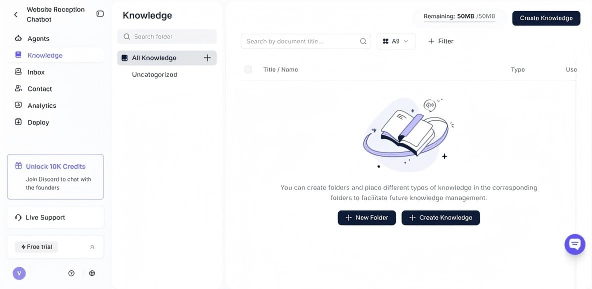
The practical outcome: your FAQ template stops being a static page that customers have to find and scroll through. It becomes the source of truth your AI uses to answer every inquiry, every channel, every hour.
[SCREENSHOT: Solvea knowledge base upload interface showing supported file formats including Word, PDF, Google Sheets, and Notion URL]
FAQ
What questions should I include in an FAQ document template?
Start with questions customers have already asked — pull from support inbox, chat logs, social DMs, and sales calls. Every question that appears more than twice in a 90-day window belongs in your FAQ. Group them into 4–6 categories and aim for 10–20 questions at launch. Add more as new patterns emerge rather than trying to anticipate everything upfront.
How long should a FAQ answer be?
Most FAQ answers should be one to three sentences. Customers arrive already knowing their question — they need the answer, not context. If an answer genuinely requires more explanation, link out to a full help article rather than expanding the FAQ entry. Long FAQ answers get skimmed and misread.
What is the difference between an FAQ page and a knowledge base?
An FAQ page is a curated list of specific questions and short answers. A knowledge base is a broader self-serve system that includes FAQs, step-by-step guides, product documentation, and policies — usually searchable. Most businesses start with an FAQ document and build toward a knowledge base as their content needs grow. The FAQ template in this article is a strong starting point for either.
Should I add a FAQ page to my Shopify store?
Yes. Shopify's guide on FAQ pages recommends a dedicated FAQ page to reduce pre-purchase questions and lower cart abandonment. Create it at Online Store → Pages → Add Page in your Shopify admin. Use the Pricing and Shipping sections from this template as your starting point.
Can I use AI to answer FAQs automatically?
Yes — and the process is straightforward once your FAQ document is ready. Upload the document into an AI receptionist platform as a knowledge base. The AI reads your Q&A content, understands customer intent, and responds automatically across your active channels without manual review for each conversation. Solvea handles this in under three minutes and works with your existing FAQ document format.