Restaurant Voice AI Comparison Criteria: What to Check Before You Buy
A restaurant voice AI comparison is only useful if it shows how the tool behaves on a real guest call. A polished demo can sound impressive and still fail when a caller asks for patio seating, changes a party size, says an allergen out loud, or wants to pay a deposit.
Use this guide as a buying checklist before you choose a restaurant voice AI platform. It covers reservations, takeout and delivery questions, menu knowledge, payment boundaries, human handoff, latency, logs, setup friction, and the trial tests that reveal whether the system can survive your busiest service window.
If you are comparing tools now, start by defining the exact calls you want the AI to handle, then test those calls with real menu details and real staff rules. After that, you can compare tools and test Solvea free with your own restaurant workflow.
See how Solvea supports restaurant AI receptionist workflows
Quick Answer: What Should a Restaurant Voice AI Comparison Include?
A restaurant voice AI comparison should check whether each tool can answer calls accurately, protect payment and policy boundaries, update reservation records, hand off exceptions to staff, and give managers usable logs after the call.
| Buying criterion | What to test | Red flag |
|---|---|---|
| Reservation handling | Book, change, cancel, and confirm a table using your actual rules | The AI takes a booking without checking availability or party-size limits |
| Menu and policy knowledge | Ask about ingredients, allergens, pricing, substitutions, hours, parking, and events | The AI invents menu items or gives policy promises staff would not honor |
| Takeout and delivery boundaries | Ask order, pickup, delivery, and third-party platform questions | The AI accepts an order or delivery promise without the right system connection |
| Payment boundaries | Ask how deposits, card capture, refunds, and fees are handled | The AI asks callers to read card data into a normal conversation |
| Human handoff | Ask for a manager, complain, request VIP seating, or raise an allergy concern | The AI keeps trying to solve a judgment call alone |
| Latency and noise | Call from a busy room, speak over the AI, and correct yourself mid-sentence | Long pauses, missed interruptions, or repeated misunderstandings |
| Logs and integrations | Review the transcript, summary, status, booking record, and staff task | Managers cannot audit what happened or fix the source data |
| Setup friction | Update menu, hours, rules, and escalation paths yourself | Every small change requires vendor support or a technical admin |
The best restaurant voice AI comparison does not ask, "Which tool sounds most human in a demo?" It asks, "Which tool can handle our real calls without creating operational risk?"
Start With the Calls You Actually Need Covered
Restaurant voice AI buyers often start by comparing feature lists. That is backwards. Start with call types.
Most restaurants need coverage for a mix of these calls:
- New reservations
- Reservation changes and cancellations
- Large-party requests
- Waitlist and walk-in questions
- Menu, ingredient, and allergen questions
- Hours, parking, accessibility, and patio questions
- Takeout and delivery questions
- Private dining and catering inquiries
- No-show, late-arrival, and confirmation calls
- Complaints, refunds, and manager requests
Your restaurant voice AI comparison should separate routine calls from judgment calls. Routine calls can often follow a workflow. Judgment calls need a person, a clear rule, or a staff review queue.
For example, "Do you have outdoor seating?" is usually a knowledge-base question. "Can you guarantee the patio for a birthday party of ten at 7:00 PM?" is not just a knowledge question. It touches availability, weather, staffing, guest expectations, and policy. A good AI host comparison should catch that difference.
Compare Reservation Handling First
Reservations are where a restaurant AI answering service either becomes useful or becomes risky. The tool should not simply capture a name and time. It should follow your actual reservation logic.
Test these flows during the restaurant voice AI comparison:
| Scenario | What a reliable tool should do |
|---|---|
| New table request | Collect name, mobile number, date, time, party size, seating notes, and any policy-relevant details |
| Availability check | Check the connected calendar or reservation system before confirming |
| Party-size threshold | Route large parties or private room requests to staff when rules require review |
| Time change | Check the new slot, update the record, and preserve the original context |
| Cancellation | Cancel only when policy allows and log the reason if the guest gives one |
| Late arrival | Mark the guest as late, alert staff, and avoid promising a table beyond the hold rule |
| No clear answer | Ask one clarifying question, then hand off if the caller still is not clear |
Solvea's restaurant page describes reservation handling, Google Calendar sync, Google Sheets logging, and human handoff. For restaurants that want a lightweight first test, those workflows make it possible to evaluate whether calls turn into records your team can actually use.
Review a restaurant no-show confirmation workflow
Test Menu Knowledge Like a Guest, Not Like a Demo Script
Menu knowledge is usually where generic voice AI breaks down. A caller rarely asks a perfectly structured question. They say things like:
- "Can you make the spicy noodles not spicy?"
- "Does the Caesar have anchovies?"
- "Is the fryer shared with shellfish?"
- "Can I order the lunch special at 4?"
- "Do you still have that lamb dish from last week?"
- "Can you do gluten free if it is not celiac?"
During a restaurant voice AI comparison, give each platform the same menu, the same policy rules, and the same exception list. Then call it with messy questions.
Look for three things.
First, does it answer from the menu and policies you provided? A tool that guesses confidently is dangerous.
Second, does it know when to qualify the answer? For allergy, cross-contact, and dietary questions, the safer pattern is to explain the known menu information and route anything uncertain to staff.
Third, can restaurant staff update the knowledge quickly? Daily specials, sold-out items, holidays, service fees, patio rules, and private-event menus change often. If the AI cannot be updated before service, it will create bad guest expectations.
Before trying voice AI in a restaurant, make sure it has the same basic information your staff would use every day: the menu, prices, FAQs, dietary options, house policies, and details for private events or specials. Solvea’s restaurant guide breaks this down into a practical menu and FAQ automation checklist you can prepare before a trial.
Draw Payment Boundaries Before the First Call
Payment handling is a buyer-checklist item, not an afterthought. Restaurant voice AI may touch deposits, cancellation fees, order payments, gift cards, refunds, and prepaid events. That does not mean the AI should collect card data in a normal phone conversation.
Ask each vendor these questions:
| Payment question | Why it matters |
|---|---|
| Does the AI ever ask callers to say card numbers aloud? | Spoken card data can create security and compliance risk |
| Is payment handled through a PCI-aware payment link, POS, reservation platform, or approved processor flow? | The payment system should control sensitive card capture |
| Can the AI explain fees without deciding disputes? | Fee disputes need staff review |
| Can the AI distinguish a deposit from a final bill? | Different payment types need different workflows |
| Are payment events logged without exposing card details? | Managers need auditability without storing sensitive data |
Treat this as a hard boundary in your restaurant voice AI comparison. The AI can explain your payment process, send callers to an approved payment path, or route payment-sensitive cases to staff. It should not improvise around card data, refunds, chargebacks, or fee disputes.
PCI Security Standards Council materials are the right place to review card-data obligations with your payment provider. Use the vendor's answer as a starting point, then confirm with the processor and whoever owns payment compliance for the restaurant.
Check Human Handoff With Hard Calls
Many restaurant voice AI demos make handoff sound easy. The real test is whether the system hands off early enough, with enough context, and without making promises it cannot keep.
Build a handoff list before you buy:
| Caller issue | Expected AI behavior |
|---|---|
| "Can I speak to a manager?" | Stop solving, route to staff, and summarize the reason |
| Allergy or accessibility concern | Capture details, avoid guarantees, and hand off |
| Angry complaint | Acknowledge, collect the issue, and escalate |
| VIP, media, private event, or influencer request | Route to staff with contact details |
| Party above the approval threshold | Collect details and mark staff review |
| Refund, charge, or cancellation fee dispute | Do not decide; hand off with transcript |
| Unclear caller after one clarification | Escalate instead of looping |
In a restaurant voice AI comparison, ask vendors to show the handoff artifact. Do staff receive a transcript? A summary? A call recording? A ticket? A row in Google Sheets? A notification? If the answer is only "the AI can transfer," the workflow may still be incomplete.
Solvea supports human handoff as part of its restaurant workflow. The useful buyer question is how that handoff will be configured for your policies, channels, and staff queue.
Measure Latency, Interruptions, and Noise
Voice quality is not just the voice. It is timing.
During the trial, call from a real restaurant environment or simulate one. Put background noise on. Interrupt the AI. Correct yourself. Use a guest name that is easy to mishear. Ask two questions in one sentence. Pause halfway through a request.
Track these signals:
- How long the AI waits before responding
- Whether it can handle barge-in when the caller interrupts
- Whether it asks too many repeat questions
- Whether it recovers after a correction
- Whether it understands common menu names and local pronunciation
- Whether the voice feels acceptable for your brand
- Whether it transfers quickly when confidence is low
This part of the restaurant voice AI comparison should be live, not slide-based. A tool that sounds good in a quiet demo may still struggle at 6:30 PM on a Friday.
Compare Logs, Integrations, and Manager Visibility
Restaurant managers need to know what happened after the AI answers a call. A transcript alone is not enough. The system should turn conversations into usable records.
For each platform, ask where these fields go:
| Field | Why it matters |
|---|---|
| Caller name and phone number | Identifies the guest and enables follow-up |
| Call intent | Shows reservation, menu, order, complaint, or staff request |
| Reservation status | Gives the host team a queue |
| Date, time, party size, and notes | Keeps booking details consistent |
| Handoff reason | Shows why a person needs to act |
| Transcript and summary | Lets managers audit the interaction |
| Source data used | Helps staff fix wrong answers at the source |
| Outcome | Shows whether the call became a booking, cancellation, question, or lost case |
Solvea's Google Tool docs describe Google Calendar actions for creating, updating, deleting, and checking events, plus Google Sheets capabilities for reading and writing spreadsheet data, storing booking records, and updating appointment lists. For restaurants using Google Calendar and Sheets as a first operating layer, that is enough to run a practical pilot before connecting more specialized systems.
Review Solvea's Google Calendar and Google Sheets tool docs
Check Setup Friction and Ongoing Maintenance
The first week matters, but month two matters more. A restaurant voice AI comparison should measure how much work it takes to keep the AI accurate.
Ask vendors to show you how to update:
- Menu items and sold-out items
- Prices and service fees
- Holiday hours
- Special events
- Large-party rules
- Cancellation policies
- Patio and seating policies
- Delivery radius and third-party platform instructions
- Staff escalation contacts
- Approved phrases for sensitive situations
If only the vendor can make changes, the tool may not fit a restaurant that changes daily. If staff can make updates without code, the system is easier to keep aligned with real service.
Solvea's restaurant workflow is positioned around no-code setup, menu and FAQ training, Google Calendar and Sheets sync, and human handoff. If you test Solvea, use your real menu and policies, not generic sample data.
Understand Phone, SMS, and Channel Limits
Some restaurant voice AI buyers assume phone, SMS, confirmations, and reminders are all the same feature. They are not.
Before you buy, ask:
- Can the platform answer inbound calls on your preferred phone setup?
- Does it require call forwarding, a dedicated AI number, or number import?
- If SMS is involved, which number sends it?
- Are SMS capabilities live for the number type you plan to use?
- Can guests opt out of texts?
- Are transactional reservation texts separated from marketing texts?
- Where are SMS replies logged?
Solvea's phone-number docs describe purchasing a phone number through Solvea or importing an existing Twilio number. The docs also note that purchased numbers support inbound calls and list SMS as coming soon, while Twilio-imported numbers require SMS capabilities to be configured in Twilio. For a restaurant voice AI comparison, that means you should verify the exact phone and SMS setup before promising guests two-way text workflows.
For SMS consent and opt-out practices, review CTIA Messaging Principles and your provider's requirements. This article is not legal advice.
Review Solvea's phone number setup docs
Compare Pricing Without Getting Trapped by the Sticker Price
Do not compare restaurant voice AI tools only by monthly price. The cheaper platform can become expensive if it misses bookings, creates staff cleanup work, requires vendor-only updates, or charges separately for every channel you need.
Build a pricing comparison around operational cost:
| Cost item | Question to ask |
|---|---|
| Base subscription | What is included at the quoted price? |
| Usage | Is pricing based on calls, minutes, orders, locations, seats, or credits? |
| Setup | Is onboarding included or charged separately? |
| Phone/SMS | Are numbers, SMS, carrier fees, or telephony usage separate? |
| Integrations | Are calendar, POS, reservation, CRM, or Sheets integrations included? |
| Support | What support is included during live service problems? |
| Updates | Can staff update menu and policy data without a paid request? |
| Exit | Can you export transcripts, logs, and configuration data if you leave? |
Because pricing pages change, use each vendor's live pricing page and sales quote as the source of truth. Solvea's public pricing page and docs show different pricing surfaces, so this article links to current pricing instead of repeating plan details that may change.
Compare current Solvea pricing
Run These Seven Trial Calls Before You Buy
Use the same trial script across every vendor in your restaurant voice AI comparison. Record the result in a spreadsheet so the team can review it together.
| Trial call | Pass condition |
|---|---|
| Normal reservation | AI captures the booking details, checks availability, confirms only when allowed, and writes a usable record |
| Large-party request | AI collects details and routes to staff instead of promising the table |
| Menu and allergen question | AI answers from approved knowledge, qualifies uncertainty, and hands off sensitive cases |
| Takeout or delivery question | AI explains the approved workflow and does not invent delivery availability |
| Cancellation or late arrival | AI updates status, logs reason, and respects policy limits |
| Complaint or manager request | AI escalates quickly with a clear summary |
| Noisy rush-hour call | AI keeps latency acceptable, handles interruptions, and transfers when confidence is low |
Score each call from 1 to 5 on accuracy, guest experience, handoff quality, staff usability, and cleanup required. The winning tool is not always the one that gets the highest demo score. It is the one your team trusts after reviewing the logs.
How Solvea Fits This Checklist
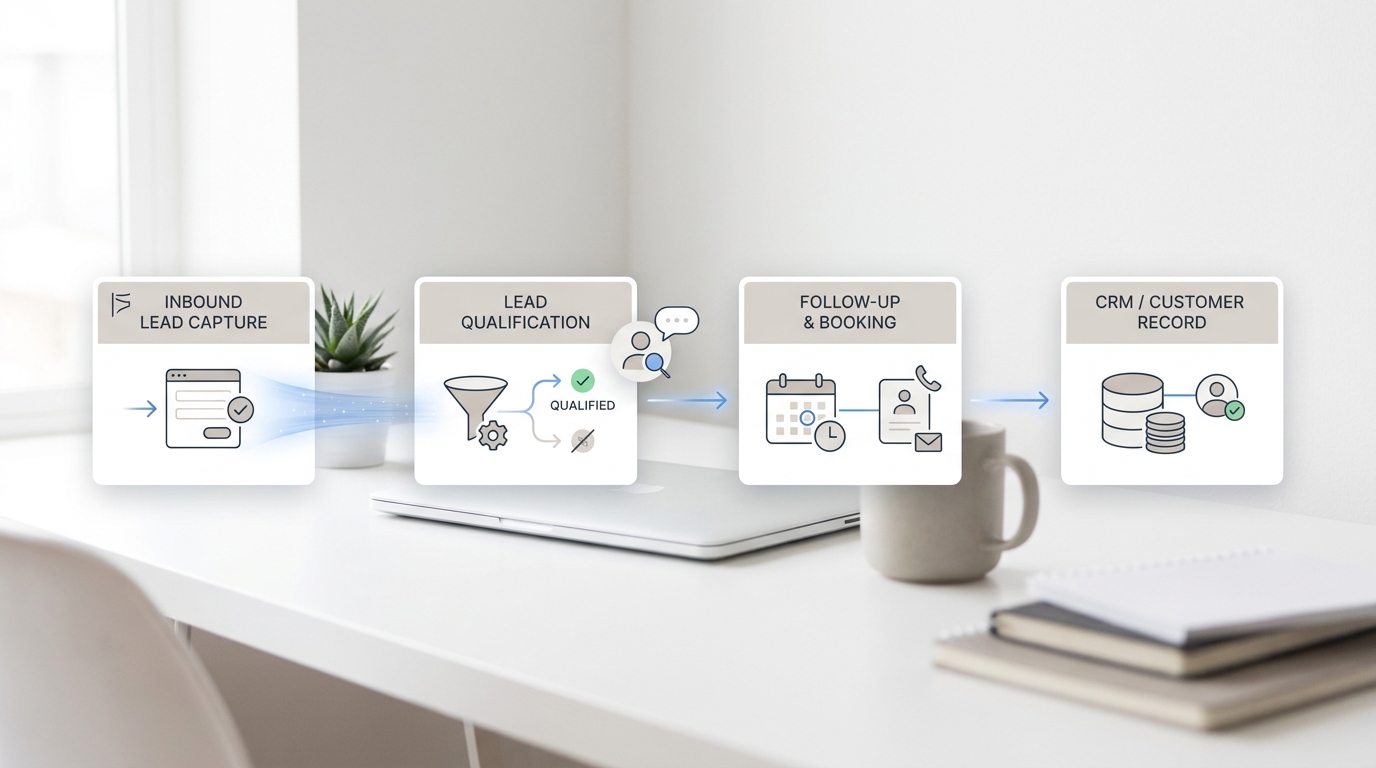
Solvea is a fit to test when your restaurant wants an AI receptionist that can answer phone calls, handle reservations and guest FAQs, connect booking workflows to Google Calendar and Sheets, and hand off complex requests to staff.
For this restaurant voice AI comparison, the strongest Solvea trial path is narrow:
- Upload or sync the menu, hours, policy notes, event details, and reservation rules.
- Connect Google Calendar for availability and booking actions.
- Connect Google Sheets for the call log, booking record, handoff reason, and outcome fields.
- Configure handoff rules for large parties, allergy/accessibility concerns, complaints, VIP requests, refunds, payment disputes, and unclear callers.
- Test the seven calls above using staff phone numbers.
- Review the transcripts and records before any guest-facing rollout.
That kind of pilot gives you a practical answer: whether Solvea can cover the call patterns that create work for your restaurant, without asking your team to change everything at once.
Your AI Receptionist, Live in Minutes.
Scale your front desk with an AI that never sleeps. Solvea handles unlimited multi-channel inquiries, books appointments into your calendar automatically, and ensures zero missed opportunities around the clock.
FAQ
What is restaurant voice AI?
Restaurant voice AI is a phone-based AI system that can answer guest calls, respond to common questions, collect reservation details, route exceptions, and update connected systems when configured.
What should I include in a restaurant voice AI comparison?
Include reservation handling, menu knowledge, takeout and delivery boundaries, payment handling, human handoff, latency, logs, setup friction, phone/SMS limits, pricing structure, and live trial-call results.
Is an AI host comparison the same as comparing restaurant answering services?
Not always. An AI host comparison usually focuses on reservation and guest-service behavior, while a restaurant AI answering service may also cover order questions, call routing, missed-call capture, logs, and multi-channel follow-up.
Should restaurant voice AI take payments over the phone?
Do not assume it should. Ask whether payment is handled through an approved processor, POS, reservation platform, or secure payment link. Avoid workflows where callers speak card numbers into a normal AI conversation.
How do I test whether a restaurant voice AI tool is accurate?
Use your real menu, hours, policies, booking rules, and escalation list. Then run calls with messy guest language, background noise, corrections, large-party requests, allergies, and complaints.
Can Solvea replace my host team?
Solvea is better framed as phone and workflow coverage for routine calls, reservations, FAQs, logs, reminders when configured, and staff handoff. Restaurants should keep people in the loop for judgment calls, hospitality exceptions, complaints, and payment-sensitive cases.
Make the Comparison Operational
A restaurant voice AI comparison should end with a working test, not a slide deck. Pick the calls that create the most staff interruption, define the rules, run the same trial calls across tools, and inspect the logs before you buy.
If the tool can answer routine questions, book and update reservations safely, respect payment and policy boundaries, hand off exceptions, and give managers usable records, it is worth a deeper pilot. If it cannot do those things in your real environment, the demo voice does not matter.
Compare tools, then test Solvea free with your restaurant's menu, reservation rules, and handoff paths.