A real-time showing request is not a normal appointment lead. The prospect is active right now. They saw a listing, drove past a property, compared homes during lunch, or finally found a time to tour. If the team responds hours later, the lead may already have booked with another agent or lost momentum.
The front desk problem is that these requests do not arrive politely. They come during showings, after hours, while agents are driving, or when staff are handling other calls. A voicemail that says 'I want to see this today' is useful only if someone hears it fast enough to act.
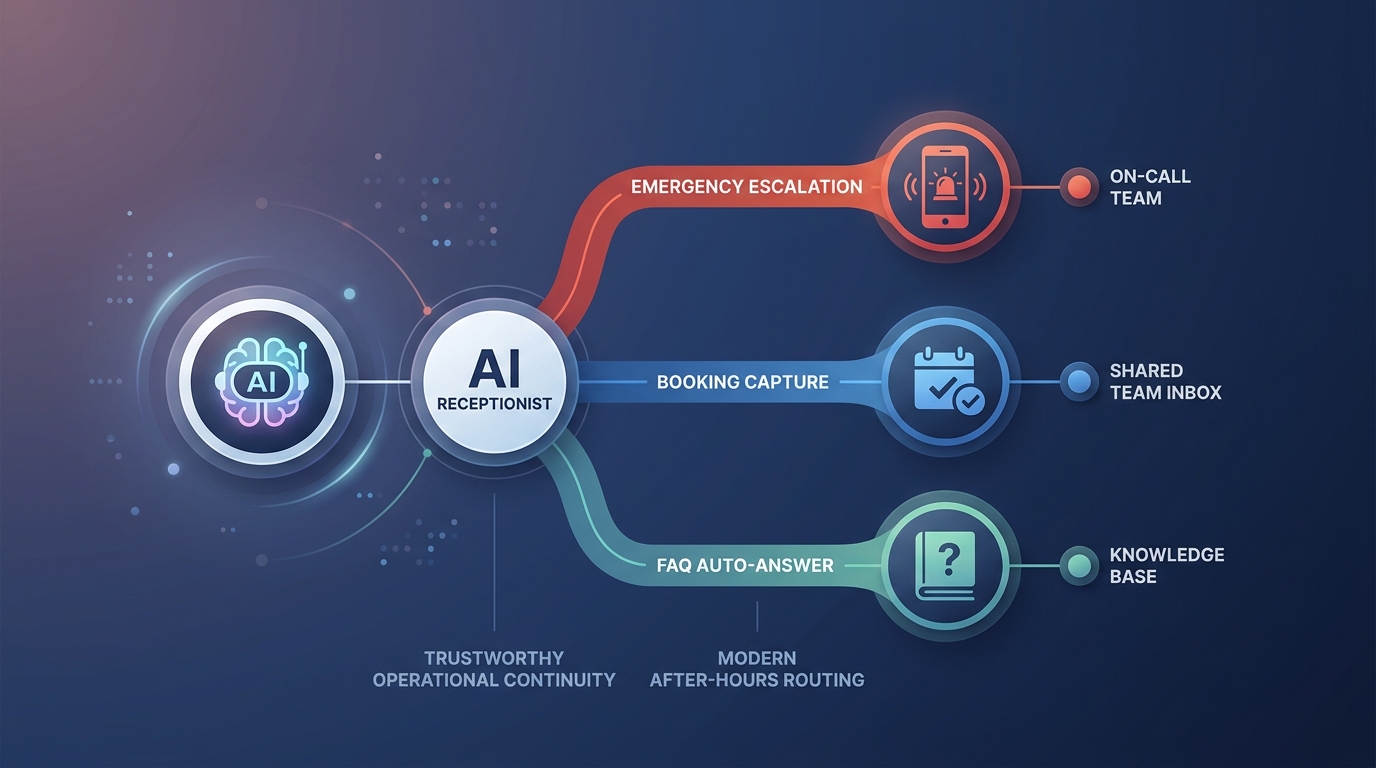
Solvea can support real-time showing requests by answering immediately, qualifying the caller, collecting property and timing details, and routing the request to the right agent or staff queue. The purpose is not to make every showing automatic. It is to prevent high-intent leads from disappearing before a human can decide.
Fast answer for showing teams
| Decision | Practical rule |
|---|---|
| Best fit | Inbound calls or messages where the prospect wants a near-term showing and needs an immediate response. |
| First data to capture | Property, preferred time, contact details, buyer or renter status, attendee count, and urgency. |
| Escalate | Same-day access conflicts, multi-property tours, pricing questions, agent-specific requests, and VIP leads. |
| Solvea role | Answer instantly, qualify intent, summarize the request, and alert the right person. |
A strong workflow gives the caller confidence before the agent is free. It should acknowledge the requested property, collect the details needed for a decision, and set expectations about confirmation. The caller should not wonder whether their request vanished into a form.
Answer the request before deciding the outcome
The first win is capture. Even if the requested time is not available, answering quickly preserves the conversation. The caller can be offered another window, added to a callback queue, routed to the listing agent, or asked whether a virtual tour would work. None of that happens if the call is missed.
Agents often hesitate to automate showing requests because access and scheduling can be sensitive. That is reasonable. The workflow does not need to confirm every showing automatically. It can answer, gather details, and create an urgent handoff. Speed and final approval are separate decisions.
Solvea is useful because it fills the gap between a live agent and a voicemail. It can speak with the lead, understand the requested property, ask clarifying questions, and send the agent a structured summary while the lead is still warm.
Collect the minimum details that make a showing actionable
A showing request is actionable only when the team knows the property, preferred time, contact method, prospect type, urgency, and attendance details. Without those fields, the agent must call back just to start the scheduling conversation. That delay can cost the lead.
The intake should stay short. Ask which property they want to see, when they hope to visit, whether they are buying or renting, how many people will attend, and the best callback number. If the caller already has an agent, collect that too. If they ask for multiple properties, route the request differently.
The AI receptionist should not over-qualify early. A real-time showing request is about speed. The goal is to collect enough information for a useful handoff, not to force the prospect through a long sales script before anyone responds.
Apply showing rules before promising a time
A requested time is not always a valid showing time. The property may be occupied, access may require notice, the listing agent may need to approve, the building may have showing windows, or the buyer may need pre-qualification before a private tour. Those rules should be explicit.
For simple requests, the AI receptionist can offer approved windows or say that the team is checking availability. For sensitive listings, it should collect details and escalate. The key is to avoid promising a showing that the agent later has to retract.
Same-day rules deserve special attention. If same-day showings are allowed only before a cutoff time, the workflow should know that. If occupied listings require more notice, the AI should explain that staff will review the request and offer the closest approved alternative.
Use Solvea to create better agent handoffs
A useful handoff is more than a missed-call alert. It should say: property requested, preferred time, buyer or renter status, urgency, attendee count, contact details, and any constraints the caller mentioned. If the caller asked a question, include the exact question.
Solvea can send that summary while the agent is still unavailable. When the agent calls back, the conversation can start with options instead of discovery. That makes the response feel faster even if a human still confirms the showing.
This also helps teams route requests. Listing-specific questions can go to the listing agent. General buyer tours can go to the showing coordinator. Rental inquiries can go to leasing. High-intent or urgent requests can be marked accordingly.
Offer alternatives without losing the lead
The requested showing time may not work. The workflow should still keep the lead engaged. Offer the nearest approved window, a virtual tour, a callback from the agent, a waitlist for cancellations, or another property that matches the same intent if the team supports that path.
The wording matters. Instead of saying, 'That time is unavailable,' the AI receptionist can say, 'I can help get this to the team. If that exact time is not available, are there other windows today or tomorrow that could work?' That keeps the prospect in the process.
For high-intent callers, escalation should happen quickly. If someone is nearby and wants to see the property today, the agent should know that urgency. If someone is casually browsing next month, the workflow can move more slowly.
Handle after-hours showing requests
After-hours showing requests are common because people browse listings outside work. A team that waits until morning may still win some leads, but it loses the chance to set expectations in the moment. The prospect should at least hear that the request was captured and what happens next.
Solvea can answer after-hours calls, collect the showing details, and tell the prospect that the team will confirm availability. If the team allows booking into approved next-day windows, the AI can offer those. If not, it can create a high-priority morning task with full context.
This is also a good place to offer virtual alternatives. If the prospect wants quick context before an in-person visit, a virtual tour or recorded walkthrough may keep them engaged until the agent responds.
Protect agents from low-quality interruption
Not every real-time request deserves an immediate agent interruption. Some callers are not serious, ask questions outside the listing, or are not available for a confirmed time. The workflow should separate urgent qualified requests from general inquiries.
Use simple routing tiers. Tier one is urgent, property-specific, with a clear time window and valid contact details. Tier two is interested but flexible. Tier three needs more information or is better served by a recorded tour, email follow-up, or staff review. Solvea can classify the request and route it accordingly.
This protects agents from constant interruptions while still giving callers a responsive experience. The caller gets an answer; the agent gets the right level of urgency.
Measure response quality, not just call volume
Track how many real-time showing requests were captured, how quickly they were routed, how many became confirmed showings, how many were attended, and how many were lost because availability was unclear. Also track no-shows, reschedules, and agent corrections to AI summaries.
Review transcripts for missed signals. Did callers mention urgency that was not routed? Did they ask property questions the AI should have escalated? Did they reject alternatives because the script sounded too rigid? These findings improve the front-desk process and the rules Solvea follows.
A real-time showing workflow should make the team faster without making agents feel spammed. If both outcomes are true, the business is capturing more lead intent while protecting the people who still need to close the appointment.
Build a same-day triage queue
Same-day requests need their own queue because they expire quickly. The queue should show requested property, desired time, distance or access constraint if known, prospect status, and whether the caller is still available for alternatives. A request for tomorrow can sit in a normal follow-up list; a request for 4 PM today needs a sharper signal.
Solvea can create that signal during the call. It can ask whether the caller is nearby, whether a different time today would work, whether a virtual tour is acceptable, and whether the prospect has already contacted another agent. The answers help staff decide whether to interrupt an agent or hold the request for scheduled follow-up.
The triage queue should also have a stale-time rule. If no one responds within the window where the showing is still realistic, the system should move to an alternate path: offer another time, send a recorded tour, or ask whether the prospect wants a callback. This prevents old urgent requests from sitting beside current ones.
Close the loop after the showing decision
The workflow is not finished when the request reaches an agent. The prospect needs to know whether the showing is confirmed, pending, unavailable, or moved to another option. Unclear status creates repeat calls, duplicate messages, and frustration for both the caller and the agent.
After staff confirm or reject the showing, Solvea can support the follow-up path. It can answer reschedule calls, collect updated windows, remind the prospect of confirmed details, or route post-showing questions. Keeping that loop connected is what turns fast response into a better front-desk experience instead of just a faster notification.
Your AI Receptionist, Live in Minutes.
Scale your front desk with an AI that never sleeps. Solvea handles unlimited multi-channel inquiries, books appointments into your calendar automatically, and ensures zero missed opportunities around the clock.
Frequently asked questions
What is a real-time showing request?
A real-time showing request is an inbound call, message, or form request from someone who wants to view a property soon, often the same day.
Why do real-time showing requests need fast response?
The prospect is usually active in the moment. If nobody answers or the reply is vague, they may keep searching or contact another agent.
Can an AI receptionist handle showing requests?
Yes. It can answer immediately, collect key details, apply routing rules, and hand off urgent cases to the right agent. It can also keep the caller engaged with approved alternatives when the first requested time is not available, without making the lead repeat the request.
What should be collected on the first call?
Collect property, preferred showing time, buyer or renter status, contact information, urgency, access constraints, and whether other people will attend.
When should staff or agents take over?
Agents should take over for same-day access issues, multi-property tours, negotiation questions, VIP leads, and requests outside approved showing rules. They should also review requests where the caller sounds unsure, cannot confirm a contact path, or needs access details the AI receptionist is not authorized to answer.