Running a Shopify store in 2026 means you're already competing against merchants who use AI for product descriptions, customer replies, ad targeting, and search ranking — simultaneously. The tools are available across every plan. The gap is knowing what's already built in and what's worth adding.
The "Shopify AI toolkit" spans three layers: native AI baked into the admin, App Store plugins that extend those capabilities, and code-level integrations for custom workflows. Most merchants are only using one of the three. Getting the full picture changes what you can realistically automate — and how fast.
This guide covers every layer, starting with a complete breakdown of what Shopify includes by default, then the plugins that fill the gaps.
TL;DR
Native AI umbrella | Shopify Magic — covers copy, images, email, replies, and more |
Admin AI assistant | Sidekick — runs store tasks via natural language |
Ad targeting AI | Shopify Audiences (Shopify Plus and above) |
Best support plugin | Solvea — phone, live chat, and email, 24/7 |
Starting point | Shopify Magic is already on your plan — activate it first |
What Is the Shopify AI Toolkit?
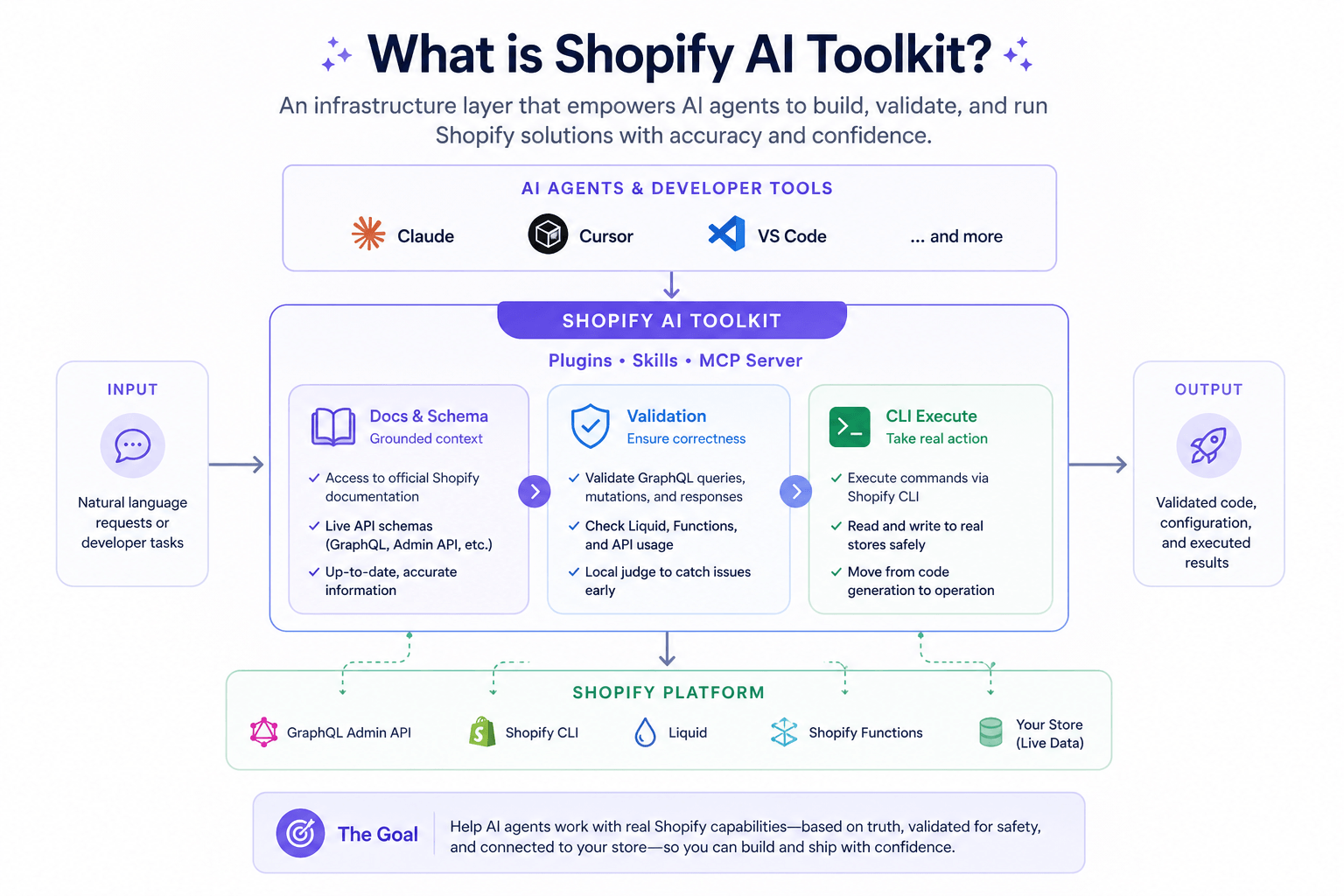
Shopify doesn't use the phrase "AI toolkit" officially, but the concept maps cleanly onto how their AI features are built and layered. As of 2026, Shopify's AI capabilities fall into three distinct layers — each serving a different audience and use case.
Layer 1: Built-in AI (Shopify Magic + Sidekick)
Shopify's native AI is branded under Shopify Magic. It's the umbrella term for every AI feature Shopify builds directly into the admin. You don't install it. You don't pay extra for most of it. It activates on your existing plan.
Shopify Magic currently covers:
- Product description generation — generates copy from product title and keywords, with tone and audience controls
- Smart replies in Shopify Inbox — suggests AI-written responses to incoming customer messages, drafted from your store's FAQs and product data
- Media editor: background removal — removes or replaces backgrounds in product photos automatically
- Media editor: image generation — generates lifestyle backgrounds for product images using text prompts
- Email subject lines and body copy — inside Shopify Email, Magic drafts subject lines, preview text, and email body sections
- Blog and page content — generates draft sections for blog posts and landing pages
- FAQ generation — drafts FAQ content based on your store's products and policies
- Theme editor text — suggests section copy directly inside the theme editor
Sidekick is a separate AI layer. Think of it as a store management assistant you talk to. It's embedded in the admin and responds to natural language requests like "what were my top 10 products last month" or "create a 20% discount code for all customers expiring in two weeks." Sidekick can read your store data and execute configuration tasks — it's not a customer-facing tool.
Layer 2: App Store AI (Plugins)
The Shopify App Store has over 8,000 apps; a growing share of them use AI for specific functions. These plugins connect to your Shopify store data (orders, products, customers) and apply AI to tasks the native tools don't cover: personalized recommendations, AI-powered search, predictive email segmentation, and customer support automation.
This is where the real customization of a Shopify AI toolkit happens. You choose based on your specific bottlenecks.
Layer 3: API and Custom Integrations
For merchants with developer resources, Shopify's Admin API and Storefront API allow custom AI integrations — connecting external AI models to order data, customer records, and product catalog. This layer is also used by enterprise teams building proprietary automation, AI-driven pricing engines, or custom recommendation systems.
Most small and mid-size merchants don't need layer 3. Layers 1 and 2 cover the vast majority of automation needs without code.
What AI Can Automate in a Shopify Store (By Category)
Understanding the toolkit also means understanding which store functions AI can realistically handle in 2026:
Store Function | What AI Handles | Native or Plugin |
Product copy | Description generation, SEO optimization | Native (Shopify Magic) |
Customer support | Replies, order status, returns, escalation | Plugin (Solvea, Gorgias) |
Product images | Background removal, lifestyle generation | Native (Shopify Magic) |
Email marketing | Segmentation, content, send-time optimization | Plugin (Klaviyo) |
On-site search | Semantic search, AI-ranked results | Plugin (Boost Commerce, Searchpie) |
Product recommendations | Personalized upsell, cross-sell | Plugin (Rebuy) |
Ad targeting | Lookalike audiences from purchase data | Native (Shopify Audiences) |
Store analytics | Summaries, anomaly detection | Native (Sidekick) |
Pricing | Dynamic pricing, competitive monitoring | Plugin (Prisync) |
Shopify Audiences: AI-Powered Ad Targeting
Shopify Audiences is a separate product available to Shopify Plus merchants. It uses purchase data from across the Shopify network to build high-intent audience segments for Facebook, Instagram, Google, and other ad platforms — without relying solely on pixel data.
The practical use case: instead of running ads to a broad lookalike audience, you upload a Shopify Audiences segment to Meta. These audiences are built from buyers across the Shopify ecosystem, not just your own traffic, so they tend to convert at lower CPAs — especially for scaling campaigns. According to Shopify's platform documentation, merchants using Shopify Audiences have reported improved return on ad spend compared to standard lookalike targeting.
Plan Availability at a Glance
Feature | Basic | Shopify | Advanced | Plus |
Shopify Magic (copy, images) | ✓ | ✓ | ✓ | ✓ |
Sidekick | ✓ | ✓ | ✓ | ✓ |
Smart replies (Inbox) | ✓ | ✓ | ✓ | ✓ |
Shopify Audiences | — | — | — | ✓ |
Media editor (image gen) | Limited | ✓ | ✓ | ✓ |
Native Shopify AI Features: Using Them Effectively
Shopify Magic for Product Copy
The most-used Shopify Magic feature. You provide the product name and a few keywords; Magic generates a description. The output quality is directly tied to the input detail — vague keyword lists produce generic copy. Specific details about materials, dimensions, use cases, and target buyers produce more usable first drafts.
One practical setup: build a product template in Shopify's bulk editor with standardized attribute fields. Run Magic across the entire catalog at once rather than one product at a time.
Smart Replies in Shopify Inbox
Shopify Magic surfaces suggested replies inside Shopify Inbox when a customer message comes in. The AI reads the question, checks your store's FAQ content and product pages, and drafts an answer. You review and send (or edit first).
This works well for common questions about shipping, returns, product specs, and order status. It doesn't handle complex multi-step issues or emotional escalations reliably — those still go to a human.
Sidekick for Store Operations
Sidekick is most useful as a reporting shortcut. Instead of navigating to Analytics → Sales → filtering by date and product, you ask: "What's my conversion rate this month compared to last month?" Sidekick returns the number and can visualize the trend.
It also handles configuration tasks: creating discount codes, adjusting shipping profiles, checking inventory thresholds. The limitation is that Sidekick doesn't integrate with third-party app data — it only sees what's inside Shopify's own admin.
AI Coding Assistants for Shopify: Claude Code and Cursor
Layer 3 of the Shopify AI toolkit — custom development — is where AI coding assistants compress weeks of work into hours. Two tools stand out in 2026: Claude Code and Cursor. Neither requires you to be a Shopify expert. Both work by understanding your codebase as a whole, not just the file you're looking at.
Claude Code
Claude Code is Anthropic's AI coding assistant. Its core capability for Shopify development is full-project context: it reads your entire theme or app codebase before responding, so suggestions fit your actual structure rather than generic Shopify patterns.
The practical effect is meaningful. A merchant who wanted to build a custom bundle pricing display — pulling data from product metafields and rendering a dynamic price table in Liquid — described the feature in plain language. Claude Code read the existing theme, identified where the product template pulled data, and generated the complete Liquid snippet and metafield schema. No prior Shopify theme experience required.
Other scenarios where this matters:
- Automating store workflows: connect Shopify webhook events to external logic — inventory reorder triggers, post-purchase sequences, review request timing — without writing boilerplate from scratch
- Storefront optimization: given access to your theme files, Claude Code can identify conversion bottlenecks (slow section renders, missing structured data, CLS issues) and implement fixes across multiple files in one pass
- API integrations: building custom connections between Shopify's Admin API and external systems — ERPs, CRMs, 3PL fulfillment — compresses from days to a single session
Cursor
Cursor is an AI-native code editor based on VS Code. For Shopify work, the key feature is project-aware editing: you can describe a change in plain language, and Cursor applies it across whichever files are affected — theme sections, snippet dependencies, JavaScript, CSS — without you having to track down each location manually.
A common use case: a store migrating from a legacy theme to a Dawn-based design needs to preserve custom section logic built years earlier. Cursor can read both the old and new theme structure, identify what needs to be ported, and generate the updated section code in the new format. What previously took a developer several days to audit and rewrite manually becomes a directed session.
Other high-impact applications:
- Headless Shopify (Hydrogen): Cursor handles React component generation and Storefront API query writing for merchants building custom storefronts — particularly useful for teams without dedicated Shopify Hydrogen experience
- Theme customization at scale: merchants running multiple storefronts (different regions, brands, or B2B/B2C splits) use Cursor to propagate changes across all themes simultaneously rather than editing each one individually
- App development: building Shopify apps (custom checkout extensions, fulfillment integrations, loyalty systems) with an AI assistant that understands the surrounding codebase significantly reduces QA cycles
How They Fit the Shopify AI Toolkit
Claude Code and Cursor don't replace Shopify Magic or third-party plugins — they sit at a different layer. Magic handles content and in-admin tasks. Plugins handle specific functions like support, email, or search. Coding assistants handle everything that requires custom development: bespoke features, integrations that don't exist as apps, and store infrastructure that needs to be built rather than installed.
For merchants with a developer on staff or access to a freelancer, adding one of these tools to the stack accelerates every Layer 3 project significantly.
How Solvea Handles the Support Layer for Shopify Stores
Shopify's native AI — Inbox smart replies and Sidekick — can draft suggested responses. It can't pick up a phone at 2 AM, process a return request from start to finish, or handle a live chat conversation while you're fulfilling orders.
Solvea fills that gap. Solvea is a no-code AI agent platform designed for SMBs. It functions as an AI shopping assistant on the customer-facing side while acting as a full support agent behind the scenes — checking real Shopify order data, escalating to a human when needed, and operating across phone, chat, and email on the same platform. Setup is under 3 minutes; no code required.
Free tier available for stores that want to test before committing.
Conclusion
The Shopify AI toolkit is already larger than most merchants realize. Shopify Magic alone covers product copy, image editing, email content, customer replies, and blog drafts — all included in existing plans. Sidekick handles admin tasks. Shopify Audiences handles ad targeting for Plus merchants.
Third-party plugins extend coverage into the areas Shopify's native AI doesn't reach: customer support at scale, AI-powered search, personalized recommendations, and cross-channel attribution. The combination of layers 1 and 2 is what makes a complete toolkit — not any single app.
Your AI Receptionist, Live in Minutes.
Scale your front desk with an AI that never sleeps. Solvea handles unlimited multi-channel inquiries, books appointments into your calendar automatically, and ensures zero missed opportunities around the clock.
FAQ
What is the Shopify AI toolkit?
The Shopify AI toolkit refers to the full set of AI capabilities available to Shopify merchants — both native features built into the admin (Shopify Magic, Sidekick, Shopify Audiences) and third-party AI plugins available through the Shopify App Store. Together they cover content, customer support, email, search, recommendations, and analytics.
What does Shopify Magic include?
Shopify Magic includes product description generation, smart replies for Shopify Inbox, email subject line and body copy suggestions in Shopify Email, blog and page content drafting, FAQ generation, image background removal, and AI image generation for product media. It's available across all Shopify plans.
What is Shopify Sidekick?
Sidekick is Shopify's conversational AI assistant inside the merchant admin. It handles store management tasks via natural language — generating discount codes, pulling reports, checking inventory — without navigating menus. It's distinct from Shopify Magic and operates on the back-end only, not customer-facing.
Does Shopify have AI for customer service?
Shopify Inbox includes AI smart replies for suggesting responses to customer messages. For full autonomous customer support — phone calls, complete chat resolution, email handling — most merchants add a dedicated app like Solvea or Gorgias, which connects to Shopify order data to resolve inquiries end-to-end.
What is Shopify Audiences?
Shopify Audiences is an AI-powered ad targeting tool available to Shopify Plus merchants. It builds high-intent audience segments from purchase signals across the Shopify merchant network and exports them to Facebook, Instagram, and Google for more efficient paid campaigns.