The missed call is only the start of the problem.
A buyer may call from a listing page and hang up before leaving a voicemail. A seller may request a valuation, answer one text, and then go quiet. A renter may ask for a callback after work. An old inquiry may become relevant again when a property status changes.
Each situation could justify follow-up. None justifies calling forever.
An AI receptionist for real estate can help a team re-engage leads without turning every contact into a generic dialing campaign. The useful model is selective: call when there is a clear trigger, a documented reason, an allowed contact path, and a specific next step. Route the conversation to a person when judgment, advice, negotiation, or a sensitive housing question enters the discussion.
This guide explains which real estate leads are good candidates for AI outbound calling, which ones should stay out of the queue, and how to build a workflow that protects context, consent, and human ownership.
Outbound follow-up is not the same as cold calling
Real estate teams often group several different activities under “outbound.” That makes workflow design harder than it needs to be.
There are at least four distinct call types:
- Requested callback: The person explicitly asked the team to call.
- Missed-inquiry follow-up: The person initiated a call, form, chat, or text, but the next step was not completed.
- Active-process follow-up: The person is already discussing a showing, valuation, application, listing, or service request with the team.
- Prospecting or reactivation: The business initiates contact without a fresh customer request.
The first three have visible context. The fourth needs a separate campaign policy, a reliable permission basis, suppression checks, and legal review. Do not use one broad “AI follow-up” rule for all four.
The safest operational question is not simply, “Do we have this phone number?” It is:
Why are we calling this person now, and what action did they reasonably expect from us?
If the workflow cannot answer that question from the contact record, the AI should not place the call automatically.
The five signals that make a lead ready for AI re-engagement
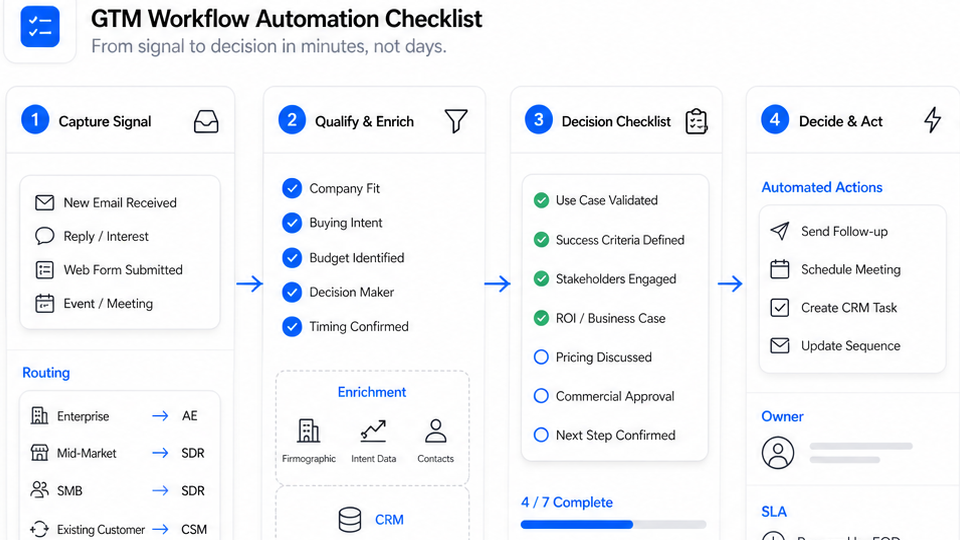
An outbound call should enter the queue only when five conditions are satisfied.
1. There is a specific trigger
Good triggers describe an event, not a vague lead status.
Examples include:
- A caller asked for an agent and the transfer failed.
- A website lead requested a callback about a named property.
- A buyer supplied two viewing windows but no time was confirmed.
- A seller started a valuation request but did not complete the intake.
- A scheduled viewing needs a confirmation or approved rescheduling prompt.
- A property update is directly relevant to a lead who requested updates.
“Old lead” is not a sufficient trigger. “Asked to be notified if 18 Oak Street returns to market” is.
2. The contact path is allowed
The record should show why the team may use the number for this call. That may include a requested callback, an active conversation, a recorded opt-in, or another basis approved by the business and its compliance process.
The workflow should also check:
- Internal do-not-call and suppression lists
- Opt-out or revocation records
- Permitted calling windows
- Campaign source and consent language
- Frequency limits and prior attempts
- Applicable federal and state requirements
AI-generated voices are not a shortcut around calling rules. The FCC has said that AI-generated voices fall within the TCPA’s restrictions on artificial or prerecorded voice calls. The FTC also maintains telemarketing guidance covering do-not-call controls, calling hours, disclosures, and other requirements. Configure the workflow with qualified legal guidance rather than assuming that an inbound inquiry permits unlimited future outreach.
3. The AI has enough context to be useful
The call should start with the information the lead already gave the business.
At minimum, the outbound task should contain:
- Contact name and phone number
- Original inquiry source and timestamp
- Property address, listing ID, or service requested
- Last conversation summary
- Promised or requested next step
- Assigned agent or team
- Questions the AI may answer
- Conditions that require transfer or callback
Without that context, the AI is likely to ask the lead to repeat everything. That may be worse than waiting for a prepared human response.
4. The call has one bounded objective
Every task should have a clear completion state.
A useful objective might be:
- Confirm whether the person still wants an agent callback.
- Collect preferred viewing windows.
- Confirm attendance for an existing appointment.
- Ask for one missing intake detail.
- Notify the person of a requested property update.
- Route an interested lead to the assigned agent.
“Nurture the lead” is too broad for one call. It encourages long scripts, unclear outcomes, and unnecessary attempts.
5. A human owner is ready for the next step
An AI call should not create a new dead end. Before launch, define who receives:
- Warm transfers
- Requested callbacks
- Scheduling exceptions
- Complaints
- Representation questions
- Pricing or negotiation questions
- Sensitive housing or screening questions
- Unrecognized situations
If nobody can own the outcome, delay the campaign until the handoff is real.
A practical call-or-don’t-call matrix
Use this matrix as a starting point for a real estate lead follow-up policy. Your final rules should reflect your brokerage process and legal review.
| Lead situation | Should AI call? | Primary objective | Human handoff |
|---|---|---|---|
| Caller requested a callback and the agent missed the transfer | Usually yes | Reconnect, confirm need, transfer or schedule callback | Transfer when available; otherwise assign the promised owner |
| Website lead asked about a specific property and selected phone follow-up | Usually yes | Confirm interest and collect preferred next step | Agent handles property advice, representation, and negotiation |
| Buyer provided viewing preferences but no slot is confirmed | Yes, if the contact path and calendar rules are approved | Confirm preferences or offer approved available options | Escalate exceptions or questions outside the calendar data |
| Existing client needs an appointment reminder | Yes, under the team’s approved reminder policy | Confirm, reschedule, or route a question | Human handles exceptions and substantive advice |
| Lead asked to be notified about a specific property change | Yes, when the requested event occurs | Deliver the update and ask whether an agent should follow up | Agent answers detailed property or transaction questions |
| Recent inquiry has one missing intake detail | Maybe | Ask for the missing detail, then stop | Human reviews the completed intake |
| Lead has not responded after the team’s approved attempt limit | Usually no | Suppress further automated attempts | Human decides whether another channel or no action is appropriate |
| Contact opted out or revoked permission | No | None | Suppress immediately across connected workflows |
| Number came from a purchased, scraped, or unclear-source list | No automatic call | None until permission and campaign legality are established | Compliance review before any outreach |
| Lead asks which neighborhood is right for a protected group | No automated recommendation | Acknowledge and route | Trained human follows fair-housing policy |
| Complaint, threat, emergency, or safety concern | No continued automated flow | Escalate promptly | Human or emergency procedure takes over |
The important distinction is that the AI does not decide who deserves attention. It executes an approved response to a documented event.
How quickly should AI call after a missed real estate inquiry?
The workflow should prioritize relevance, not a universal stopwatch.
For a requested callback or failed transfer, the task can be created immediately and placed inside the next permitted contact window. For a partially completed viewing request, the team may first send a confirmation text and call only if voice follow-up was requested or approved. For an old lead, a fresh event should reopen the conversation before the system calls.
Use a trigger ladder instead of one blanket cadence:
- Fresh request: Create the follow-up task with the original inquiry attached.
- Channel check: Confirm the requested or approved contact method.
- Time-window check: Hold the call until the configured window permits it.
- Attempt check: Review prior calls, texts, outcomes, and opt-outs.
- Objective check: Confirm the call still has a useful, current purpose.
- Owner check: Verify that a person can receive the handoff.
This is a stronger control than simply retrying every unanswered number at fixed intervals.
What the AI should say on a re-engagement call
The opening should identify the business, connect the call to the lead’s action, and make the purpose easy to understand.
For example:
Hi, this is the automated assistant for Northstar Realty. You asked for a callback about 18 Oak Street earlier today. I can collect your preferred viewing time or connect you with the listing team. Would you like to continue?
That opening does four jobs:
- Identifies the business
- Discloses that the caller is automated
- Explains why the call is happening
- Offers a bounded next step
Avoid openings that pretend to be a human agent, hide the source of the call, or launch directly into qualification questions.
Keep the script narrow
A good AI re-engagement script can usually follow this structure:
- Identify the business and automated assistant.
- State the inquiry or approved trigger.
- Confirm whether the person wants to continue.
- Complete one task.
- Summarize the result.
- Transfer, schedule a human callback, or close the task.
The AI should not improvise advice about contracts, financing, property suitability, legal rights, negotiation, or representation. Housing-related workflows should also keep decisions involving protected characteristics with trained people under the business’s Fair Housing Act compliance process.
When the call should switch to a real estate professional
Human handoff is not a failure. It is part of the design.
Escalate when the lead:
- Wants to make or discuss an offer
- Asks for property recommendations based on personal or protected characteristics
- Needs legal, financing, tax, inspection, or contractual guidance
- Disputes a listing fact or expresses a complaint
- Has an existing agent or raises a representation issue
- Requests information the approved knowledge base cannot verify
- Shows urgency that the script is not designed to handle
- Asks to stop automated calls or changes contact preferences
The handoff should include the transcript, summary, original source, property context, questions asked, answers collected, and the promised next action. The lead should not need to restart the conversation.
For the broader inbound workflow, see how real estate teams use AI across calls, texts, and follow-up.
How Solvea supports outbound real estate follow-up
Solvea combines inbound reception and native outbound calling, so a missed inquiry can become a controlled follow-up task without losing the earlier conversation.
Teams can use Solvea to:
- Configure outbound calling windows, retry logic, priority rules, and frequency limits
- Import or select contacts for approved follow-up workflows
- Generate and edit a campaign script before launch
- Preview the AI call experience
- Track pending, active, and completed outbound tasks
- Record connection status, call duration, and customer response
- Attach an AI-generated call summary to the contact profile
- Keep prior calls, messages, notes, and ownership available for the next team member
- Apply blocklist and do-not-call controls within the configured workflow
That native outbound layer distinguishes Solvea from products that stop after answering the inbound call. The value is not “more calls.” It is a connected path from missed inquiry to controlled follow-up to informed human action.
Explore Solvea outbound calling or review the full AI receptionist for real estate workflow.
A seven-step setup checklist
Before activating AI outbound calling for real estate leads:
- Classify your call types. Separate callbacks, active-process follow-up, reminders, reactivation, and prospecting.
- Define approved triggers. Document the exact event that creates each task.
- Map permission and suppression data. Store source, opt-in, opt-out, calling-window, and do-not-call status.
- Give each task one objective. Avoid open-ended “nurture” calls.
- Write escalation rules. Keep housing judgment, advice, negotiation, and exceptions with trained humans.
- Set attempt limits. Stop when the objective expires, the person declines, or the policy limit is reached.
- Audit outcomes. Review connection results, opt-outs, transfers, unresolved questions, and duplicate contacts before expanding the workflow.
Start with one narrow use case, such as requested callbacks after missed transfers. Once the team can prove that context, suppression, and handoff work correctly, add the next trigger.
Your AI Receptionist, Live in Minutes.
Scale your front desk with an AI that never sleeps. Solvea handles unlimited multi-channel inquiries, books appointments into your calendar automatically, and ensures zero missed opportunities around the clock.
Frequently asked questions
Can an AI receptionist call a real estate lead back after a missed call?
It can when the workflow has a documented reason to call, an allowed contact path, configured calling windows, suppression checks, a bounded purpose, and a human handoff. A missed call should not be treated as permission for unlimited marketing outreach.
Should AI call stale real estate leads?
Not simply because they are old. A stale lead is a better candidate when a fresh, relevant event exists—such as a requested property update—and the contact remains eligible under the business’s approved outreach policy.
How many times should an AI call a lead?
There is no universal number that fits every workflow. Set limits by call type, consent source, recency, prior outcomes, state and federal requirements, and the lead’s preferences. Stop on opt-out, revocation, an invalid number, an expired objective, or the team’s approved attempt limit.
Can AI qualify real estate leads on an outbound call?
AI can collect structured intake details and route the conversation. It should not make housing, representation, financing, legal, or transaction decisions. Define qualification as information capture—not a judgment about who is a desirable buyer, renter, or seller.
What makes outbound AI useful for a brokerage?
It can consistently execute approved callbacks, confirmations, and re-engagement tasks while preserving call outcomes and contact history. The team still owns campaign policy, compliance, advice, exceptions, and relationship-building.
Add outbound follow-up to the workflow you already use
The best time for AI to re-engage a real estate lead is when the next call is expected, relevant, permitted, and easy to hand off.
Start with requested callbacks. Attach the original context. Give the AI one job. Stop when the reason for calling expires. Send judgment and relationship work to the real estate professional who owns it.
Add outbound follow-up to your Solvea workflow.
Compliance note: This article provides operational guidance, not legal advice. U.S. federal and state calling, texting, recording, disclosure, licensing, and fair-housing requirements may apply differently to your workflow. Review your implementation with qualified counsel.