AI GTM Agents Workflows and Examples
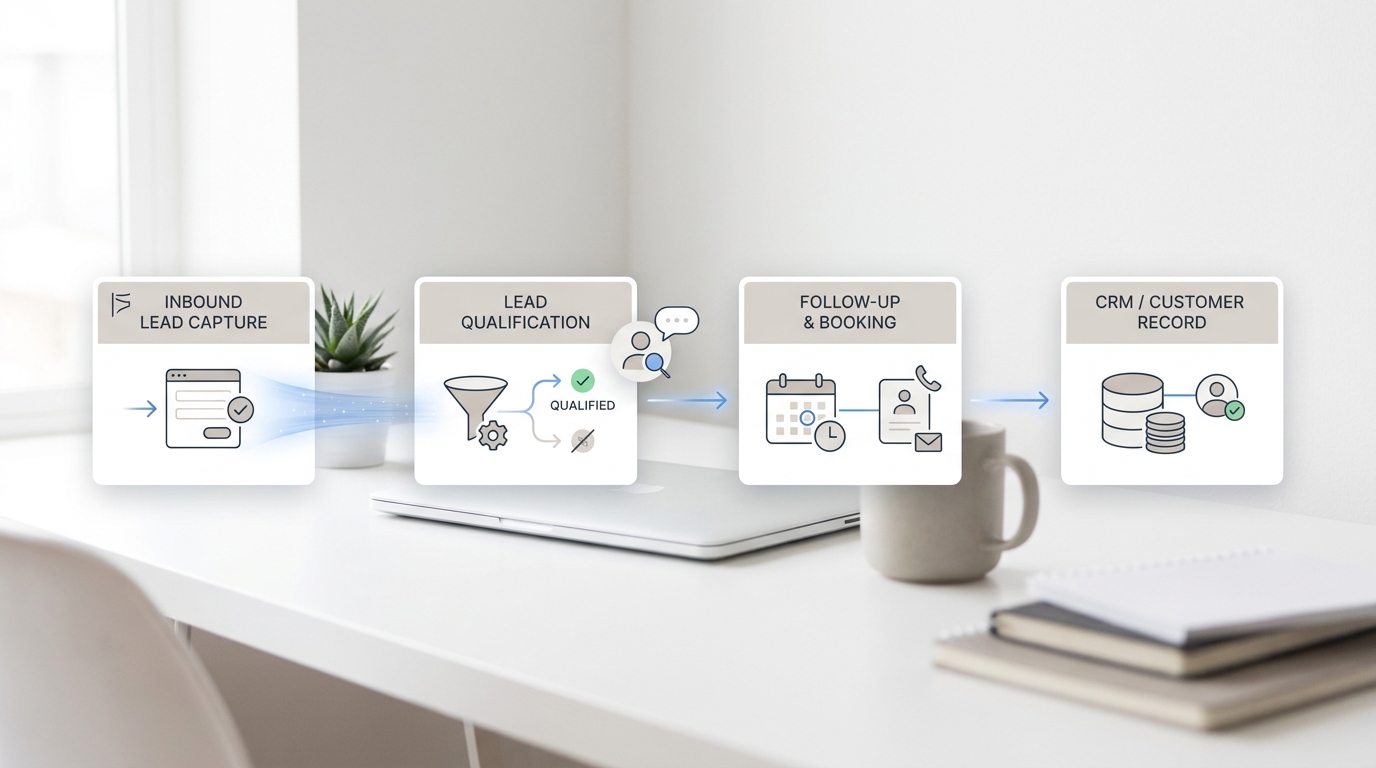
Most teams do not need a vague "AI agent" pitch. They need AI GTM agents that own a real workflow: capture the lead, enrich the record, qualify the request, route it, schedule the meeting, follow up, update the CRM, and report what happened.
That is the practical difference between a demo and something you can actually deploy. The best AI GTM agents are not one giant system. They are small agents assigned to specific jobs, with a clean handoff and one system of record.
This guide shows AI GTM agents workflows and examples you can copy, then maps them to current product surfaces from HubSpot, Clay, Lindy, Relevance AI, and Solvea.
What AI GTM agents actually do
An AI GTM agent is a workflow layer that sits between a trigger and a business outcome.
It usually does five things:
- Detects a signal.
- Pulls context from a source system.
- Decides the next action.
- Executes or routes the task.
- Logs the result somewhere your team can see it.
That means AI GTM agents are useful when the work is repeatable, the inputs are messy, and the output needs to land in a CRM, inbox, calendar, or queue.
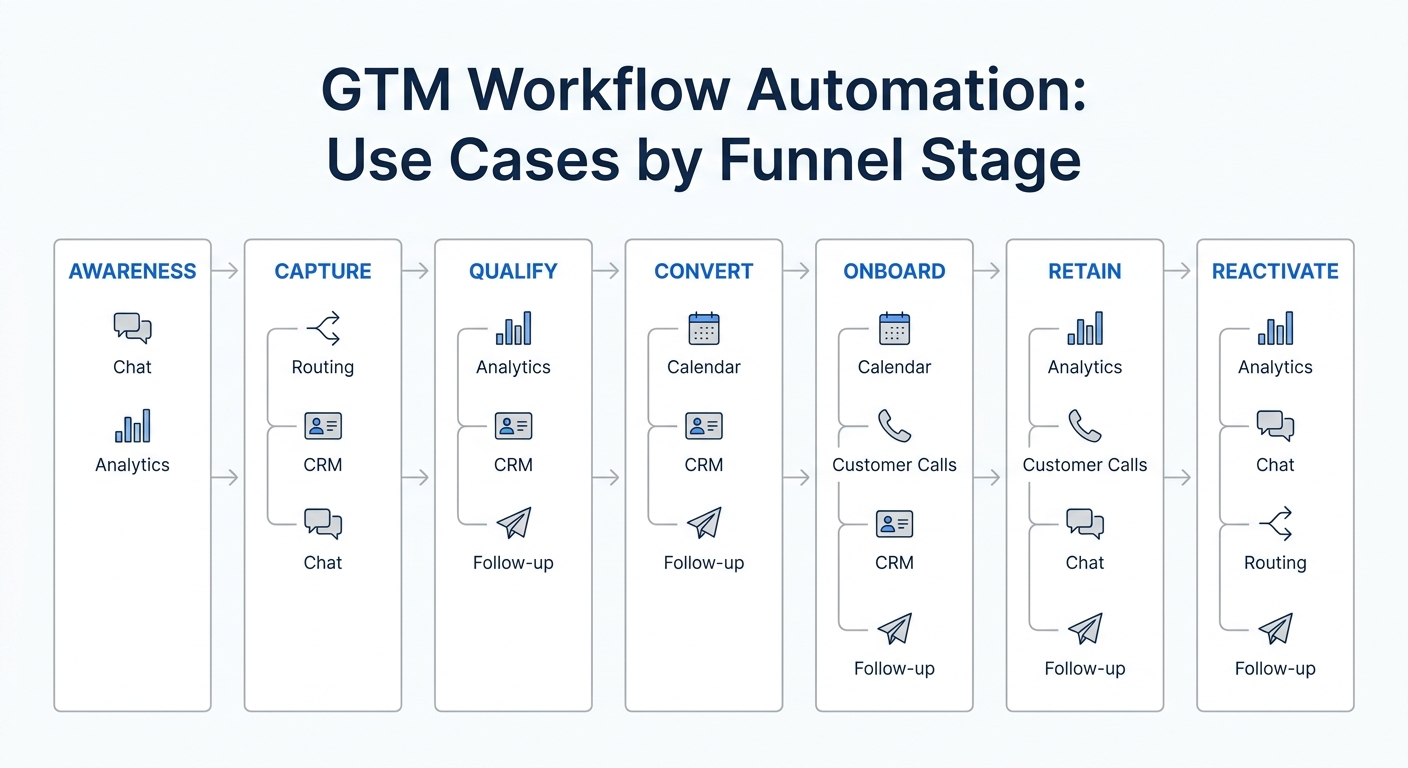
Seven AI GTM agents workflows and examples
| Workflow | Trigger | What the agent does | Example surfaces |
|---|---|---|---|
| Lead capture and enrichment | Form fill, chat, inbound call, ad reply | Captures context, enriches the contact, adds the account, logs source data | Clay, HubSpot Agent Hub, Relevance AI |
| Qualification and routing | High-intent reply or request | Asks clarifiers, scores fit, routes to the right owner | Solvea AI receptionist, HubSpot, Clay |
| Scheduling and reminders | Demo request or booking intent | Books the meeting, sends reminders, handles reschedules | Lindy, Solvea appointment tools |
| Personalized outbound | New account list, trigger event, warm lead | Drafts tailored outreach and sequence steps | Clay, Lindy |
| CRM hygiene and note capture | Call ends, meeting ends, task closes | Summarizes notes, updates fields, creates follow-up tasks | Lindy, HubSpot, Solvea |
| Reactivation and no-response follow-up | No reply after a set delay | Sends a new touch, changes the channel, escalates when needed | Solvea, Lindy, HubSpot |
| Reporting and optimization | Weekly review window | Summarizes activity, surfaces blockers, suggests next actions | HubSpot Agent Hub, Clay, Relevance AI |
1. Lead capture and enrichment
This is the easiest place to start with AI GTM agents. A signal comes in, usually from a form, ad, chat widget, or missed call. The agent captures the details, enriches the record, and writes the result into the system of record.
Clay's homepage makes this model obvious: it positions itself around AI research agents, workflow building, enrichment, scoring, and outbound. HubSpot's Agent Hub also points in the same direction: build and manage agents inside the CRM. In practice, that means a lead can be researched and normalized before a rep ever touches it.
For service businesses, Solvea uses the same logic at the front door. The AI receptionist answers first, captures the caller's need, and hands the team a summary instead of a blank voicemail.
2. Qualification and routing
AI GTM agents are strongest when the next step is obvious if the inputs are clear. Qualification is a good example.
The agent asks one or two follow-up questions, checks the answer against your rules, and routes the lead to the right queue or owner. If the request is urgent, the agent can escalate. If it is low fit, it can send a lighter response and keep the thread warm.
Solvea's AI receptionist and AI agent builder fit this model well because they combine rule-setting with a clean handoff into PC Desk. That matters more than a flashy demo. The question is not "can the agent talk?" The question is "can it leave a useful record and move the lead to the right person?"
3. Scheduling and reminders
Scheduling is one of the most practical AI GTM agents workflows and examples because the outcome is measurable fast. The agent does not need to solve every problem. It needs to turn intent into a booked slot, then keep the appointment alive with reminders.
Lindy is a clear example of this category. Its homepage emphasizes inbox work, meeting scheduling, calendar management, drafting, follow-up, and integrations. That is exactly the kind of surface you want for a scheduling agent: enough context to book the meeting, enough memory to follow up, and enough integration depth to keep the calendar in sync.
If your business depends on booked calls, demos, or service visits, scheduling should usually be one of the first AI GTM agents you deploy.
4. Personalized outbound
Outbound is where AI GTM agents can help, but only when the inputs are structured. The agent should not invent a strategy. It should take a defined list, enrich the accounts, pull the relevant signal, and draft the first version of the message.
Clay is built for this style of work. Its homepage highlights AI research agents, enrichment, outbound, lead scoring, and trigger-driven workflows. That makes it a strong fit for teams that need account research and message generation before a human approves the send.
The rule here is simple: let the agent do the research and drafting, then keep a human in the loop before anything leaves the company.
5. CRM hygiene and note capture
This is the least glamorous but often the highest-return workflow. AI GTM agents can turn calls, meetings, and messages into clean CRM updates.
Lindy's homepage explicitly calls out email drafting, meeting notes, scheduling, reminders, and follow-up. Solvea does the same thing on the call side by summarizing conversations and preserving them in the desk view. That reduces the "I forgot to log it" problem that usually breaks pipeline hygiene.
If the CRM stays clean, the rest of the GTM motion gets easier. If the CRM stays messy, every other agent becomes less useful.
6. Reactivation and no-response follow-up
A useful AI GTM agent does not stop at the first reply. It should know when to re-open a lead, switch channels, or escalate to a human.
This is where AI GTM agents become more than automation rules. The agent can look for inactivity, send a follow-up, and update the owner when the lead wakes back up. Solvea's omnichannel setup is a fit here because it can keep customer conversation context across voice, SMS, email, chat, and WhatsApp.
For most teams, this workflow matters more than broad "AI outreach" claims. It converts forgotten intent into a visible next step.
7. Reporting and optimization
The final workflow is the one most teams skip: the weekly review agent.
An AI GTM agent can summarize what happened, what stalled, which leads converted, and where the handoff broke. Relevance AI's positioning around specialist AI agents for every task is useful here because reporting is rarely one thing. It is usually a bundle of small specialist tasks: summarize, compare, flag, and recommend.
If the reporting agent surfaces the same failure every week, you do not need another tool. You need to fix the workflow.
How to choose the first workflow
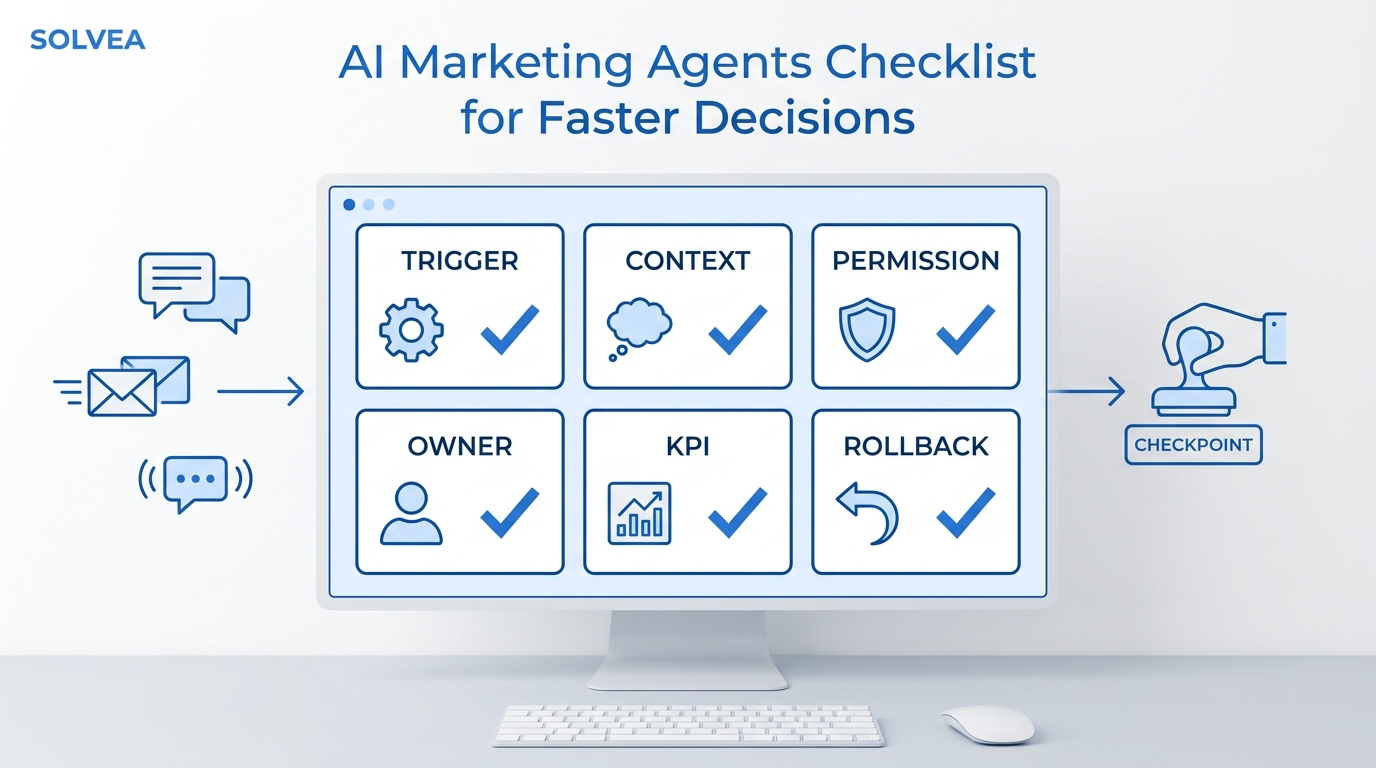
Start with the workflow that has three traits:
- Clear trigger.
- Clear output.
- Clear owner if the agent escalates.
For most teams, that means one of these:
- Inbound lead capture and enrichment.
- Qualification and routing.
- Scheduling and reminders.
If you are in a service business, the first AI GTM agents workflow is often the front door. A call or message comes in, the agent captures it, and the team gets a usable handoff. That is why Solvea's AI receptionist and AI agent builder are relevant here.
A simple rollout order
- Start with capture.
- Add qualification.
- Add scheduling.
- Add follow-up.
- Add reporting.
That order keeps the system narrow enough to manage. It also makes debugging easier, because each step has one job.
Where Solvea fits
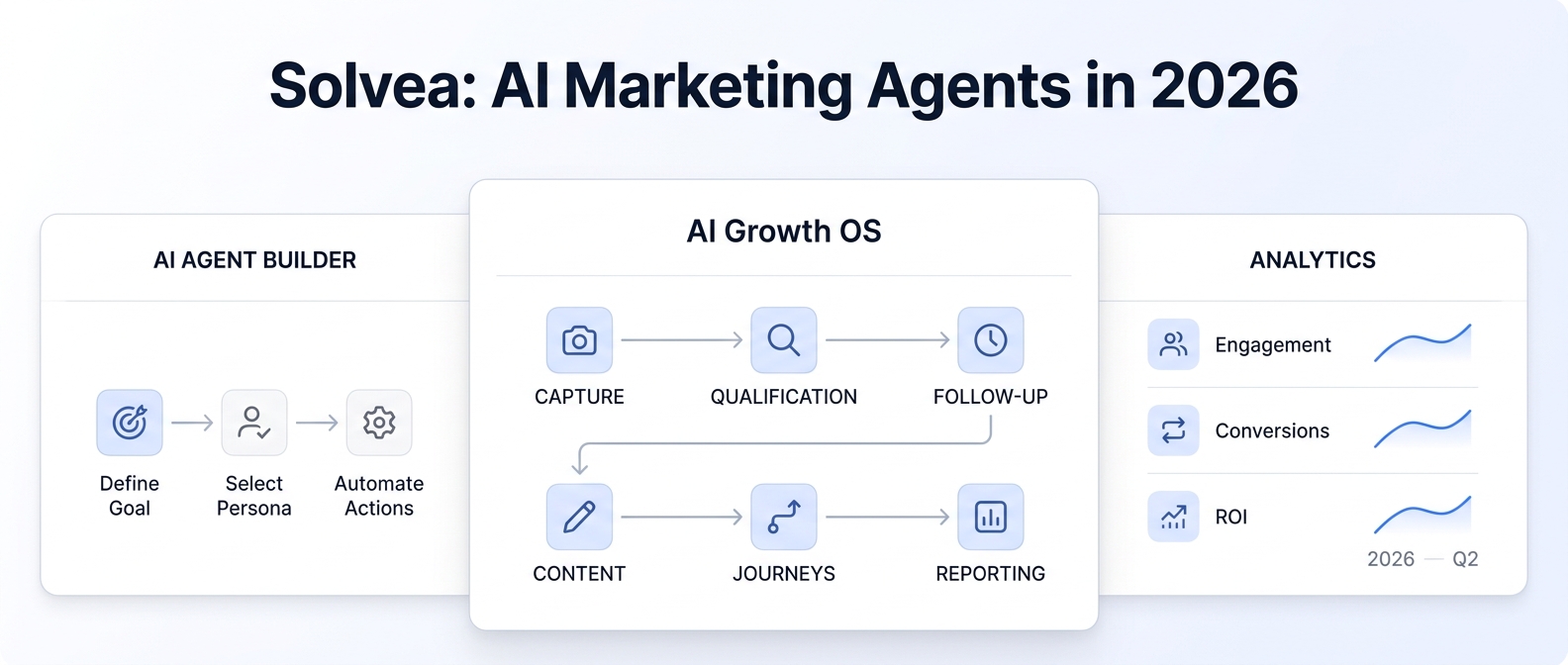
Solvea is not trying to be every kind of GTM agent. It is built to handle customer conversations across voice, SMS, email, WhatsApp, and live chat in one no-code app.
That makes it a good fit for the first mile of the GTM motion: capture, qualify, route, and follow up. The AI receptionist answers missed customer calls, the AI agent builder lets you tune the rules, and the integrations keep the next step connected to your stack.
If you want AI GTM agents that start with real customer conversations instead of abstract workflow diagrams, that is the part of the funnel Solvea is built for.
Your AI Receptionist, Live in Minutes.
Scale your front desk with an AI that never sleeps. Solvea handles unlimited multi-channel inquiries, books appointments into your calendar automatically, and ensures zero missed opportunities around the clock.
FAQ
What is an AI GTM agent?
It is an AI workflow that owns a go-to-market task from trigger to outcome, usually across capture, qualification, scheduling, follow-up, or reporting.
Which workflow should I automate first?
Start with the one that has the clearest trigger and the cleanest handoff. For many teams, that is inbound capture and qualification.
Do AI GTM agents replace sales reps?
No. The useful pattern is to remove repetitive work so reps spend more time on judgment, conversations, and closing.
How do AI GTM agents connect to a CRM?
They usually write back contacts, notes, statuses, tasks, or summary fields through an integration or direct sync.
What is the difference between AI GTM agents and normal automation?
Normal automation follows fixed steps. AI GTM agents make a bounded decision inside a workflow, then hand off or execute the next action.
Conclusion
The best AI GTM agents are small, specific, and measurable. They handle one workflow, leave one good record, and make the next human step faster.
If you are choosing where to start, do not begin with a giant platform rewrite. Start with capture, qualification, or scheduling. That is where AI GTM agents prove themselves quickly.
For teams that need the front door handled well, Solvea gives you a no-code way to manage the first conversation, keep the handoff clean, and move the lead forward.