Writing emails is not the problem. Writing them repeatedly, at scale, and under time pressure is.
Whether you're responding to inbound leads, handling support tickets, sending follow-ups, or launching promotional campaigns, email consumes a disproportionate amount of operational bandwidth. Now, AI assistant offers a solution — but only when used correctly. Many professionals stop at basic AI writing tools, missing the broader opportunity: full email workflow automation.
In this step-by-step guide, you'll learn how to use AI to write emails effectively, how to choose the right tools, and how advanced platforms like Solvea can turn your inbox into a structured, automated communication engine.
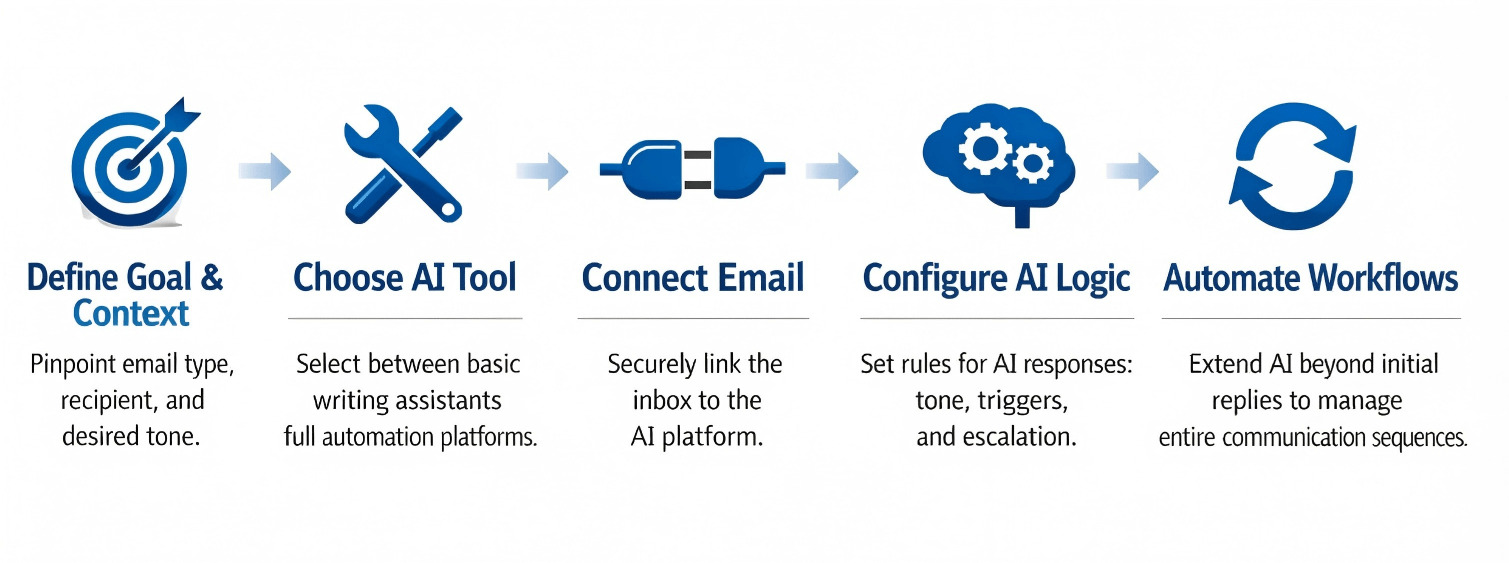
How to Use AI to Write an Email in 5 Steps: TL; DR
How to Use AI to Write an Email?
Step 1 — Define the Goal and Context
Define the objective before using AI. Every effective AI-generated email begins with a clearly identified purpose.
In practice, most AI-powered email writing falls into five primary goal categories. Understanding which category your email belongs to will determine its structure, tone, and level of detail.
1. Lead Generation and Outreach
This category includes cold emails, partnership proposals, and first-contact introductions. The primary objective is to start a conversation and secure a response.
These emails require a clear value proposition, immediate relevance to the recipient, and a defined next step. AI can help structure the message efficiently, but only if the goal is explicitly framed as outreach rather than general communication.
2. Follow-Ups and Relationship Nurturing
Follow-up emails continue an existing interaction. They may reference a recent meeting, an unanswered message, or an ongoing discussion.
The purpose here is continuity. The email must acknowledge previous context, restate the objective if necessary, and guide the recipient toward the next action. When AI is given that prior context, it can maintain logical flow instead of producing disconnected text.
3. Customer Service and Issue Resolution
Support emails focus on clarity and resolution. Whether responding to a complaint, a service inquiry, or a technical issue, the objective is to provide accurate information and reduce uncertainty.
In this case, AI must be supplied with correct data and policy details. The tone should be reassuring and precise. Without structured inputs, automated replies risk being vague or incomplete.
4. Transactional and Operational Communication
Transactional emails include confirmations, scheduling messages, reminders, and status updates. Their primary goal is accuracy rather than persuasion.
These messages require structured formatting and specific details such as dates, times, order numbers, or instructions. AI performs well in this category when provided with clear data fields.
5. Marketing and Promotional Campaigns
Promotional emails aim to drive engagement, clicks, or conversions. They typically announce new features, limited-time offers, or product updates.
The focus here is persuasive framing and benefit-oriented language. AI can assist in refining messaging angles, testing subject lines, and adjusting tone, but it still depends on clearly defined campaign objectives.
After identifying the category, clarify three additional elements: who the recipient is, what they already know, and what action they should take next. These variables function as operational inputs. When they are defined, AI produces structured, outcome-driven communication. When they are not, the result defaults to generic phrasing.
Use case:
Consider a real estate agent handling multiple property inquiries each week.
Most inbound emails fall under lead response or appointment scheduling. Each reply must include specific property details, available viewing times, and a clear call to action. If the agent submits only a broad instruction such as “reply to this inquiry,” the AI will generate a generic acknowledgment.
However, when the agent provides structured inputs — property specifications, availability windows, and the desired next step — the AI produces a response that is specific, professional, and actionable. The difference lies not in writing style, but in clarity of intent.
Step 2 — Choose the Right AI Tool
Match the tool to the mission. Not all AI is engineered for identical purposes. Tool selection hinges on operational scale and the desired level of autonomy. The choice lies between a smart assistant for occasional tasks and a fully autonomous system designed to manage high-volume workflows.
Option A:
Writing Assistants: Tools such as ChatGPT and DeepSeek excel at augmenting human effort. They function as sophisticated co-pilots, capable of generating drafts, refining language, or suggesting stylistic improvements. These are ideal for individuals requiring occasional compositional assistance, those working with simple prompts, or users who prefer to retain direct human oversight for every message dispatched. Such tools enhance writing proficiency, yet human intervention remains integral for each send action.
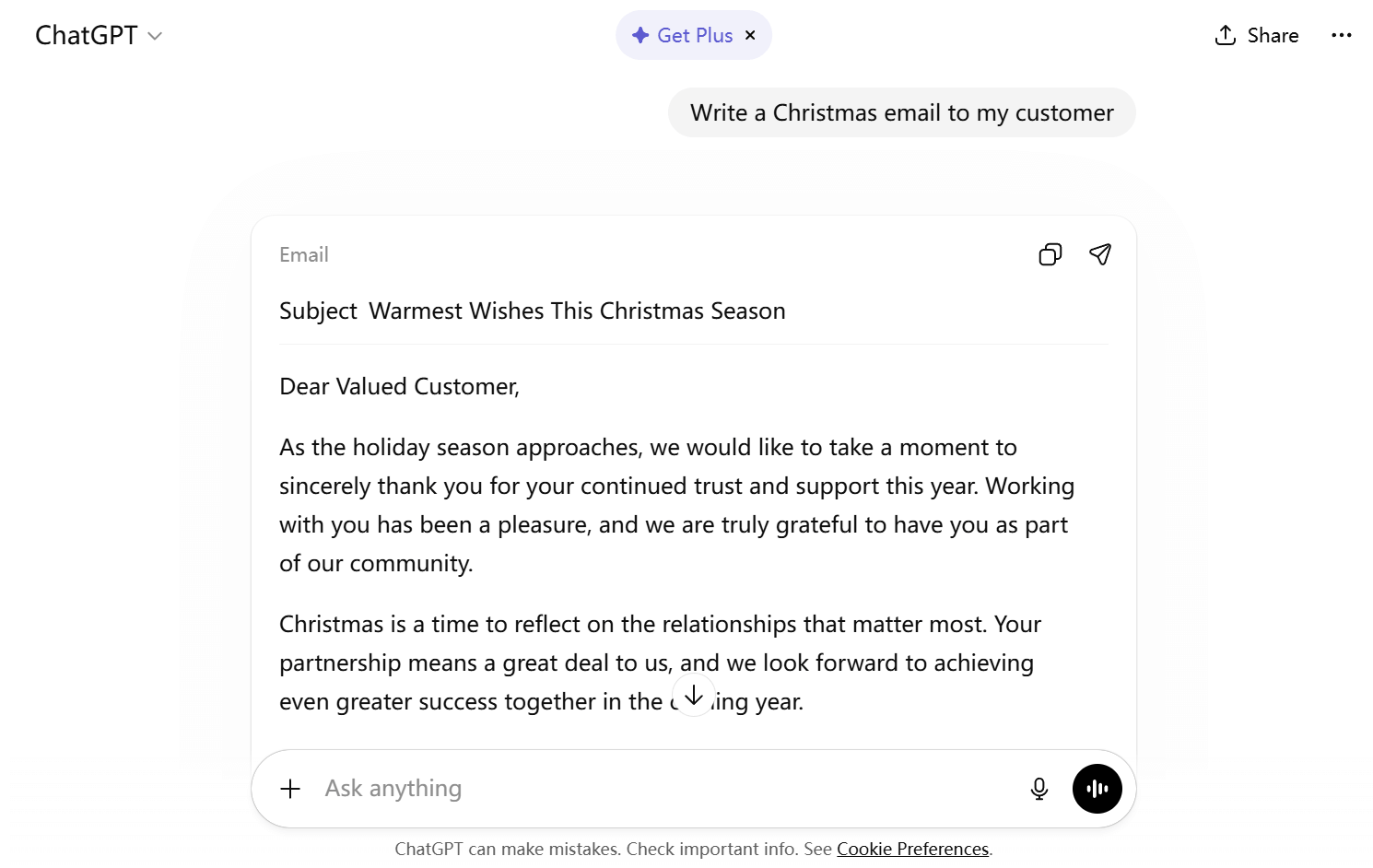
Option B:
Automation Platforms: This category, exemplified by Solvea, introduces a significant operational paradigm shift. Solvea is not merely a text generator; it functions as an operational intelligence platform. It establishes direct, secure connections to an email inbox, intelligently triggers automated responses based on complex, predefined conditions, meticulously manages multi-stage follow-ups, and seamlessly integrates with existing business workflows and CRM systems. For organizations inundated with email volume, or those whose strategic objective is to eliminate repetitive, time-consuming aspects of email management, an automation platform like Solvea represents a critical infrastructure upgrade, rather than a simple software acquisition.
Step 3 — Connect the Email
Bridge the operational gap from manual drafting to intelligent, autonomous email management. For an AI to function effectively as an extension of a team, it necessitates secure, direct access to the email infrastructure. Solvea has engineered this connection process to be both robust and remarkably straightforward, supporting major providers such as Gmail and other enterprise email services.
Using Solvea as an example, this step is to connect your email account so AI can move beyond drafting and begin operating directly within your communication workflow.
Integrating an email with Solvea – a tactical breakdown:
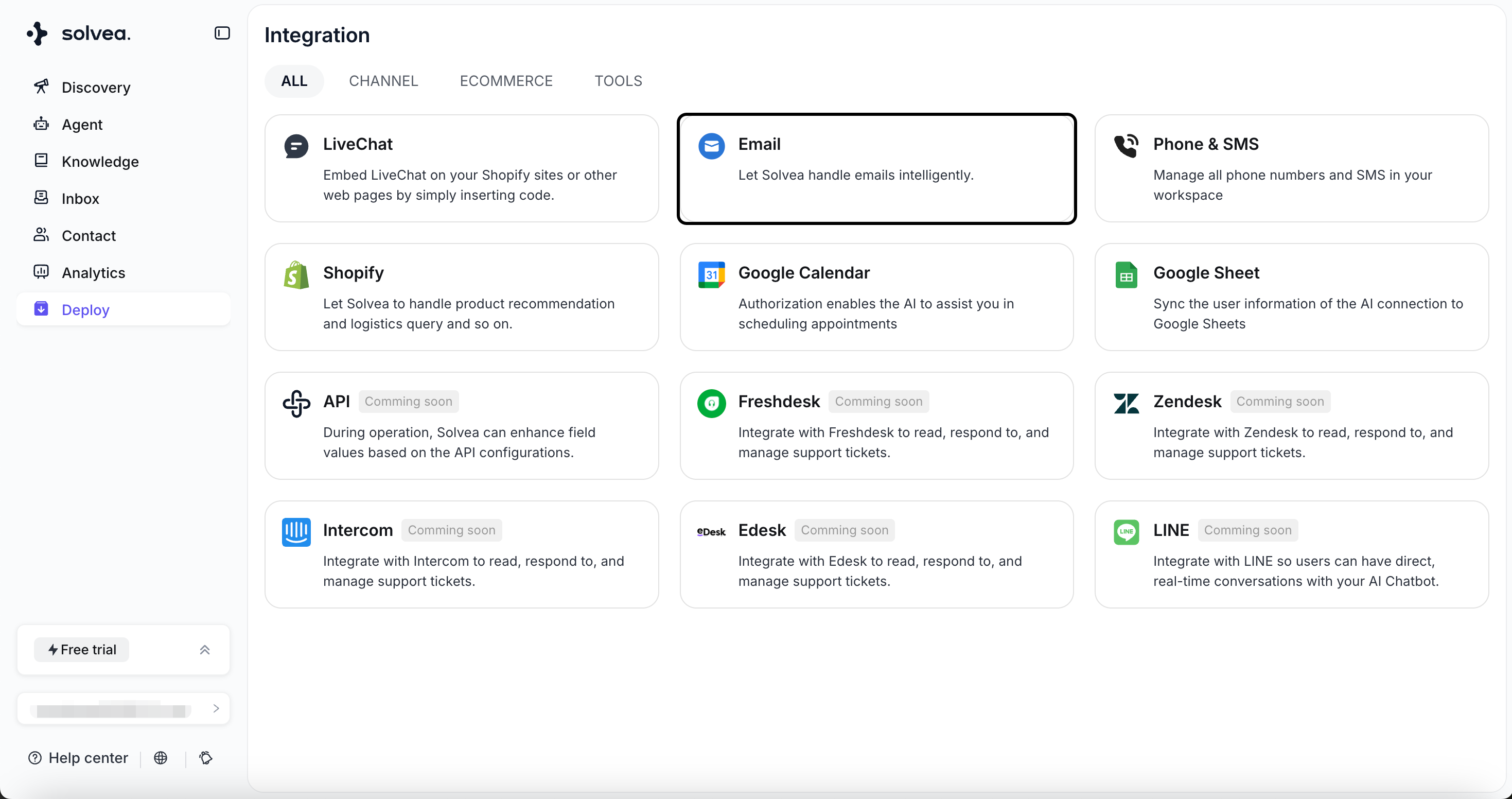
Initiate Deployment: Access the Solvea dashboard. Navigate to Deploy → Email → Email Connection, then execute the Connect command. This action initiates the secure binding protocol.
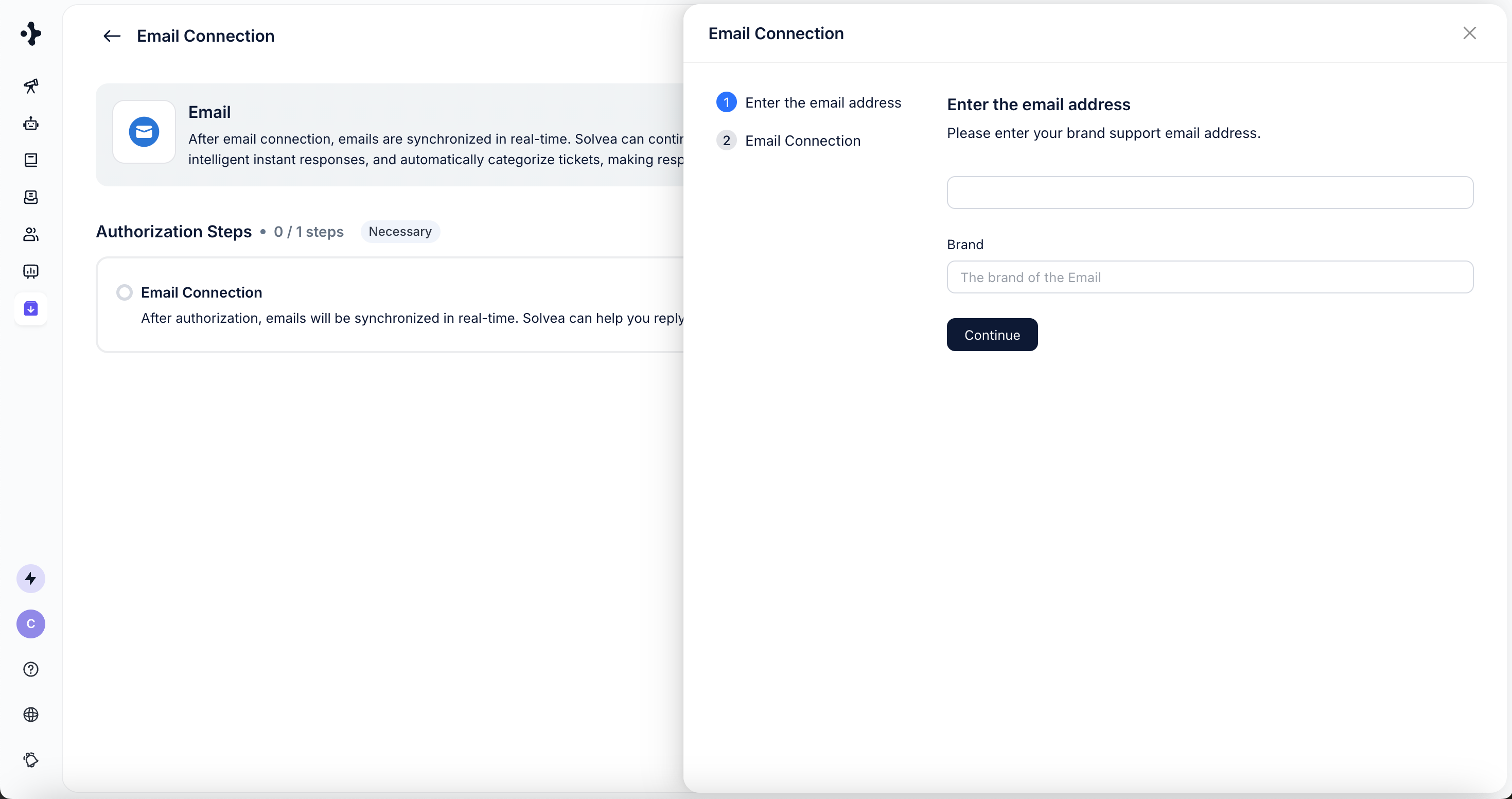
Input Credentials: Provide the primary email address. For enhanced organizational clarity, an optional "Brand" name can be specified, which aids in categorizing and labeling support channels within the Solvea ecosystem.
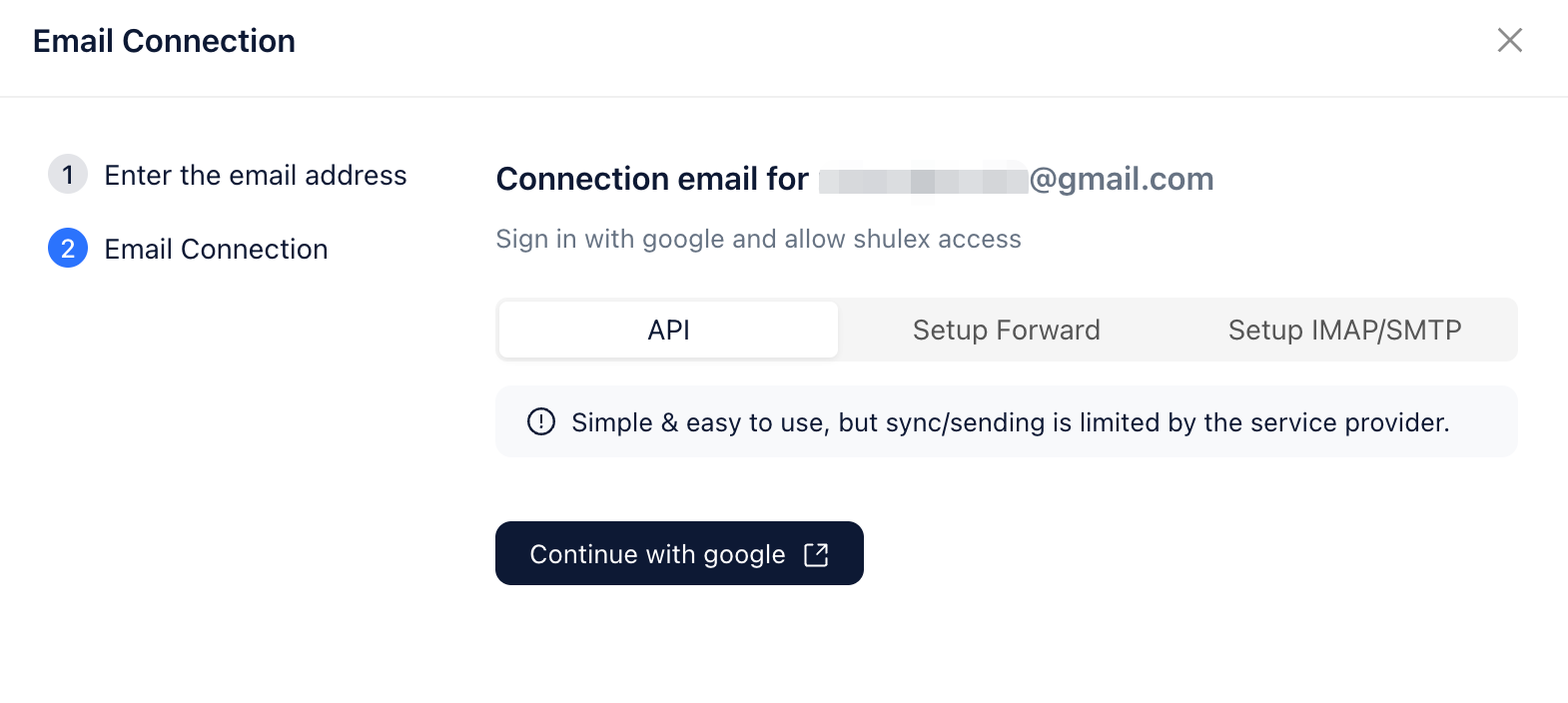
Select Authorization Method: Solvea offers a spectrum of secure authorization options. For Gmail users, API Authorization is the recommended standard. Alternatively, for broader compatibility or specific legacy system requirements, Forwarding or IMAP/SMTP authorization are available. It is important to note that IMAP/SMTP typically necessitates enabling IMAP access within Gmail settings and generating a unique App Password – a secure, application-specific credential designed to protect the main account password.
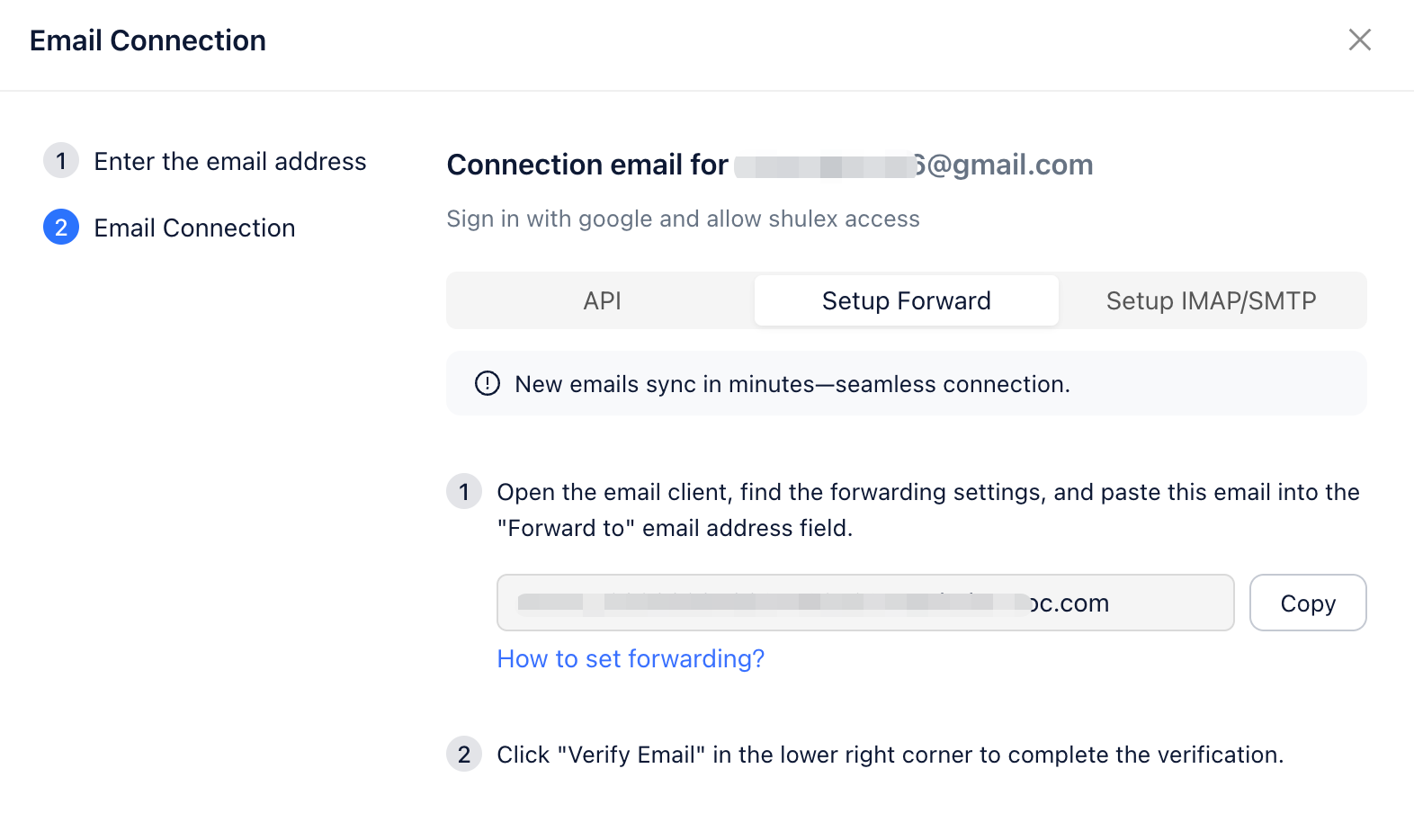
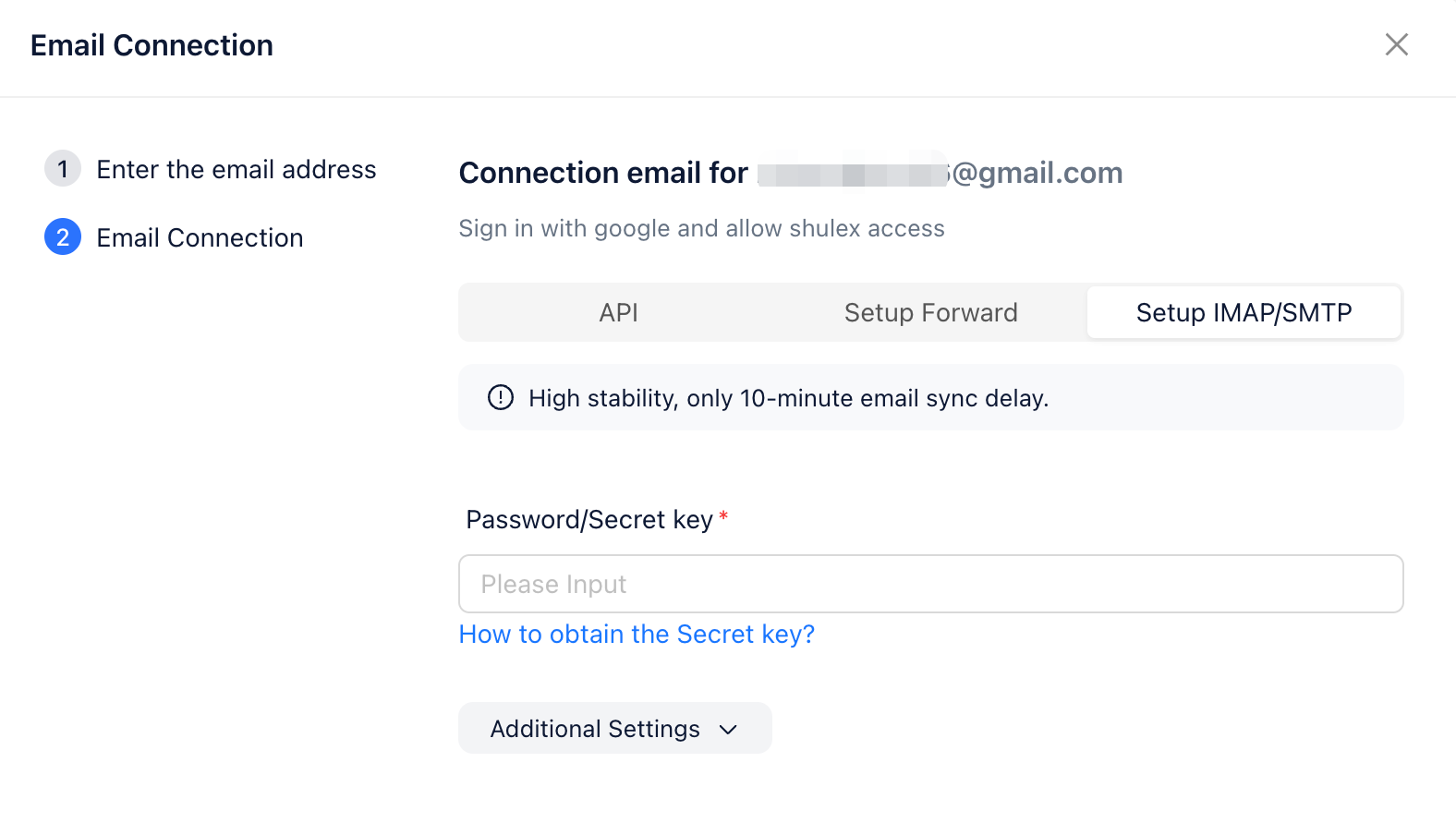
Verify Connection: Solvea subsequently performs a handshake to confirm the integrity of the connection. Upon successful verification, the Solvea AI agent becomes fully activated, primed to intelligently process, send, and receive emails as a dedicated digital communication hub.
Use case:
Consider an e-commerce customer support team overwhelmed by hundreds of daily inquiries concerning order status, shipping updates, and product availability. Manually addressing each query is unsustainable.
By securely connecting their inbox to Solvea, the platform autonomously ingests, categorizes, and comprehends the intent of each incoming email. It then crafts and dispatches intelligent, contextually accurate replies, delivering instant customer satisfaction for routine queries. This strategic deployment liberates human agents, allowing them to focus their expertise on complex, high-value customer interactions that demand human empathy and advanced problem-solving.
This connection transforms AI from a drafting tool into an operational email layer capable of structured automation.
Step 4 — Configure AI Email Logic
After connecting your inbox, the next step is to define how the AI should operate defining its rules, its voice, its decision-making parameters.
At this stage, you are not asking the AI to “write better.” You are configuring rules that determine how it reads, interprets, and responds to incoming emails. This is where email automation moves from reactive drafting to structured workflow execution.
With Solvea, configuration typically includes:
- Defining tone guidelines (formal, concise, empathetic, direct)
- Setting conditional auto-replies based on keywords or detected intent
- Creating trigger actions (e.g., assign to human agent, book a meeting, update CRM)
- Establishing escalation logic for complex or sensitive scenarios
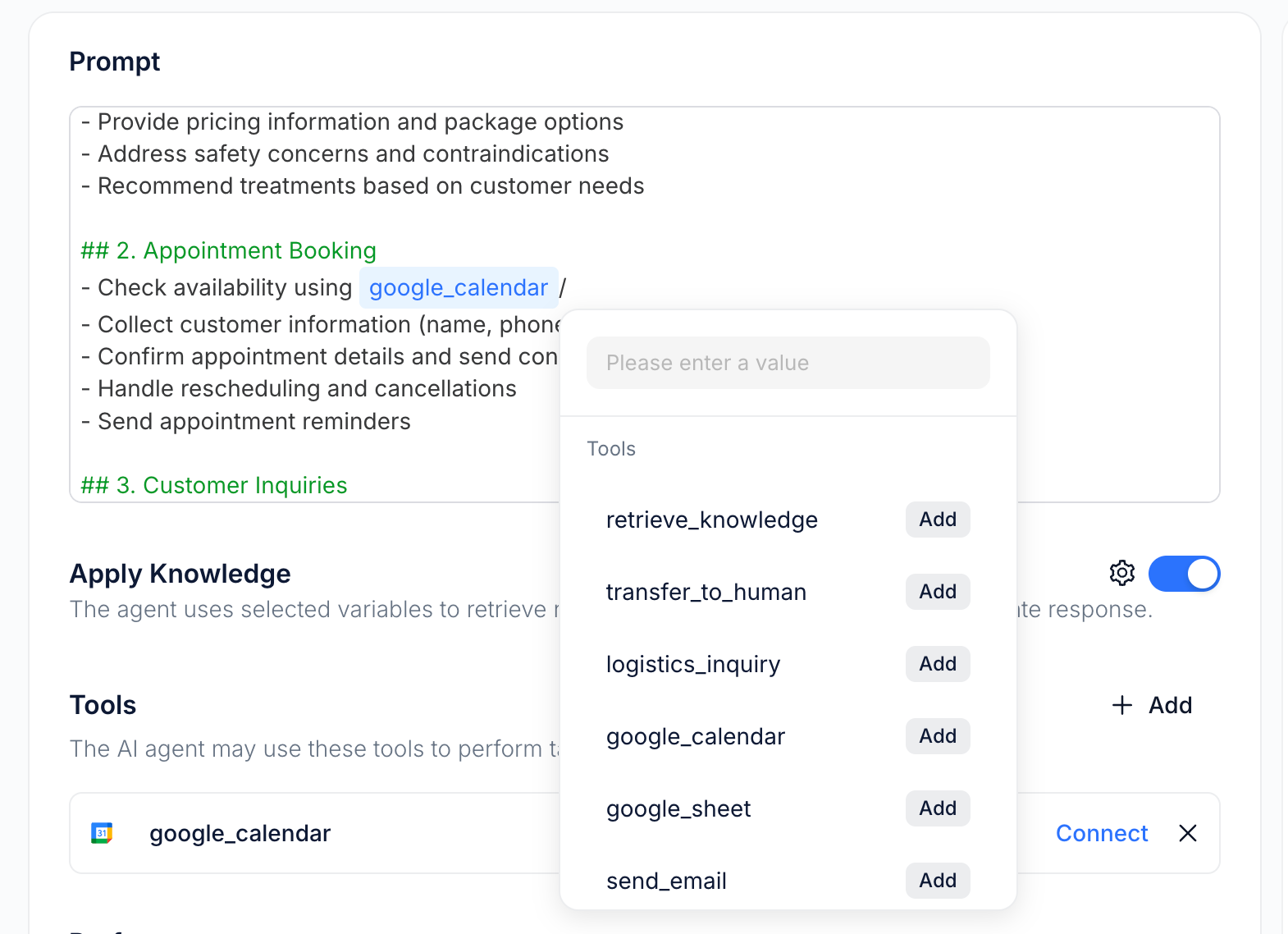
Instead of treating every email the same way, the AI follows predefined operational rules. This ensures consistency across responses while still adapting to context. This sophisticated automation ensures an exceptionally fast, accurate, and consistent response, all without requiring direct human effort for routine inquiries. It transforms a potential bottleneck into a seamless, efficient customer journey.
Step 5 — Automate Follow-Ups and Workflows
Extend AI beyond single replies and apply it to the entire communication lifecycle.
The real value of AI in email management does not lie only in drafting initial responses. It lies in its ability to monitor conversations, trigger follow-ups, and maintain structured engagement over time. Without automation, follow-ups depend on manual tracking, which often leads to delays or missed opportunities.
With Solvea, you can configure time-based and condition-based workflows. For example, you can:
- Automatically send a follow-up if no reply is received within 3 or 7 days
- Generate recap emails immediately after a call or meeting
- Trigger internal reminders for sales or support teams
- Update CRM records based on email interactions
These actions are predefined within the system and executed consistently, without requiring manual input each time. With automation in place, email becomes a structured system where follow-ups are triggered on time, conversations stay active, and fewer opportunities are missed. AI shifts from simply writing emails to reliably managing the flow of communication at scale.
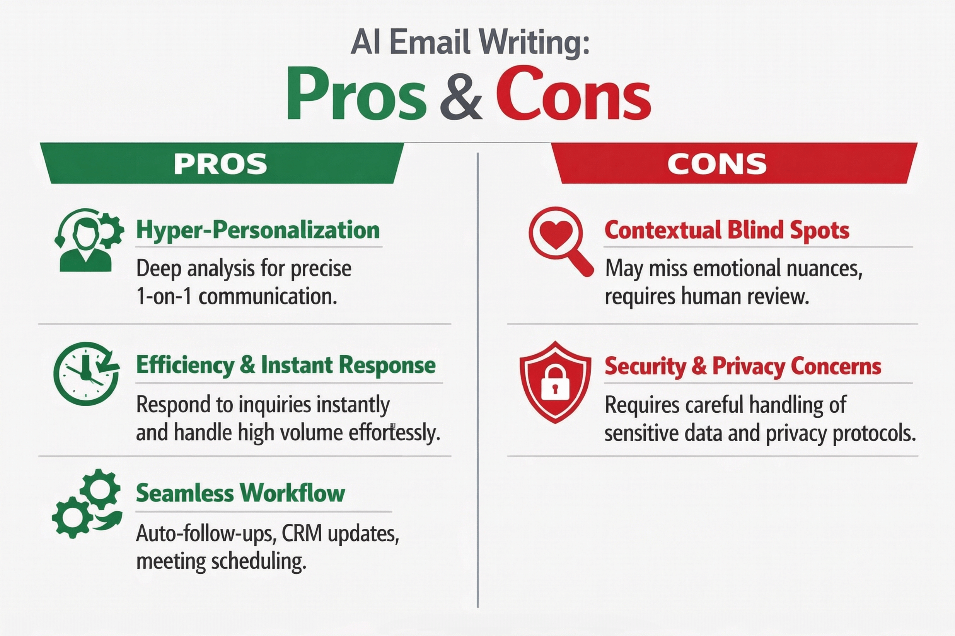
Pros and Cons
Is AI the ultimate solution for your inbox, or does it come with hidden risks? From hyper-personalization to security considerations, here is a quick look at the strengths and challenges of using AI to manage your professional emails.
Why Choose Solvea?
As an AI agent platform designed for workflow automation. Solvea offers a distinct approach to email management. It functions as an operating system for the inbox, engineered for end-to-end email intelligence and autonomous operations. It provides a robust solution for modern digital communication challenges.
- Native Inbox Integration: The necessity for manual copy-pasting is eliminated. Solvea integrates directly and natively with existing email infrastructure. It monitors, processes, and responds in real-time, becoming a seamless extension of the communication flow. This deep integration ensures minimal friction and maximizes operational efficiency.
- Robust Authorization Options: Solvea provides a comprehensive spectrum of secure, reliable connection methods: API, Forwarding, and IMAP/SMTP. This ensures broad compatibility and resilience across virtually any email provider, offering peace of mind and an always-on connection. All methods adhere to industry-standard security protocols, safeguarding data integrity and privacy.
- Intelligent AI Agent Logic: This is not a basic chatbot operating on static scripts. Solvea functions as a sophisticated AI agent. It possesses the capability to understand complex conversational context, meticulously adhere to intricate business rules, and autonomously execute multi-step workflows. It learns, adapts, and continuously optimizes its interactions, evolving dynamically with business needs.
- Multi-Channel Communication: Solvea's email automation capabilities are not isolated. They are designed for seamless integration with other critical communication channels, such as voice agents and chatbots. This creates a unified, consistent, and highly efficient customer experience across all touchpoints, making it an indispensable solution for diverse, high-volume industries including Real Estate, SaaS, and E-commerce. It offers a centralized, holistic approach to communication strategy.
- Enterprise-Grade Security: Solvea is built with enterprise-level security standards and is trusted by major global brands such as Anker. This combination of strong security architecture and real-world validation by high-volume enterprises reflects its reliability, stability, and ability to manage mission-critical communication workflows with confidence.
Other Tools to Consider: For basic writing augmentation, Grammarly excels at polishing tone and grammar. Jasper is a strong contender for generating creative marketing email copy. HubSpot offers robust CRM-integrated email sequencing.
However, for autonomous inbox automation, real-time processing, and genuine AI agent behavior that manages the entire communication lifecycle, Solvea provides a more comprehensive and integrated solution. It is designed for full operational control rather than merely content generation.
Conclusion
AI email has evolved beyond simple templates. It is now about strategic automation. The modern imperative is to define communication goals with precision, select the right intelligent platform, securely integrate email infrastructure, and then empower sophisticated AI logic to manage the heavy lifting. For minimal email volume, a basic AI writer may suffice. However, for scalable automation, intelligent triggers, and a tireless 24/7 AI agent that truly understands, manages, and optimizes business communications, Solvea represents a powerful long-term solution for operational excellence.
From lead generation to support resolution and multi-step follow-ups, automation platforms enable consistent, scalable communication without increasing workload. Email will always be essential. The question is whether you manage it manually — or let AI manage it intelligently.
FAQ
1.Can AI automatically send emails?
Yes. Advanced platforms like Solvea are engineered to autonomously generate and dispatch emails based on sophisticated triggers, conditions, and predefined rules, ensuring timely and contextually relevant communication without manual intervention.
2.Is connecting a Gmail account to an AI platform secure?
When utilizing industry-standard authorization methods like OAuth (the API method) or App Passwords (for IMAP/SMTP), the connection adheres strictly to Google’s rigorous security standards. This robust framework ensures that sensitive data remains thoroughly protected and privacy is maintained through encrypted protocols.It's also necessary to choose safe tool like Solvea.
Your AI Receptionist, Live in Minutes.
Scale your front desk with an AI that never sleeps. Solvea handles unlimited multi-channel inquiries, books appointments into your calendar automatically, and ensures zero missed opportunities around the clock.
3.What is the fundamental difference between AI writing tools and AI email automation platforms?
AI writing tools primarily assist human users in manually composing text, functioning as a sophisticated grammar and style checker or content generator. In stark contrast, AI email automation platforms, such as Solvea, integrate deeply with email inboxes and broader workflows to manage the entire communication process—from intelligently receiving and comprehending incoming emails, to crafting, sending, and meticulously following up on responses, all autonomously and at scale.
4.Is AI email writing and automation suitable for small businesses?
Yes. It is exceptionally beneficial for small businesses, particularly those operating in industries characterized by high inquiry volumes, such as Real Estate, SaaS, and E-commerce. AI automation empowers smaller teams to deliver an enterprise-level responsiveness and efficiency, allowing them to compete effectively, scale operations, and maintain high customer satisfaction without proportionally increasing headcount. It democratizes advanced communication capabilities.