You call a dental clinic on a Tuesday afternoon. Three rings. Then: "The number you have dialed is not available. Please leave a message after the tone." No name. No company. No mention of business hours or when to expect a callback. So you hang up — and dial the next clinic on Google's list.
This plays out thousands of times a day across businesses of every size. That's not a missed call — that's a missed customer. And the gap between the two is often a 20-second recording that most businesses set once, forget, and never think about again.
A voicemail greeting is a small thing. Most businesses treat it that way. The ones that don't, win the callback.
Quick Summary
What it is | The pre-recorded message callers hear before leaving you a voicemail |
Why it matters | First impression + lead capture — works even when you're offline |
Ideal length | 10–30 seconds (~20-second sweet spot) |
Who needs it most | SMBs, solo practitioners, sales reps, customer service teams |
Fastest way to create one | AI generator — no mic, no retakes, download as MP3 |
What Is a Voicemail Greeting?
A voicemail greeting is the pre-recorded audio message that plays when you miss an incoming call — before the caller has a chance to leave their message. It's what plays first, from your end, every time you don't pick up: it introduces who you are, acknowledges that you can't talk right now, and tells the person on the other end what to do next.
An effective greeting doesn't need to be elaborate, but it does need to answer five questions the caller is silently asking the moment they realize you're unavailable: Have they reached the right person? Why can't you talk? When will they hear back? What should they leave? And is there anyone else who can help right now? Every professional voicemail greeting addresses all five — and any script that misses one leaves the caller to fill in the gap, usually with doubt.
The five elements in practice:
- Your name — and company name for business lines
- Availability status — briefly, no apologies needed
- Response timeline — a specific window, not "as soon as possible"
- What to leave — order number, preferred time, relevant details
- Alternative contact — for anything urgent
Cover all five and you've done the job in under 20 seconds.
Why a Bad Voicemail Greeting Is Costing You More Than Missed Calls
Your Greeting Is Your Brand on Autopilot
Most businesses spend real time on their website: they think carefully about the words on the homepage, how they want the brand to come across, what a visitor should do next. And yet those same businesses leave their voicemail greeting as the default system message — a robotic, anonymous recording that tells the caller almost nothing. The disconnect is hard to explain, because the two situations are almost identical: in both cases, your business is making an impression without anyone from your team present to manage it.
Your voicemail greeting is the audio version of that homepage. It plays every time you miss a call, to every caller who doesn't reach you — potential clients, existing customers, partners, referrals. If it sounds like you didn't bother, that's the impression it leaves. If it sounds professional and considered, that's the impression it leaves instead. The difference between those two outcomes is 20 seconds of recorded audio.
The Real Cost of Getting It Wrong
The evidence for how much first contact matters is hard to ignore. Salesforce's 2024 State of Service report found that 88% of customers say good service makes them more likely to purchase again; bad service, even a single incident, has the opposite effect. When a caller hits a voicemail that offers nothing useful, that expectation is already broken before you've had a chance to help them.
A generic voicemail greeting isn't a "bad experience" in the dramatic sense, but it creates friction at exactly the moment when someone is deciding whether to wait for you or move on. For industries like healthcare, legal, or real estate — where trust is the deciding factor — that friction can be the whole deal.
What a Professional Greeting Actually Delivers
A well-crafted voicemail greeting doesn't just sound better — it does specific, measurable things for your business. The most immediate effect is expectation-setting: a caller who knows you'll respond by end of day is less likely to hang up or call a competitor than one who has no idea whether their message was even received. Beyond that, a well-written greeting can reduce the time you spend on return calls by asking callers to leave the right information upfront — account numbers, preferred windows, the nature of their question — so you arrive prepared.
At a higher level, the consistency matters. Consider the difference between a business that fields 30 missed calls a week and a business that fields 30 missed calls a week with a professional, on-brand greeting for every one of them. Some key things that change:
- Lead quality improves — callers who leave detailed messages are better qualified when you call back
- Trust signals earlier — for first-time callers, a polished greeting is often the first real evidence of how a business operates
- Brand is protected after hours — holidays, weekends, and late evenings are covered without any extra staff
- Returns become more efficient — structured prompts in the greeting mean return calls start with context, not catch-up
Who Actually Needs a Professional Voicemail Greeting?
The honest answer is: most businesses that receive inbound phone calls. But not everyone benefits equally, and it's worth thinking about where this fits for you specifically before investing time in the recording.
It makes the most sense to prioritize a professional greeting if your business relies on inbound calls as a lead or service channel — particularly if you're in a high-trust industry like healthcare, legal, real estate, or financial services, where callers form strong impressions quickly. It also matters if your team can't always answer live, or if you have after-hours periods where calls regularly go unanswered. In those scenarios, the greeting is the only thing standing between a caller and a decision to look elsewhere. If, on the other hand, virtually all your business happens over email or chat and calls are rare, or you have live coverage during every business hour with no exceptions, it's a lower priority — though still worth having if people do occasionally call.
For most businesses, the first scenario describes reality better than the second.
Who Benefits Most, by Role
Who | Their situation | Without a good greeting | With a good greeting |
Small business owner | Juggling everything; often unavailable | Callers hang up; no lead captured | 24/7 lead capture; sounds established |
Sales professional | On calls all day; can't answer every ring | Prospect moves to the next rep | Sets value prop and response timeline |
Customer service team | High volume; calls overflow the queue | Frustrated callers with no next step | Routes to resources; manages expectations |
Solo practitioner (real estate, legal, medical) | One-person operation | One missed call = one lost client | Projects professionalism; builds trust fast |
Retail / e-commerce | After-hours and holiday call spikes | Customer abandons; no path forward | Confirms hours; offers website or email fallback |
The 6 Types of Voicemail Greetings (And When Each Applies)
One reason businesses end up with generic voicemail greetings is that they think of it as a single, static recording rather than a set of context-specific messages. In practice, different situations call for different content — and using the wrong type means your greeting is giving callers inaccurate or incomplete information.
Most businesses need at least two: a standard business hours greeting for calls missed during the day, and an after-hours version for evenings and weekends. Beyond that, specific situations — vacations, holidays, role changes — each warrant their own recording. Getting the type right before writing the script prevents the most common mistake: a business hours greeting that plays through a two-week vacation, or an after-hours message still quoting last season's operating hours.
Type | When it plays | Must include | Real-world scenario |
Business Hours | During work hours, when you can't pick up | Name, company, response time | A real estate agent out showing a property at 2pm |
After-Hours | Outside working hours | When you'll be back; emergency contact | A law firm fielding calls at 7pm on a Wednesday |
Out-of-Office / Vacation | Extended absence | Return date; temporary contact | A consultant traveling internationally for a week |
Holiday | Closed for a recognized holiday | Holiday name; when service resumes | A dental clinic closed over Thanksgiving week |
Department-Specific | A dedicated sales, support, or billing line | What to leave; who handles it | A customer calling the billing department directly |
Personal / Cell Phone | Personal number; any missed call | Name; brief availability note | A freelancer between client calls |
Ready-to-use scripts for each type → voicemail greeting examples
What Separates a Professional Voicemail Greeting from a Generic One
Length: The 30-Second Rule
The single most common reason voicemail greetings fail isn't what they say — it's how long they take to say it. Callers begin disengaging after about 30 seconds, and many hang up before the beep if the greeting runs long. The target is around 20 seconds, which works out to roughly 60–80 words at a natural speaking pace. That's enough space to cover all five essential elements without asking for patience the caller doesn't have. Anything beyond that — extended apologies, lengthy company descriptions, multiple phone number options read aloud — erodes the credibility you're trying to build.
Phrases That Undermine Your Greeting
Certain phrases appear in voicemail greetings so often that they've lost all meaning — and in some cases, they actively work against you. "Your call is very important to us" has been heard so many times that callers register it as the opposite of what it claims. "I'm away from my desk" states something the caller already knows. "I'll return your call at my earliest convenience" sounds like the caller is an inconvenience. These aren't minor stylistic choices; they're signals about how you treat the people trying to reach you. The fix in every case is to replace vague, reflexive language with something specific and useful.
❌ Don't say this | ✅ Say this instead | Why it matters |
"Your call is very important to us" | State exactly when you'll call back | Overused — callers stopped believing it |
"I'm sorry I missed your call" | Skip the apology; go straight to action | They already know you missed it |
"I'm away from my desk right now" | Tell them when you'll be back | States the obvious; adds nothing |
"I'll return your call at my earliest convenience" | Give a specific timeframe (e.g., "within one business day") | "Earliest convenience" signals low priority |
Keeping Your Greeting Current
A professional voicemail greeting recorded two years ago and never updated is almost as bad as no greeting at all. Callers who hear "I'll be back from vacation on March 15" in July get an immediate signal that this business doesn't pay close attention to details — which is exactly the opposite of what a professional greeting is supposed to communicate. There are six situations that reliably require a new recording:
- Before any vacation or PTO
- Your first morning back from leave
- Before a holiday closure
- After a promotion or role change
- When your business hours shift
- When a colleague mentioned in the greeting has left
Setting a recurring monthly calendar reminder — even a 30-second check to confirm the greeting is still accurate — prevents the kind of stale message that erodes trust without you ever knowing it's happening.
How to Create a Professional Voicemail Greeting
There are two practical paths, and they involve very different trade-offs in time, equipment, and effort.
Option Comparison at a Glance
Record It Yourself | Use an AI Generator | |
Equipment needed | Quiet room, decent microphone | None |
Time investment | 20–60 min (including retakes) | Under 3 minutes |
Retakes required | Typically 3–10 | Zero |
Audio quality | Depends on your environment | Consistent, professional |
Cost | Free | Free (most tools offer free generations) |
Output format | Varies by device | MP3, ready to upload anywhere |
Best for | Full control over personal delivery | Speed, consistency, no recording skills needed |
Option 1 — Record It Yourself
Recording your own greeting gives you full control over tone, pacing, and personality — which matters if your brand relies on a personal, recognizable voice. The process is straightforward, but it takes more time than most people expect: finding a genuinely quiet space, writing and timing the script, running several takes, and then uploading the file to your phone system. A closet full of clothes, oddly, makes an excellent recording booth.
- Find a quiet room with minimal echo
- Write your script first and time it — target under 20 seconds
- Record 2–3 takes; pick the one that sounds most natural, not most polished
- Upload to your phone system (iPhone: Settings → Phone → Voicemail → Greeting; Android: varies by carrier; VoIP systems have their own admin portals)
Option 2 — Use an AI Voicemail Greeting Generator
If recording isn't your preference — or you simply want something done quickly — AI voicemail greeting generators have become a practical alternative. These tools write the script based on your inputs (greeting type, industry, business details), let you choose from a range of natural-sounding AI voices, and output an MP3 file you can upload directly to any phone system. The result is a professional-quality recording without a microphone, a quiet room, or ten retakes.
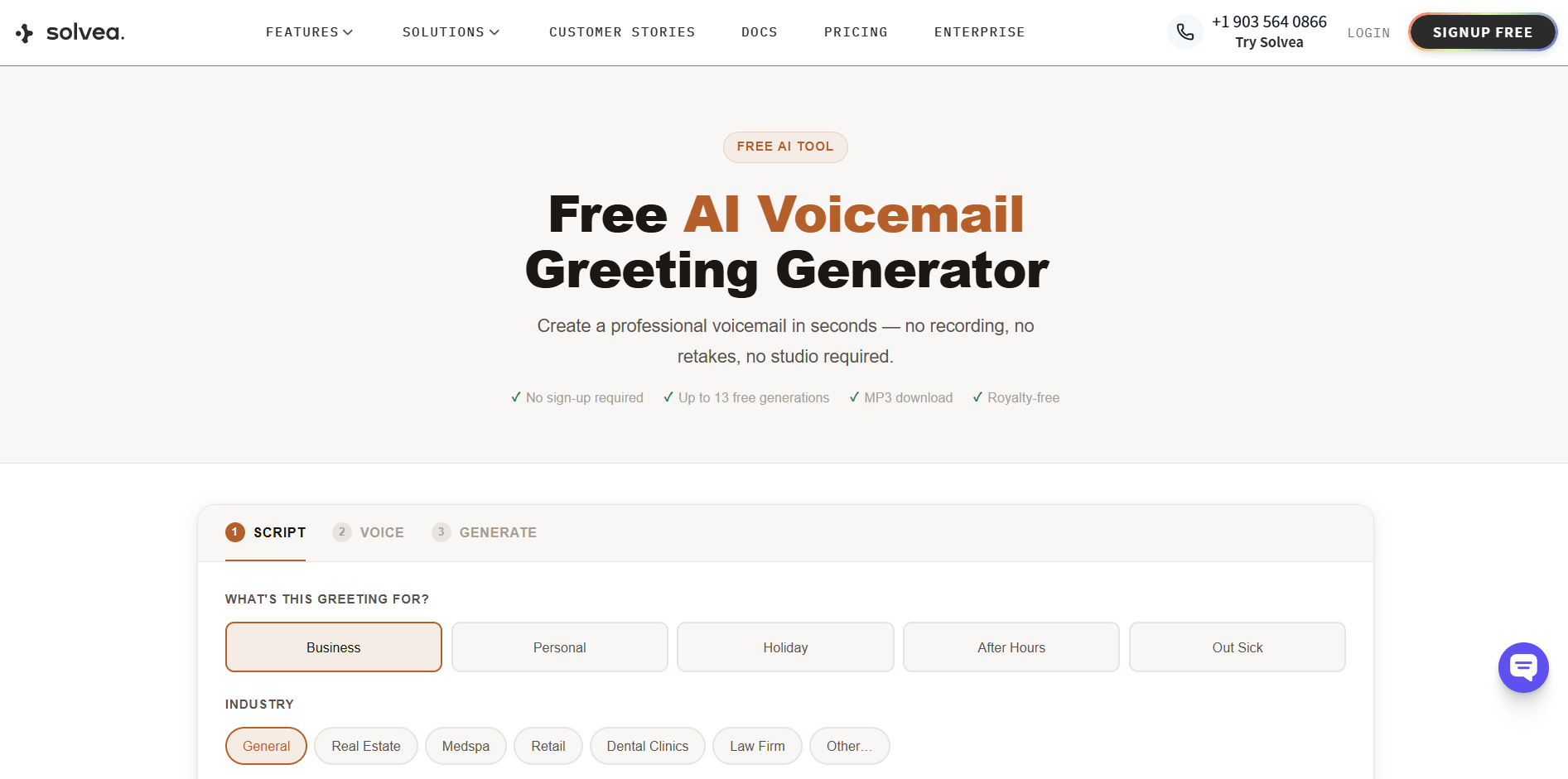
Solvea offers a free voicemail greeting generator that covers the full process in three steps: choose your greeting type, select a voice, and download the MP3. It includes industry-specific templates for real estate, dental, legal, medspa, retail, and more, and works with iPhone, Android, RingCentral, Zoom Phone, and most VoIP systems. No sign-up is required for your first three generations.
See how it works:
How to Set Up Your Voicemail Greeting on Any Device
Once you have your recording — whether self-recorded or AI-generated as an MP3 — the final step is getting it onto your phone system. The process takes under two minutes on any platform, but the path is different depending on what you're using. Here's the exact location on each major system.
iPhone
iPhone's native voicemail doesn't support direct MP3 file upload. You have two options:
Option A — Record through the native interface:
- Settings → Phone → Voicemail → Greeting → Custom
- Tap Record, speak your greeting, tap Stop
- Tap Save
Option B — Play your MP3 while recording (workaround):
- Settings → Phone → Voicemail → Greeting → Custom → Record
- Play your MP3 file through your phone's speakers from another device while recording
- Tap Stop → Save
Note: Option B reduces audio quality due to re-recording. If you use a VoIP app (RingCentral, Zoom Phone, Google Voice) for your business number, upload through that portal instead — it accepts MP3 files directly and produces better results.
Android
The path varies by carrier and phone model, but the general location is consistent:
- Open Phone app → tap ⋮ (Menu) → Settings → Voicemail
- Look for Greeting or Personal greeting
- Some carriers support direct MP3 upload; others require recording in-app
If you don't see an upload option, check your carrier's dedicated voicemail app (Visual Voicemail, YouMail, etc.) — most carrier apps support custom greeting uploads directly.
RingCentral
- Log in to the Admin Portal at ringcentral.com
- Phone System → Auto-Receptionist → Greeting & Hold Music
- Under Custom, click Upload and select your MP3 or WAV file
- Click Save
For individual user greetings (not company-wide): User Settings → Voicemail → Greeting → Upload.
Zoom Phone
- Log in to the Zoom web portal at zoom.us
- Phone → Settings → scroll to Voicemail Greeting
- Click Upload and select your file
- Save changes
Zoom Phone accepts MP3 and M4A files up to 5 MB.
Google Voice
- Go to voice.google.com → Settings (gear icon)
- Under the Voicemail tab, click Record a greeting
- Select Upload and choose your MP3 file
- Set it as your active greeting
Most VoIP and Business Phone Systems
The path is typically: Settings → Voicemail → Custom Greeting → Upload file
Accepted formats on most platforms are MP3 or WAV. If your system only accepts WAV, most audio editors (including Audacity, which is free) can convert an MP3 in under a minute.
Putting It Together
Your voicemail greeting plays every single time you miss a call. It sets the tone before you've said a word, answers questions you weren't there to answer, and either keeps the caller in or sends them to a competitor. For a piece of your business that's so easy to get right, it's remarkable how often it gets left as an afterthought.
Getting it right means covering five things in about 20 seconds: your name, your company, why you're unavailable, when you'll respond, and what to leave. Skip the apologies. Skip the filler phrases. And update it every time your situation changes. If you'd rather skip the recording session too, there are free tools that generate a professional MP3 in minutes — this one is a good place to start.
Your AI Receptionist, Live in Minutes.
Scale your front desk with an AI that never sleeps. Solvea handles unlimited multi-channel inquiries, books appointments into your calendar automatically, and ensures zero missed opportunities around the clock.
Frequently Asked Questions
What is a voicemail greeting?
A voicemail greeting is the pre-recorded message that plays when you miss an incoming call. It introduces you or your business, explains your unavailability, and tells the caller what to do next — before they record their own message. It's your first impression when you can't answer in person.
How long should a voicemail greeting be?
Keep it between 10 and 30 seconds — about 20 seconds is the sweet spot. That's roughly 60–80 words: enough for your name, company, availability, response timeline, and what information to leave. Anything longer and callers start hanging up before the beep.
What should you say in a voicemail greeting?
Include five things: your name and company, that you're unavailable (no apologies), when you'll respond, what information the caller should leave, and an alternative contact for urgent matters. Avoid filler phrases like "your call is very important to us" — they waste time and erode trust.
What types of voicemail greetings are there?
The main types are: business hours, after-hours, out-of-office or vacation, holiday, department-specific, and personal. Each serves a different situation and requires different information. Most businesses need at least two — a business hours version and an after-hours version — and should update them whenever the situation changes.
Can I use AI to create a voicemail greeting?
Yes. AI voicemail generators let you select a greeting type, choose from natural-sounding voices, and download a professional MP3 in minutes — no recording equipment or retakes needed. Solvea's free voicemail greeting generator works with iPhone, Android, RingCentral, Zoom Phone, and most VoIP systems.