More businesses are adopting AI receptionists to handle calls, capture leads, and streamline customer communication—but getting real value depends on how well the system is set up.
In this guide, we’ll walk through how to set up an AI receptionist step by step, while also explaining what an AI receptionist is, what it can do, how pricing usually works, and what makes a setup actually effective in practice.
TL;DR
Setting up an AI receptionist is a structured process designed to automate customer interactions and enhance business efficiency. The following table provides a concise overview of the essential steps paired with the necessary materials or tools to guide your implementation.
Step | Summary | Required Materials/Tools |
1. Define Your Goal | Clearly articulate objectives to guide implementation and feature selection. | Internal business objectives, current call logs, customer feedback, target KPIs. |
2. Choose a Method | Select between natural-language, template-based, or hybrid setup approaches. | AI platform, pre-built templates, natural language prompts. |
3. Design Your Workflow | Map out caller interactions, call-handling rules, and escalation triggers. | Flowchart software, call scripts, decision trees, escalation protocols. |
4. Add Knowledge Base | Populate with FAQs, product details, and company policies for accurate responses. | FAQs document, product/service catalogs, company policies, website URLs, CSV files. |
5. Add Integrations | Connect with CRM, calendars, POS, and communication platforms. | CRM system (e.g., Salesforce, HubSpot), calendar (e.g., Google Calendar, Calendly), POS system, communication apps (e.g., Slack, WhatsApp). |
6. Test and Configure | Conduct internal trials, monitor performance, and continuously optimize the AI. | Test call scenarios, internal staff for trials, performance monitoring dashboard, call transcripts. |
AI Receptionist Overview
Before getting into the setup steps, it helps to understand what an AI receptionist actually is, what it can do, and how pricing usually works.
An AI receptionist is a virtual front-desk assistant that uses conversational AI to answer inbound calls or messages, understand customer intent, and handle routine customer-facing tasks. Depending on the system, it may work across phone, web chat, WhatsApp, SMS, email, or other business channels.
Compared with a traditional IVR or scripted auto-attendant, an AI receptionist is more flexible. Instead of forcing callers through fixed menu options, it can handle natural-language requests, collect information, and move the conversation toward the right next step.
Functions
In practice, most AI receptionists are used for a core group of repeatable front-desk tasks, such as:
- answering FAQs about hours, services, pricing basics, locations, and policies
- capturing lead information from new callers
- asking qualifying questions before passing inquiries to sales
- booking, rescheduling, or canceling appointments
- routing callers to the right team or person
- sending internal alerts when follow-up is needed
- escalating urgent or sensitive conversations to a human
The exact capability depends on the platform and setup quality, but the overall role is the same: reduce repetitive intake work and make sure more customer requests are handled correctly.
Cost
AI receptionist pricing varies by vendor, channel coverage, model quality, and integration depth, but it usually falls into three common pricing models:
- Subscription pricing: a monthly fee that includes a set number of conversations, minutes, or users
- Usage-based pricing: charges based on call volume, talk time, or message volume
- Hybrid or enterprise pricing: a platform fee plus extra charges for integrations, premium voices, custom workflows, or onboarding
In practice, the real cost is not just the monthly plan. Businesses also need to account for setup time, knowledge-base maintenance, and the cost of poor customer handling. A cheaper tool that misses leads or causes bad handoffs can end up costing more than a better-configured system with a higher monthly fee.
Set Up an AI Receptionist Step by Step
Once you have identified the core goals for your AI receptionist, the next logical step is to choose the most effective building method. This decision will dictate the flexibility and speed of your deployment.
Step 1: Define Your Goal
Before setting anything up, the first job is to clarify what the AI receptionist is supposed to achieve. This keeps the build focused and makes later decisions much easier.
To define the goal clearly, start with these points:
- Identify the main business need. This might be reducing missed calls, providing 24/7 first-response coverage, speeding up appointment booking, or qualifying leads before handoff.
- Decide which tasks matter most first. In many cases, the best starting point is not “handle everything,” but one or two high-value functions such as FAQs, bookings, or intake.
- Tie the setup to measurable outcomes. Common success metrics include answer rate, qualified leads captured, booking completion rate, transfer rate, and customer satisfaction.
A few industry signals help explain why this matters. Google Cloud’s contact center AI materials emphasize customer-service consistency and cost efficiency, while the NIST AI RMF highlights the need to evaluate AI systems in use rather than treating deployment as a one-time event.
Step 2: Choose a Method
Once the goal is clear, the next step is deciding how to build the receptionist. Most setups fall into three categories, and the right one depends on how custom the workflow is.
1. Natural-language setup
This method uses plain-language instructions to describe what the receptionist should do, how it should sound, what it must ask, and when it should escalate.
It works well when:
- your workflow is custom
- you want a fast first draft
- you can describe business rules clearly in natural language
- you want the system to suggest structure for you
This is often the fastest way to get a usable first version, especially when the business wants a more flexible, human-sounding assistant.
2. Template-based setup
Templates provide a ready-made structure for common workflows. Instead of starting from a blank page, the team starts from an industry or use-case pattern and customizes it.
It works well when:
- your workflow matches a common business pattern
- you want quicker deployment
- your team prefers more structure and fewer setup decisions
- you want a baseline that can be refined later
3. Hybrid setup
A hybrid setup combines structured flows for critical tasks with natural-language flexibility for general conversation.
It works especially well when you need both reliability and a natural customer experience. For example:
- appointment booking can follow a strict process
- payment or sensitive information collection can use tighter controls
- general FAQs can stay conversational
- complex or emotional conversations can escalate faster to a human
This is often the most practical option because it balances control with usability.
Step 3: Design Your Workflow
A good AI receptionist should feel smooth to the customer, but it still needs clear operational rules behind the scenes. This is why workflow design matters so much.
1. Greeting, call handling, and escalation triggers
Start by defining the basic interaction flow:
- Greeting: include the business name, a short introduction, and a simple invitation for the caller to explain what they need.
- Call handling: decide how different request types should be handled, such as sales inquiries, bookings, support questions, or after-hours messages.
- Escalation triggers: define the moments when the AI should stop and hand off, especially when the caller is frustrated, the request is sensitive, or the AI lacks enough confidence.
2. Routing logic
Once the main call types are defined, routing should be based on clear business rules rather than vague prompts.
Useful routing factors include:
- keywords or intents mentioned by the caller
- urgency or sensitivity of the issue
- customer type or account status
- appointment-related needs
- business hours vs. after-hours situations
A strong workflow does not treat every conversation the same way. It helps the AI move each caller to the right next step with as little friction as possible.
Step 4: Add Knowledge Base
Once the workflow exists, the AI needs accurate business information to support it. This is where the knowledge base becomes critical.
1. What to include
A useful knowledge base should cover the information customers ask about most often. In most cases, that includes: FAQs, service or product details, pricing basics, opening hours, booking rules, refund or cancellation policies, address and contact details, business-specific terms, service names, or branded packages
The goal is simple: make sure the AI can give answers that are specific to the business rather than generic to the industry.
2. How to organize it
The format matters almost as much as the content. Information is easier for the AI to use when it is presented as:
- clear Q&A pairs for repeat questions
- concise policy summaries
- well-labeled internal documents
- synced website pages or source URLs
- consistent wording across all sources
If hours, prices, or policies differ across documents, the AI may reflect those inconsistencies back to customers. That is why knowledge maintenance is ongoing work, not a one-time upload.
Step 5: Add Integrations
At this point, the receptionist can answer questions. Integrations are what allow it to do useful work inside the business workflow.
1. CRM integration
CRM connections help the AI move from intake to customer context. With CRM integration, the receptionist can:
- identify returning customers
- log conversation notes
- update lead or contact records
- pass qualified leads to the right team
Examples include Salesforce and HubSpot.
2. Calendar and scheduling integration
Calendar connections are one of the most practical AI receptionist use cases.
They allow the system to check availability, book appointments, reschedule meetings and send confirmations or reminders
Examples include Google Calendar and Calendly.
3. POS or order-system integration
For retail, restaurant, hotel, and service businesses, these integrations can support: order-status checks, booking detail capture, stock or availability questions and transactional workflows tied to the business system
4. Internal communication integration
Internal alerts matter just as much as customer-facing actions. Slack or email notifications can make sure the team knows when:
- a lead needs follow-up
- a caller requested a human
- the AI could not complete a task
- an urgent request arrived after hours
This is often the difference between an AI that sounds helpful and an AI that is actually operationally useful.
Step 6: Test and Configure
Testing should not be treated as the final checkbox. It is an ongoing part of making the AI receptionist reliable.
1. Start narrow
A safer rollout usually begins with a limited use case rather than a full deployment. Good starting options include after-hours inquiries, booking requests, or FAQ handling.
Helpful ways to test include:
- internal staff calls
- simulated customer scenarios
- edge cases and ambiguous phrasing
- escalation-path verification
- checking whether integrations write the right data correctly
2. Optimize continuously
After launch, the most important work usually comes from reviewing real interactions and refining the setup.
Things to review regularly include:
- call transcripts
- failed or abandoned flows
- low-confidence responses
- unnecessary transfers
- missed intake details
- caller frustration signals
Based on those findings, teams can update:
- prompts and business instructions
- routing rules
- escalation thresholds
- knowledge-base entries
- integration logic
This iterative process is what turns a decent setup into a strong one.
Case Study: Setting Up an AI Receptionist with Solvea
To illustrate the practical application of these steps, let's examine how a platform like Solvea approaches AI receptionist setup, particularly through its "Vibe Coding Builder" method. Solvea emphasizes a natural-language approach, allowing users to describe their business needs in plain language rather than requiring extensive manual configuration.
See how it comes together:
Method 1: Build Agent with Vibe Coding Builder
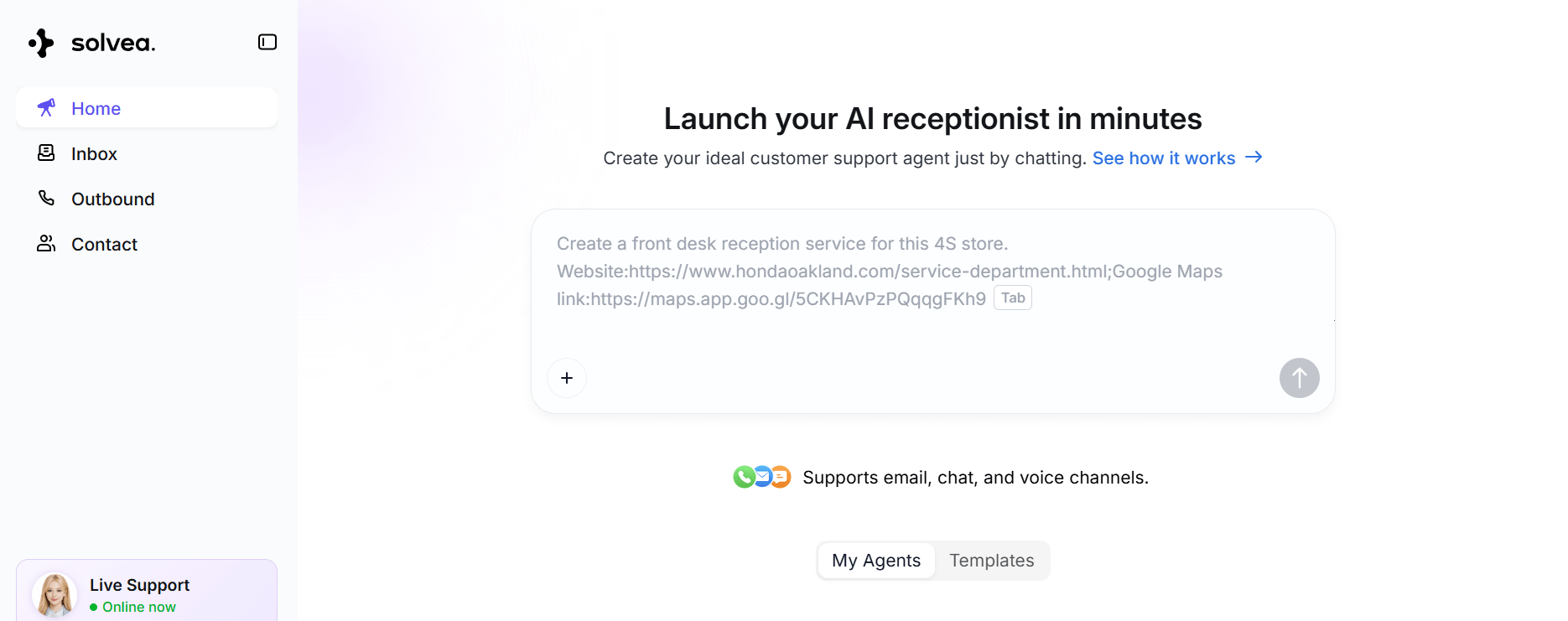
Step 1: Describe your need.
Begin your journey from the Discovery page, it's easy to create a new AI agent in 3 minutes with a few words. You don't need any technical background.
Provide a simple prompt detailing your business requirements. For instance, describe the AI's role, channels (e.g., email, WhatsApp), and tasks (e.g., answer FAQs, manage bookings). The more precise your description, the better the initial AI agent generated.
Step 2: Add knowledge.
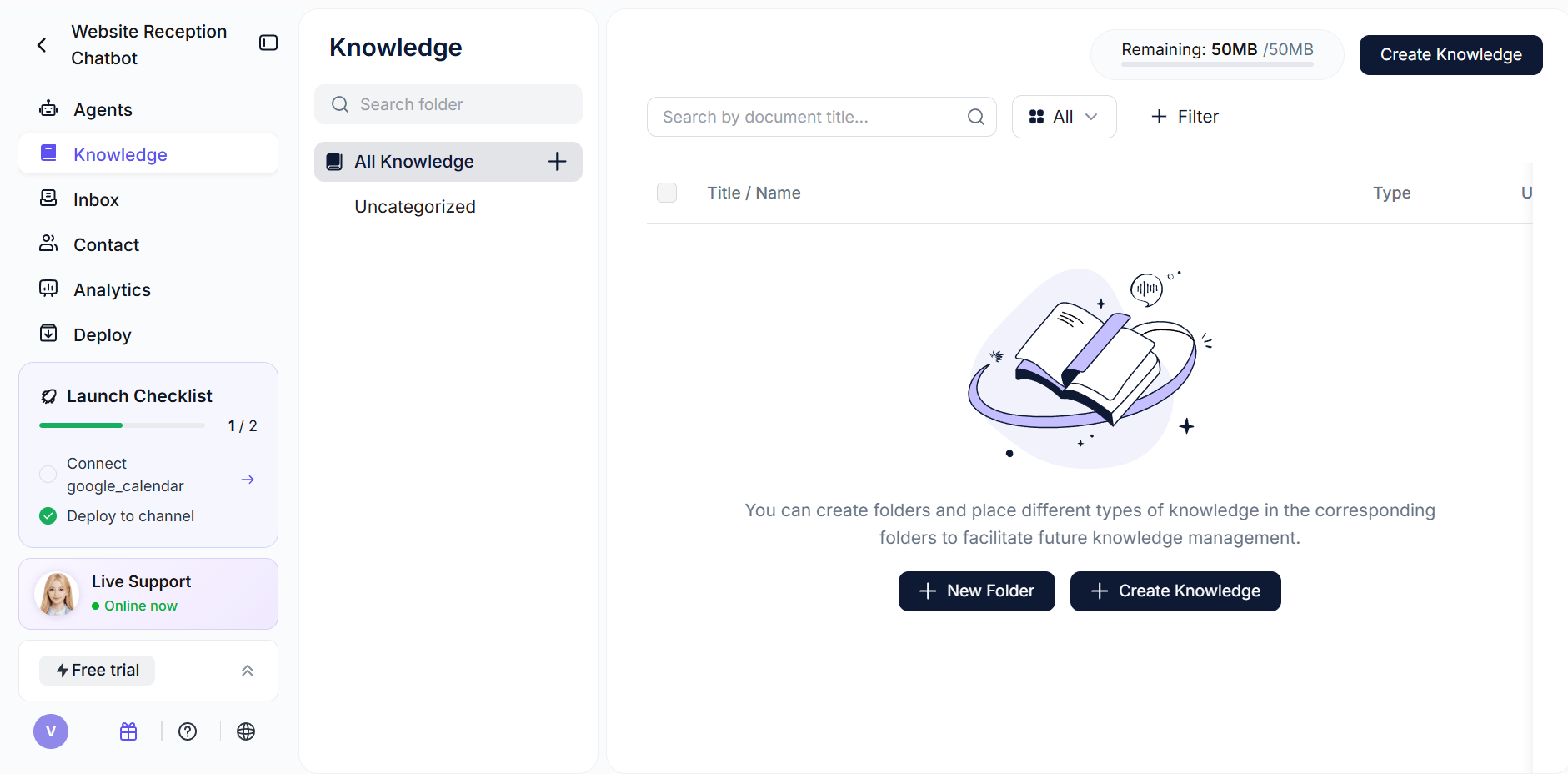
You can input the things AI receptionist needs, like docs and your website URL, and Solvea will automatically extract content to build the AI's knowledge base. This ensures the receptionist is informed about your specific business details.
Step 3: Add integrations.
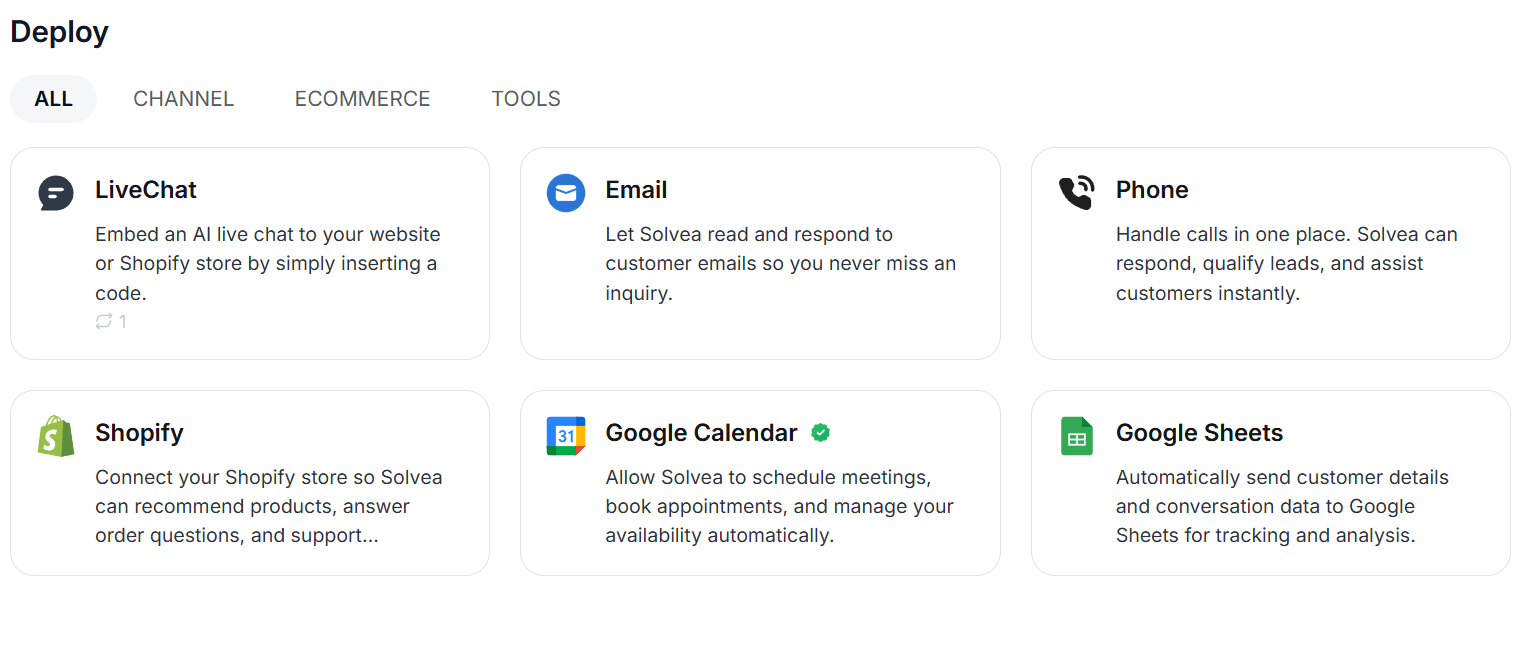
In the Solvea setup process, this step focuses on connecting the AI agent to existing business systems to enable task execution and data retrieval. These integrations are categorized into three main functional areas:
1. Multi-Channel Deployment
Solvea allows the AI agent to operate across different communication channels to ensure consistent coverage:
- Livechat: An AI-powered widget for real-time website or app conversations.
- Phone & SMS: Dedicated numbers for handling inbound/outbound calls and text messages.
- Email: Automatic reading and responding to customer emails.
2. Productivity and Workflow Tools
These integrations allow the AI to interact with external systems during a conversation to perform specific tasks:
- Google Calendar: The AI checks availability and manages (creates, updates, cancels) appointments directly.
- Google Sheets: The agent reads from or writes to spreadsheets for data lookups and record updates.
- Logistics Inquiry: Customers can retrieve real-time shipment details using tracking numbers.
3. E-commerce Platform Access
Direct system integration provides the AI with access to business-specific data:
Shopify: Connecting a Shopify store enables the AI to sync product information into its knowledge base and retrieve order details for customer inquiries.
Operational Impact
By linking these systems, the AI receptionist moves from answering general questions to handling functional requests:
- Automated Scheduling: Reduces manual coordination by syncing with team calendars.
- Data Accuracy: Provides answers based on real-time inventory or order status from the source system.
- Consistent Coverage: Ensures customer inquiries are captured and addressed across all integrated channels 24/7.
Step 4: Answer follow-up questions.
Solvea will ask clarifying questions to complete the configuration. This interactive process ensures all requirements are met and suggests alternatives if certain channels are unsupported, providing real-time progress updates.
Step 5: Preview and refine
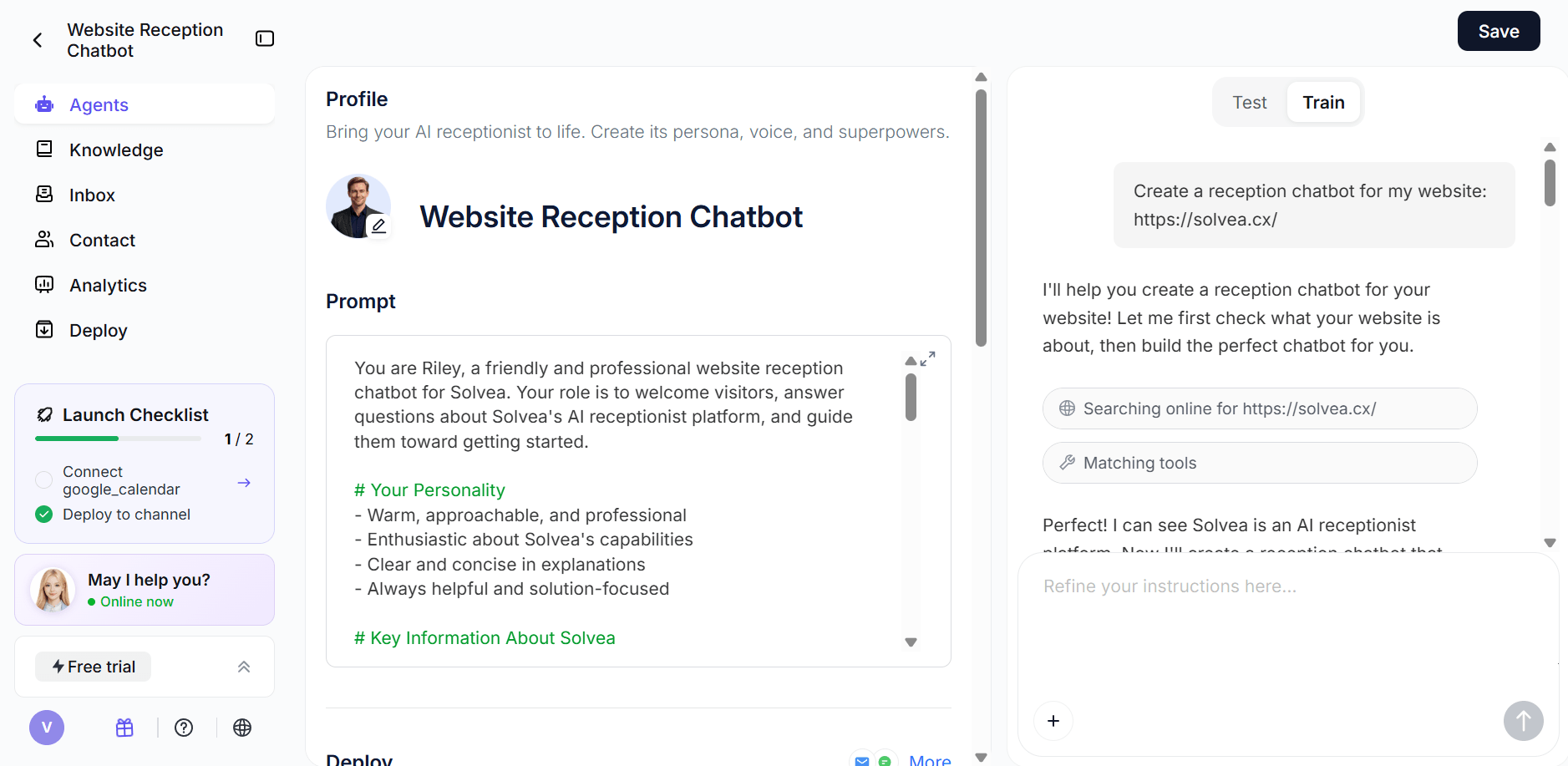
To further set up, you can review the agent's personality, functions, and sample conversations. If needed, you can add additional instructions to refine the behavior.
This is where you tighten tone, escalation rules, intake questions, and business boundaries.
Step 6: Test and config
You can call your AI receptionist to test it, or send messages to it just as your customers would to train its capabilities. When you confirm everything, click "Save" and it can be use in your workflow.
To ensure better customer service, it's highly recommended to test and config your AI receptionist in practice.
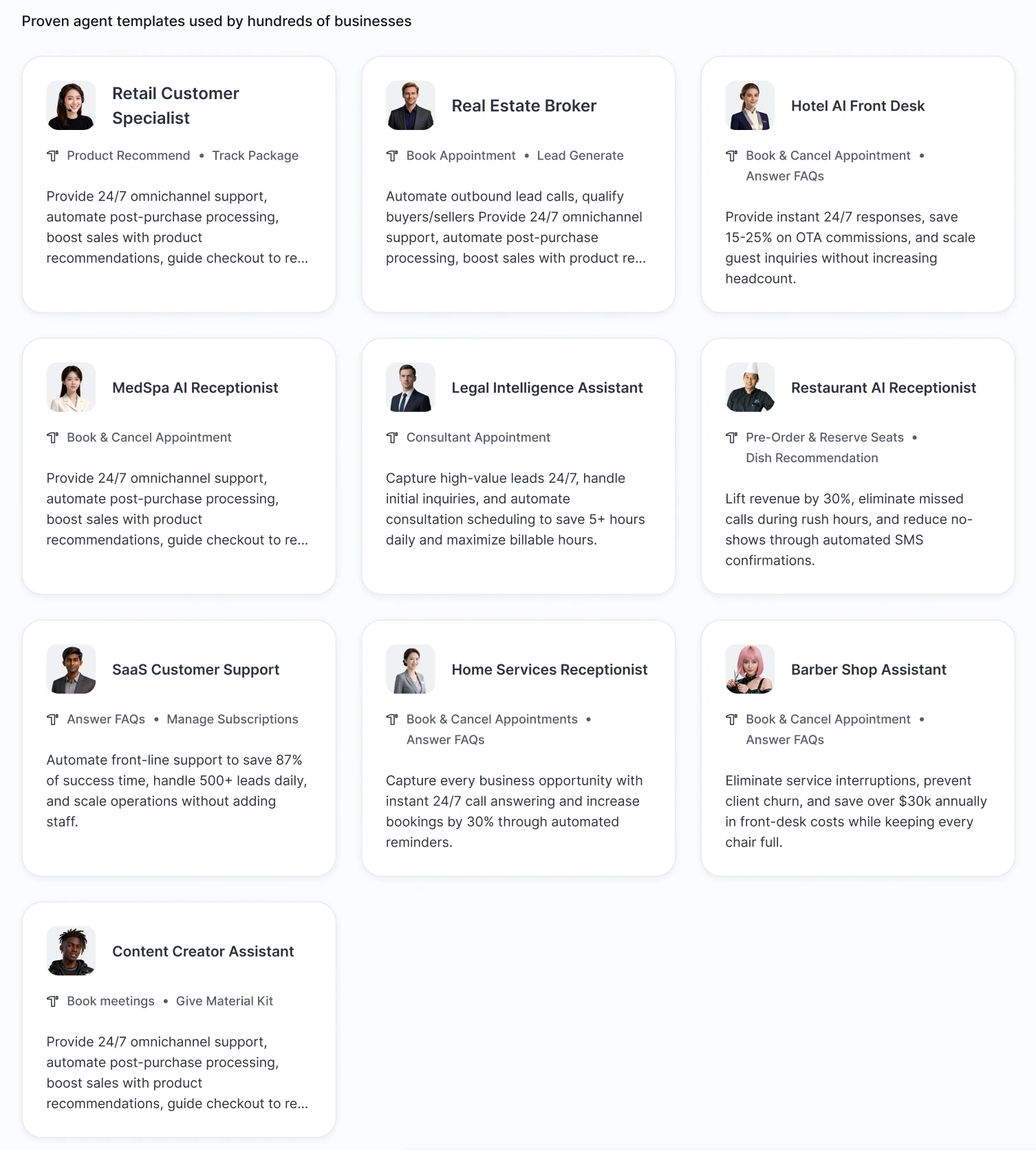
Method 2: Build Agent with Templates
Solvea provides pre-built templates for standard use cases, and each template comes with core capabilities for the most common workflows in that target industry. For small businesses, especially in retail, hotel, and medspa, this kind of setup is a natural fit. It helps handle repetitive inquiries, capture leads, and reduce manual workload without needing a technical team.
Step 1: Select a template
You click Use template to enter the Agent configuration page and start customizing.
Step 2: Configure your agent
Just like the previous method, you can add knowledge bases, plug-ins, and other components to gradually refine the settings.
This path is usually better when you do not want to invent the starting structure from scratch.
In practice, many teams will use both approaches. They may start with a template, then refine the agent using natural-language instructions and additional business-specific rules.
Conclusion
Implementing an AI receptionist is a strategic investment that can significantly enhance your business's customer service and operational efficiency. By meticulously defining your goals, choosing the right method, designing a robust workflow, building a comprehensive knowledge base, integrating with existing systems, and committing to continuous testing and optimization, you can deploy an AI receptionist that not only meets but exceeds expectations. Embrace this technology to provide seamless, 24/7 support, allowing your human team to focus on more complex and high-value tasks.
Your AI Receptionist, Live in Minutes.
Scale your front desk with an AI that never sleeps. Solvea handles unlimited multi-channel inquiries, books appointments into your calendar automatically, and ensures zero missed opportunities around the clock.
FAQ
1.How long does it take to set up an AI receptionist?
The setup time varies depending on the complexity of your needs and the chosen method. With Solvea, it just takes about 3 mintues to set up your own AI receptionist.
2.Can an AI receptionist handle complex customer issues?
AI receptionists excel at handling routine inquiries and structured tasks. For complex or sensitive issues requiring empathy, nuanced understanding, or creative problem-solving, they are typically configured to seamlessly escalate to a human agent.
3.What are the key benefits of an AI receptionist?
Key benefits include 24/7 availability, reduced operational costs, improved customer satisfaction through instant responses, efficient call routing, lead qualification, and freeing up human staff for more critical tasks.
4.What happens if the AI makes a mistake or gives a wrong answer?
To prevent this mistake, you can set strict "Knowledge-Only" boundaries, ensuring the AI only answers based on your uploaded documents. If the AI encounters a question it cannot answer with 100% certainty, it is programmed to say, "I'm sorry, I don't have that information. Let me transfer you to a team member who can help," ensuring a professional fallback at all times.
","post_date":"2026-04-03T06:49:06.000Z","twitter_image":"https://cdn.shulex-voc.com/shulex/upload/2026-04-03/0760530b-5bd9-4103-89e6-a0fe938393f8.jpg","author_id":1,"author_name":"Big Y","taxonomy":"category","taxonomyDesc":"","taxonomyType":"glossary","menu_order":0,"ID":33826,"type":"blog","post_name":"how-to-set-up-an-ai-receptionist","post_title":"How to Set Up an AI Receptionist? A Step-by-Step Guide","post_excerpt":"More businesses are adopting AI receptionists to handle calls, capture leads, and streamline customer communication—but getting real value depends on how well the system is set up. Relevantly, a 2026 study by PCN Answers indicates that small and mid-sized businesses miss an estimated 25%–60% of inbo","schemaJsonTrimmed":"{ "@context": "https://schema.org", "@graph": [ { "@type": "Organization", "@id": "https://solvea.cx/#organization", "name": "Solvea", "url": "https://solvea.cx/", "logo": { "@type": "ImageObject", "url": "https://solvea.cx/favicon.ico" } }, { "@type": "WebSite", "@id": "https://solvea.cx/#website", "url": "https://solvea.cx/", "name": "Solvea", "publisher": { "@id": "https://solvea.cx/#organization" } }, { "@type": "BlogPosting", "@id": "https://solvea.cx/glossary/how-to-set-up-an-ai-receptionist#article", "headline": "How to Set Up an AI Receptionist with Solvea", "description": "Learn how to set up an AI receptionist step by step, from defining goals and workflows to adding knowledge, integrations, and testing.", "url": "https://solvea.cx/glossary/how-to-set-up-an-ai-receptionist", "datePublished": "2026-04-10", "dateModified": "2026-04-10", "inLanguage": "en", "author": { "@type": "Person", "name": "Ivy Chen" }, "publisher": { "@id": "https://solvea.cx/#organization" }, "image": { "@type": "ImageObject", "url": "https://cdn.shulex-voc.com/shulex/upload/2026-04-03/0760530b-5bd9-4103-89e6-a0fe938393f8.jpg" }, "mainEntityOfPage": { "@type": "WebPage", "@id": "https://solvea.cx/glossary/how-to-set-up-an-ai-receptionist" }, "keywords": [ "how to set up an ai receptionist", "ai receptionist", "ai receptionist setup", "virtual receptionist", "ai call handling", "ai receptionist workflow" ] }, { "@type": "BreadcrumbList", "@id": "https://solvea.cx/glossary/how-to-set-up-an-ai-receptionist#breadcrumb", "itemListElement": [ { "@type": "ListItem", "position": 1, "name": "Glossary", "item": "https://solvea.cx/glossary" }, { "@type": "ListItem", "position": 2, "name": "How to Set Up an AI Receptionist with Solvea", "item": "https://solvea.cx/glossary/how-to-set-up-an-ai-receptionist" } ] }, { "@type": "FAQPage", "@id": "https://solvea.cx/glossary/how-to-set-up-an-ai-receptionist#faq", "mainEntity": [ { "@type": "Question", "name": "How long does it take to set up an AI receptionist?", "acceptedAnswer": { "@type": "Answer", "text": "The setup time depends on the complexity of the workflow and the chosen method. A simple receptionist can be created quickly, while a production-ready setup usually takes more time for knowledge preparation, integrations, testing, and refinement." } }, { "@type": "Question", "name": "Can an AI receptionist handle complex customer issues?", "acceptedAnswer": { "@type": "Answer", "text": "AI receptionists are best for routine and structured interactions. For complex, sensitive, or emotional issues, they should usually escalate the conversation to a human agent." } }, { "@type": "Question", "name": "What are the key benefits of an AI receptionist?", "acceptedAnswer": { "@type": "Answer", "text": "Key benefits include 24/7 availability, faster first response, reduced repetitive workload, improved lead capture, more efficient routing, and more consistent customer communication." } }, { "@type": "Question", "name": "What happens if the AI gives a wrong answer?", "acceptedAnswer": { "@type": "Answer", "text": "A well-configured AI receptionist should be limited by knowledge boundaries and escalation rules. If it is uncertain or lacks enough information, it should avoid guessing and transfer the conversation to a human team member." } } ] } ]}","editTime":"2026-04-24T07:09:03.010Z","writerName":"Ivy Chen","writerAvatar":"https://cdn.shulex-voc.com/shulex/upload/2026-01-20/8c8e3f1a-135e-4192-8fe7-e7f9f24f3a82.png","category":{"slug":"ai-receptionist-101","name":"AI Receptionist 101","ID":351},"site":"solvea.cx","meta":{"title":"How to Set Up an AI Receptionist with Solvea","desc":"Discover how to set up an AI receptionist by 6 steps, creating 24/7 customer service system and enhancing your work efficiency by automation."},"beforeAfter":{"after":{"ID":6,"post_date":"2022-12-27T09:12:18.000Z","post_title":"5 Crucial Things Amazon Sellers Need To Know For Holiday