Ask an AI chatbot a question it doesn't have an answer for, and it does one of two things: it makes something up, or it says "I don't know." Neither option helps your customer. Neither protects your reputation.
The gap between a useful AI chatbot and a frustrating one usually comes down to a single thing: what information the AI has actually been given. A chatbot knowledge base is the structured collection of content your AI reads before responding — the source it consults every time a customer asks something. Get the knowledge base right, and your AI resolves problems accurately at scale. Get it wrong, and even the most sophisticated AI model will produce unreliable answers.
This guide covers what a chatbot knowledge base is, how it differs from a FAQ page, what belongs in it, why its quality directly determines how your AI performs, and what the most common mistakes look like in practice.
TL;DR
Details | |
What it is | A structured collection of content your AI reads to answer customer questions |
Why it matters | The quality of your knowledge base determines the accuracy of every AI response |
What goes in | FAQs, product specs, pricing, policies, troubleshooting guides, operational details |
Who it's for | Any SMB or CS team using or planning to use an AI chatbot or AI receptionist |
Biggest mistake | Vague, incomplete, or outdated content — the AI can only work with what it's given |
Next step | Audit your top 20 customer questions and write specific answers for each one |
What Is a Chatbot Knowledge Base?
A chatbot knowledge base is a structured repository of information that an AI system draws from when generating responses to customer questions. For a customer-facing chatbot or AI receptionist, it's the source of truth — everything your AI knows about your business, your products, your policies, and how you operate.
Think of it like your business's internal Wikipedia, curated specifically for answering customer questions. The difference from a general reference is intentionality: a chatbot knowledge base is organized around actual customer questions, written with direct and specific answers, and maintained as a living document that reflects the current state of your business.
How a knowledge base differs from similar terms
These three terms get conflated constantly, and the distinctions matter when you're building your AI content stack:
What it is | Who reads it | Depth | |
FAQ page | A short public list of common questions and answers | Website visitors | Shallow — broad coverage, limited detail |
Knowledge base | A structured repository of organized business information | AI systems, support agents, sometimes customers | Deep — detailed, categorized, regularly updated |
Help center | A browsable library of support articles and tutorials | Customers seeking self-service help | Medium — organized by topic, written for humans to browse |
A FAQ page is a snapshot for customers. A knowledge base is the complete reference that powers it — and the AI behind it.
What a chatbot knowledge base looks like in practice
A small clinic's knowledge base might contain: business hours, appointment cancellation policy, accepted insurance providers, what to bring to a first visit, post-treatment instructions, and answers to the 25 most common pre-appointment questions.
When a patient messages at 8 PM asking "do you accept Blue Cross?" — the AI checks the knowledge base, finds the answer, and responds immediately. No voicemail. No wait until morning. No lost appointment.
Without that content in the knowledge base, the AI has nothing to reference. The patient gets a generic deflection ("please call during business hours"), and the interaction ends without resolution.
A similar logic applies for any service-based business — a law firm handling intake questions, a medspa explaining treatment options, a home services company fielding availability requests. The knowledge base is what makes the AI specifically useful rather than generically present.
Why a Knowledge Base Matters for Your AI Chatbot
An AI doesn't invent answers from nowhere. It retrieves, synthesizes, and summarizes information from what it's been given. The knowledge base defines the ceiling of what your AI can correctly resolve. No matter how capable the underlying model is, it can't give accurate business-specific answers it hasn't been given the content for.
Your AI's answers are only as good as its source material
Vague source material produces vague answers. Specific source material produces specific answers. This is a content problem, not a technology problem — and it's one of the most important things to understand before deploying an AI chatbot for customer service.
According to McKinsey Global Institute research, knowledge workers already spend nearly one-fifth of the workweek searching for and gathering information to do their jobs. When that information is hard to find or poorly organized, the people relying on it — including AI systems — either slow down or get it wrong. A well-structured knowledge base removes that friction for your AI the same way good internal documentation removes it for your team.
It reduces wrong answers and prevents costly escalations
Wrong AI answers are worse than no answers. A customer who receives a specific but incorrect response — the wrong return window, the wrong price, an outdated policy — leaves with misinformation they'll act on. They may make a purchase under false assumptions, show up expecting a service you don't offer, or dispute a charge based on something your AI told them incorrectly.
The IBM Institute for Business Value has documented extensively how AI in customer operations generates ROI primarily when it resolves inquiries accurately — and how inaccurate AI responses create downstream costs that exceed what manual handling would have cost. Investing in knowledge base quality is the most direct lever for reducing wrong answers.
It enables real 24/7 coverage without proportional cost
According to PwC's Future of Customer Experience research, 73% of all people point to customer experience as an important factor in their purchasing decisions. A significant portion of that experience is simply whether help was available when they needed it.
A chatbot backed by a solid knowledge base handles questions at midnight, on weekends, and during holiday peaks with no change in response quality. There are no high-volume days that strain the system. The AI reads the same knowledge base every time, for every customer, with the same accuracy.
It creates consistency across every channel and every customer
One of the persistent problems with human-handled support is inconsistency. Different agents give different answers to the same question based on what they remember, what they were trained on, and when they last saw a policy update. Multiply that by a team of 10 or 50, and the inconsistency is visible to customers.
A centralized knowledge base solves this structurally. Every AI response — whether the customer calls, chats, or emails — draws from the same single source of truth. When you update your pricing or change your return policy, every channel reflects that change immediately. The AI doesn't have a Monday version and a Friday version.
It determines how much your AI can self-resolve
Resolution rate is the metric that determines whether an AI investment pays off. A chatbot that resolves 80% of inquiries without human escalation is a fundamentally different business impact than one that resolves 20%. The knowledge base is the primary driver of that number.
What Goes Into a Good Chatbot Knowledge Base
A functional knowledge base isn't a dumped Word document or a copy-paste of your website. It's a structured, maintained collection of accurate, specific information organized around customer questions. Here's what belongs in it:
Core content categories
Category | What to include | Example entry |
FAQs | Top 20–30 most common customer questions with direct answers | "What's your return policy?" → "We accept returns within 30 days of delivery. Items must be unused and in original packaging. Refunds process in 5–7 business days." |
Product / service info | Names, specs, pricing, availability, what's included and excluded | "What's in the Basic plan?" → full feature list with clear boundaries |
Pricing | Current prices, plan tiers, discounts, how billing works | "Do you charge annually or monthly?" → specific answer with both options |
Policies | Shipping times, refund rules, cancellation terms, warranty coverage | Exact policy text, not redirects to "contact us" |
Hours and availability | Business hours, holiday closures, after-hours handling | "Are you open on weekends?" → yes/no + exact hours |
Troubleshooting | Step-by-step resolution guides for common product or service issues | Error codes, standard diagnostics before escalation |
Escalation triggers | What situations require human handling and how to hand off | Billing disputes, urgent requests, high-value situations |
What makes knowledge base content good vs. bad
The difference between a knowledge base that makes your AI perform well and one that produces unreliable responses is almost always specificity. Here's what that distinction looks like in practice:
❌ Vague (what most teams write) | ✅ Specific (what AI can actually use) |
"Prices vary — contact us for a quote" | "Standard plan starts at $30/month. Enterprise pricing for teams over 50 — book a demo at [link]." |
"Shipping times depend on your location" | "Standard shipping: 5–7 business days. Expedited: 2–3 days (+$12). Orders placed before 2 PM EST ship same day." |
"We'll do our best to accommodate returns" | "Returns accepted within 30 days. Items must be unused and in original packaging. Refunds process in 5–7 business days to the original payment method." |
"See our website for more information" | [The actual information, written out in full] |
"Hours vary by location" | "Our main location is open Monday–Friday 9 AM–6 PM, Saturday 10 AM–4 PM. Closed Sundays and federal holidays." |
The test: if the answer could have come from a human who just told the customer "go look it up," it's not usable for a knowledge base.
Format considerations for AI consumption
How content is written affects how accurately AI can extract and use it. A few practical format rules:
- Answer first, context second. AI parses answers more reliably when the direct answer comes before the explanation. "Yes, we ship internationally" is better than "While our main warehouse is in the US, we do ship internationally."
- Use Q&A structure where possible. Question followed by direct answer is the clearest format for AI retrieval. Narrative paragraphs bury the answer.
- Write out numbers and specifics in full. "$30/month for up to 10 users" is more useful than "affordable pricing."
- Avoid "it depends" without the conditions. If something varies, write out all the conditions and their corresponding answers.
How Solvea Uses Your Knowledge Base
Solvea is an AI receptionist designed for SMBs. Solvea supports a diverse range of industries based on real use cases, including Retail, Hotel, Real Estate, Medspa, Software Companies, Barber Shops, Restaurants, Freelancers, Law Firms, and Home Services, offering tailored solutions to meet the unique demands of each sector.
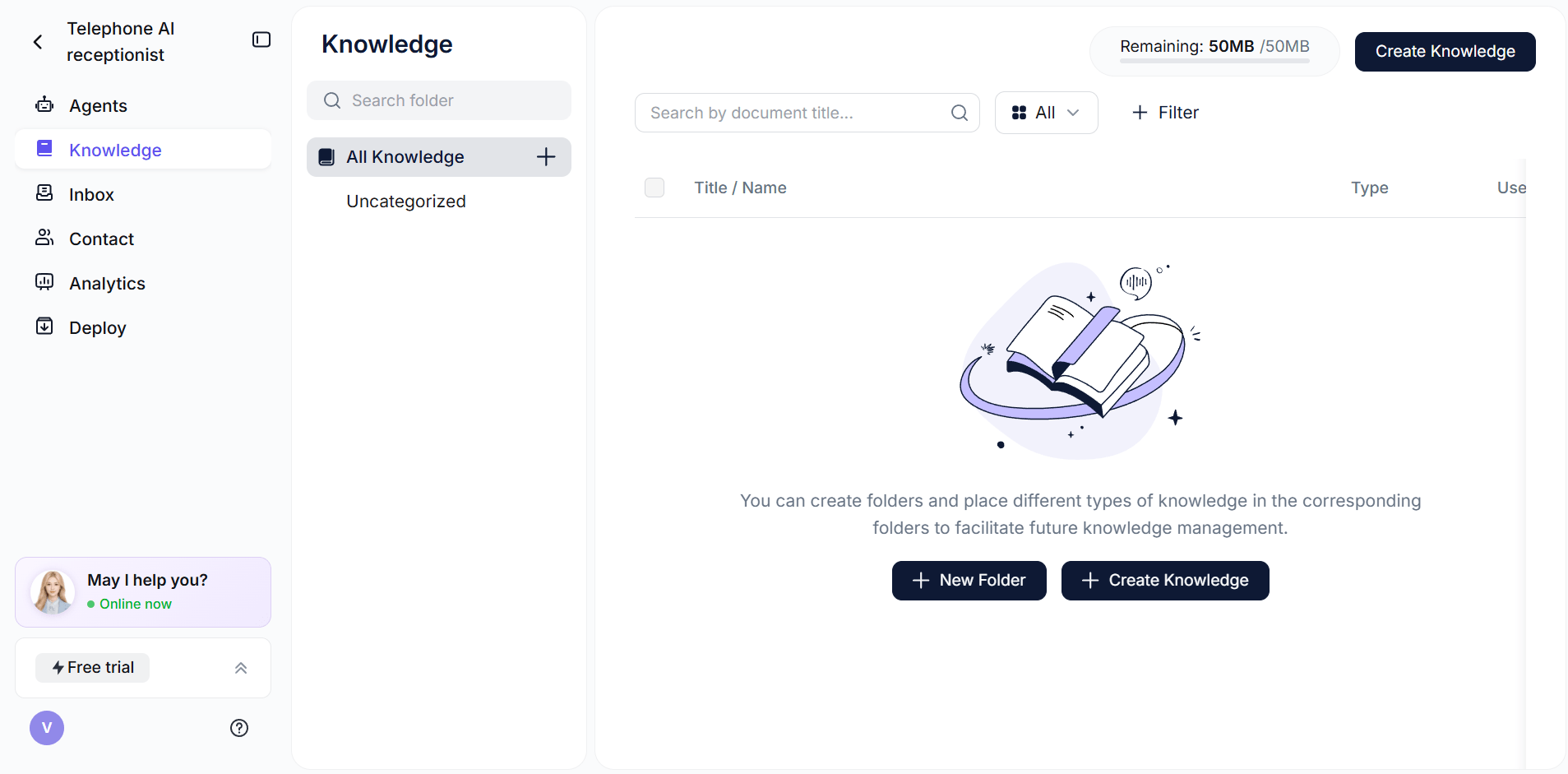
With Solvea, you upload your knowledge base once — a document, a connected Notion page, or a Google Drive file — and the AI reads it to answer customer questions across phone, live chat, and email. Every response is drawn from your knowledge base rather than generated from scratch. When a customer asks something not covered in the knowledge base, Solvea flags it for your team instead of guessing. The quality of your knowledge base directly controls the quality of what customers receive, across every channel, around the clock.
If your FAQ template feels empty, drop your existing content into the AI FAQ generator and it'll suggest the right questions to fill it.
Common Mistakes That Break Your AI's Answers
Most AI chatbot failures trace back to knowledge base content problems, not the AI technology itself. These five patterns cause the majority of issues:
1. Writing for humans, not AI
Long narrative paragraphs that bury the answer at the end are hard for AI to extract from reliably. Customers read with context; AI parses without it. Write every knowledge base entry with the answer at the start, followed by any necessary explanation.
2. Using internal jargon customers don't know
If your knowledge base references "SKU 4892" or "the Tier 2 package" without explaining what those mean in customer terms, your AI won't match them to how customers actually ask questions. Write using the language your customers use, not internal shorthand.
3. Leaving answers vague to avoid commitment
"Prices vary" and "contact us for details" are not answers. They're escalation triggers disguised as content. Every vague entry in your knowledge base is a future escalation — a customer who had to call or wait for an email when they could have gotten their answer immediately. The knowledge base should contain your actual policies and prices.
4. Not updating the knowledge base when things change
A knowledge base that still reflects last quarter's pricing, a discontinued product, or old business hours will cause your AI to give confidently wrong answers. Any operational change — price update, new service, revised policy — should trigger a same-day knowledge base update before it goes live anywhere else. Outdated content is the most common cause of AI trust erosion.
5. Only documenting what you do, not what you don't do
If your AI only knows what services you offer, it has no way to handle questions about services you don't offer. The result is a confused non-answer or a hallucinated response. Write explicit "no" content: "We don't currently offer X. The closest alternative we have is Y." This turns a gap into a handled interaction.
Conclusion
A chatbot knowledge base is the foundation every AI customer service interaction runs on. The technology can be sophisticated and the interface can be polished — but if the knowledge base behind it is vague, outdated, or incomplete, the AI will produce responses that reflect exactly that.
The highest-leverage thing you can do to improve your AI chatbot's performance isn't changing the model or adjusting the settings. It's improving the quality and coverage of what you've given it to work from. Start with your 20 most common customer questions. Write specific, complete answers with real policies, real prices, and real details. Then keep it updated. That's the foundation.
Your AI Receptionist, Live in Minutes.
Scale your front desk with an AI that never sleeps. Solvea handles unlimited multi-channel inquiries, books appointments into your calendar automatically, and ensures zero missed opportunities around the clock.
FAQ
What is the difference between a knowledge base and a FAQ?
A FAQ is a short, publicly displayed list of common questions and answers — usually a dedicated page on a website. A knowledge base is a broader, more detailed collection of structured information that AI systems, support agents, and sometimes customers can access. Your FAQ might contain 10–15 questions. Your knowledge base might contain 200+ entries covering policies, troubleshooting steps, product specs, and operational details across categories. A well-built knowledge base powers your FAQ page — and everything else your AI needs to answer accurately.
Does my AI chatbot really need a knowledge base?
Yes. Without a knowledge base, an AI has no reliable source of business-specific information to draw from. It either falls back on generic responses or — more problematically — generates plausible-sounding but incorrect answers. A knowledge base is what turns a general-purpose AI interface into something that can handle your specific customers' actual questions. Every AI chatbot or AI receptionist needs one to perform reliably.
How often should I update my knowledge base?
Immediately whenever anything changes — pricing, policies, hours, products, services. A practical rule: treat the knowledge base as the first thing that gets updated when any operational change goes into effect, not an afterthought. As a routine practice, a monthly audit to check for outdated content is a reasonable baseline. Set a process where any team member who changes a policy or price is responsible for updating the corresponding knowledge base entry the same day.
Can I use Notion or Google Drive as a knowledge base for my chatbot?
Many AI platforms support connecting to Notion, Google Drive, or uploaded documents as knowledge base sources. The format matters less than the content quality. Whether your knowledge base lives in a Notion page, a Word document, or a PDF, the AI reads the text — so the same principles apply: specific answers, clear structure, no vague redirects. Before connecting any source, verify that the content meets the specificity standard.
What happens if my AI gives a wrong answer?
Wrong AI answers almost always trace back to knowledge base issues: outdated information, vague content the AI misinterpreted, or a question about something not covered in the knowledge base. The fix is content improvement. Review which questions produced wrong answers, identify the gap or inaccuracy in the knowledge base, update the entry, and re-test. AI platforms like Solvea flag queries that couldn't be resolved from the knowledge base, giving you a clear view of where coverage is missing. Solvea's knowledge base chatbot cites the source doc with every answer — so reps trust what it says.
Will my chatbot actually use the knowledge base, or just make things up?
This depends on how the AI platform is configured. Properly built AI platforms for customer service are designed to draw answers specifically from provided knowledge sources and escalate when something isn't covered — rather than generating responses from outside that scope. The safeguard exists at the platform level; but the quality control is yours: the more complete and specific your knowledge base, the more the AI has to work with, and the fewer situations arise where it could go off-script.