Rescheduling an appointment is a trust test. The moment a client hears "we need to move your appointment," they're measuring how much the practice values their time. Done badly — late notice, vague explanation, no immediate alternative offered — and the client doesn't rebook. Done well, with clear communication, a genuine apology, and an easy path to a new slot, and the client often strengthens their relationship with the practice rather than losing confidence in it.
Most med spa appointment rescheduling failures aren't policy failures — they're communication failures. The practice waits too long to notify. The message is vague. No one follows up. The client books elsewhere, not because they were angry about the reschedule, but because the practice made it easier to go somewhere new than to find out what to do next.
This guide covers how to reschedule a client appointment professionally — from the moment you know you need to reschedule to confirming the new slot — in a way that keeps the relationship intact.
TL;DR
| Field | Summary |
|---|---|
| What "professional" means here | Early notice, genuine apology, immediate alternative offered, easy path to rebooking |
| Timing rule | Notify as soon as you know. For same-day changes: phone call, not text or email |
| What to avoid | Vague explanations, over-apologizing, making the client chase you for a new time |
| Who it's for | Med spa front desk coordinators, practice managers, and receptionists |
| AI's role | Handles routine client-initiated reschedules; frees staff to handle practice-initiated ones personally |
Why Rescheduling Feels Harder Than It Is
The fear with rescheduling is that the client will be angry. Most of the time, clients aren't angry about the reschedule itself — they're frustrated by how it's handled. Clients who receive early, clear, empathetic communication about a change typically stay on the schedule. Clients who receive late or confusing communication often cancel entirely — not because they're angry about the reschedule, but because the practice made it easier to go somewhere else.
The key principle: the moment you know you need to reschedule, tell the client. Every hour of delay narrows the window for them to adjust their plans and raises the likelihood they'll simply book elsewhere.
The other mistake: over-apologizing. A single, sincere apology is appropriate. Repeating "I'm so sorry" three times in one message signals that you think the situation is worse than the client probably does, which often creates more anxiety rather than less.
How to Reschedule an Appointment Professionally: Step-by-Step
Step 1: Notify as Early as Possible
The window between when you know you need to reschedule and when you tell the client is the trust window. Every hour of delay is an hour the client's time is already planned around an appointment that's going to change.
Rule of thumb: notify within one hour of knowing you need to reschedule, regardless of what time of day it is.
- If the change is more than 48 hours out: a phone call, text, or email all work. Match the client's preferred contact method from their profile.
- If the change is within 24 hours: phone call first, followed by a text confirmation. Do not use only email for same-day changes — email open rates within two hours are unreliable.
- If the change is same-day: phone call, personal. This is a situation that warrants a personal call from the practice manager or provider, not a front desk template.
Timing matters more than the channel. Early notice by text beats late notice by phone.
Step 2: Write the Message with These Three Elements
A professional rescheduling message has three parts, in this order:
1. Inform clearly — State what needs to change, without being vague. "Something came up" is not an explanation. "Our provider has an unexpected scheduling conflict" is. You don't need to share personal details, but you do need to give the client enough information to understand this wasn't optional.
2. Apologize briefly and sincerely — One sentence. "I'm sorry for the inconvenience — I know you planned your schedule around this appointment." Do not repeat the apology multiple times.
3. Offer an immediate alternative — This is the most important part. Give the client two or three specific new time options in the same message. Do not say "please call us to reschedule" — this creates a follow-up step that breaks the rescheduling loop. Every additional step reduces rebooking rate.
Sample practice-initiated reschedule message:
"Hi [Client Name] — this is [Name] from [Clinic]. I wanted to reach out right away about your [service] appointment on [date] at [time]. Our provider has an unexpected conflict and we need to reschedule. I'm so sorry for the disruption to your plans.
I have openings on [Day 1] at [Time] or [Day 2] at [Time] — would either of those work for you? If neither fits, reply here or call us at [number] and we'll find something that does.
Thank you for your understanding — we look forward to seeing you."
Step 3: Make Rebooking Frictionless
After the initial message, the client needs one click or one call to confirm a new time. Any step beyond that reduces your rebooking rate.
Options: - Include a direct booking link in the text/email with the new options pre-selected (most booking software supports this) - Ask the client to reply to confirm one of the options you offered — this is the fastest path - Call back within 30 minutes if you don't receive a response to a text or email message
What to avoid: "Please call our front desk to reschedule." This requires the client to initiate a follow-up call during business hours. For a change your practice initiated, the client should not have to do the work.
If you use a booking platform, set up a direct reschedule link that the client can use to pick from available times. Some practices include this in every rescheduling message automatically.
Step 4: Follow Up If You Don't Hear Back
If the client doesn't respond to your reschedule message within 24 hours, follow up once. A single follow-up call or text that says "Hi [Name], just following up on our message about rescheduling your [service] — did any of those times work, or should we look at other options?" shows you care about getting them back on the schedule.
Do not follow up more than once by phone. If the client doesn't respond to two contacts, send a final message: "We'd love to get you rescheduled — here's our booking page with current availability: [link]. If we can help, don't hesitate to reach out."
Step 5: Handle Client-Initiated Reschedules With the Same Care
When the client initiates the reschedule (which is the more common situation), the professional handling is slightly different:
- Acknowledge immediately — don't leave the request in voicemail or a message queue for more than two hours during business hours
- Confirm the cancellation and any deposit transfer or fee implications according to your policy
- Offer new times proactively — don't just cancel and say "see you next time"
- Document the reason if shared — if a client mentions they're rescheduling because of an illness or travel, note that. It's useful context for their next visit
The tone should be: "We've got you — let's find a time that works." Not: "Got it, cancelled."
Step 6: Use AI for Routine Reschedule Requests
Handling rescheduling professionally at scale — for every client, across every channel, including evenings and weekends — is only possible with some automation in the workflow.
With Solvea, routine client-initiated reschedule requests are handled automatically. When a client calls or messages to reschedule, Solvea checks your calendar, offers the next available times, applies your cancellation and deposit policy, and confirms the new appointment — without putting the request in a queue until the next morning. For practice-initiated reschedules or complex situations, Solvea flags them for human follow-up so your team can handle them with the personal touch this step requires.
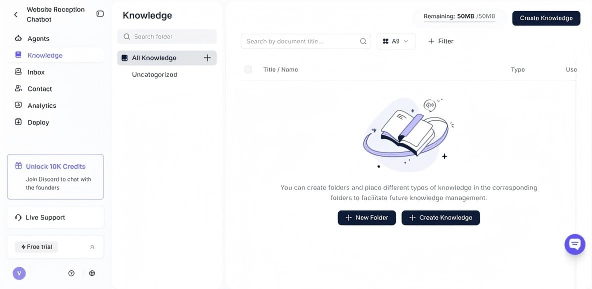
To set up Solvea for reschedule handling: 1. Upload your cancellation and rescheduling policy to Solvea → Knowledge Base 2. Connect your booking calendar to Solvea 3. Set the policy for when Solvea should escalate to a human (same-day changes, VIP clients, complex situations)
What to Say When the Client Is Upset About the Reschedule
Occasional pushback is normal, especially for same-day changes. The professional response:
Don't argue or over-explain. Acknowledge the client's frustration: "I completely understand — this is disruptive and I'm sorry we're in this position."
Offer something tangible if appropriate. For a same-day change where the client has already arranged transportation or taken time off: a small service upgrade, priority booking for their rescheduled appointment, or a product sample can go a long way. This isn't a required policy — it's a judgment call for situations where the disruption is significant.
Don't promise things you can't deliver. "It won't happen again" is a promise you may not be able to keep. Better: "We're making sure this is handled differently going forward."
Common Rescheduling Mistakes to Avoid
❌ Waiting until the last minute to notify ✓ Notify within one hour of knowing you need to reschedule. The same-day phone call after a same-week text is worse than a same-week phone call the moment you know.
❌ Vague explanations ("something came up") ✓ Give the client enough to understand the change was necessary. "Provider conflict" or "medical situation" is sufficient without oversharing.
❌ Over-apologizing in the message ✓ One apology. Sincere, brief. Move to solutions.
❌ Putting the rebooking burden on the client ✓ Always offer two to three specific alternatives in the rescheduling message itself. Never just say "please call to reschedule."
❌ Not following up on unresponsive clients ✓ One follow-up within 24 hours if no response. Then a final message with a booking link.
Your AI Receptionist, Live in Minutes.
Scale your front desk with an AI that never sleeps. Solvea handles unlimited multi-channel inquiries, books appointments into your calendar automatically, and ensures zero missed opportunities around the clock.
FAQ
How do you reschedule an appointment without upsetting the client?
Notify as early as possible, apologize briefly and sincerely, and offer specific alternative times in the same message. The combination of early notice and frictionless rebooking path addresses the two most common sources of client frustration: feeling disrespected about their time and being made to do extra work to rebook.
What is the best way to reschedule a client appointment by text?
Keep it under four sentences. State the change, apologize once, offer two or three specific alternative times, and give a direct way to confirm. Include a booking link if possible. Example: "Hi [Name], your [service] on [date] needs to move — so sorry for the disruption. Are you available [Day 1 at Time] or [Day 2 at Time]? Reply to confirm or use this link: [URL]."
How much notice should a med spa give before rescheduling?
Ideally, 48 hours or more. If a change is unavoidable within 24 hours, a phone call is required — not a text or email. Same-day rescheduling should be handled by the practice manager or provider personally, not delegated to a front desk template.
Should you offer a discount when rescheduling a client appointment?
Not as a default. Offering a discount for every reschedule trains clients to expect compensation and signals the practice is at fault in a way that's often disproportionate. Offer a tangible gesture (service upgrade, priority booking, product sample) only for significant disruptions — same-day changes when the client has already arranged travel, for example.
Can an AI handle rescheduling requests professionally?
Yes, for routine client-initiated reschedules. AI can acknowledge the request, check availability, apply the rescheduling policy, and confirm the new time — all within minutes, at any hour. Practice-initiated reschedules and situations involving upset clients benefit from a human follow-up that the AI can flag and route appropriately.