A booking cancellation is not the same as a no-show—the client told you they're not coming. That's actually progress: you have a window to refill the slot, adjust staffing, and reach out to the waitlist. But high cancellation rates still erode revenue, disrupt schedules, and signal that something in your booking system is not creating enough commitment at the point of reservation.
For service businesses—salons, clinics, fitness studios, home services, consulting practices—last-minute cancellations cost roughly as much as no-shows because they arrive too late to recover the slot. Same-day or day-before cancellations are typically the hardest to fill, leaving your revenue window closed before you can act.
This article covers nine practical strategies to reduce booking cancellations—and where cancellations do happen, to turn them into rebookings rather than lost revenue.
TL;DR – Cancellation Reduction Strategies at a Glance Strategy
- Clear Policies: Modernize cancellation terms with automated, interactive FAQs.
- Pre-Qualification Safeguards: Screen intents to filter out low-value browsers.
- Upfront Deposits: Anchor financial commitment to minimize disposable booking habits.
- Multi-Touch Reminders: Automate consistent SMS, email, and voice touchpoint cadences.
- Conversational Rescheduling: Let clients modify appointments directly inside chat or calls.
- Attendance Incentives: Reward reliable clients with perks or early-bird privileges.
- Dynamic Waitlists: Automatically backfill sudden gaps by alerting waitlisted accounts.
- Card-on-File: Secure booking credentials to enforce accountability on high-value slots.
- Data-Driven Filtering: Review booking history to restrict chronic, serial cancellers.
Why Clients Cancel Bookings
Understanding the mechanism behind a cancellation helps you choose the right intervention. Research and industry data consistently identify five root causes:
- Changed mind or reduced urgency: The need that drove the booking has lessened or disappeared
- Scheduling conflict: Something more urgent arose and the client prioritized it
- Financial constraint: Especially for discretionary services, the client can no longer afford the appointment
- Lack of commitment at booking: The booking was made casually without full intent to attend
- Forgetting the booking existed: This drives both cancellations (if they remember at the last minute) and no-shows (if they forget entirely)
The most impactful strategies target causes 1, 3, and 4—reducing uncommitted bookings—and cause 5, through proactive reminders.
9 Ways to Reduce Booking Cancellations for Service Businesses
Unmanaged calendar leaks are the silent killers of small business profitability. Operational reviews archived by the Harvard Business Review indicate that across high-touch service sectors, volatile schedule abandonment directly disrupts revenue forecasting and inflates labor overhead. For appointment-dependent brands—ranging from wellness salons to professional consultancies—solving this problem isn't just about tweaking your calendar; it requires understanding the psychological and behavioral economics behind why a consumer chooses to cancel.
To build a zero-friction retention system, you must address both customer-side cognitive gaps and provider-side system flaws. Before deploying defensive strategies, it helps to understand the underlying behavioral triggers by reviewing our diagnostic guide on why clients miss appointments.
Here are 9 actionable, data-backed ways to reduce booking cancellations and secure your service capacity.
1. Transparently Communicate and Modernize Your Cancellation Policy
Friction and ambiguity breed cancellations. According to Transaction Cost Theory listed in global economic taxonomies, consumers consistently opt for the path of least resistance. If your cancellation policy is buried in a wall of text or requires an awkward phone call to navigate, customers will simply default to a silent no-show or a last-minute abandonment to avoid social friction.
The solution is to make your boundaries crystal clear right at the point of intent. Instead of static text, businesses are deploying conversational automation. Integrating smart, interactive FAQ generators onto your booking page allows clients to instantly clarify cancellation windows, rescheduling parameters, and deposit rules in real-time, removing all transactional uncertainty.
2. Implement Strategic Pre-Qualification Safeguards
Not all bookings are created equal. High cancellation rates often stem from low-intent leads who lock in time slots on a whim without being fully committed or qualified for your service parameters.
To insulate your calendar from these low-value disruptions, you must vet intents before they occupy your prime hours. Implementing automated AI lead qualification tools for small business allows you to screen incoming requests against custom logic (such as service areas, budget matches, or project scopes). By weeding out mismatched or casual browers before a booking is finalized, you naturally elevate your appointment adherence rate.
3. Leverage the Sunk Cost Effect with Upfront Deposits
Market consumer insights aggregated by Statista show that financial commitment at the point of booking remains the single most effective psychological anchor against calendar volatility. When a service is entirely free to book, the consumer bears zero risk, causing them to treat your time slot as disposable.
Charging a non-refundable booking fee or deposit—even a nominal 10% to 20%—flips the behavioral dynamic. The moment a consumer experiences a financial outlay, their psychology shifts toward minimizing loss, ensuring they either show up or reschedule well within your approved operational windows.
4. Automate Multi-Touch Reminders
Forgetfulness drives both last-minute cancellations and no-shows. A client who remembers their appointment two days out is far more likely to cancel thoughtfully (giving you advance notice) than one who forgets entirely until an hour before.
Multi-touch reminder sequence:
- At booking: Confirmation with all details + ICS calendar file
- 72 hours before: Reminder + rescheduling link
- 48 hours before: Confirmation request ("Reply YES or NO")
- 24 hours before: Final reminder
A randomized trial of 54,066 patients at Kaiser Permanente Colorado found that sending two reminders—one 3 days out and one 1 day out—cut missed visits to roughly 4.4%, compared to 5.3–5.8% with a single reminder; SMS and phone calls performed about the same (Steiner et al., 2018).
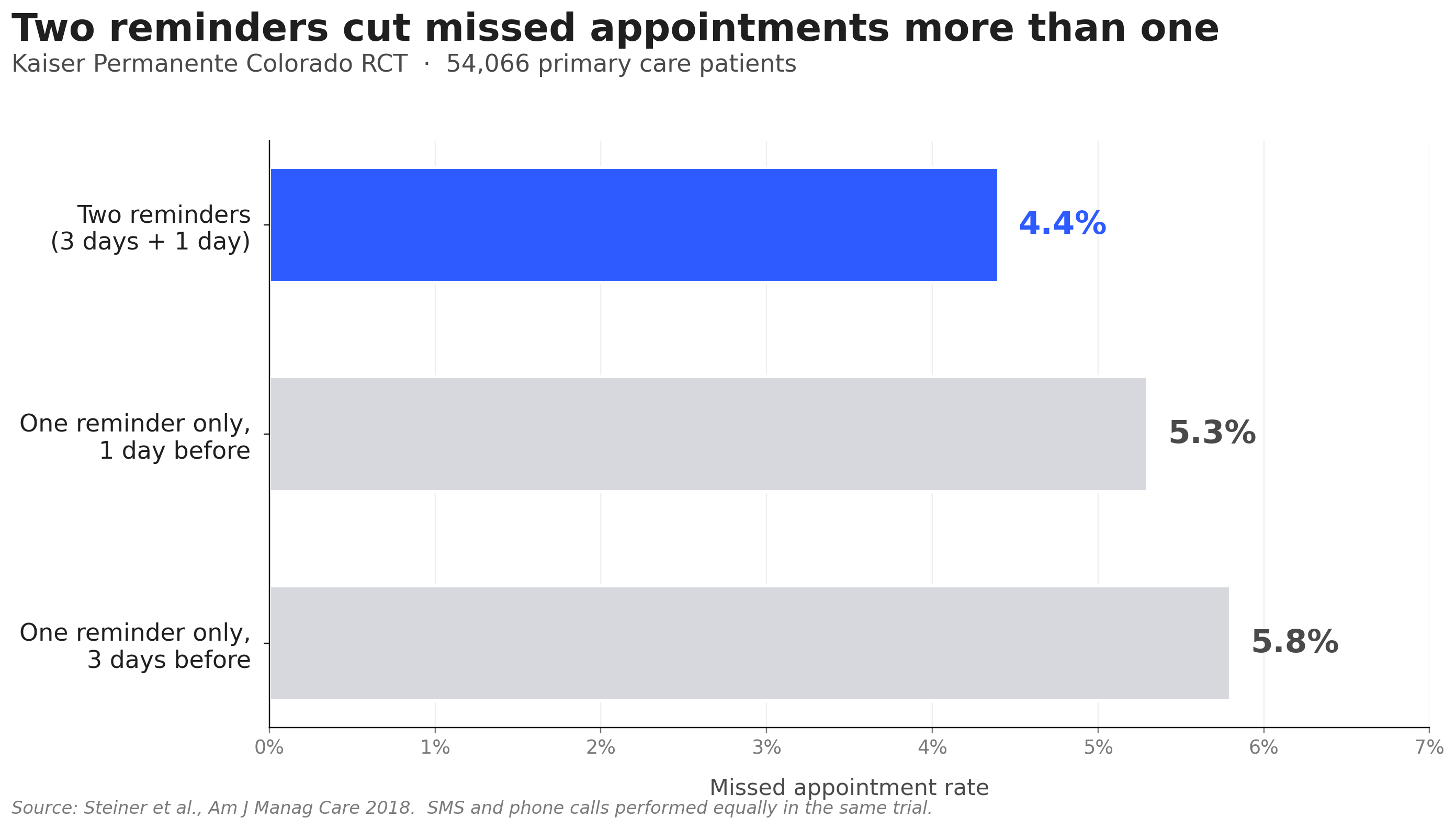
One nuance worth knowing: that same trial found reminders did not significantly change the cancellation rate itself. What reminders really do is convert silent no-shows into advance-notice cancellations. That trade is still worth making—an advance-notice cancellation gives you a window to refill the slot that a no-show never does—but it means reminder cadence alone is not a complete cancellation strategy. The deposit, policy, and waitlist levers above are what actually move the cancellation number.
5. Make Rescheduling Easier Than Cancelling
Many cancellations represent clients who cannot make the original time but are open to an alternative. If rescheduling is harder than cancelling, clients cancel. If rescheduling is easier, they reschedule.
Every reminder and every cancellation-response flow should include a direct rescheduling link. The client who clicks "I can't make it" should immediately see available slots and be able to pick one in under a minute. No phone tag, no staff involvement, no friction.
Self-serve rescheduling is often one of the most effective single changes for reducing cancellation loss—clients who can move themselves to a new slot do so instead of walking away.
6. Shorten the Booking Window
The longer the gap between booking and appointment, the higher the cancellation risk. Life changes, priorities shift, and the sense of commitment fades over eight weeks more than over eight days.
"Strike while the iron is hot"—getting new clients onto the calendar within a week of their initial inquiry keeps their intent fresh and their commitment strong.
For service businesses where this is operationally feasible, limiting the advance booking window to 2–4 weeks reduces changed-mind cancellations significantly. For longer-horizon bookings (annual checkups, seasonal services), compensate with more frequent reminders as the date approaches.
7. Build and Actively Manage a Digital Waitlist
When cancellations do happen, the financial impact depends entirely on how quickly you can refill the slot. A managed waitlist—clients who have opted in for short-notice availability—turns cancellations into rebookings within minutes.
A digital waitlist is one of the most powerful tools you have when cancellations happen: clients are notified automatically, booking is self-serve, and fills are first-come, first-served.
Make waitlist opt-in visible and easy: mention it at checkout, include it in confirmation emails for high-demand services, and prominently feature it on your booking page when slots are limited.
8. Segment Clients and Protect Prime Slots
Not all clients carry the same cancellation risk. New clients cancel more often than regulars. Clients who booked during a sale or promotional period cancel more often than full-price clients. Clients with a documented cancellation history continue that pattern.
Smart segmentation strategies that apply across service types:
- New clients: require deposits or full prepayment before confirming prime-time slots
- Repeat cancellers: require full prepayment for all future bookings
- Loyal, reliable clients: offer more flexibility as a demonstrated trust benefit
- High-risk time slots (early mornings, late afternoons, Mondays, Fridays): protect with deposit requirements
This approach protects your most valuable schedule slots without penalizing your best clients.
9. Use AI-Powered Booking Management for 24/7 Responsiveness
Cancellations often happen outside business hours—in the evening, on weekends, or early in the morning before staff arrive. If a client calls at 9 PM to cancel their 8 AM appointment and gets voicemail, the slot almost certainly goes unfilled. If they get an immediate response with a rescheduling offer, the relationship is preserved and the slot may be recovered.
Solvea handles inbound cancellation and rescheduling requests 24/7 via phone, SMS, and chat. A client who calls outside business hours to cancel reaches the AI receptionist, which acknowledges the cancellation, logs it in the scheduling system, and immediately offers alternative slots for rescheduling. The client who might have been lost is offered a path to rebook before the conversation ends.
Beyond cancellation handling, Solvea sends all configured reminders on schedule and manages the confirmation request workflow—the full communication system that reduces cancellations before they happen.
When Cancellations Still Happen: Minimizing Revenue Loss
Even with defensive strategies in place, some cancellations are completely unavoidable due to client emergencies. When they happen, your operational focus must instantly shift from prevention to damage control:
- Activate Automated Waitlists: Instantly alert next-in-line clients via automated SMS within minutes of a slot opening to maximize quick backfill rates.
- Pivot to Instant Rescheduling: Prompt the canceling client with an immediate, one-click rebooking link to retain their lifetime value within your revenue pipeline.
- Enforce Pre-Agreed Fees: Automatically process authorized late fees or retain upfront deposits to offset idle staff labor costs and protect your baseline.
Your AI Receptionist, Live in Minutes.
Scale your front desk with an AI that never sleeps. Solvea handles unlimited multi-channel inquiries, books appointments into your calendar automatically, and ensures zero missed opportunities around the clock.
FAQ
What is a reasonable booking cancellation rate for a service business?
Industry benchmarks vary widely by sector. Well-run service businesses typically keep combined cancellation and no-show rates in the low double digits, while stretches into the high teens or above consistently indicate a system problem—usually inadequate reminders, lack of commitment mechanisms at booking, or friction in the rescheduling process.
Should I charge a cancellation fee?
Yes, when disclosed upfront and applied consistently. A cancellation fee that is communicated clearly at booking reduces impulsive late cancellations without damaging client relationships. Surprise fees—applied without prior disclosure—do the opposite. The fee size matters less than the consistency of enforcement: a $25 fee you always apply is more effective than a $75 fee you sometimes waive.
How do deposits differ from prepayment?
A deposit is a partial upfront payment (typically 25–50% of the service value) that is applied to the final bill when the client attends. Prepayment is the full service amount paid at booking. Deposits reduce uncommitted bookings while maintaining accessibility. Prepayment is more appropriate for high-value appointments or clients with documented cancellation histories. Both are significantly more effective than no commitment requirement.
What should I include in a cancellation policy?
At minimum: the cancellation window (how far in advance is acceptable), the late cancellation fee (amount and how it's collected), the no-show consequence, how to cancel (specific channels), and any exceptions. Display it at booking, in the confirmation, and in every reminder.
How quickly should I fill a cancelled slot?
Immediately. Your waitlist should be notified within minutes of a cancellation. Fill rates drop sharply after the first hour: clients with flexible schedules are available now, not later. A digital waitlist system with automatic notification is the most reliable way to achieve this response time consistently.
How does Solvea help reduce booking cancellations?
Solvea addresses cancellations at every point in the booking lifecycle: automated reminders reduce forgetfulness-based cancellations, 24/7 availability means cancellation requests are handled immediately rather than going to voicemail, and instant rescheduling offers give clients a path back into your calendar before they walk away. The result is fewer lost bookings and more converted to rescheduled appointments.