The gap between a buyer lead and a booked showing is where most real estate agents lose deals they never knew they had. A buyer fills out a form at 9pm, gets no response until the next morning, and has already scheduled a showing with the first agent who replied within the hour. Routing buyer inquiries to a CRM immediately — rather than letting them pile in inboxes — dramatically reduces response times and keeps interest from cooling.
The buyer lead to showing booking flow covers every step from the moment a prospect makes first contact to the moment they walk through a property. Done well, it is systematic, fast, and requires minimal manual work from the agent after the initial setup.
This guide breaks down the complete flow — the stages, the tools, the scripts, and where AI can handle the work that currently falls between the cracks.
TL;DR
Field | Details |
What you'll build | A complete, systematic flow from buyer lead to confirmed showing |
Key stages | Capture → Qualify → Respond → Book → Confirm |
Tools needed | CRM, showing scheduling software, AI receptionist for after-hours |
Time to first response | Goal: under 5 minutes for any inbound inquiry |
Who it's for | Buyer's agents, real estate team leads, solo agents managing high lead volume |
Biggest drop-off point | Leads that don't get a same-hour response — they book elsewhere |
What You Need Before You Start
Before building the flow, verify these components are in place:
Checklist:- [ ] A CRM is active and receives all inbound leads automatically (no manual entry)- [ ] Lead sources are identified: website form, Zillow, Realtor.com, social media, referrals- [ ] A showing scheduling tool is configured (ShowingTime, Calendly, or similar)- [ ] A response script is written for each lead channel (phone, text, email, DM)- [ ] After-hours coverage is defined — who or what responds when the agent is unavailable
Lead source vs. typical response window:
Lead Source | Average Buyer Response Time | Competitive Response Target |
Zillow / Realtor.com | 15–30 min by platform median | Under 5 minutes |
Website form | Depends on agent | Under 15 minutes |
Phone call | Real-time or missed | Real-time (AI or live) |
Social media DM | Hours to days | Under 1 hour |
Referral / warm intro | Low urgency — already warm | Same day |
The Buyer Lead to Showing Booking Flow: Step-by-Step
Step 1: Capture Every Lead in One Place
The flow breaks if leads arrive from different sources and land in different places. A Zillow lead in one inbox, a website form submission in another, and an Instagram DM in a third creates an unmanageable, easily-missed queue.
Connect all lead sources to a single CRM. The CRM should:- Automatically create a new contact record for every inbound inquiry- Tag the lead source (Zillow, website, referral, etc.) so follow-up can be tailored- Notify the agent or their coverage system immediately when a new lead arrives
Popular options for real estate: Follow Up Boss, LionDesk, KvCore, Salesforce for Real Estate. Most integrate directly with Zillow, Realtor.com, and the major real estate platforms.
Step 2: Qualify the Lead Before Booking a Showing
Booking a showing for an unqualified buyer wastes the agent's time and sometimes the seller's. A brief qualification step — 3–5 questions — separates serious buyers from early-stage browsers before a showing gets scheduled.
Key qualification questions:- Timeline: "When are you looking to move?" — buyers with a 30–60 day timeline are high priority- Financing: "Are you pre-approved, or would you like a lender referral?" — pre-approved buyers can close faster- Current situation: "Are you renting or do you have a home to sell first?" — contingency situations require different handling- Property criteria specificity: Buyers who can describe specific bedrooms, neighborhoods, and price ranges are more engaged than those who say "just looking"
AI systems use exactly these qualification factors — weighting budget alignment, timeline urgency, financing readiness, and property criteria specificity — to score and route leads. A prospect who is pre-approved, needs to move within 45 days, and has a specific neighborhood in mind is immediately high-priority. A prospect who says "just starting to look" enters a nurture sequence instead.
Step 3: Respond Within the First Hour
Speed is the primary competitive variable in lead response. Multiple studies on lead response rates in sales consistently show that contacting a prospect within the first hour of their inquiry is dramatically more effective than responding hours later — and the gap widens after 24 hours.
Response channel matching:- Phone call inquiry: Call back immediately or within 5 minutes. Every minute after the first reduces contact probability.- Form submission: Text first ("Hi, I got your inquiry about [property] — are you available for a quick call?"), then call. Text has a higher open rate than email for time-sensitive communication.- Email inquiry: Respond by email within 15 minutes with a specific next step ("I'd love to show you this property — here are my next available times…")- Social DM: Match the channel. Reply via DM within an hour.
Script for first contact (text/phone):
"Hi [Name], this is [Agent] from [Brokerage]. I saw you were interested in [property or area]. Are you available for a quick 5-minute call today to find out if this is a good fit for you?"
Keep the first contact short, low-commitment, and oriented toward a clear next step.
Step 4: Book the Showing During or Immediately After Qualification [Solvea Step]
The most common missed opportunity is ending a qualification conversation without confirming the showing before hanging up. Buyers who say "yes, I want to see it" and are told "I'll send you a link to book" often don't follow through. Book the showing in the same interaction.
If the qualification happens by phone, offer times directly: "I have Thursday at 5pm or Saturday at 11am available. Which works better for you?"
For after-hours leads and inquiries that arrive when the agent isn't available, an AI receptionist like Solvea handles this entire sequence automatically. The AI engages the buyer through phone or chat, asks the qualification questions, checks available showing windows, and confirms a booking — without the agent being present.
How to set up Solvea for buyer lead showing booking:
- Go to solvea.cx and connect your account
- In Knowledge Base, document your showing availability, the properties you're representing, and your qualification criteria
- Set up the buyer qualification flow: timeline, financing status, property requirements
- Connect your phone number and/or web chat so Solvea intercepts inbound leads
- Configure a booking confirmation workflow — when Solvea confirms a showing, it notifies you and creates the appointment
- Test with a sample buyer inquiry call — verify qualification questions and booking confirmation both work correctly
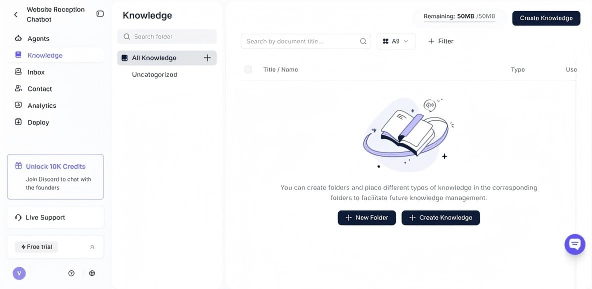
After-hours leads no longer fall to voicemail. Every buyer who inquires at 9pm gets an immediate response, qualification, and a confirmed booking for a showing within minutes.
Step 5: Send Confirmation and Pre-Showing Information
Once a showing is booked, send a confirmation immediately via the buyer's preferred channel (text + email is the baseline). The confirmation should include:
- Property address with a map link
- Showing time and date confirmed
- Agent's contact information
- What to bring: photo ID, pre-approval letter (if required by seller's agent)
- Any access notes: gate codes, parking, pets in the home
Also send a 24-hour reminder the day before. ShowingTime and most scheduling platforms automate this if configured. Confirmation and reminder workflows reduce no-show rates — a showing that falls through after being scheduled wastes everyone's time and creates a rebooking task for the agent.
Step 6: Follow Up After the Showing Immediately
The showing is not the end of the flow — it's the transition point from prospect to active buyer. Follow up within 2 hours of the showing ending:
- "What did you think? Did it feel like a fit?"
- If yes: move directly to offer conversation
- If no: gather specific objections to refine the next showing criteria
- If uncertain: send 2–3 alternative properties that address the stated concerns
Agents who follow up within 2 hours are positioned ahead of those who wait. The buyer's emotional response is strongest immediately after a showing — that is when the decision is easiest to move forward.
Why the Flow Breaks Down (And How to Fix It)
Break point 1: Lead arrives in inbox, not CRMFix: Connect every lead source to the CRM via native integration or a tool like Zapier. A lead that requires manual entry will often sit unlogged.
Break point 2: No after-hours coverageFix: Use an AI receptionist or a team member on coverage rotation. Leads who inquire after 6pm are not less valuable — they're just more likely to book with whoever responds first.
Break point 3: Qualification happens in a separate call from bookingFix: Book the showing in the same qualification conversation. Introducing a second step ("I'll send you a calendar link") adds friction that causes drop-off.
Break point 4: No confirmation or reminder sentFix: Automate both. Every booked showing should trigger an automatic confirmation text + email, and a reminder 24 hours before.
Break point 5: Post-showing follow-up is delayedFix: Follow up within 2 hours. Build it into your daily workflow or automate a follow-up message through your CRM.
From Lead to Showing: How AI Closes the Gaps
The buyer lead to showing booking flow is fundamentally an information and timing problem. Buyers want to know: "Is this property available? When can I see it? What do I need to bring?" These questions have known answers — they just need to reach the right person (or AI) fast enough.
An AI receptionist like Solvea fills the gaps in the flow that manual processes can't cover: after-hours calls, simultaneous inquiries from multiple leads, and rapid qualification without agent involvement. You set up the flow once — qualification criteria, available showing windows, confirmation messaging — and the AI executes it reliably for every buyer who makes contact.
Your AI Receptionist, Live in Minutes.
Scale your front desk with an AI that never sleeps. Solvea handles unlimited multi-channel inquiries, books appointments into your calendar automatically, and ensures zero missed opportunities around the clock.
FAQ
How quickly should you respond to a buyer lead?Under 5 minutes for phone and platform leads (Zillow, Realtor.com); under 15 minutes for web form submissions; under 1 hour for social media DMs. Response speed is the primary variable in lead conversion — every hour of delay reduces contact probability significantly.
Should you qualify a buyer before booking a showing?Yes, briefly. A 3–5 question qualification — timeline, financing status, property criteria — takes 2–3 minutes and prevents wasted showings with buyers who aren't ready or aren't a fit. You don't need a full buyer consultation before booking an initial showing.
What if a buyer lead comes in after hours?Have a defined after-hours response path. Options include: AI receptionist that qualifies and books automatically, a team member on coverage, or a scheduled callback message that sets expectations. Voicemail without a clear next step often results in the buyer not following up.
How do you reduce no-shows for booked showings?Send a confirmation immediately after booking and a reminder 24 hours before. ShowingTime and most scheduling platforms automate both. Direct text reminders have higher open and response rates than email reminders for same-day or next-day appointments.
What information should I send a buyer before their first showing?Property address with map link, showing time, your contact information, what to bring (ID, pre-approval letter if needed), and any access notes (gate codes, pets, parking). Complete pre-showing information reduces confusion and no-show risk.
Can an AI handle the complete buyer lead to showing booking flow?An AI can handle the inbound communication, qualification, and booking confirmation steps — particularly for after-hours leads and simultaneous inquiry volume. The showing itself and the post-showing conversation are still best handled by the agent. Tools like Solvea are designed specifically for this qualification and booking workflow.