According to MarketsandMarkets report, the global AI assistant market is projected to grow from USD 3.35 billion in 2025 to USD 21.11 billion by 2030, achieving an impressive 44.5% CAGR. This rapid growth reflects one clear reality: AI assistants are now widely adopted across industries and have proven their effectiveness in real business scenarios.
Today, AI assistants are used to manage customer conversations, qualify leads, schedule meetings, automate workflows, and handle both chat and voice interactions. Companies are leveraging them to reduce operational costs, improve response times, and create scalable 24/7 digital experiences. What was once considered experimental technology has become a practical, results-driven business tool.
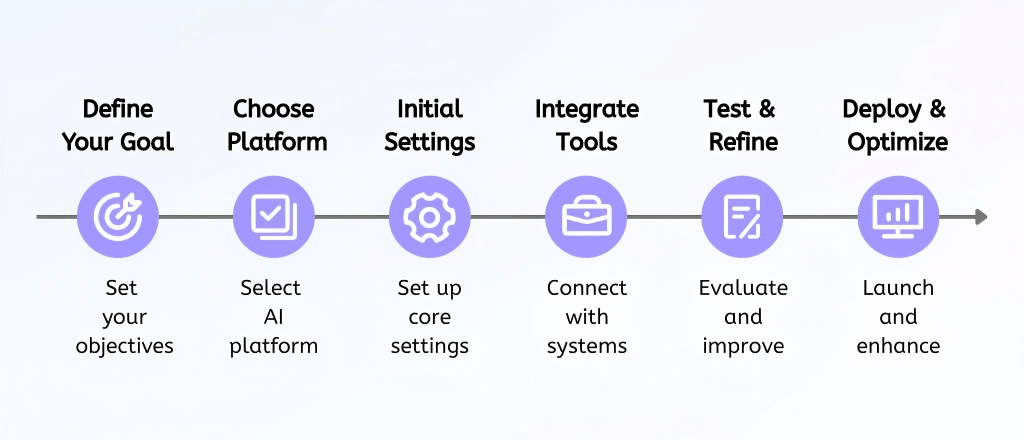
This comprehensive guide is designed to demystify the process of creating an AI assistant, offering a clear step-by-step methodology — from defining your strategic objectives to deployment and continuous optimization — so you can build an intelligent agent that delivers measurable business impact.
TL;DR: Quick Guide to Building Your AI Assistant
How to Create an AI Assistant Without Coding?
Step 1: Strategically Defining Your AI Assistant's Objectives
Before embarking on the selection of technological tools or the intricate configuration of workflows, it is necessary to precisely articulate the core purpose and expected outcomes of your AI agent. This foundational step involves answering several critical questions to ensure that the assistant's design and functionality are perfectly aligned with your overarching business strategy.
- What is the assistant’s primary purpose? This question delves into the fundamental role the AI will play within your organization. Is it intended for enhancing customer support by answering frequently asked questions, streamlining sales processes through lead qualification, managing booking and scheduling appointments, or automating internal operations to boost efficiency?
- What measurable outcome do you expect? Defining quantifiable metrics is crucial for evaluating the AI assistant's success. This could include improving the lead conversion rate, increasing the booking rate, reducing customer service resolution times, or enhancing employee productivity. Ground new teammates by sharing the AI virtual assistant primer when you explain why assistants must ladder up to specific KPIs.
- Who will interact with it? Understanding your target audience—whether they are external customers, potential prospects, or internal employees—will inform the assistant's tone, language, and interaction style.
- Will it operate via chat, voice, or both? The chosen communication channel dictates the technical requirements and user experience design. Some tasks are better suited for text-based interactions, while others benefit significantly from the immediacy and personalization of voice.
A well-defined goal serves as the blueprint for your AI assistant, ensuring that its underlying logic, conversational flows, and system integrations are meticulously crafted to achieve tangible business results, rather than merely facilitating conversations without strategic impact.
Step 2: Selecting the Optimal AI Assistant Platform
Once the strategic objectives for your AI assistant are unequivocally clear, the next pivotal step involves selecting a technological platform that not only meets your functional requirements but also aligns with your organization's technical capabilities and resource availability. The market offers a spectrum of solutions, each catering to different levels of complexity and technical expertise.
AI assistant platforms usually include chatbot builders, developer frameworkers and AI agent platforms.
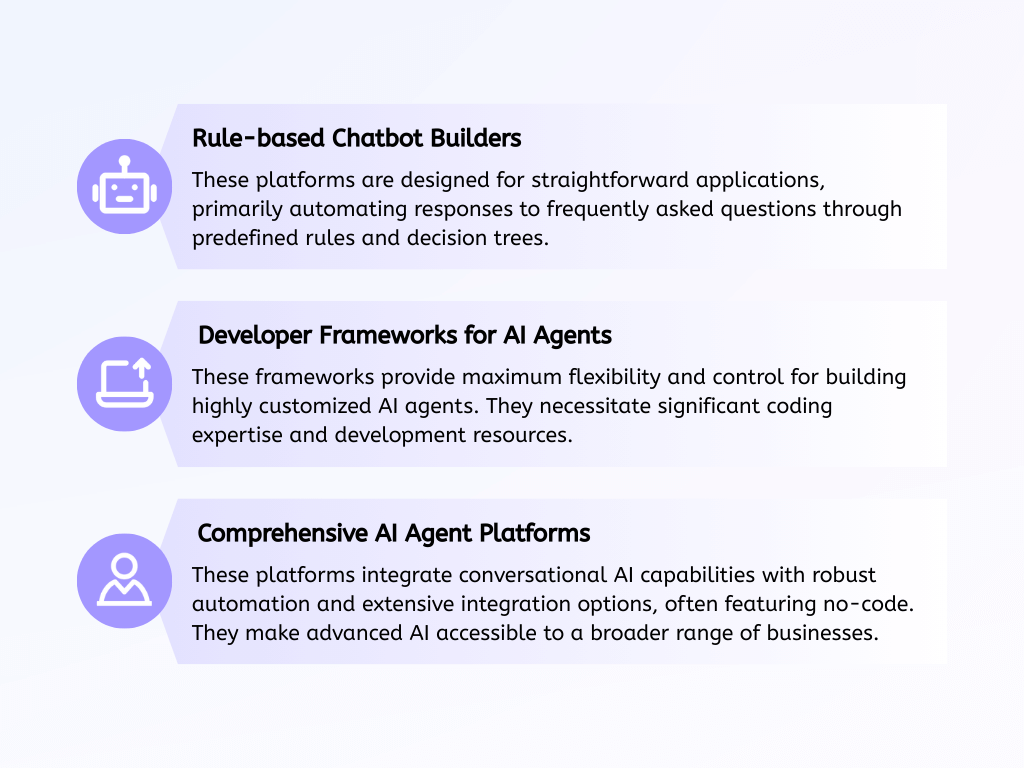
When evaluating vendors, stack your shortlist against the best no-code agent builders breakdown. The judicious selection of the right platform is a critical determinant of your AI assistant's long-term scalability, adaptability, and its ultimate readiness to drive meaningful automation within your enterprise.
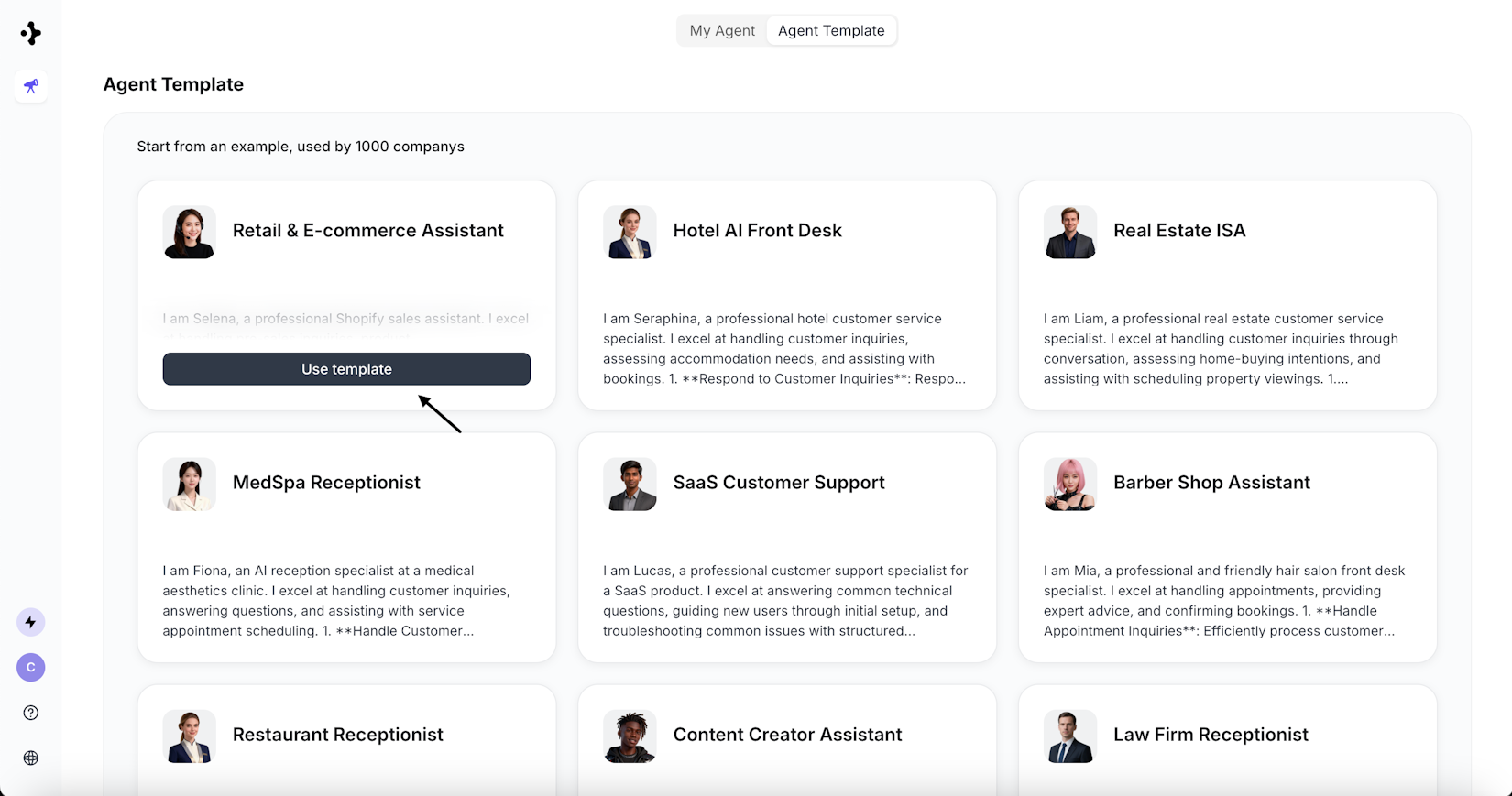
For businesses that demand a harmonious blend of intelligent, context-aware responses and the capacity for structured workflow execution, platforms such as Solvea emerge as a leading choice. Solvea provides an intuitive, no-code environment specifically engineered for building sophisticated AI agents equipped with both chat and voice interaction capabilities. Examples of its specialized templates include a Retail Customer Specialist, a Real Estate Broker, or a Hotel AI Front Desk agent.
Step 3: Configuring the Foundational Elements of Your Agent
With your chosen AI assistant platform in place, the subsequent phase focuses on configuring the foundational elements that will define your agent's identity, behavior, and operational parameters. This initial setup transforms your abstract concept into a tangible, functional AI entity.
Using Solvea as a prime example, the configuration process is streamlined and user-friendly:
Initiating Agent Creation: Solvea offers two primary pathways to create a new agent.
You can leverage its innovative Vibe Coding Builder by simply describing your desired agent's goal and functions in natural language, allowing the AI to construct the initial framework.
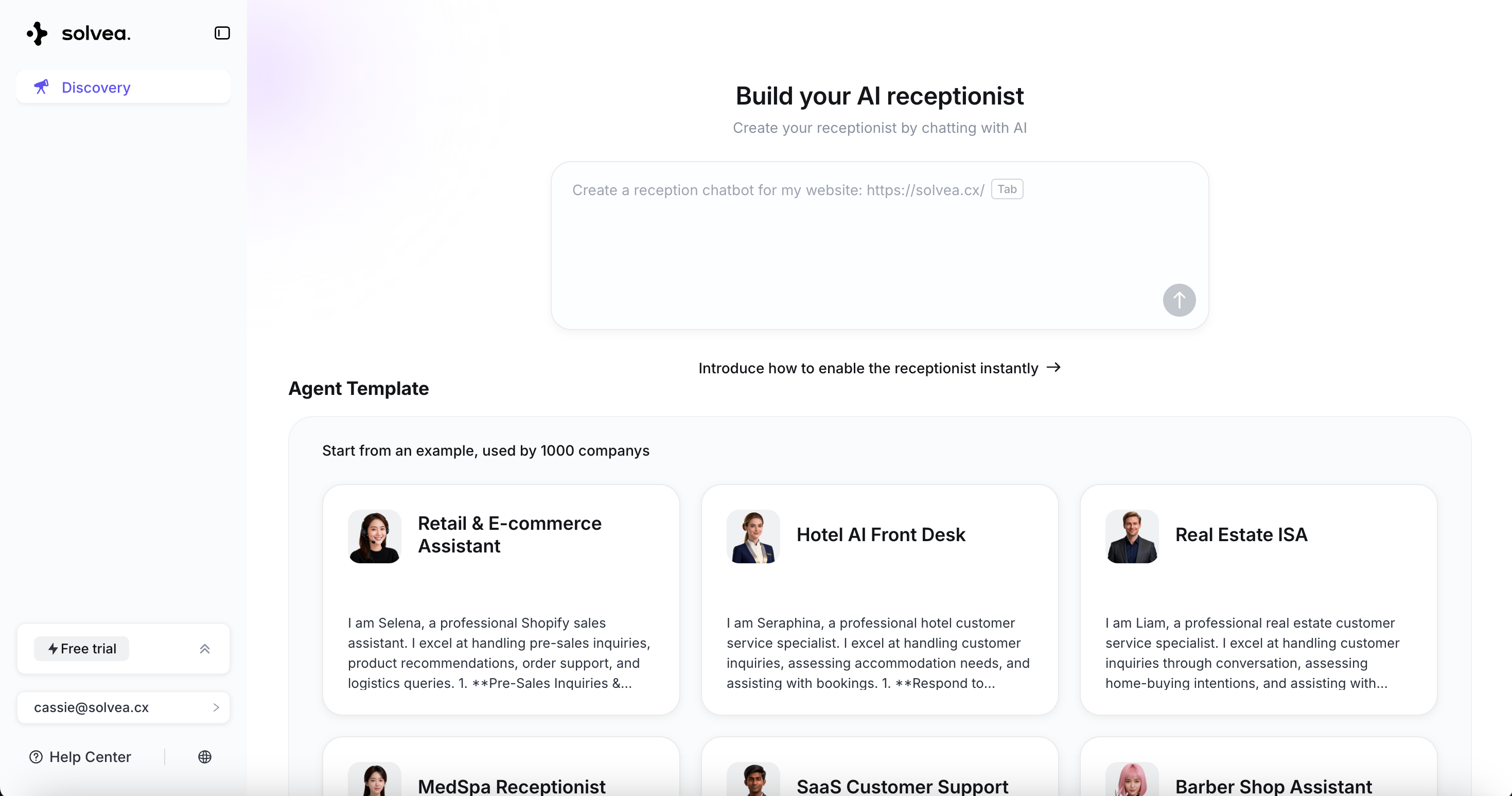
Alternatively, for common use cases, you can select from a diverse range of pre-built templates that provide a robust starting point, significantly reducing setup time.
Defining the Agent’s Role and Identity: This crucial step involves personalizing your AI assistant. You will set the agent's name and upload a distinctive avatar, which helps establish its brand identity. Concurrently, you will configure its communication channels, enabling it to interact effectively via voice, chat, and email, ensuring omnichannel presence.
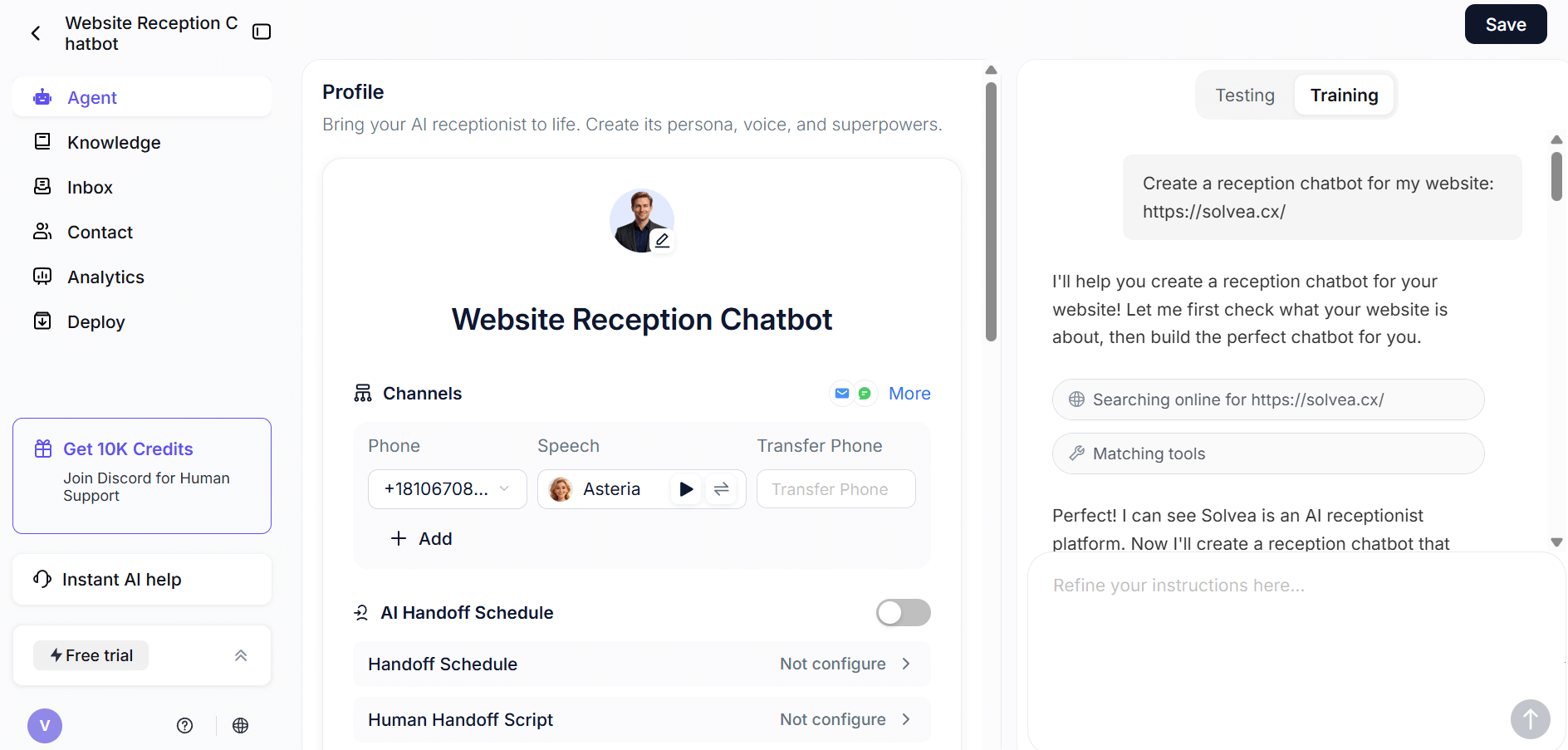
Crafting Engaging Greeting Messages and Communication Style: The initial interaction sets the tone for the user experience. You will customize the opening messages for both voice calls and chat conversations, ensuring they are welcoming and on-brand. Additionally, you will define the agent's overall communication style, dictating its formality, empathy, and responsiveness.
Establishing Core Conversational Behavior: This is where you lay the groundwork for how the assistant will process information and respond. By defining its basic conversational behavior, you instruct the system on how the agent should think, speak, and operate at a foundational level. Based on your input, Solvea’s system intelligently generates an initial structured agent framework, translating your conceptual requirements into a functional AI agent.
This meticulous configuration process is pivotal, as it transforms your strategic vision into a tangible, functional AI agent, ready to be imbued with knowledge and integrated into your operational ecosystem.
Step 4: Enriching the AI Assistant with Knowledge and Integrations
With the foundational structure of your AI assistant firmly established, the next critical phase involves significantly enhancing its intelligence and expanding its operational capabilities through the strategic addition of a comprehensive knowledge base and seamless integrations with your existing systems. This step empowers the AI to move beyond basic interactions and perform meaningful, data-driven tasks.
1.Building a Robust Knowledge Base
To ensure your AI assistant provides accurate, relevant, and consistent information, it must be grounded in your specific business data.
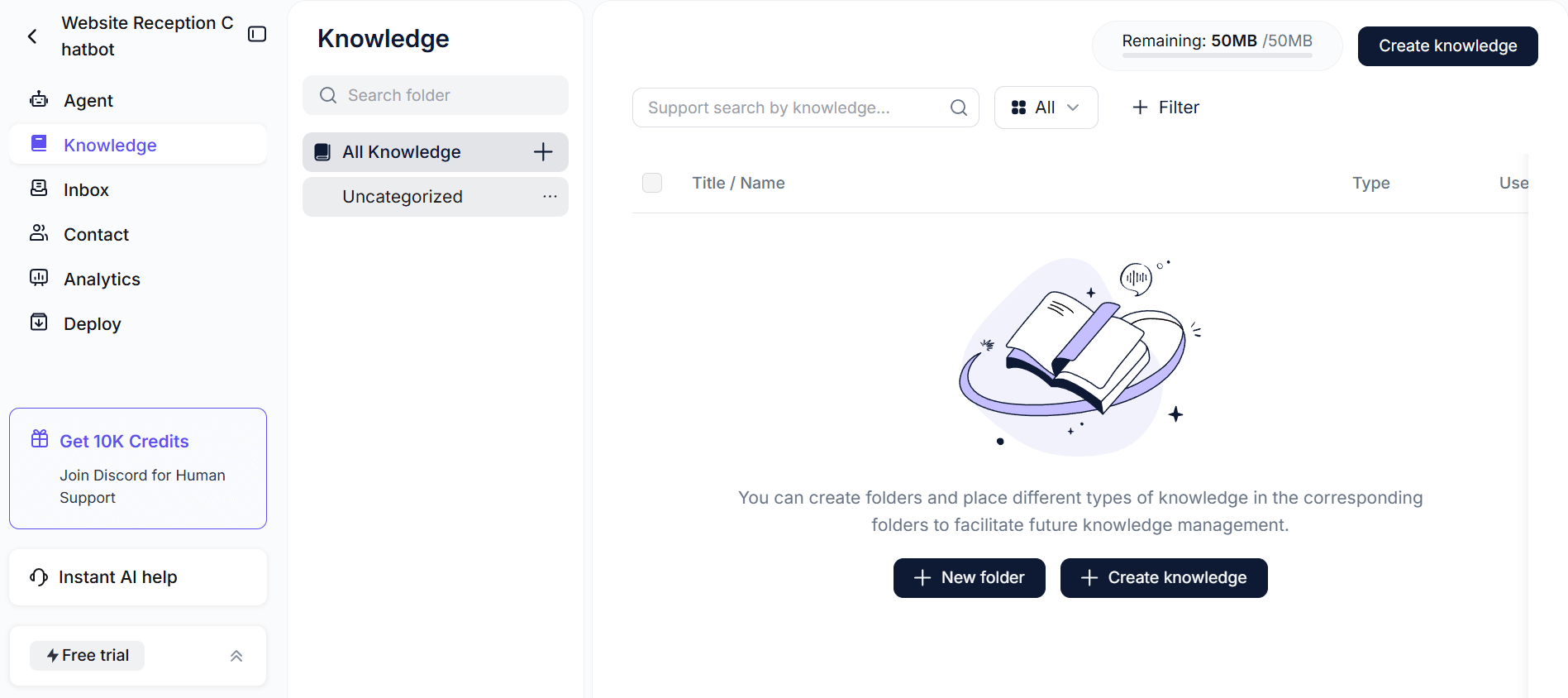
This involves curating and integrating various forms of information:
- Uploading Diverse Documents: Incorporate essential business documents such as product manuals, service guides, internal policies, and training materials. Solvea supports the upload of various formats, including PDFs and text files, allowing for a rich and varied information repository.
- Integrating Website Content: For businesses with extensive online resources, Solvea offers a powerful feature to add website URLs. The platform can automatically extract and process content from specified webpages, seamlessly integrating it into the agent’s knowledge base. This ensures the AI is always up-to-date with your public-facing information.
- Providing Structured Data: Beyond unstructured documents, supply the AI with structured information like Frequently Asked Questions (FAQs), detailed product descriptions, comprehensive service details, and pricing information. This direct input ensures that the AI’s responses are based on verified, authoritative business data, preventing reliance on generic or potentially inaccurate model outputs.
By systematically building out this knowledge base, you equip your AI assistant with the specific context required to understand complex queries and deliver precise, brand-aligned answers.
2.Seamless System Integrations
An AI assistant’s true power is unleashed when it can interact with and trigger actions within your operational systems.
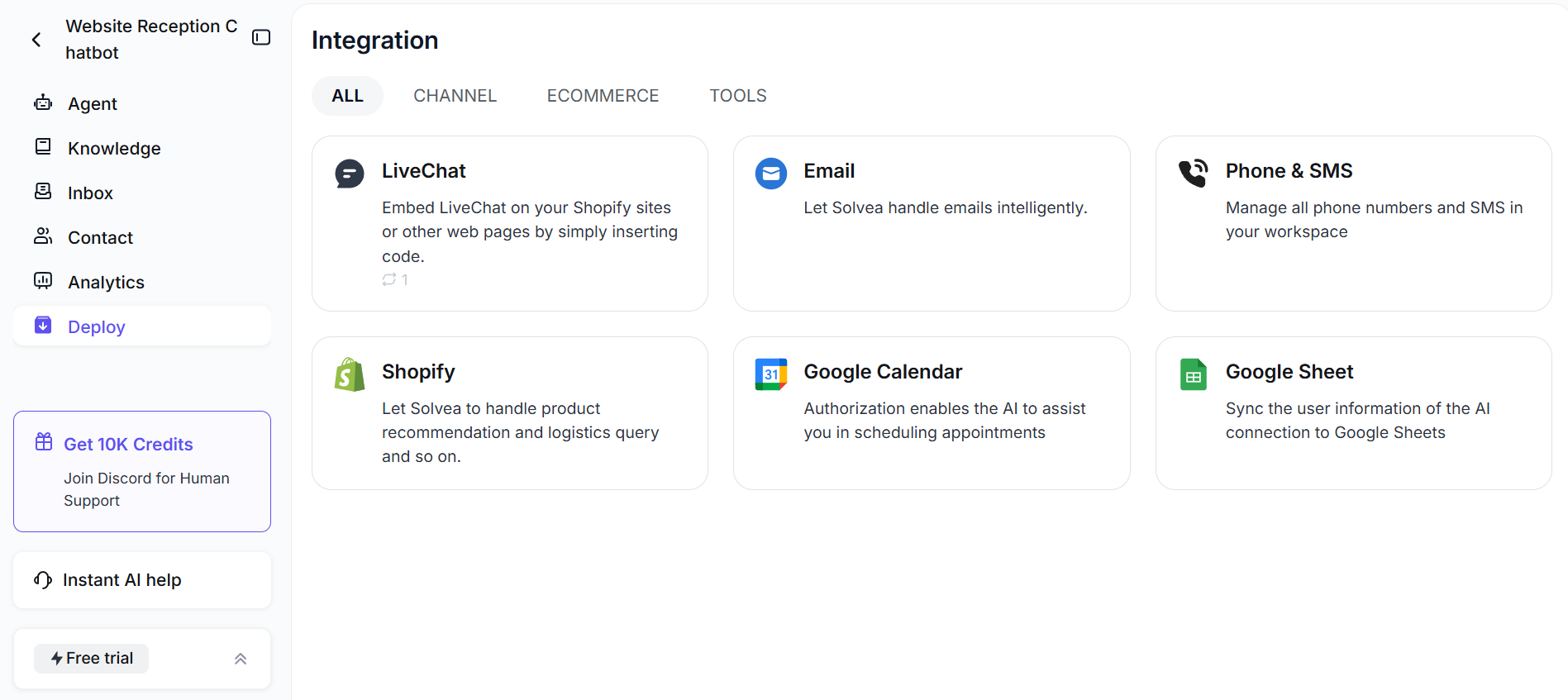
Integrating the assistant with external platforms allows it to move beyond mere conversation and actively execute real-world tasks:
- CRM Platforms: Connect your AI assistant to Customer Relationship Management (CRM) systems to automatically create new leads, update customer records, log interactions, and retrieve relevant customer history during conversations. This integration streamlines sales and support workflows.
- Calendar Scheduling Tools: For businesses that rely on appointments, integrating with calendar tools is indispensable. Solvea, for instance, supports direct integration with services like Google Calendar, enabling the AI to check availability, create new appointments, modify existing ones, and even cancel events based on user requests.
- Automation Triggers and Actions: Configure the AI assistant to initiate specific automation workflows in response to user input or predefined conditions. This could involve triggering email sequences, sending internal notifications, or updating project management tools.
- Webhooks or API Connections: For highly customized needs, Solvea provides robust support for webhooks and API connections. This allows for integration with virtually any third-party service or internal system. Solvea specifically offers tools for various functions, including logistics inquiries (e.g., tracking order status), interacting with Google Sheets (for data retrieval and entry), sending automated emails, and comprehensive integration with Shopify for e-commerce operations (e.g., retrieving order details, tracking numbers).
Through these strategic integrations, your AI assistant transforms into a proactive digital employee, capable of executing tasks, updating records, and streamlining operations, thereby significantly enhancing efficiency and user experience.
Step 5: Rigorous Testing and Iterative Refinement
Before deploying any AI assistant to a live environment, comprehensive and rigorous testing is an absolutely essential phase. This critical step ensures that the AI agent performs as expected, aligns with its defined objectives, and delivers a seamless user experience. Solvea provides a dedicated Playground environment directly on the Agent page, specifically designed for thorough testing and continuous training.
Within this testing environment, you should systematically:
- Simulate Real User Conversations: Engage with your AI assistant as a typical user would. Solvea offers options for both Voice Test and Chat Test, allowing you to evaluate its performance across different communication modalities. This simulation helps identify how the AI interprets natural language and responds in various scenarios.
- Explore Diverse Question Types and Edge Cases: Go beyond common queries. Test the AI with ambiguous questions, out-of-scope requests, complex multi-turn conversations, and even intentionally challenging or unusual inputs. This helps uncover potential weaknesses in its understanding and response generation.
- Evaluate Response Accuracy, Relevance, and Tone: Critically assess the quality of the AI’s output. Key evaluation criteria include: Accuracy (Are the facts correct?), Relevance (Does the response directly address the user’s query and maintain context?), Completeness (Does the AI follow all defined steps and complete the intended workflow?), and Tone (Does the AI’s communication style align with your brand guidelines and desired persona?).
- Confirm Workflow Triggers Function Correctly: If your AI assistant is integrated with external systems or designed to trigger specific actions, meticulously verify that these workflows are initiated accurately and complete their intended functions without errors.
It is imperative to understand that AI assistants are not static creations; they improve significantly through continuous iteration. This rigorous cycle of testing and refinement is what ensures a strong alignment between your initially defined goals and the AI assistant’s real-world performance, leading to a truly effective and reliable solution.
Step 6: Strategic Deployment and Continuous Optimization
Upon successful completion of thorough testing and refinement, the AI assistant is ready for strategic deployment. This phase involves making your AI agent accessible to its intended audience and establishing mechanisms for ongoing performance monitoring and optimization. Deployment is not the culmination of the process but rather the commencement of a continuous journey of improvement.
Deployment strategies can vary depending on the chosen communication channels and integration points:
- Embedding a Chat Widget on Your Website: For web-based interactions, the AI assistant can be seamlessly integrated as a chat widget, providing instant support and engagement for website visitors.
- Activating Voice Channels: If your AI assistant is designed for voice interactions, this step involves activating and configuring phone numbers, ensuring it can handle inbound and outbound calls effectively.
- Connecting Communication Platforms: Integrate the AI with popular messaging platforms (e.g., WhatsApp, Facebook Messenger) or internal communication tools (e.g., Slack, Microsoft Teams) to reach users where they are.
- Enabling CRM and Scheduling Workflows: Ensure all previously configured integrations with CRM systems, calendar tools, and other operational platforms are fully activated and functioning in the live environment.
Once the AI assistant is live, continuous monitoring is paramount to gauge its effectiveness and identify areas for further enhancement.
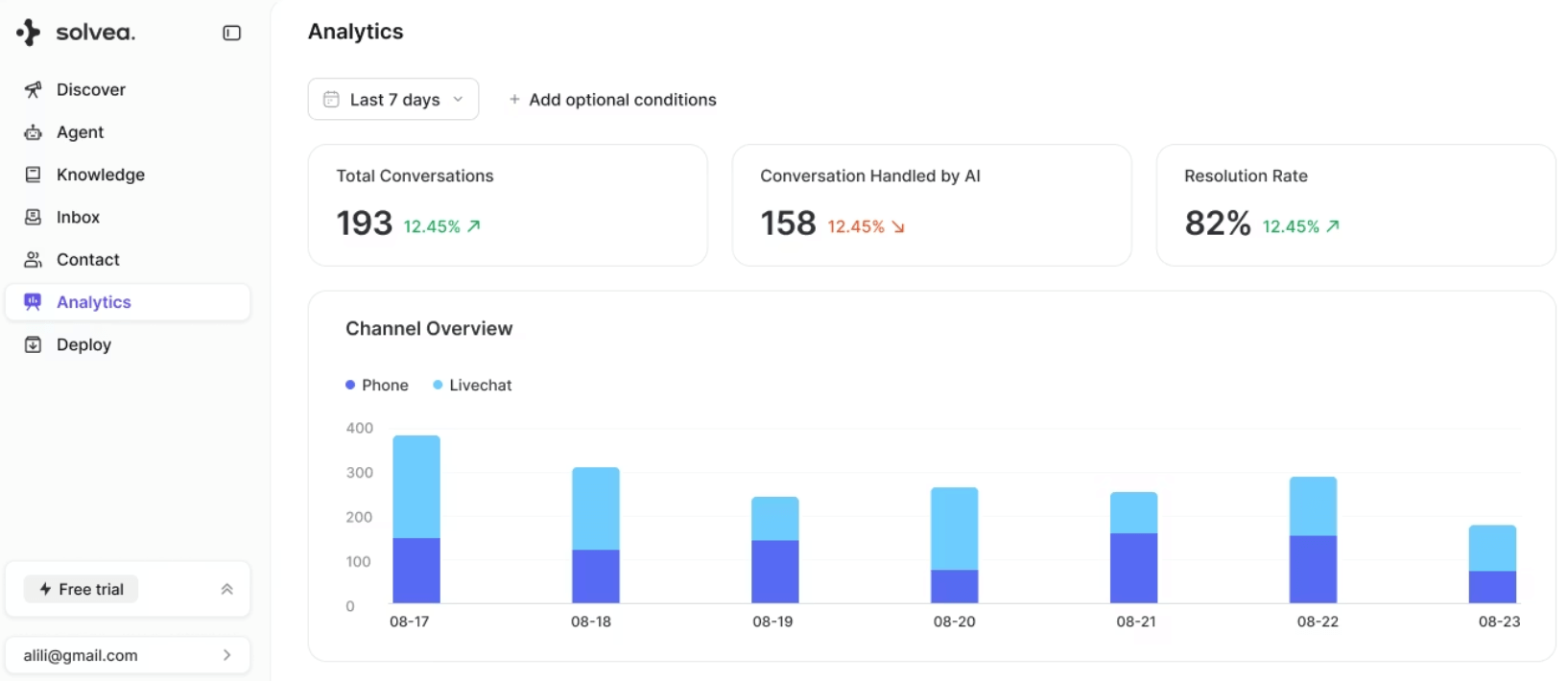
Deployment marks the beginning of an iterative optimization cycle. By continuously analyzing performance data and user feedback, businesses can make informed adjustments to the AI’s knowledge base, conversational flows, and integration logic, ensuring the assistant evolves to meet changing business needs and user expectations, thereby maximizing its long-term value.
Why Choose Solvea to Power Your AI Assistant?
Solvea stands out as a comprehensive and intuitive platform designed to empower businesses in building AI assistants that seamlessly blend intelligent conversation with robust, structured automation. It addresses the complexities of AI development by offering a streamlined, no-code environment that accelerates deployment and enhances operational efficiency.
Key capabilities and advantages of the Solvea platform include:
- AI-Driven Agent Creation with No-code: Solvea’s innovative Vibe Coding Builder allows users to describe their business needs in plain, natural language. The platform’s AI then intelligently generates the agent’s core functionalities, roles, and behaviors, significantly simplifying the initial setup process.
- Template-Based Starting Points: To further expedite development, Solvea provides a rich library of pre-built templates tailored for a wide array of common business scenarios. These templates offer robust starting configurations for various industries and use cases, enabling rapid deployment and customization.
- Extensive Workflow Automation and Integrations: Solvea is engineered for deep integration with your existing business ecosystem. It supports connections with critical systems such as CRM platforms, calendar scheduling tools (e.g., Google Calendar), and offers specialized tools for logistics inquiries, Google Sheets, automated email sending, and Shopify integration. These integrations enable the AI assistant to perform real tasks and automate complex workflows.
- Comprehensive Support for Both Chat and Voice Channels: Recognizing the importance of omnichannel presence, Solvea provides robust support for both text-based chat and voice interactions. Users can easily configure phone numbers, select preferred languages, and customize voice profiles directly within the platform, ensuring a consistent and high-quality user experience across all touchpoints.
In essence, Solvea eliminates the need to manage multiple disconnected tools and platforms. It centralizes the entire AI assistant lifecycle, from initial setup and configuration to deployment and ongoing optimization, providing a holistic solution for modern businesses seeking to leverage the full potential of AI.
Your AI Receptionist, Live in Minutes.
Scale your front desk with an AI that never sleeps. Solvea handles unlimited multi-channel inquiries, books appointments into your calendar automatically, and ensures zero missed opportunities around the clock.
Conclusion
Creating an AI assistant in today’s competitive business environment extends far beyond merely enabling conversational chat functionalities. It represents a strategic endeavor to design and implement a sophisticated, structured system that intelligently connects user interactions with tangible business execution. By following a methodical framework, organizations can harness the transformative power of AI to achieve measurable results and gain a significant competitive advantage.
By diligently adhering to the structured framework outlined in this guide—from defining clear objectives and selecting the optimal platform to configuring foundational elements, enriching with knowledge and integrations, rigorous testing, and continuous optimization—businesses are well-positioned to develop scalable, automation-driven AI assistants. These intelligent agents not only enhance operational efficiency but also deliver significant, quantifiable results, ultimately driving growth and innovation.
Frequently Asked Questions (FAQ)
1. What is an AI assistant, and how does it differ from a traditional chatbot?
An AI assistant is an intelligent system that understands natural language, manages conversations, and executes real business tasks. Unlike traditional rule-based chatbots that follow fixed scripts, AI assistants can respond dynamically, handle context, and integrate with tools like CRMs or calendars. In short, chatbots answer questions; AI assistants automate work.
2. How to create an AI assistant without coding?
To create an AI assistant without coding, follow six steps: define your goal, choose a no-code platform like Solvea, configure the agent, add knowledge and integrations, test thoroughly, and deploy. Modern platforms allow you to describe your needs in plain language instead of writing code. The process is structured but accessible to non-technical users.
3. What should I consider when choosing an AI assistant platform?
Focus on ease of use, automation capability, integration support, channel flexibility (chat and voice), and scalability. The right platform should not only generate responses but also execute workflows. A unified no-code system like Solvea simplifies long-term management and growth.
4. Do I need a technical background to create an AI assistant?
No. With no-code AI agent platforms, you can build and deploy assistants without programming skills. You only need clear business goals and process understanding. The platform handles the technical complexity behind the scenes.
5. Is an AI assistant suitable for small businesses?
Yes. AI assistants help small businesses automate lead qualification, customer support, and scheduling without hiring additional staff. They provide 24/7 engagement while reducing operational costs. With no-code tools like Solvea, implementation is fast and affordable.