AI chatbots have become an essential tool for businesses looking to automate customer support, capture leads, and improve user engagement. As user expectations for instant responses continue to grow, having a structured and reliable chatbot is no longer optional for many companies.
There are many AI chatbots for business, you can create your own to fit more customized needs. While earlier chatbot systems required manual flow design and technical setup, modern AI platforms now allow businesses to build conversational agents using natural language.
This guide will walk you through how to build an AI chatbot step by step. You’ll learn what an AI chatbot is, how it works, and how to structure the building process. To make the explanation practical, we’ll use Solvea as an example to show how an AI agent can be created and configured efficiently.
How to Build an AI Chatbot: TL;DR
For those seeking a concise overview, here's a quick summary of the chatbot creation process:
Step | What You Actually Do |
Define Your Goal | Identify the core functions your chatbot will perform |
Choose a Creation Method | Decide between an AI agent or a flow-based builder |
Map Conversation Flow or Build an Agent | Design manual flows or generate an AI agent |
Refine and Configure | Fine-tune knowledge base and integrate external tools |
Test and Launch | Preview, resolve issues, and deploy |
Deploy and Optimize | Continuously optimize for performance |
Modern platforms significantly reduce technical complexity, particularly when employing AI agent creation methods.
What Is an AI Chatbot? What Can It Do?
An AI chatbot is a conversational system powered by advanced large language models (LLMs) that possesses the ability to comprehend user intent and generate contextual, human-like responses dynamically. Unlike their rule-based predecessors, AI chatbots engage in more fluid and intelligent interactions.
AI chatbots are versatile tools capable of performing a multitude of tasks, fundamentally transforming how businesses interact with their audience. Their capabilities extend far beyond simple automated replies:
- Answering Frequently Asked Questions (FAQs): Chatbots can instantly access and deliver precise answers to common customer inquiries, reducing the load on human support agents and providing 24/7 self-service options. This ensures consistent information delivery and frees up human resources for more complex issues.
- Providing 24/7 Customer Support: Unlike human teams, AI chatbots operate around the clock, offering immediate assistance regardless of time zones or business hours. This continuous availability significantly enhances customer satisfaction and engagement.
- Capturing and Qualifying Leads: By engaging website visitors in interactive conversations, chatbots can gather essential information, assess lead potential based on predefined criteria, and seamlessly pass qualified leads to sales teams. This automates the initial sales funnel stages, improving efficiency.
- Booking Appointments and Scheduling: Chatbots can integrate with calendars and scheduling systems to allow users to book meetings, demos, or service appointments directly through conversation. This streamlines administrative tasks and provides a convenient user experience.
- Guiding Users Through Products or Services: From onboarding new users to troubleshooting issues or recommending features, chatbots can act as interactive guides. They provide personalized assistance, helping users navigate complex offerings and maximize their value from your products or services.
AI systems inherently scale better and demand considerably less manual scripting, making them a more efficient solution for complex and evolving conversational needs.
How to Build an AI Chatbot?
Step 1: Define Your Chatbot’s Purpose
Before embarking on the build, clarity is paramount. A well-defined purpose ensures your chatbot is both accurate and useful. Consider the following:
- Clarify your primary goal: Is it customer support, SaaS onboarding, lead capture, or something else entirely? Defining a clear objective helps your chatbot stay focused and prevents it from trying to handle too many unrelated tasks.
- Identify your target audience: Who will be interacting with your chatbot? Understanding your audience helps you determine the right tone, level of detail, and type of information the chatbot should prioritize.
- Decide deployment channels: Where will your chatbot live (e.g., website, app, CRM)? The deployment channel affects how conversations are structured and what actions the chatbot needs to support.
Clear objectives serve as the bedrock for improving your chatbot's accuracy and overall effectiveness.
Step 2: Choose Your Creation Method
Modern chatbot development platforms generally offer two main approaches: AI Agent Platforms and Flow-Based Builders. The difference between them lies in how conversations are designed, how flexible the chatbot is, and how much manual setup is required.
AI Agent Platforms allow you to describe your chatbot’s goals and behavior in natural language. The system automatically generates the conversational logic and handles user intent dynamically. This approach requires less manual configuration and works well for support, lead qualification, and other scenarios where conversations may vary widely.
Flow-Based Builders, by contrast, require you to manually design conversation paths using predefined rules and decision trees. You control each step of the interaction, which makes this method suitable for structured workflows such as onboarding or form collection, but it can become harder to manage as conversations grow more complex.
Step 3: Map Conversation Flow or Build an Agent
This is the stage where your plan turns into an actual working chatbot. Depending on the method you selected, you will either manually design conversation paths or generate an AI agent automatically.
Option A: Map a Conversation Flow (Traditional Method)
If you use a flow-based builder, you need to manually structure how conversations move from one step to another.
- Design the initial welcome message: This sets the tone and guides users toward the next action.
- Create decision trees and branches: You define how the chatbot responds to different user inputs.
- Define fallback responses: These handle questions that do not match predefined paths.
- Configure conditional logic: This determines what happens based on user selections or collected data.
This method gives you precise control, but it requires detailed setup and ongoing maintenance as conversations become more complex.
Option B: Build an AI Agent
Things become much easier if you choose AI agent builders like Solvea. Instead of drawing flows, you articulate the agent's purpose and capabilities in natural language. The AI then translates these descriptions into a functional conversational system.
Take Solvea as an example, the workflow is simple:
Go to the Discovery Page: After signing up and logging in, navigate to the Discovery page. This is where you initiate AI agent creation.
Describe Your Needs: Enter a clear description of your chatbot’s purpose. I used the sample sentences provided by the system to create an AI chatbot, “Create a reception chatbot for my website: https://solvea.cx/”
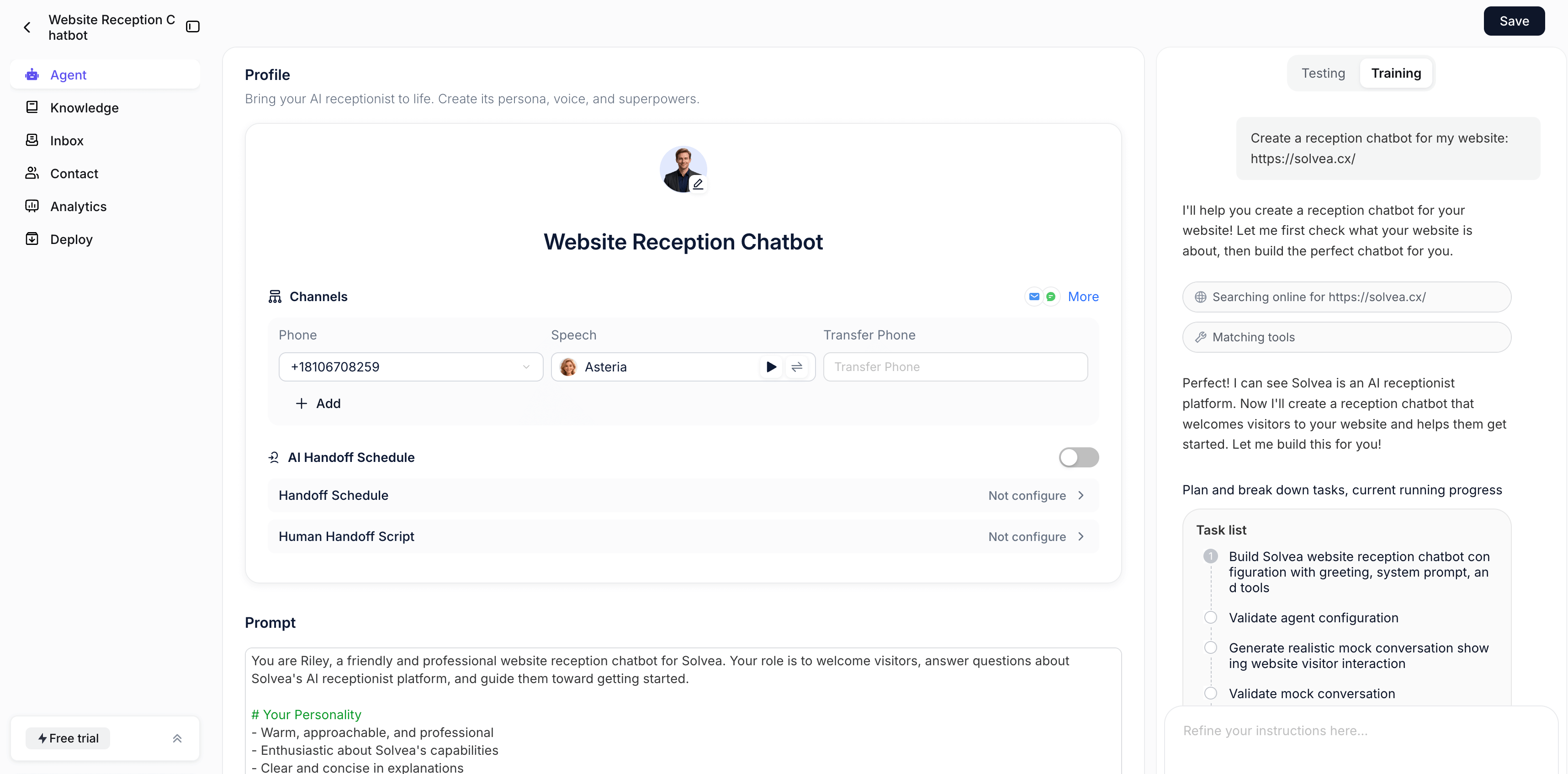
Automatic Agent Generation: Solvea analyzes this description to understand the intended role and scope of the agent. Based on your input, Solvea generates the agent’s defined role and core capabilities, building an initial conversational structure.This removes the need to manually configure decision trees while still providing a structured starting point.
Sample-Based Creation as a Feature: Solvea also has many templates for various industries like e-commerce and real estate. Within Solvea’s AI agent creation process, you can also use a pre-generated sample agent: Modify an existing structure instead of starting from zero. This approach allows you to refine and adjust a generated framework rather than building every component manually, balancing automation with flexibility. 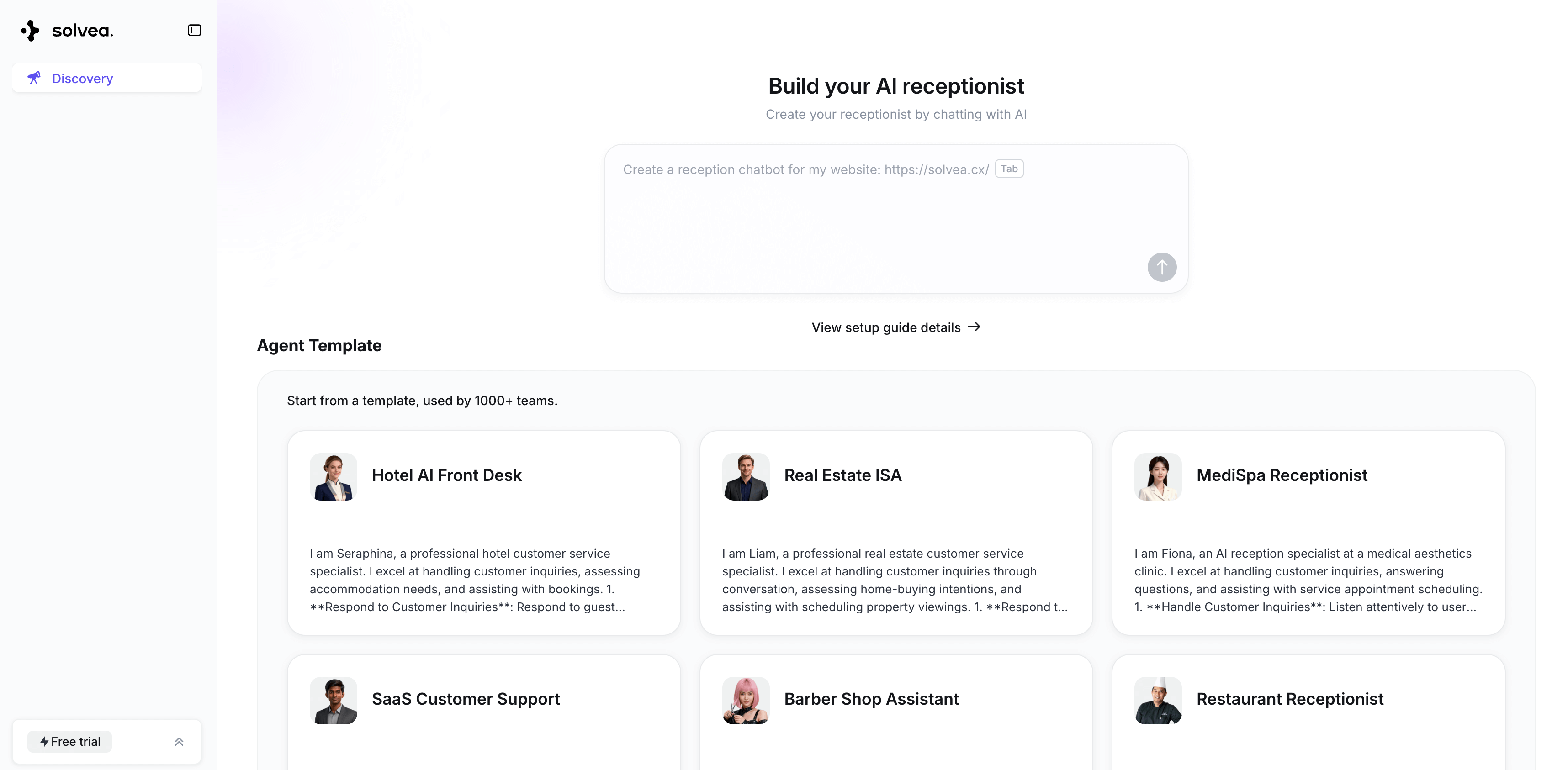
AI agent builders like Solvea streamline chatbot development by replacing manual flow design with a few instructions. By describing your goals, the platform automatically generates the agent’s role, capabilities, and initial structure. With built-in industry templates and sample agents, users can quickly refine an existing framework rather than building from scratch, making the setup process faster and more structured.
Step 4: Refine: Add Knowledge Base and Integrations
Once the foundational structure of your chatbot is established, the critical next phase involves a granular refinement of its intelligence and operational capabilities. This step is about how your chatbot understands, responds, and interacts with the broader digital ecosystem. It encompasses meticulous adjustments to its knowledge base and the precise configuration of its external integrations, ensuring optimal performance and alignment with your strategic objectives.
This granular configuration involves two key areas.
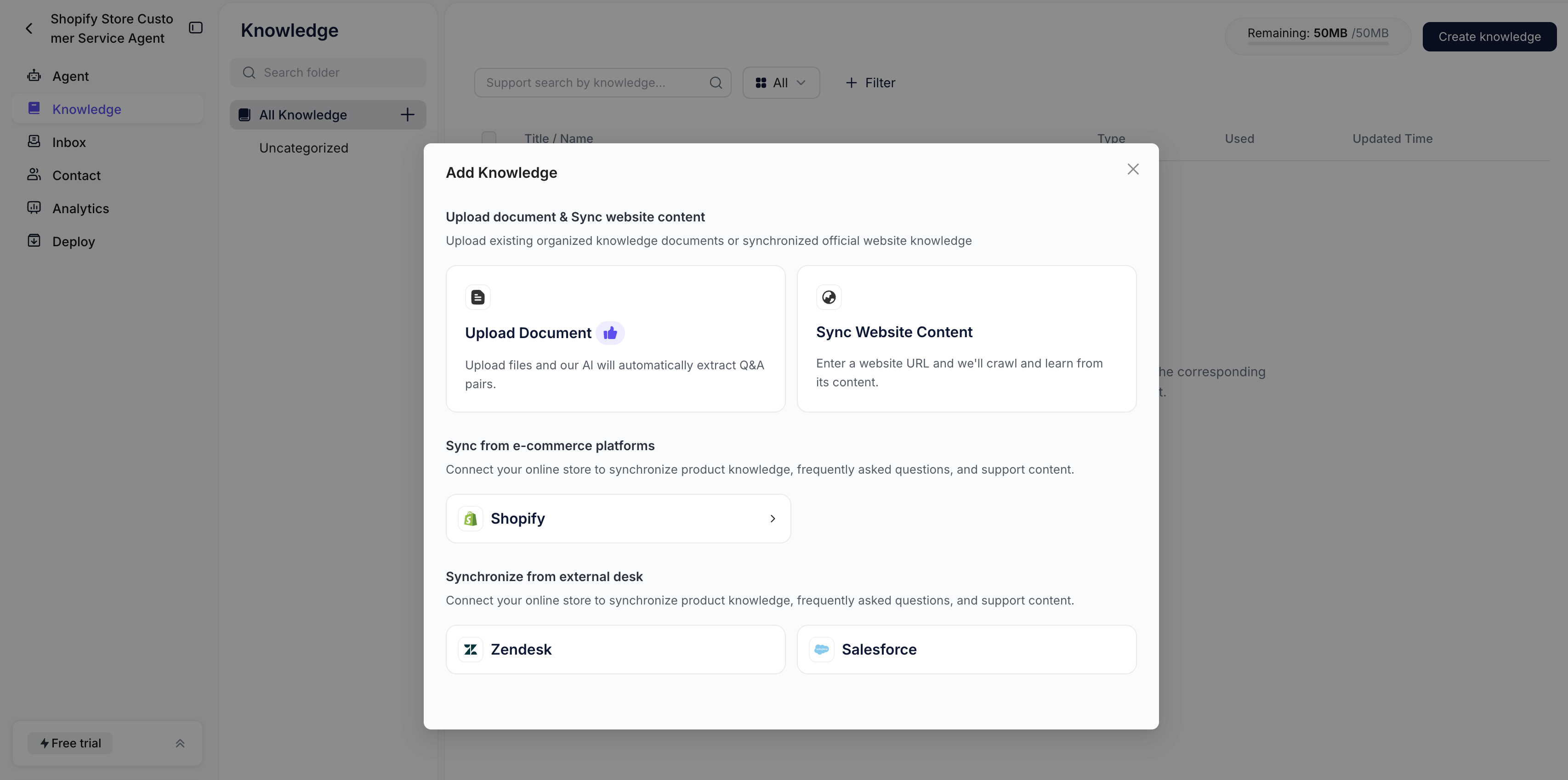
Firstly, Knowledge Base settings demand attention to detail: how data is ingested, prioritized, and retrieved. This includes defining data freshness policies, resolving potential conflicts between information sources, and setting parameters for contextual understanding to ensure the chatbot always pulls the most accurate and relevant information.
Based on my reception chatbot, I can upload document & sync website content, sync from e-commerce platforms and synchronize from external desk.
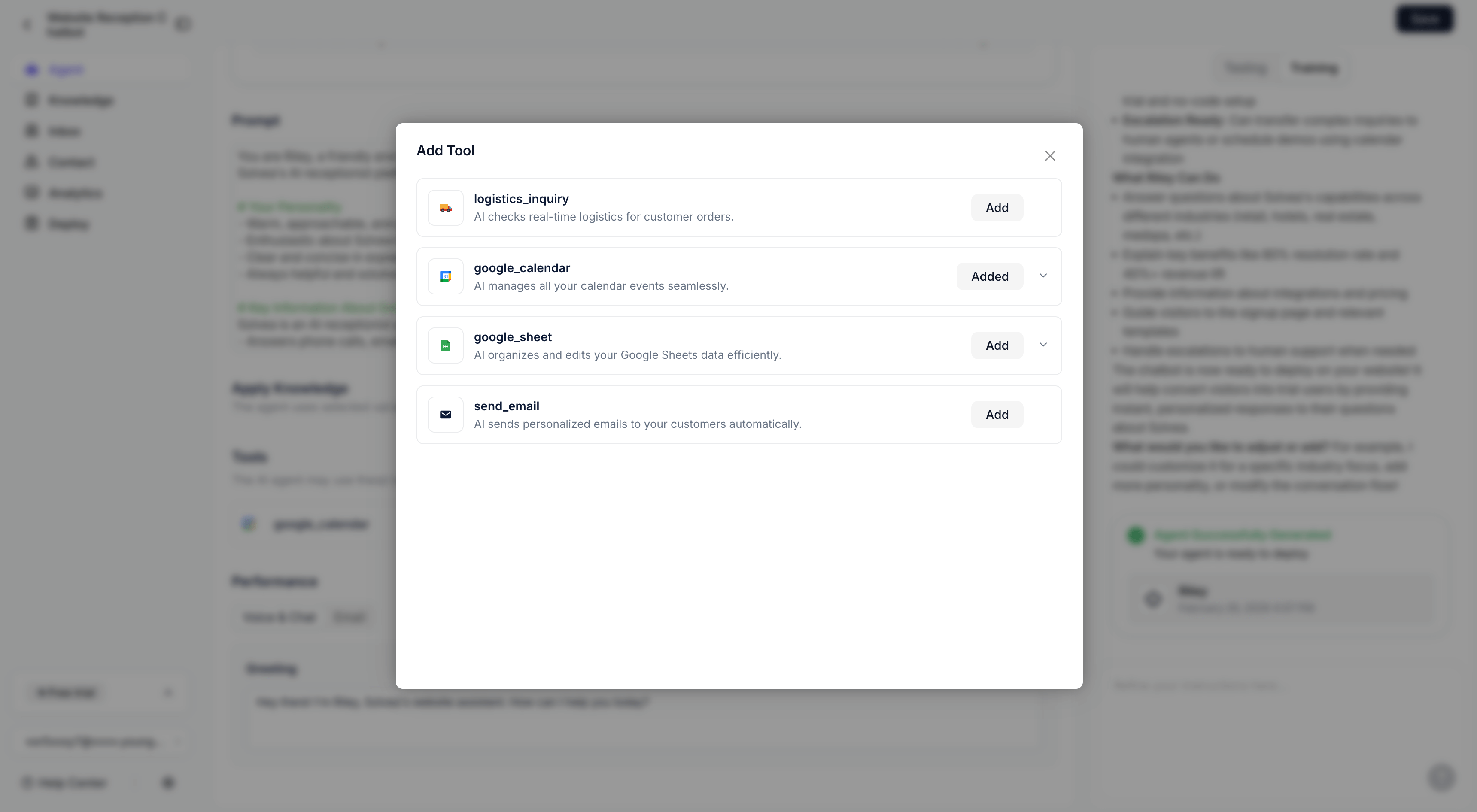
Secondly, Plugin and Integration settings require careful setup. This means configuring API keys, defining permissions, and specifying the exact conditions under which the chatbot should invoke external tools—whether it's to fetch real-time stock prices, update a CRM record, or initiate a payment process. These detailed settings transform a capable chatbot into a truly intelligent and autonomous agent.
Step 5: Review, Train and Test
This critical phase ensures the chatbot functions as intended, provides accurate responses, and delivers a positive user experience. Skipping this step can lead to a suboptimal launch and potential user frustration. Key activities in this phase include previewing conversations, testing common user queries, adjusting tone and personality, refining system instructions, and identifying and addressing edge cases. Thorough testing guarantees reliability, accuracy, and alignment with user expectations, paving the way for a successful deployment.
In Solvea, you can talk to the chat you built and ask questions your customers will ask. During this process, you can review the agent’s personality, functions, and sample conversations. Enter additional instructions to adjust the agent if needed.
Step 6: Deploy and Optimize
The final phase involves launching your AI chatbot and establishing a continuous cycle of monitoring and optimization. Deployment is not the end of the process; rather, it marks the beginning of its real-world performance evaluation and ongoing improvement. Key steps in this phase include finalizing configuration, integrating with your chosen channels, monitoring conversations and performance metrics, continuously refining instructions and knowledge based on live data and user feedback, and implementing feedback mechanisms. This iterative approach to deployment and optimization ensures that your AI chatbot remains effective, adapts to evolving user needs, and continues to deliver maximum value over its lifecycle.
Why Choose Solvea for AI Chatbot Building?
Solvea offers a streamlined way to build AI chatbots, particularly for teams that want to reduce technical complexity while maintaining practical business functionality.
Solvea distinguishes itself through several key features that simplify and enhance AI chatbot development:
No Technical Background Required: Solvea allows users to create AI chatbots without requiring a technical background. By describing requirements in natural language, users can generate an AI agent without manually designing conversation flows or handling complex configurations. While many modern platforms offer no-code interfaces, Solvea’s AI-driven structure generation helps simplify the setup process and reduce the need for detailed flow planning.
Sample-Based Starting Points: Users can begin with suggested use cases or pre-generated agent structures and modify them as needed. This makes it easier to move from idea to implementation without building every component from scratch.
Automated Knowledge Extraction: Solvea supports importing content from websites and documents to form the chatbot’s knowledge base. By structuring this information automatically, the platform reduces the need for manual data entry and ongoing maintenance.
Practical Industry Applications: Solvea is commonly applied in business scenarios such as SaaS support automation, e-commerce customer assistance, and real estate inquiry handling. For example, businesses like Anco have used AI-driven chat systems to manage customer conversations more efficiently. These use cases reflect how AI chatbots can support operational workflows across different industries rather than serving as standalone tools.
Conclusion
AI chatbots have evolved from simple FAQ tools into intelligent systems that support customer service, lead qualification, appointment booking, onboarding, and multi-channel engagement. For businesses looking to deploy quickly without heavy technical setup, AI agent platforms such as Solvea provide a practical and scalable solution. By allowing users to describe goals in natural language and automatically generating conversational structure, they significantly lower the barrier to entry while maintaining business-level functionality.
In this guide, we covered the full process of building an AI chatbot: defining your objective, choosing between a flow-based builder and an AI agent platform, structuring or generating the conversation system, refining it with business knowledge and integrations, and finally testing, deploying, and optimizing performance. Whether you prefer manual control or automated generation, the foundation remains the same—clarity of purpose and structured configuration.
Ultimately, building an effective AI chatbot is not a one-time setup. It requires real usage, testing with realistic scenarios, reviewing responses, and continuously improving instructions and knowledge sources. The most successful implementations come from iteration. Start with a clear goal, launch a workable version, and refine it over time to align with evolving customer needs.
Your AI Receptionist, Live in Minutes.
Scale your front desk with an AI that never sleeps. Solvea handles unlimited multi-channel inquiries, books appointments into your calendar automatically, and ensures zero missed opportunities around the clock.
FAQ
1. Do I need coding skills to build an AI chatbot?
It depends on the method you choose.
For traditional flow-based chatbots, some technical understanding is often required. You may need to manually design conversation paths, configure conditional logic, and manage integrations. While many platforms offer no-code interfaces, the setup can still become complex as workflows grow.
For AI agent platforms like Solvea, coding skills are not required. You simply describe what the chatbot should do in natural language. The system generates the conversational structure automatically, making it significantly easier for non-technical teams to deploy and manage.
2. How to build an AI chatbot?
- Define Your Goal
- Choose a creation method
- Map conversation flow or build an agent
- Refine and configure, add knowledge and integrations
- Test and launch
- Deploy and optimize
3. What information does an AI chatbot need?
To provide accurate responses, your chatbot should have access to reliable business information. This typically includes website content, FAQs, product documentation, pricing details, and internal policies. The more structured and relevant the information, the better the chatbot’s contextual understanding.
4. Can I learn from existing chatbot examples or case studies?
Many platforms provide industry templates, sample agents, or real-world case studies to help you understand practical applications.For example, Solvea showcases use cases across SaaS, e-commerce, and real estate. These examples demonstrate how AI agents can automate support, qualify leads, and manage customer inquiries efficiently. Reviewing such cases can help you define clearer objectives and shorten your implementation time.