Virtual receptionist pricing in 2026 can range from around $30 per month for AI-based tools like Solvea to $4,000 per month or more for in-house receptionists like Smith.ai. However, the "real-world" cost of a virtual receptionist is a moving target, shifting based on your pricing model, monthly call volume, and the complexity of your service needs.
This guide breaks down today’s pricing structures, explaining real market virtual receptionist service rates and exposing hidden fees—to help you identify the perfect balance between cost-efficiency and a world-class caller experience.
TL;DR: How Much Does a Virtual Receptionist Cost
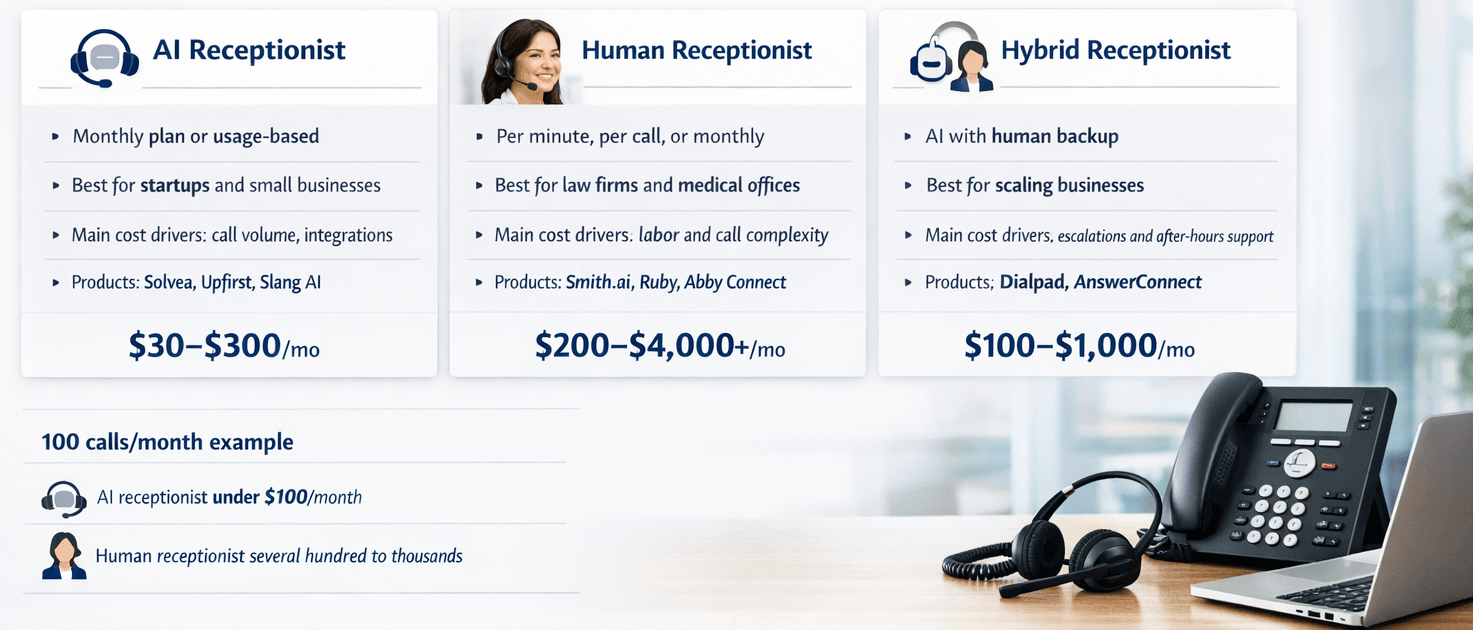
Virtual receptionist costs can be low for AI tools and much higher for human or hybrid services. If your business handles about 100 calls per month, an AI receptionist may cost under $100 (e.g., $30/month for Solvea), while a human service can easily cost several hundred dollars or more (e.g., $4000/month for Smith.ai in-house receptionist).
The right choice depends on your call flow, your need for human support, and the level of service you want. The table below gives a simple view of the main cost differences.
Model | Billing Model | Best For | Main Cost Drivers | Top Products | Typical Price Range |
AI | Monthly plan or usage-based | Small businesses, service businesses, startups | Call volume, features, integrations | Solvea, Upfirst, Slang AI | $30 to $300+ per month |
Human | Per minute, per call, or monthly | Law firms, medical offices, high-touch support | Labor, coverage hours, call complexity | Smith.ai, Ruby, Abby Connect | $200 to $4,000+ per month |
Hybrid | Mixed subscription + human backup | Growing teams that need both scale and quality | AI usage, human escalation, after-hours support | Dialpad, AnswerConnect | $100 to $1,000+ per month |
What are the Different Virtual Receptionist Pricing Models
Virtual receptionist pricing is not the same across providers. Some charge by the minute, some by the call, and some use a flat monthly plan. The best model depends on how often you get calls and how much support you need.
·Monthly Subscription: You pay a flat fee for a set number of minutes or calls. AI virtual receptionists like Solvea use this model, offering predictable scaling. (Typical: $30 - $300/month).
·Per-Minute Billing: You pay only for the actual time a receptionist spends on the phone. Ruby receptionists is a classic example, ideal for businesses with low but unpredictable call volumes. (Typical: $3.45 - $5/min).
·Per-Call Billing: A flat rate is charged every time the phone is answered, regardless of the conversation length. Smith.ai receptionist is well known for this transparent approach, preventing "long-call" bill shocks. (Typical: $1.6 - $1.9/call).
·Pay-As-You-Go: This model requires no monthly commitment; you are billed strictly based on real-time usage. Retell AI offers this flexibility, which is ideal for seasonal businesses or emergency backup. (Typical: $0.07 - $0.31/min for an AI agent).
·AI Subscription: A specialized low-cost monthly fee that often includes unlimited or high-volume concurrent calls. Dialpad AI or Bland AI are typical here, focusing on high-speed automation and massive scalability. (Typical: $30 - $100/month).
Pricing Model | How It Works | Typical Price Range | Pros | Cons | Best For |
Per-minute | Charged by call time | $3.45 – $5 per minute | Flexible, fair for short calls | Can get expensive with long calls | Law, healthcare, service businesses |
Per-call | Charged per answered call | $1.6 to $1.9 per call | Easy to understand, predictable | Less efficient for very short calls | SMBs with steady call flow |
Monthly plan | Flat monthly fee | $30 to $300+ per month | Clear budgeting, stable cost | May include limits | Businesses that want control |
Pay-as-you-go | Pay only for usage | Varies by volume | Low commitment, flexible | Harder to forecast | Seasonal or new businesses |
AI subscription | Monthly software pricing | $30 to $100+ per month | Low cost, scalable, fast setup | Limited human judgment | Small businesses and startups |
Cost Comparison of Virtual Receptionist Services in Real World
To make the comparison of virtual receptionist service rates more useful, we looked at typical use cases, product styles, and public feedback from review sites like G2 and Trustpilot, along with product pages and customer case studies. The goal is not to rank every brand by marketing claims, but to compare practical fit, expected cost, and likely return.
Evaluation Standard | Why It Matters |
Call volume | Higher volume changes the cost structure fast |
Call complexity | More complex calls need better handling |
Coverage hours | 24/7 support costs more than business hours |
Integration needs | CRM and calendar tools affect workflow and price |
Industry fit | Some industries need more compliance and accuracy |
Customer feedback | Real user reviews reveal strengths and weak points |
Scenario 1: The Solo Professional (AI Focus) A freelance consultant gets 50 calls monthly, mostly for FAQ and scheduling. Using an AI receptionist like Solvea costs about $30/month.
- Monthly Cost: $30
- Annual Cost: $360
- Verdict: AI is the only logical choice here; human services would be 10x more expensive for simple tasks.
Scenario 2: The Mid-Sized Law Firm (Human/Hybrid) A law firm handles 300 calls monthly requiring deep lead qualification. They use a premium human answering service like Ruby.
- Monthly Cost: $250 - $1,725
- Annual Cost: $3,000 - $20,700
- Verdict: High stakes lead justifies the human cost, but a hybrid model could save them $10,000 annually.
Scenario 3: The Local Medical Clinic (Hybrid Model) A busy clinic receives 500 calls monthly. They use a hybrid model like DeepCura to manage complex medical intake, HIPAA-compliant scheduling, and automated clinical documentation.
- Monthly Cost: $129
- Annual Cost: $1,000+
- Verdict: Hybrid models provide the best ROI for high-volume, high-trust essential services.
What Factors Affect Virtual Receptionist Pricing
Virtual receptionist pricing is mainly driven by usage, service complexity, and technology type. Once you understand these three factors, the rest of the pricing logic becomes much easier to read. The sections below break the cost down by the most important variables.
Virtual Receptionist Pricing by Call Volume
Call volume has a direct effect on cost. In many cases, the more calls you get, the lower your cost per call becomes. This is why high-volume businesses often get better value from flat plans or AI systems.
Call Volume | Typical Situation | Best Fit | Typical Price Range |
0 to 100 calls | Very small business or low demand | AI subscription | $30 to $300 per month |
100 to 500 calls | Small business with steady flow | AI or hybrid | $300 to $1,000 per month |
500+ calls | Busy office or growing team | Hybrid or human | $1,000 to $4,000+ per month |
Virtual Receptionist Cost by Call Duration
Average call length can change the final bill a lot. A two-minute call is very different from a ten-minute call when billing is based on time. This is especially true for per-minute pricing. For example, if a receptionist charges by the minute, a business with 100 ten-minute calls can pay far more than a business with 100 two-minute calls.
Average Call Duration | Cost Impact | Best Billing Model | Typical Result |
2 minutes | Low cost per call | Per-call or monthly | Lower monthly bill |
5 minutes | Moderate cost | Monthly or hybrid | Balanced cost and service |
10 minutes | High cost per call | AI or flat monthly | Higher expense on minute-based plans |
Virtual Receptionist Pricing by Service Type (AI vs Human vs Hybrid)
Service type is one of the biggest cost factors. AI tools usually offer lower virtual receptionist service rates, human receptionists cost more, and hybrid systems sit in the middle. The right choice depends on how much judgment, empathy, and flexibility your calls need.
Service Type | Top Products | Typical Price Range | Strengths | Tradeoffs |
AI | Solvea, Retell AI | $30 to $300+ per month | Low cost, scale, fast response | Less human nuance |
Human | Smith.ai, live answering services | $200 to $4,000+ per month | Strong service, empathy, better judgment | Higher cost |
Hybrid | Dialpad, AnswerConnect | $100 to $1,000+ per month | Balanced cost and quality | More complex setup |
Virtual Receptionist Cost by Features and Services Included
The more features you add, the more the price usually rises. Basic plans may only cover call answering, while premium plans can include CRM integrations, scheduling, lead qualification, and call recording. These features often improve business value, but they also add cost.
Tip: Solvea stands out here because it offers a flexible monthly model with calendar and CRM integrations, plus appointment scheduling. That makes it a practical option for teams that want useful automation without a heavy setup burden.
Plan Level | Included Features | Typical Use Case | Typical Cost Impact |
Basic | Call answering, message taking | Simple support needs | Lowest cost |
Standard | Scheduling, routing, basic integrations | Growing SMBs | Moderate cost |
Advanced | CRM sync, call recording, lead qualification | Sales and service teams | Higher cost |
Virtual Receptionist Pricing by Hours of Coverage (24/7 vs Business Hours)
Coverage hours also affect the bill. Business hours are usually cheaper, while after-hours service and 24/7 all support cost more because they require more staffing or more advanced automation. Many businesses only need full coverage during peak hours.
Coverage Type | Typical Cost Level | Best Fit | Cost Effect |
Business hours | Lower | Local service businesses | Most affordable |
After-hours | Medium | Teams that miss evening calls | Moderate premium |
24/7 | Higher | Emergency, global, or sales-driven teams | Highest cost |
Virtual Receptionist Pricing by Business Size (Small Business vs Enterprise)
Business size matters because larger teams often need more users, more routing rules, and more integrations. Small businesses usually want a simple plan and low monthly cost. Enterprises often need stronger controls, custom workflows, and service-level agreements.
Business Size | Typical Needs | Best Fit | Typical Price Range |
Small business | Low cost, easy setup | Solvea and similar AI plans | $30 to $300 per month (0 – 50 calls) |
Mid-market | Better routing and teamwork | Hybrid systems like Dialpad | $100 to $1,000 per month (50 - 100 calls) |
Enterprise | Custom workflows and compliance | Human or enterprise hybrid like Smith.ai | $800 to $21,00 per month (100 – 300 calls) |
Virtual Receptionist Pricing by Industry
Different industries have different levels of complexity. For example, medical and legal teams often need more accuracy and compliance, while e-commerce and real estate may care more about speed and call volume. SaaS companies usually want strong integrations and clean routing.
Industry | Cost Driver | Common Best Fit | Notes |
Healthcare | Compliance and accuracy | Human or hybrid | Higher service cost |
Legal | Intake quality and sensitivity | Human or hybrid | More expensive calls |
E-commerce | High call volume | AI | Scales well |
Real estate | Speed and lead capture | AI or hybrid | Fast response matters |
SaaS | Integrations and routing | AI or hybrid | Workflow fit is key |
Virtual Receptionist Cost by Country
Virtual receptionist pricing also changes by country. North America and Europe usually have higher labor and service costs, while the Philippines and India often offer lower-cost outsourcing options. Local versus offshore support is not just a cost decision, though, because language, time zones, and customer experience matter too.
Country / Region | Average Cost Range | Key Value Proposition | Typical Service Model |
United States | $30–$300/month (AI) $2,000–$5,000/month (Human) | Highest service quality; wide range of AI tools like Solvea. | AI-First/Hybird |
Philippines | $3–$7/hour ($400–$850/month dedicated) | Lowest human cost; excellent for high-volume support. | Direct Hire/Outsourced |
India | $3–$5/hour (BPO) | Massive scalability for BPOs; ideal for high-volume technical desk. | Managed BPO |
Australia | $3.79/call or $2.99/minute (Bundles from $80/month) | Transparent per-interaction pricing is the market standard. | Per-call/Bundle |
Latin America | $12–$20/hour | Same-time-zone support for US firms with bilingual skills. | Outsourced/Nearshore |
Hidden Virtual Receptionist Costs You Should Know
The monthly plan is not always full price. Many businesses end up paying more because of setup, overage, or extra service fees. Before signing a contract, it helps to look closely at what is included and what is billed separately.
- Setup fees can apply when a provider needs to build call flows, train a system, or connect integrations. Typical: $50–$300 one-time.
- Overage charges happen when you exceed the call or minute limit in your plan. Typical overage rate: $1.50–$3/min, roughly 1.5–2x your base rate.
- Integration costs may be charged for CRM, calendar, or help desk setup.
- After-hours fees can increase the cost if you want coverage outside standard business times. Expect a 20–40% premium on your base plan for 24/7 guaranteed coverage.
- Training and onboarding can create a hidden cost even when the provider does not charge for it directly.
- Escalation or transfer fees may appear when calls need to move from AI to a human agent. These typically run $0.50–$2 per escalated call on hybrid platforms.
- Spam & robocall charges might be billed for telemarketers. Ensure your provider uses AI filtering to block spam before it hits your bill.
How to Choose the Right Virtual Receptionist Pricing Plan/Model
The best pricing plan is not always the cheapest one. It is the one that fits your call volume, your service complexity, and your growth goals. A good decision framework can help you avoid paying too much or choosing a system that does not work well for your team.
Step 1: Estimate your call volume
Start with a real monthly estimate of how many calls you receive. Include both answered and missed calls, since both can affect your business value. If your volume is low, a simple AI plan may be enough. If it is high, a hybrid or human solution may be better.
Step 2: Measure call complexity
Think about what callers usually want. Simple booking and FAQ calls are a good fit for AI. Sensitive intake, complaint handling, and sales qualification may need human support. The more complex the call is, the more carefully you should choose your plan.
Step 3: Match service type to business need
Choose AI, human, or hybrid based on the customer experience you want to deliver. AI is best for speed and scale. Human support is best for trust and nuance. Hybrid model works well when you want both.
Step 4: Compare cost against ROI
Do not only compare monthly fees. Compare what each option helps you gain, such as saved time, fewer missed calls, better lead capture, and more bookings. In many cases, a slightly higher plan can create better results if it improves conversion.
A good receptionist plan should lower costs, protect customer experience, and support growth at the same time. That is why businesses often get better results when they choose based on workflow, not just price.
Your AI Receptionist, Live in Minutes.
Scale your front desk with an AI that never sleeps. Solvea handles unlimited multi-channel inquiries, books appointments into your calendar automatically, and ensures zero missed opportunities around the clock.
FAQs
What is the pricing structure for virtual receptionist services?
Most virtual receptionist services use one of four pricing structures: per minute, per call, monthly plan, or pay-as-you-go. AI tools often use flat monthly pricing, while human services may charge by time or by call. The best structure depends on how predictable your usage is.
How to budget for a virtual receptionist?
To budget accurately, multiply your average monthly calls by your average call duration (e.g., 100 calls x 3 mins = 300 mins). Add a 20% buffer for seasonal spikes. If using human services, factor in a $100/month reserve for hidden fees like holiday surcharges and overages. AI subscriptions are generally the easiest to budget for due to their fixed costs.
What is the average cost of a part-time virtual receptionist?
A part-time human virtual receptionist usually costs between $200 and $4,000 per month, depending on the hours covered. However, since AI tools like Solvea work 24/7 for a fraction of that cost ($30-$100/month), many businesses now use AI as their "part-time" or "after-hours" solution to save thousands annually.
What additional services may affect virtual receptionist pricing?
Pricing is often pushed higher by "premium" add-ons such as bilingual support, HIPAA or legal compliance certifications, outbound lead follow-ups, and complex CRM data entry. While basic message-taking is cheap, any task that requires the receptionist to log into your software or make decisions will increase the rate.
What are the real hidden operational costs of virtual receptionists?
Beyond the monthly fee, hidden costs include "rounding up" on minutes, setup fees, and the internal labor cost of training the provider on your business. Additionally, many per-call providers charge for "transfers," meaning you are billed once for the receptionist answering and again for the call being patched to your phone.
How do "per-minute" and "per-call" billing models actually differ in total cost?
Per-minute billing is highly sensitive to talkative customers; one 15-minute call can cost you $45. Per-call billing is more stable for long consultations but becomes expensive if you get many short "wrong number" calls. For high-volume businesses, a flat monthly AI subscription usually results in the lowest total cost.
Does virtual receptionist pricing include bilingual support or specialized industry knowledge?
In most cases, no. Expect to pay a 15%–30% premium for guaranteed bilingual (e.g., Spanish English) agents. Specialized fields like law or medicine also carry "Intake Fees" or higher base rates due to the required training. AI receptionists are increasingly offering these multi-language features at no extra cost.
Can an AI-powered virtual receptionist reduce costs without sacrificing customer experience?
Yes, in many cases it can. AI can lower costs by handling routine tasks like scheduling, lead capture, and FAQs at scale. The key is to make sure the system is well trained, has clear escalation rules, and fits the kind of calls your business receives.