There's a question that comes up at almost every Atlassian renewal: do we actually need Confluence, or could we get the same outcome from Google Drive — which we're already paying for through Workspace? It's a fair question. Confluence is a structured documentation system; Drive is a folder of files. If your team's docs aren't actually using the structure, you're paying for overhead.
This comparison is written from the perspective of a team currently on Confluence, weighing whether the structure justifies the cost — or whether you'd be just as well-served by Drive. We'll go through pricing (which is closer than people assume), the structural features that actually matter, the AI integrations on each side, and the migration math if you decide the answer is "switch to Drive." We're focused on the knowledge base use case specifically; this is not a general project-management or wiki replacement comparison.
If you're starting from Drive and wondering whether to upgrade to Confluence, that's the reverse comparison — read here. This article is for teams already on Confluence asking whether they need to be.
TL;DR
Feature | Confluence Cloud | Google Drive (Workspace) |
Best for | Mid-size and growing teams whose KB has become a structured system with ownership, templates, and cross-team navigation | Teams whose KB needs are mostly "find this Doc"; Workspace-native orgs of any size |
Free plan | Free for up to 10 users with core features (Confluence Pricing) | 15 GB consumer Drive; no free Workspace tier |
Starting price (annual) | Standard: $5.42/user/month, 250 GB (Confluence Pricing) | Business Starter: $7/user/month, 30 GB (Google Workspace Pricing) |
Knowledge base structure | Spaces, pages, sub-pages, templates, macros | Folders and files |
Search capability | Page + content search; Rovo AI Search bundled from Free | Full-text across Docs/Sheets/Slides/PDFs; Gemini AI on paid tiers |
Templates | Built-in for technical docs, how-tos, FAQs, decisions | Doc-level templates only |
Permission model | Space-level + page-level + advanced permissions on Standard+ | Per-file and per-folder sharing |
Migration effort to switch | Moderate to high — page structure, macros, restrictions don't translate cleanly | N/A |
Who it's for | Teams of 25+ where the KB actively uses templates, macros, and cross-space navigation | Teams whose KB is essentially a folder of documents people read individually |
The short version: the question isn't whether Confluence is better — for many use cases, it is. The question is whether your team is actually using the structure that makes it better. If your Confluence space is mostly long Docs that nobody navigates through the page tree, Drive will give you the same outcome for similar money. If your team writes structured technical docs, uses Jira embeds, relies on templates, and benefits from page-level permissions, switching to Drive is a regression.
A pricing note: Confluence is actually slightly cheaper than Google Workspace at the entry tier ($5.42 vs $7), so the cost case for switching to Drive only works if you're already paying for Workspace for email/calendar (which most teams are). The marginal cost of dropping Confluence and using Drive is the per-user Confluence fee.
What Is Confluence?
Confluence is Atlassian's documentation and knowledge base platform. Content lives in Spaces (typically per team or per topic), each with a tree of pages that support templates, macros (Expand, Status, ToC, Info panels), inline Jira ticket embeds, version history, and granular page-level permissions. It's designed for teams whose documentation is part of their workflow — engineering teams writing RFCs and runbooks, support teams maintaining a structured FAQ, product teams documenting decisions and roadmaps.
Confluence Cloud has four tiers: Free (up to 10 users with core features), Standard ($5.42/user/month annual; adds Rovo AI search/chat, advanced permissions, 250 GB storage), Premium ($10.44/user/month annual; unlimited storage, 99.9% SLA, advanced admin controls, 24/7 support), and Enterprise (custom pricing) (Confluence Pricing). Rovo — Atlassian's AI layer — is bundled into Free and above, providing cited search across connected Atlassian content.
The strengths show up at scale: a 1,000-page Confluence space organized into Spaces with consistent templates is genuinely navigable; the same content as 1,000 Drive Docs is not. Templates enforce a consistent shape across pages so a new RFC follows the same structure as last year's, macros let you embed live status (a Jira ticket's current state inline in a page), and Rovo AI search produces cited answers across the whole knowledge base. For teams that have hit the scale where these features pay off, Confluence is the right tool.
The weaknesses show up below that scale: the learning curve is real, macros are powerful but require training to use well, and the structure that helps at 1,000 pages is overhead at 50. If your team isn't actually using templates, macros, or page-tree navigation, you're paying for a structure you've turned off.
What Is Google Drive?
Google Drive is the file storage and collaborative editing layer of Google Workspace. Files live in folders; editing happens in Google Docs, Sheets, and Slides. As a knowledge base, Drive is conventional: create a top-level folder, nest sub-folders, put documents inside. Search is full-text across Docs, Sheets, Slides, and PDFs.
For a knowledge base, Drive's biggest practical advantage is its ubiquity. If your team is on Workspace for email and calendar, the marginal cost of using Drive as the KB is zero. There's no new app, no new login, no new permission system. The Docs editing experience is the most familiar collaborative editor in business software, and Gemini AI is being rolled out across Workspace plans for summarization and Q&A.
The structural ceiling: Drive treats every file as an island. There's no native concept of a page tree, of templates that enforce structure across files, of macros that embed live data. Cross-references happen through hyperlinks that break when files move. Templates exist but aren't versioned. For teams whose documentation needs are essentially "create a Doc, write what's relevant, share the link," Drive is plenty. For teams whose documentation is part of a structured workflow, Drive's flatness shows up.
Pricing on Google Workspace: $7/user/month Business Starter (30 GB pooled), $14/user/month Standard (2 TB), $22/user/month Plus (5 TB) (Google Workspace Pricing).
Confluence vs Google Drive for Knowledge Base: Detailed Comparison
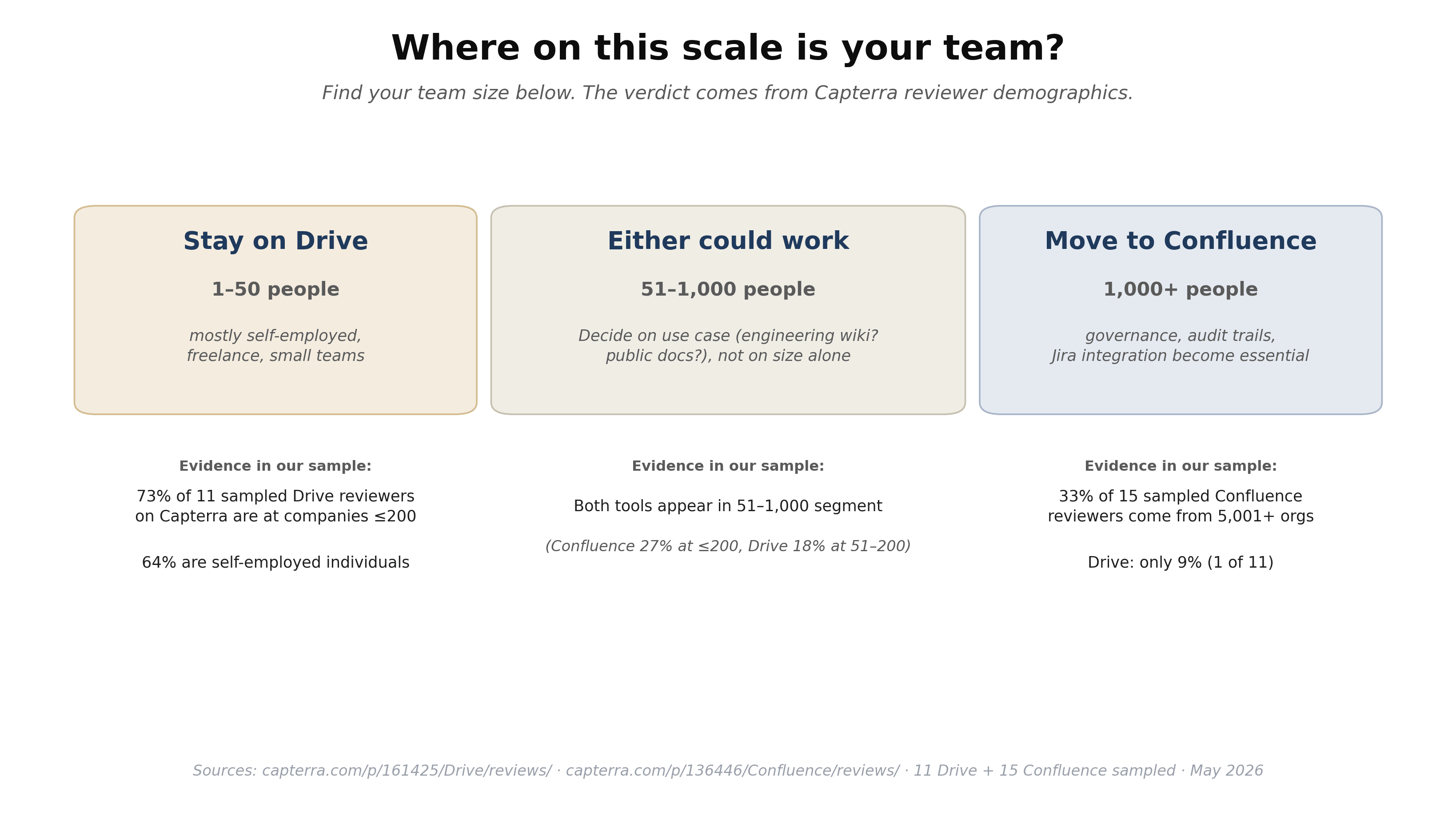
Before features, where on the team-size scale is your team? In our sample of 11 Drive reviewers on Capterra, 73% are at companies of 200 or fewer employees, and 64% are self-employed individuals. In our sample of 15 Confluence reviewers, 33% come from organizations with 5,001+ employees (Drive: only 9%). The implication for your decision: under 50 people, Drive's reviewer base is your peer group; over 1,000, Confluence's is. Between 50 and 1,000, both tools have reviewers — pick on use case (engineering wiki? customer-facing docs?), not size alone.
Structure & Organization
Dimension | Confluence | Google Drive |
Primary unit | Page in Space | File (Doc, Sheet, Slide, PDF) in folder |
Hierarchy | Space → page → sub-page tree | Folder tree |
Cross-linking | Native page mentions, intelligent links, ToC macro | Hyperlinks (break when files move) |
Templates | Built-in space + page templates per use case | Doc-level templates only |
Versioning | Per-page version history with content-block restore | Per-file version history |
Macros / dynamic content | Built-in (status, expand, ToC, Jira embeds, decisions) | None native (Apps Script for custom) |
Confluence is structurally richer; the question is whether your team is using that richness. If most of your Confluence pages are essentially long Docs without macros, embedded tickets, or template enforcement, you've recreated Drive inside Confluence and are paying extra for the privilege. The rule of thumb: count how many pages in your Confluence use non-text features (status macros, embedded Jira, page-properties, table of contents). If under 20%, the structure isn't earning its keep.
Search & Retrieval
Confluence's search has been overhauled with Rovo AI Search, which produces cited answers across connected Atlassian content. Rovo is bundled into Free and above, which is unusually generous for an enterprise SaaS AI layer. For teams whose knowledge spans Confluence, Jira, and other Atlassian products, Rovo's cross-product Q&A is genuinely useful.
Drive's search benefits from Google's underlying infrastructure — fast, full-text across Docs, Sheets, Slides, and PDFs, with Gemini AI rolling out across paid Workspace plans for natural-language Q&A. For teams whose knowledge is essentially in Drive, Gemini's coverage is improving but is more uneven across plan tiers than Rovo is across Confluence tiers.
The deeper structural difference: Confluence lets users navigate the page tree as well as search. Drive users almost always end up searching because the folder tree at scale is harder to scan visually. Both work; Confluence's hierarchy enables a different mode of finding.
Team Collaboration
Both support real-time editing, comments, mentions, and granular sharing. Differences for KB use:
- Permission models. Confluence's Space-level permissions are well-suited for a multi-team org — engineering's Space, marketing's Space, finance's Space, each with its own access list. Drive's per-file/per-folder model is more flexible but requires more upkeep at scale.
- Comment workflows. Confluence comments live on the page tied to specific paragraphs. Google Docs comments resolve to email threads. The right choice depends on whether your team's collaboration mode is "discuss in the doc" or "discuss over email about the doc."
- Templates and standards. Confluence's template library enforces consistent shape across pages — every RFC follows the same structure. Drive doesn't have the equivalent.
For Atlassian-native teams, Confluence's collaboration model is hard to replicate in Drive. For teams whose work isn't tightly coupled to Jira or other Atlassian products, the difference is less material.
AI Integration
This is the gap that's narrowing fastest in both directions, but with very different shapes.
Rovo (Confluence) is bundled into Free and above, with Search (cited answers from Atlassian content), Chat (conversational Q&A), and Agents (multi-step automation). The integration with Jira tickets, decision records, and project pages makes it more than a search tool — it's an answer layer over your Atlassian footprint.
Gemini (Workspace) is being woven into Workspace progressively. On entry plans, AI features are limited; on Business Standard ($14/user) and above, Gemini handles summarization, drafting, and search across Drive content (Google Workspace Pricing). For organizations whose knowledge primarily lives in Drive Docs, Gemini's coverage is good and improving.
Practical assessment: Confluence's Rovo bundle reaches the Free tier and is the bigger AI value at the entry-level. Gemini in Workspace is good once you're on Business Standard or above. Most teams pay both either way (Workspace for email, Confluence for docs), so this is rarely the deciding factor.
Pricing
Plan | Confluence Cloud | Google Workspace |
Free | Up to 10 users with core features (Confluence Pricing) | 15 GB consumer Drive; no free Workspace tier |
Entry | Standard: $5.42/user/month, 250 GB (Confluence Pricing) | Business Starter: $7/user/month, 30 GB (Google Workspace Pricing) |
Mid | Premium: $10.44/user/month, unlimited storage (Confluence Pricing) | Business Standard: $14/user/month, 2 TB (Google Workspace Pricing) |
Top | Enterprise: custom (Confluence Pricing) | Business Plus: $22/user/month, 5 TB (Google Workspace Pricing) |
The pricing comparison surprises most teams: Confluence Standard is cheaper per user than Google Workspace Business Starter ($5.42 vs $7). The economic argument for switching from Confluence to Drive isn't "Drive is cheaper" — it's that you're already paying for Drive through Workspace, so dropping Confluence saves the entire Confluence cost without adding to your Workspace bill. For a 50-person team, that's roughly $3,250/year in savings if you can actually move all KB content to Drive.
Warm Tips: You can turn that knowledge base into a 24/7 self-service channel with an AI knowledge base chatbot.
The migration cost rarely shows up in the procurement spreadsheet but should: 50 people losing access to templates, macros, and the page tree they've built habits around is a real productivity hit for 4–8 weeks.
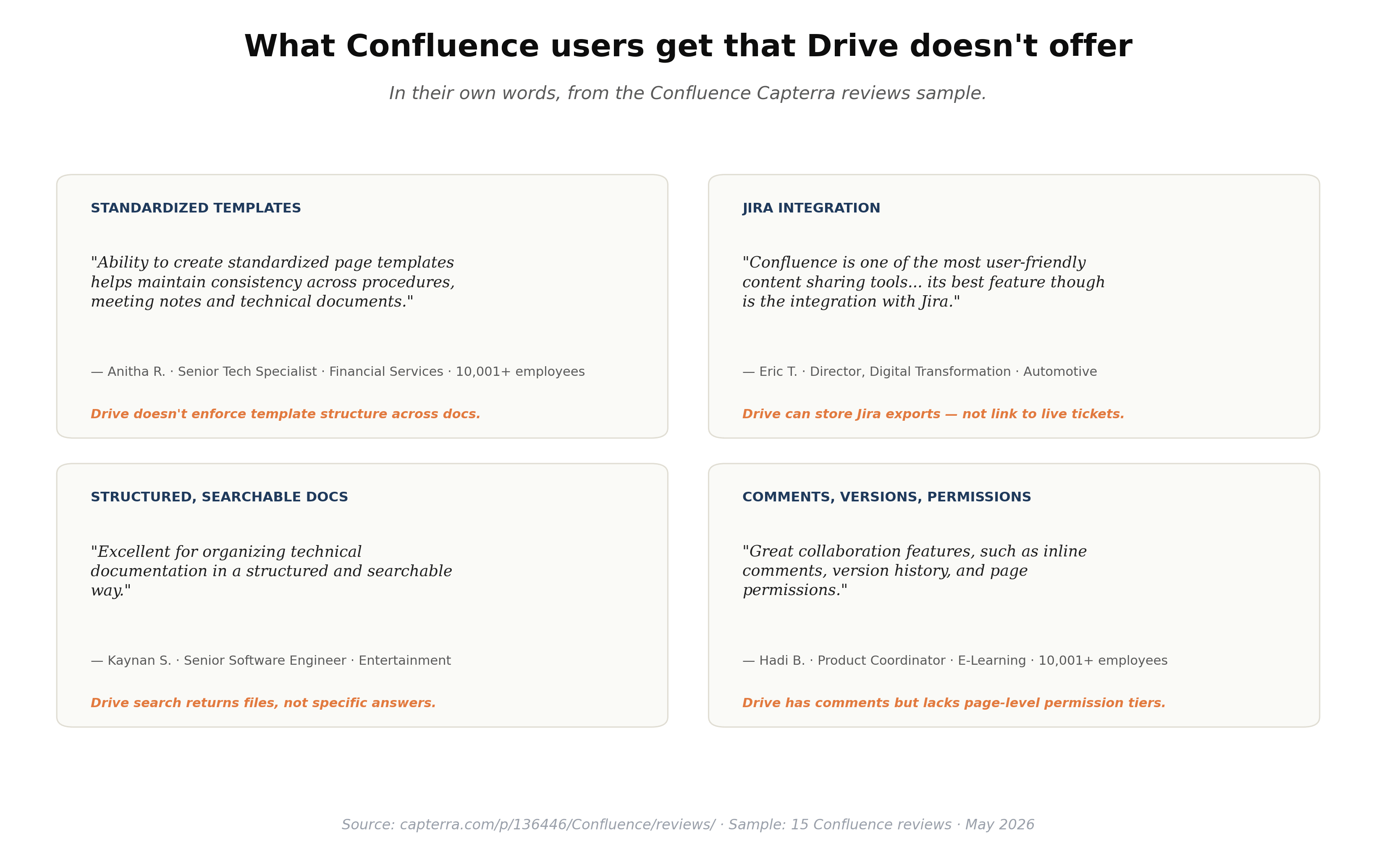
One concrete way to think about Confluence's price: what specifically are you paying for that Drive doesn't deliver? In our sample of Confluence reviewers on Capterra, four capabilities recur and don't have Drive equivalents: standardized page templates (Anitha R., Senior Tech Specialist at a 10,001+ Financial Services firm), Jira integration (Eric T., Director of Digital Transformation in Automotive — *"its best feature though is the integration with Jira"*), structured + searchable technical documentation (Kaynan S., Senior Software Engineer in Entertainment), and page-level permissions with version history (Hadi B., Product Coordinator at a 10,001+ E-Learning company). If none of these unlock value for you, Drive likely is enough. If two or more do, the upgrade pays for itself.
When Confluence Is Worth Keeping (vs. Switching to Drive)
Use this decision matrix:
- Keep Confluence if your team uses templates and macros in 30%+ of pages, your engineering team relies on Jira embeds in pages, your KB has a page-tree navigation pattern that people actually use, or you have multi-team Spaces with different permissions per Space.
- Switch to Drive if your Confluence space is essentially long-form Docs without templates or macros, your team mostly searches rather than navigates, your KB is fewer than ~150 pages, and you're already paying for Workspace.
- Keep both if your engineering team genuinely uses Confluence for technical docs but the rest of your org has standardized on Drive. This is more common than people admit; the cost is having two places to look but the productivity is real.
- Reconsider both if your need is specifically a customer-facing knowledge base or AI-driven help center — neither Drive nor Confluence is the published help-center surface; both are better as the source of truth that you publish from.
A pragmatic test before switching: pick the 20 most-accessed pages in Confluence, copy them as plain text into Drive Docs, and see if your team can find them as fast as in Confluence over a two-week pilot. If yes, the structure was overhead. If no, keep Confluence.
Beyond Confluence vs Drive: Powering Customer-Facing AI from Either
Whichever tool wins internally, the next step for many teams is making that knowledge available to customers — through a chat widget, an AI receptionist, or an email auto-reply system. This is where the choice of internal KB tool matters less than people think. The same content can flow into a customer-facing AI layer regardless of which platform holds the source of truth.
If you're evaluating either tool as the source for customer-facing AI, worth knowing: a service like Solvea connects to either platform and uses it as the source of truth for an AI receptionist that handles questions across phone, chat, and email.

Solvea ingests Confluence exports (PDF, Word) or Drive documents (PDF, Word, Excel, CSV, TXT up to 20 MB per file) directly through Create Knowledge → Upload Document, so the choice of internal KB doesn't lock you into one downstream AI tool. The walkthrough below covers the upload-and-test flow end to end:
Your AI Receptionist, Live in Minutes.
Scale your front desk with an AI that never sleeps. Solvea handles unlimited multi-channel inquiries, books appointments into your calendar automatically, and ensures zero missed opportunities around the clock.
FAQ
Q: Is Confluence worth the cost over Google Drive for small teams?
A: Confluence's Free tier covers up to 10 users with core features, so the cost question doesn't apply at small scale — both are free for tiny teams. The structural question matters: Confluence's templates, macros, and page-tree navigation pay off once your team is genuinely using them. If you're a 5-person team writing occasional Docs, Drive is simpler. If you're a 5-person engineering team writing structured RFCs and runbooks, Confluence is worth it even at small scale.
Q: Can I use Confluence or Google Drive as a knowledge base for my chatbot?
A: Yes for both. Confluence content can flow into a chatbot via API integration, page export to PDF/Word, or website-sync of public Confluence sites. Google Drive content flows via document export and direct upload, or via Drive-connector integrations on chatbot platforms. Solvea, for example, accepts both paths through its document upload feature.
Q: How do I migrate from Confluence to Google Drive?
A: Confluence supports exporting individual pages or entire spaces to PDF, Word, or HTML. The mechanical export is straightforward — the harder parts are losing macros (Jira embeds, status macros, expand panels become static text), losing the page-tree navigation, and re-doing per-file permissions to replicate Confluence's Space-level model. Most teams find the migration takes 4–8 weeks and is worth piloting on a single space first.
Q: Is Confluence cheaper than Google Drive?
A: At entry tier, yes. Confluence Standard is $5.42/user/month annual; Google Workspace Business Starter is $7/user/month (Google Workspace Pricing). The economic argument for switching to Drive is that you're already paying for Workspace for email and calendar, so dropping Confluence is pure savings. If you weren't already on Workspace, Confluence would actually be the cheaper choice.
Q: Does Confluence have better AI than Google Drive?
A: At the entry tier, yes — Confluence's Rovo AI is bundled into the Free tier, while Gemini in Workspace is rolled out unevenly across plans. At higher tiers, both offer comparable AI — cited search, summarization, conversational Q&A. The bigger difference is what the AI is searching: Rovo searches across Atlassian content (Confluence + Jira), Gemini searches across Workspace content (Drive + Docs + Gmail).
Q: Which is better for an AI agent or chatbot's knowledge base?
A: Both work. The deciding factor is content quality, not platform choice. Confluence pages with clear question-style headings retrieve well from RAG-based AI; Drive Docs with similar structure work the same way. Most modern AI receptionist platforms accept exports from either tool — Solvea, for example, accepts Confluence PDFs and Drive Docs (exported to PDF or Word) up to 20 MB per file through Create Knowledge → Upload Document.