A med spa front desk hears the same fifteen questions all day long. How much is a Hydrafacial? Do I need a consult before Botox? Can I drink coffee after? What if I'm pregnant? Every minute spent re-typing the same answer is a minute not spent prepping rooms, calling no-shows, or closing a package sale — and after-hours, those questions sit unanswered until morning.
A clear, well-structured FAQ document fixes most of that. It gives your team a single script, gives your website a self-serve answer page, and — once you load it into an AI receptionist — gives every prospect a real reply at 11 p.m. on a Sunday. This guide gives you a copy-paste FAQ template built around the questions med spa clients actually ask, in a format you can drop into Word, Notion, or Google Docs.
You'll get the full template, the real Reddit questions most spas don't cover, and a short walkthrough for turning the document into an AI auto-reply system.
TL;DR
Field | Content |
What it is | A copy-paste FAQ template for medical spas with 35+ pre-written questions across 6 categories. |
Template sections | Services, Pricing & Packages, Booking & Cancellations, Pre-Treatment, Aftercare, Safety & Eligibility. |
Formats covered | Word (.docx), Notion page, Google Docs, Excel/Sheets two-column. |
Who it's for | Solo injectors, medical aesthetics clinics, dermatology and laser practices, IV therapy bars. |
Next step | Upload the finished document into an AI receptionist so it answers the same questions automatically across phone, chat, and email. |
Your AI Receptionist, Live in Minutes.
Scale your front desk with an AI that never sleeps. Solvea handles unlimited multi-channel inquiries, books appointments into your calendar automatically, and ensures zero missed opportunities around the clock.
What Is a Medical Spa FAQ Page?
A medical spa FAQ page is a single document that lists the questions clients ask most often — services offered, pricing, prep, eligibility, aftercare, safety — together with a clear, short answer for each. It lives somewhere clients can reach (your website, a portal page, a printed handout) and somewhere your team can reach (intake training, the phone script, an AI bot).
It's narrower than a knowledge base. A knowledge base might also hold treatment protocols, OSHA forms, vendor SOPs, employee handbooks. A FAQ page is the front-of-house slice — the exact questions a prospect or returning client asks before, during, or after a visit. If your knowledge base is the backstage manual, your FAQ is the script the AI receptionist reads from.
Free Medical Spa FAQ Template
Copy the template below directly into Word, Notion, or Google Docs. Replace every bracketed [placeholder] with your real numbers, products, and policies. The tone is intentionally plain — clients searching at midnight don't want a brand voice essay, they want the price and whether they can book.
Section 1 — Services & Treatments
Q: What treatments do you offer?
A: We offer [Botox, Dysport, dermal fillers (Juvederm, Restylane), Hydrafacial, microneedling with PRP, IPL photofacial, laser hair removal, chemical peels, and IV therapy]. A full menu with pricing is available at [link to services page]. If you're not sure which treatment fits your goals, book a free 15-minute consult.
Q: Are your providers licensed?
A: Yes. All injections and laser procedures are performed by [Registered Nurses and Nurse Practitioners] working under the medical direction of [Dr. Last Name, MD, board-certified in Dermatology / Plastic Surgery]. Provider bios are at [link to team page].
Q: Do you treat all skin types?
A: Yes. Our laser devices are calibrated for Fitzpatrick skin types I–VI, and our injectors are trained in technique adjustments for darker skin. We'll confirm safety during your consult.
Q: How is a medical spa different from a regular spa?
A: A regular spa offers facials, massage, and relaxation services. A medical spa is supervised by a licensed physician and offers procedures that affect the body at a medical level — neurotoxins, fillers, lasers, prescription skincare. Treatments require a brief medical history and, for some procedures, an in-person consult.
Section 2 — Pricing & Packages
Q: How much does [Botox / filler / Hydrafacial] cost?
A: [Botox is priced per unit at $X/unit, with most areas using 20–60 units. A standard syringe of dermal filler is $X. A Hydrafacial starts at $X.] See full pricing at [link]. Prices include the consultation, treatment, and one follow-up.
Q: Do you offer packages or memberships?
A: Yes. Our [Glow Membership] is $X/month and includes one Hydrafacial monthly, 10% off all injectables, and free birthday treatment. Full details at [link to membership page].
Q: Do you accept insurance or HSA/FSA?
A: Cosmetic treatments are not covered by insurance. Most clients pay with HSA/FSA cards for medical-grade skincare, IV therapy, and acne or rosacea treatment — confirm with your plan before purchase. We accept [Visa, Mastercard, American Express, CareCredit, Cherry, and Affirm].
Q: Can I get a refund?
A: Treatments already performed are non-refundable. Unused package sessions can be refunded within [30] days of purchase, minus a [10%] administrative fee. Pre-paid memberships can be cancelled with [30 days'] notice.
Section 3 — Booking & Cancellations
Q: How do I book an appointment?
A: Book online at [link], call [phone], or text [SMS number]. New-client consults are free. Most treatments require a consultation first; we'll let you know during booking.
Q: What's your cancellation policy?
A: We require [24 hours'] notice to cancel or reschedule without a fee. Late cancellations or no-shows are charged [50%] of the service price. We send a reminder text [48 hours] before every appointment.
Q: Do you take walk-ins?
A: Walk-ins are welcome for medical-grade skincare purchases and quick add-ons (eyebrow tint, brow wax) but injections, lasers, and Hydrafacials are by appointment only.
Q: How early should I arrive?
A: First-time clients should arrive [15] minutes early to complete intake forms. Returning clients can arrive 5 minutes early to check in.
Section 4 — Pre-Treatment Prep
Q: Can I drink alcohol or coffee before Botox or filler?
A: Avoid alcohol for [24] hours before injectables — it thins the blood and increases bruising risk. Caffeine is fine. Skip aspirin, ibuprofen, fish oil, vitamin E, and ginkgo for [3–7] days unless prescribed by your physician.
Q: Should I shave before laser hair removal?
A: Yes. Shave the treatment area [12–24 hours] before your appointment — clean shave, no stubble. Do not wax, pluck, or use depilatory cream for [4 weeks] before laser sessions; the laser needs an intact follicle to work.
Q: Can I wear makeup to my appointment?
A: For facials, peels, microneedling, or laser, please come with clean skin. For injectables, light makeup is fine — we'll cleanse the area before treatment.
Section 5 — Aftercare & Recovery
Q: How long does recovery take?
A: Most treatments have minimal downtime. Botox and filler: redness for a few hours, possible bruising for [3–7] days, no exercise or facials for [24] hours. Hydrafacial and chemical peels: pinkness for a few hours. Microneedling with PRP: redness for [2–3] days. Laser: redness up to a week, sun avoidance for [4 weeks].
Q: When will I see results?
A: Botox: [3–5] days for first effect, full effect at [10–14] days. Filler: immediate, with final shape settling in [2 weeks]. Hydrafacial: same day. Microneedling: [4–6] weeks for collagen. Laser hair removal: full result in [6–8] sessions.
Q: What should I avoid after treatment?
A: For [24] hours after injectables: no exercise, saunas, hot yoga, or massages on the treated area. For [2 weeks] after laser or peels: SPF 30+ daily, no sun exposure, no retinoids. After microneedling: no makeup or active skincare for [24 hours].
Q: What if I have a reaction?
A: Mild redness, swelling, and bruising are normal. Call us at [phone] if you experience severe pain, prolonged swelling beyond [72 hours], spreading redness, fever, or vision changes. After hours, call [emergency contact] or go to your nearest urgent care.
Section 6 — Safety & Eligibility
Q: Can I get treatment if I'm pregnant or breastfeeding?
A: We do not perform Botox, filler, retinoid peels, or oral medications during pregnancy or breastfeeding. Hydrafacial (without active ingredients), gentle facials, and prenatal massage are safe. Always confirm with your OB-GYN.
Q: Can I get treatment if I have [a medical condition]?
A: We screen every client with a brief medical history. Conditions like keloid scarring, active cold sores, autoimmune disease, or recent isotretinoin use can affect eligibility. Bring a current medication list and any specialist notes to your consult.
Q: Are your needles single-use?
A: Yes. Every needle, syringe, and microneedling cartridge is single-use, sterile, and disposed of in compliance with [state board] standards.
Q: How old do I have to be?
A: You must be [18] or older for injectables, lasers, and chemical peels. Clients under 18 may receive facials or acne treatment with a parent or guardian's written consent.
Real Questions Med Spa Clients Actually Ask
The template above covers the textbook list. The questions that lose you bookings are the ones clients post on Reddit and Google — specific, slightly anxious, often phrased awkwardly. Three patterns show up repeatedly across r/30PlusSkinCare, r/PlasticSurgery, and aesthetics-related healthcare threads:
"Will this make me look frozen / fake / weird?" This is the single most common Botox and filler hesitation, and most spa websites ignore it. A short, honest paragraph — we use micro-dose techniques and review results at 14 days; you can add more, but we can't take it away — converts more than any before-and-after photo.
"Is it safe with my [medication, autoimmune condition, recent surgery]?" A 2025 Reddit Healthcare Insights study found that 75% of U.S. healthcare seekers cross-reference products online before booking. When your FAQ doesn't address common contraindications, prospects assume the answer is "no" and stop searching.
"How much does it actually cost — including everything?" The phrase "prices vary" is a conversion killer. Quote a real range, name the units (per unit, per syringe, per session), and link to the full pricing page. If you have a starter package, name it.
These aren't edge cases. They're the questions your phone-line staff handles every shift. Putting them in the FAQ — and into the AI receptionist that reads from the FAQ — is what turns a generic template into something that closes business.
How to Customize This FAQ Template
The template is intentionally generic; the value comes from your specifics. Work through it in this order:
- Replace every bracket. Search the document for
[and resolve every placeholder. If you don't have a number for something (e.g. you don't currently take Affirm), delete the line — empty placeholders erode trust. - Add your three highest-revenue services first. Don't list every treatment alphabetically; lead with the services that drive 70% of revenue, then group the rest.
- Quote real prices, not "starting at." Clients trust ranges (
$650–$900 per syringe) more than vague phrasing. If your pricing changes, update the doc — see Section 6 below for cadence. - Cut anything that doesn't sound like you. If you'd never tell a client "Cosmetic treatments are not covered by insurance" in those exact words, rewrite it. The template is a starting point, not a script.
- Add 5 questions specific to your spa. Things only your clients ask: parking, accessibility, language support, group bookings, gift cards. These are the questions that show you actually run the business.
How to Use This FAQ Template in Word, Notion & Google Docs
In Microsoft Word
Paste the template into a new document. Apply Heading 2 to each section name (Services, Pricing, etc.) and bold the Q: lines so a 30-second scan still finds the answer. Save as medical-spa-faq.docx. To export for your AI receptionist, use File → Save As → PDF so any rich formatting survives the upload (some bots strip Word's heading styles). Microsoft's official template gallery has a Frequently Asked Questions template you can use as a starting layout.
In Notion
Create a new page titled "FAQ — [Spa Name]". Paste the template as plain text, then convert each section header to a Heading 2 by typing /h2. Convert each Q to a bold callout (/callout) so it visually stands apart from the answer. Notion's official help center has a guide on converting blocks if you want the toggle-list version (each Q becomes a collapsible answer). To export for an AI receptionist, use • • • menu → Export → Markdown & CSV — this is the cleanest format for downstream parsing.
In Google Docs
Paste into a new document. Use Format → Paragraph styles → Heading 2 for sections and Format → Text → Bold for questions. The two-column table format also works well in Google Docs — Insert → Table with two columns (Question | Answer), one row per FAQ. Google's Docs help center has a guide on building forms from a Doc if you want to convert the FAQ into an intake form later.
In Excel or Google Sheets (two-column format)
For teams that already work in spreadsheets, the simplest format is two columns: A. Question | B. Answer. Add a column C for Category (Services / Pricing / Booking / Aftercare / Safety) so you can filter. This format imports cleanly into most chatbot platforms and is easy to update — when prices change, you sort by Category and edit one section at a time.
From FAQ Templates to Automated Answers: How AI Uses Your Content
A finished FAQ document is the front half of the work. The back half — answering those same questions at 9 p.m. on a Sunday, on a missed call, in a Hydrafacial inquiry email, in a chat widget on your services page — is where AI does the heavy lifting.
An AI receptionist doesn't invent answers. It reads the FAQ document you give it and replies from there. The quality of the AI's response is exactly the quality of your FAQ: vague answers in, vague answers out; specific prices and policies in, specific replies out. That's why the template above pushes you to fill in real numbers rather than leave placeholders.
Solvea is an AI receptionist platform designed for SMBs, equipped with industry-sepecific templates like medspa, real estate, retail and home services. With Solvea, you upload your finished FAQ document once — the AI reads it and answers client questions across phone, voice messages, live chat on your site, and email, and flags anything it can't find for your front-desk team to handle. The setup runs through three short steps:
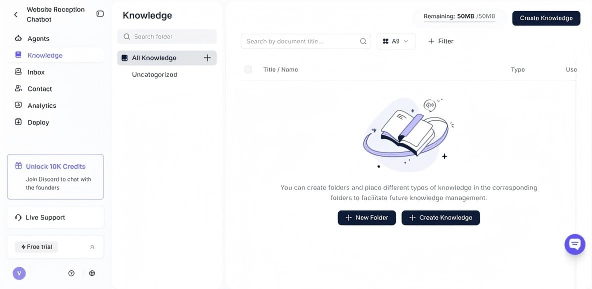
- Upload the FAQ document. In Solvea, go to Create Knowledge → Upload Document, pick a folder (e.g.
Front Desk FAQs), select yourmedical-spa-faq.docxor PDF, and click Publish. PDF, Word, Excel, CSV, and plain text are all supported, up to 20 MB per file. - Test the agent. Open the test chat and run the same questions you wrote into the template — "How much is Botox?", "Can I get filler if I'm pregnant?", "What's your cancellation policy?" If an answer is off, fix the FAQ wording, re-upload, and test again. Two or three rounds usually settle it.

- Connect a channel. Add a phone number, paste the live chat snippet on your booking page, or authorize Gmail to handle inbound inquiries. Most spas turn on phone first — that's where after-hours questions stack up.
The reason this matters for a med spa specifically: missed calls are missed bookings. A Tidio CX statistics report shows customers expect a response within minutes, and aesthetic clients are price-comparing across three or four spas in a single sitting. The first one to answer often wins the consult. A clear FAQ + an AI that reads from it is the cheapest way to be that first answer.
If you want to see what the workflow looks like end-to-end before setting it up, this short walkthrough covers the same setup in under five minutes:
FAQ
Q: What questions should I include in my medical spa FAQ template?
A: Start with the 15 questions your front desk hears most often — pricing for top services, cancellation policy, eligibility (pregnancy, medical conditions), pre-treatment prep, and aftercare. Group them by category: Services, Pricing & Packages, Booking, Pre-Treatment, Aftercare, Safety & Eligibility. Most spas need 30–40 questions total to cover the day-to-day.
Q: How long should each FAQ answer be?
A: One to four sentences. The first sentence is the direct answer (Yes, No, $X per unit, 24 hours). The next sentences add the conditions, the source, and the next step. Anything longer becomes a wall of text that clients skim past — and that AI receptionists summarize away.
Q: Should I add a FAQ page to my Notion or just my website?
A: Both. The Notion page is the source of truth your team edits; the website page is the formatted, public version. When you change a price in Notion, you republish to the website (manually or via a sync tool). If you add an AI receptionist, point it at the Notion export so the AI uses the same answers your team uses.
If support tickets repeat the same questions, point them to a chatbot powered by your knowledge base instead.
Q: What's the difference between a medical spa FAQ and a knowledge base?
A: A FAQ is the front-of-house slice — the questions a prospect or client asks before, during, or after a visit. A knowledge base is broader: it includes treatment protocols, intake forms, OSHA paperwork, vendor SOPs, and employee handbooks. The FAQ feeds your AI receptionist and your public site; the knowledge base feeds your team. They overlap, but the FAQ is what an AI bot actually answers from.
Tip: paste your help docs into the AI FAQ generator and let it surface the questions worth answering publicly.
Q: Can I use AI to answer FAQs automatically for my med spa?
A: Yes — that's the workflow this article describes. Build the FAQ document, upload it to an AI receptionist (Solvea handles PDF, Word, Excel, CSV, and TXT up to 20 MB per file), test against the questions you wrote, and connect a channel like phone, live chat, or Gmail. The AI reads from the document and replies in real time across hours your front desk can't cover. Compliance-sensitive answers (like contraindications) should be tested carefully and escalated to a human when the AI isn't confident.
Q: How often should I update the FAQ?
A: Monthly is the right cadence for active spas. Update immediately when prices change, when you launch a new service, when policies change (cancellation fee, age requirement), or when you onboard a new injector. If your AI receptionist relies on the document, an outdated FAQ becomes outdated AI — clients catch the mismatch on the first call.