A hot listing generates a familiar problem fast: showing requests arriving by phone, text, and email from five different buyer's agents — all wanting to see the property this week, some wanting the same time slot. Without a system, a listing agent ends up playing manual phone tag, double-booking time slots, and frustrating sellers with constant interruptions.
The coordination challenge compounds when a listing agent manages several active properties simultaneously. Keeping track of which agents have confirmed, which are pending, and which need to be rescheduled is genuinely complex work — and mistakes aren't just inconvenient. A missed showing can cost the seller a qualified buyer.
This guide covers the step-by-step process for managing showing requests from multiple buyer's agents — from setting up a showing system to using AI tools to handle inbound communication automatically.
TL;DR
Field | Details |
What you'll build | A structured showing coordination system that handles multiple buyer's agents without manual phone tag |
Key tools needed | Showing scheduling software (ShowingTime, Calendly), shared availability calendar, AI receptionist for after-hours requests |
Who it's for | Listing agents, team leads managing multiple listings, real estate operations coordinators |
Biggest challenge | Multiple agents requesting the same slots without a centralized scheduling view |
Fastest fix | Enable online showing requests with automated confirmations — eliminates most manual phone coordination |
What You Need Before You Start
Before you can systematically handle showing requests from multiple agents, confirm these basics are in place:
Checklist:- [ ] A showing management tool is active for each listing (ShowingTime, Centriq, or similar)- [ ] Seller has agreed on showing availability windows and notification preferences- [ ] Showing instructions are clearly documented in the MLS agent remarks- [ ] Phone and email are set up to route showing requests to the same system- [ ] After-hours requests have a defined response path (voicemail, AI, or team coverage)
Showing coordination options by operation size:
Approach | Best For | Coordination Quality | After-Hours Coverage |
Manual phone/text | Solo agent, 1–2 listings | Low — prone to gaps | None |
ShowingTime / Centriq | Any agent, multiple listings | High — automated confirmations | Partial (notification-only) |
Team showing coordinator | High-volume teams | High — dedicated human | Depends on coordinator hours |
AI receptionist (Solvea) | Any size, 24/7 coverage | High — answers all requests immediately | Full 24/7 |
How to Handle Showing Requests from Multiple Agents: Step-by-Step
Step 1: Set Up a Centralized Showing Scheduling System
The first rule of managing multiple agents is: never coordinate showings by individual calls and texts. Each untracked communication is a future scheduling conflict waiting to happen.
Use a dedicated showing scheduling platform for every active listing. ShowingTime (now part of Zillow Group) is the industry standard and integrates directly with most MLS systems. Key settings to configure:
- Allowed hours: Set the windows when showings are permitted (e.g., Mon–Sat 9am–7pm, Sun 12pm–5pm) rather than leaving it open-ended
- Advance notice requirement: Require at least 2 hours' notice to protect the seller from last-minute requests
- Confirmation type: Set to "Appointment Required" so no agent assumes access without explicit confirmation
- Seller notification method: Choose how the seller is notified (text, email, or app) and how long they have to approve or decline
When every agent submits requests through ShowingTime, you have a single view of the schedule and automatic conflict prevention.
Step 2: Publish Clear Showing Instructions in the MLS
Buyer's agents check the MLS agent remarks before calling. Make their job easy and yours less cluttered by documenting:
- Scheduling method: "All showing requests via ShowingTime — no texts or calls accepted"
- Access instructions: Lockbox code location and type, gate codes, or key pickup process
- Pet and occupant notes: Seller-approved language for what agents need to know before arrival
- Availability exceptions: Any blocked dates, open house windows, or offer deadlines that affect showing scheduling
When these instructions are complete and accurate, you eliminate most inbound "quick questions" that pull you out of other work.
Step 3: Configure Automated Confirmations and Reminders
Manual confirmation emails for every showing request is time the listing agent shouldn't be spending. Configure ShowingTime or your scheduling platform to:
- Send automatic confirmation to the requesting agent immediately upon slot approval
- Send a 24-hour reminder to the agent before the scheduled showing
- Send a cancellation notice to all parties if a showing is removed from the calendar
Automated reminders reduce no-shows. Automated reminders reduce no-shows — sending confirmations and 24-hour reminders is standard practice across appointment-based industries precisely because buyers and agents receive so many requests that unconfirmed appointments frequently slip.
Step 4: Use an AI Receptionist for After-Hours and Overflow Showing Requests [Solvea Step]
Showing requests don't stop arriving when the business day ends. A buyer's agent working with a motivated client at 8pm will call and text about availability. Without a response path, that request sits unacknowledged until morning — and by then, the agent may have moved on or found a competing property that did respond.
With Solvea, you upload your listing details, showing availability windows, and FAQ answers once. The AI handles inbound calls and messages automatically — for every listing, 24 hours a day — collecting showing request details, confirming availability against your calendar, and notifying you of any requests that require manual approval.
How to set up Solvea for showing request management:
- Go to solvea.cx and create your agent or team account
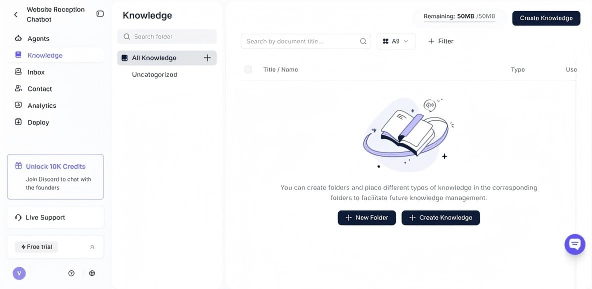
- Navigate to Knowledge Base and add your listing FAQs: addresses, availability windows, access instructions, and any showing rules
- Connect your phone number so Solvea receives inbound showing request calls
- Set your escalation rules: which requests should trigger an immediate notification to you vs. which can be auto-confirmed
- Test with a sample showing request call — verify that the AI collects agent name, buyer name, and preferred time correctly
- Enable for your active listings
After-hours requests are captured and logged automatically. You review the queue each morning rather than missing calls you never knew arrived.

Step 5: Establish a Communication Protocol for Conflicts and Changes
Even with a scheduling system, conflicts happen — the seller gets sick, a property goes under contract, or a buyer's agent requests a slot already taken. Define your protocol upfront:
- Slot conflicts: ShowingTime prevents double booking, but if a manual request arrives, decline immediately and provide the next 3 available windows — don't leave agents waiting for alternatives
- Seller cancellations: Notify all affected agents via ShowingTime messaging within 30 minutes of the cancellation, with a reschedule offer
- Multiple offers on the horizon: When the seller is reviewing offers by a set date, update your MLS agent remarks and ShowingTime notes immediately so all agents requesting showings have the same information
- Under contract: Cancel all pending showing requests the same day the property goes under contract. Leaving confirmations in place wastes agents' time and creates friction
Step 6: Track Showing Feedback Systematically
Showing feedback from multiple buyer's agents is valuable market intelligence — and most agents don't collect it systematically. ShowingTime includes automated feedback requests sent to agents after each showing. Enable this feature and review feedback weekly:
- High-frequency objections (price, condition, specific feature) should be communicated to the seller
- Agents who showed the property are warm prospects for the seller's next transaction
- Feedback trends across multiple showings give the listing agent credibility when recommending a price adjustment
Tracking feedback in one place (ShowingTime's feedback summary) is faster than chasing individual agents by phone.
How Managing Multiple Agent Showings Differs From Single Showings
A single showing request is easy to handle manually. The complexity increases non-linearly as volume goes up:
- Conflict probability increases with every new agent in the queue. Five agents all wanting Thursday at 6pm require a system, not a calendar app.
- Seller communication burden grows as each showing request needs seller approval. ShowingTime's direct-to-seller notification flow protects listing agents from becoming manual message relays.
- After-hours exposure multiplies. With one agent, a missed after-hours request is a minor inconvenience. With five or ten, missing after-hours requests means the listing is systematically underselling its responsiveness to the buyer's agent pool.
- Feedback aggregation requires tooling. Remembering three feedback conversations is feasible; remembering fifteen is not.
Common Mistakes Listing Agents Make With Multiple Showing Requests
❌ Accepting showing requests by personal text → ✓ Direct all requests to ShowingTime or your scheduling platform. Personal texts create an untracked queue with no conflict prevention.
❌ Leaving showing instructions vague in the MLS → ✓ Complete agent remarks eliminate the vast majority of inbound clarification calls. Include access method, availability windows, and contact preference explicitly.
❌ Confirming slots manually, one by one → ✓ Configure automatic confirmations. You should receive the request and approve it — not draft a new confirmation email for every booking.
❌ No after-hours coverage → ✓ Use an AI receptionist or a team showing coordinator. A listing with no after-hours response path is less accessible than one that is — and buyer's agents notice.
❌ Forgetting to cancel pending showings after going under contract → ✓ Build contract execution into your checklist: within the same day, cancel all pending showings and update showing instructions in ShowingTime and the MLS.
From Showing Requests to Automated Coordination: How AI Handles the Volume
Managing showing requests from multiple agents is fundamentally an information routing problem. Agents need to know: "Is this time available? How do I access the property? Is the seller okay with my buyer?" These answers are known and repeatable — they just need a reliable delivery channel.
An AI receptionist like Solvea provides that channel at scale. You document your listing's showing rules, availability, and access instructions once. The AI answers every inbound request — calls, texts, web messages — with accurate, listing-specific information and collects the showing details you need to confirm the appointment. For listing agents managing several active properties, this means the showing coordination workload doesn't grow linearly with the number of listings.
Your AI Receptionist, Live in Minutes.
Scale your front desk with an AI that never sleeps. Solvea handles unlimited multi-channel inquiries, books appointments into your calendar automatically, and ensures zero missed opportunities around the clock.
FAQ
How do you prevent double bookings when multiple agents want the same showing slot?Use a scheduling tool like ShowingTime that has real-time conflict prevention built in. When a slot is confirmed for one agent, the same slot is no longer offered to the next agent. Manual scheduling by phone or text cannot prevent double bookings reliably at any meaningful volume.
Should I respond to every buyer's agent individually when I have multiple showing requests?No. Use ShowingTime's automated confirmations and notifications to handle routine communications. Reserve personal responses for situations that require judgement — conflicting requests, seller communication nuances, or feedback that warrants a follow-up conversation.
What do I tell a buyer's agent when no showing slots are available?Be direct and give them the next available window. "The property is fully scheduled through Thursday — I have Friday at 2pm and Saturday at 10am available. Would either work for your client?" Never leave agents in a holding pattern without a concrete alternative.
How do I handle a seller who keeps declining showing requests?Have a direct conversation about what's happening. Sellers who frequently decline showings are limiting their property's market exposure, which directly affects sale price and days on market. According to NAR guidance, listing agents have a professional obligation to communicate the impact of showing restrictions clearly and document the conversation.
Can an AI receptionist handle showing requests accurately for multiple listings?Yes, if the AI is given listing-specific information for each property. Tools like Solvea let you create a separate knowledge base entry for each listing, so the AI provides accurate availability and access instructions for each one without mixing information across properties.
What is ShowingTime and do I need it?ShowingTime is the industry-standard showing management platform used by the majority of listing agents in the US. It integrates with MLS systems, automates confirmation and reminder workflows, and provides feedback collection after each showing. For any agent managing more than one active listing, it is the practical baseline for coordinated showing management.