> ## Documentation Index
> Fetch the complete documentation index at: https://solvea.cx/docs/llms.txt
> Use this file to discover all available pages before exploring further.

# Add Knowledge Sources

> The Knowledge module allows you to upload, sync, and manage business knowledge from multiple sources. 

Uploaded content is automatically parsed and organized into folders, enabling agents to retrieve accurate information and respond to users more effectively.

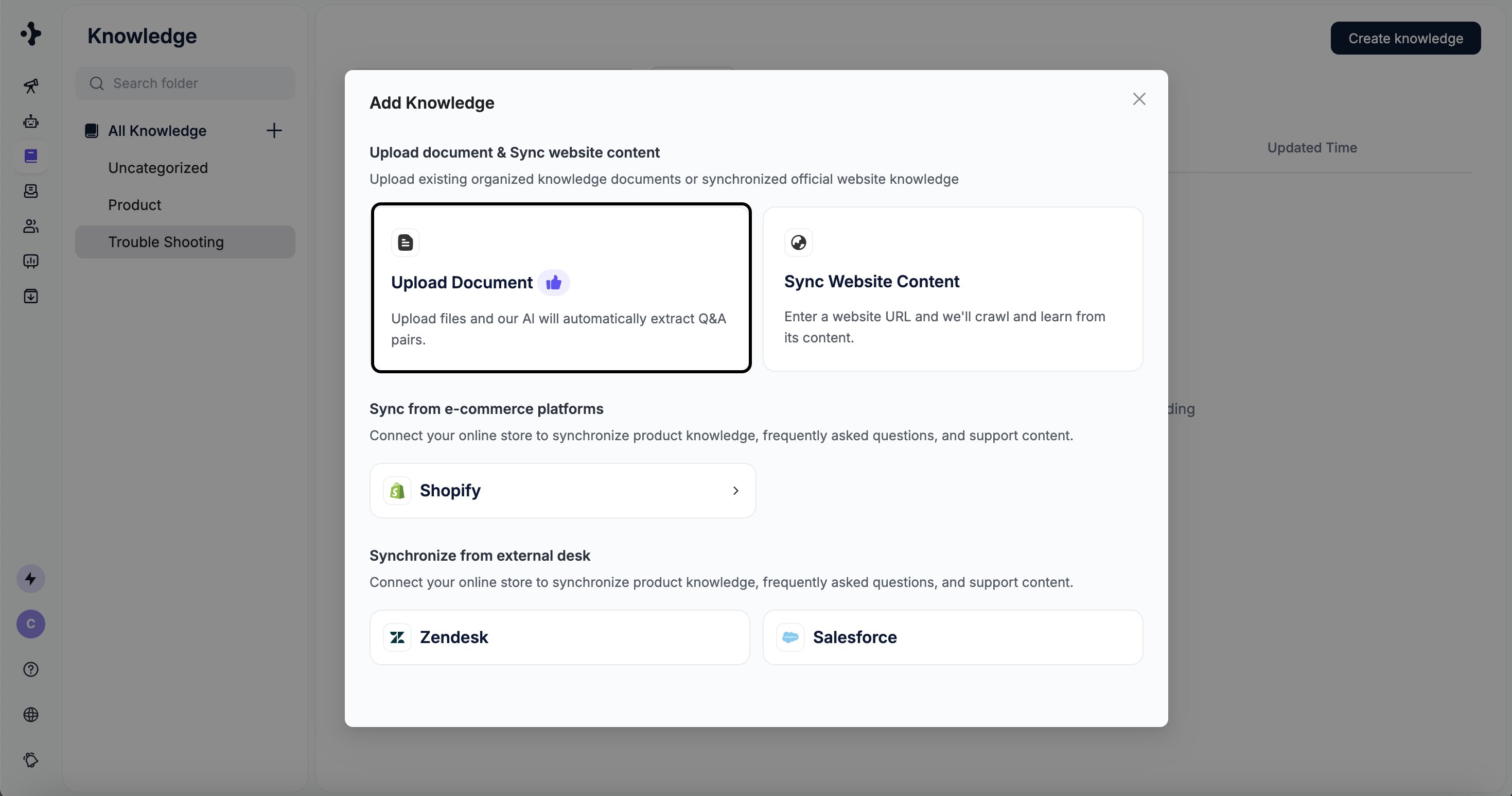
## Upload Document

Upload local documents to quickly build your knowledge base. The system will automatically extract and process the content.

<Tip>
  Uploading documents is the recommended way to add knowledge.
</Tip>

### Supported File Formats

* PDF
* Word
* Excel
* CSV
* TXT

<Note>
  File size limit: 20 MB per file
</Note>

**Document Tips**

* Keep each article short and clear.
* The title of each article is very important. Please use the title to briefly summarize the topic.

### Steps

<Steps>
  <Step title="">
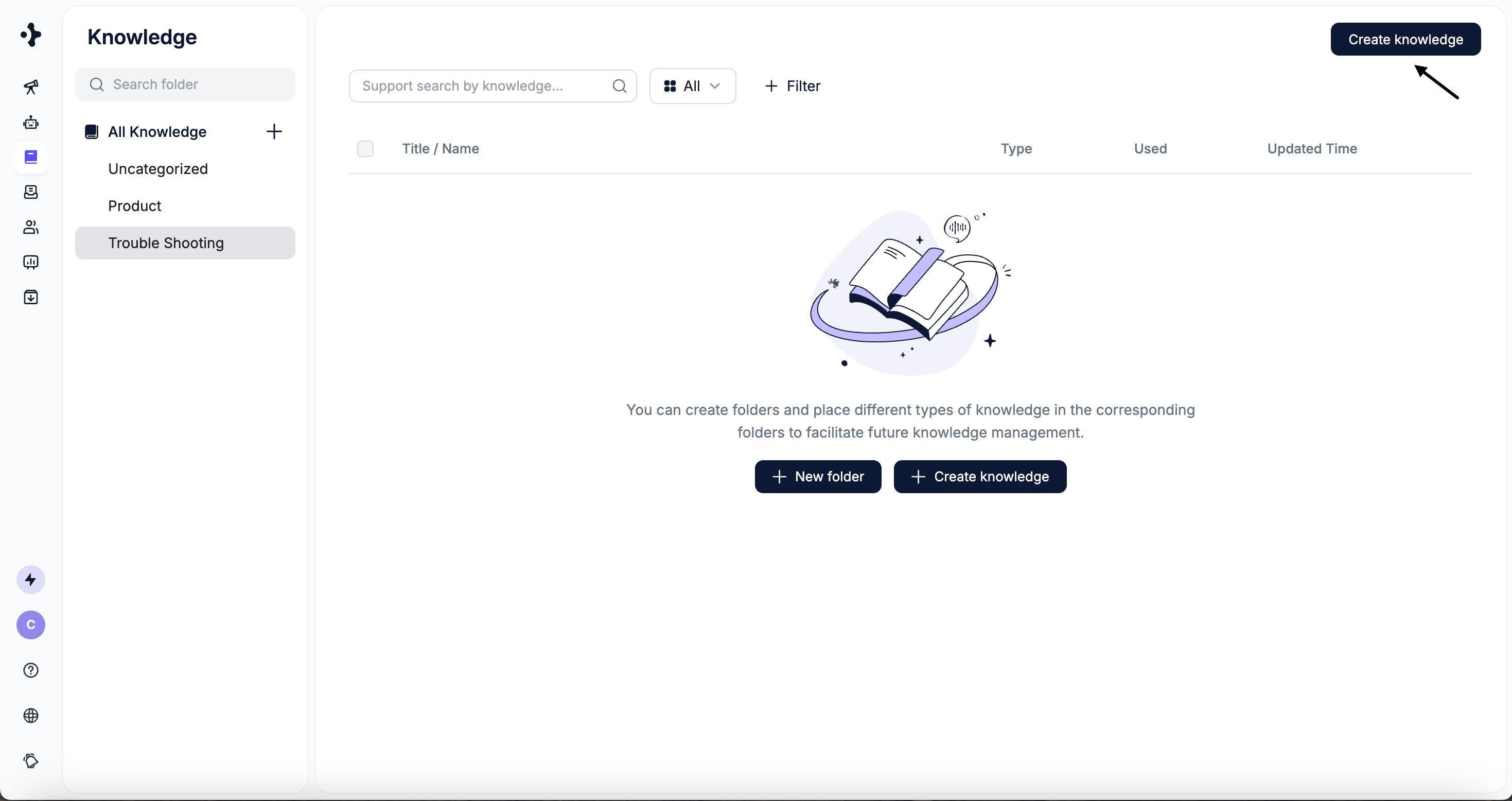
    Select the folder where the knowledge should be stored. \
    Click **Create Knowledge** → **Upload Document**.
    <Frame>
      <img src="https://mintcdn.com/solvea-a5b10e8e/rx-Gqu60Sp7nIe7o/images/image-22.png?fit=max&auto=format&n=rx-Gqu60Sp7nIe7o&q=85&s=7a41075fe96bcab46b2f6561c2eff65a" alt="Image" width="2938" height="1556" data-path="images/image-22.png" />
    </Frame>

    <Frame>
      <img src="https://mintcdn.com/solvea-a5b10e8e/rx-Gqu60Sp7nIe7o/images/image-23.png?fit=max&auto=format&n=rx-Gqu60Sp7nIe7o&q=85&s=0f6830faf71e1c855f70e9cecdfd3bca" alt="Image" width="2938" height="1546" data-path="images/image-23.png" />
    </Frame>
  </Step>

  <Step title="">
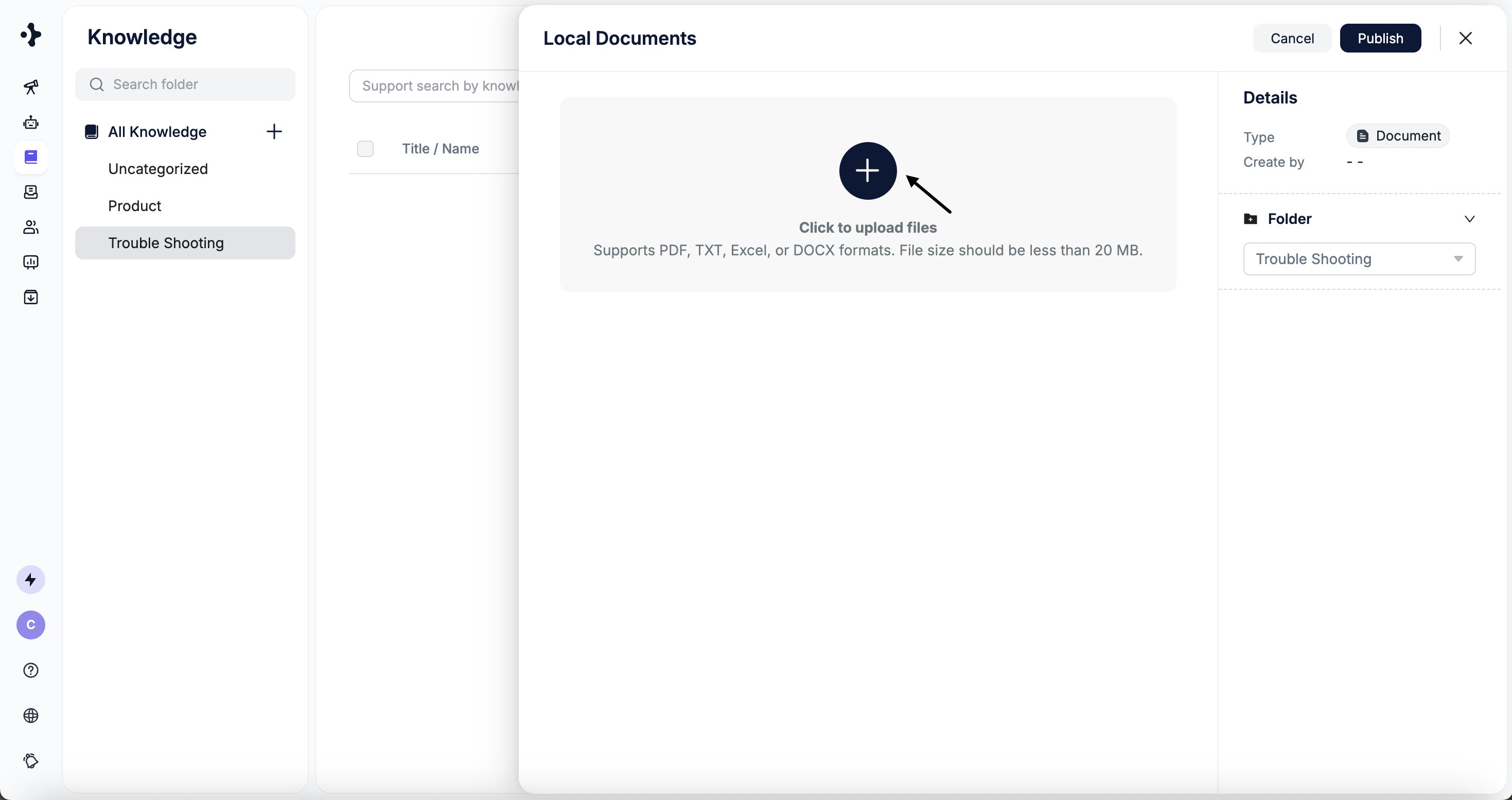
    Click **Click to upload files** and upload your document.
    <Frame>
      <img src="https://mintcdn.com/solvea-a5b10e8e/rx-Gqu60Sp7nIe7o/images/image-24.png?fit=max&auto=format&n=rx-Gqu60Sp7nIe7o&q=85&s=9bd5d64d9db46c4bb84836edeff99111" alt="Image" width="2938" height="1554" data-path="images/image-24.png" />
    </Frame>
  </Step>

  <Step title="">
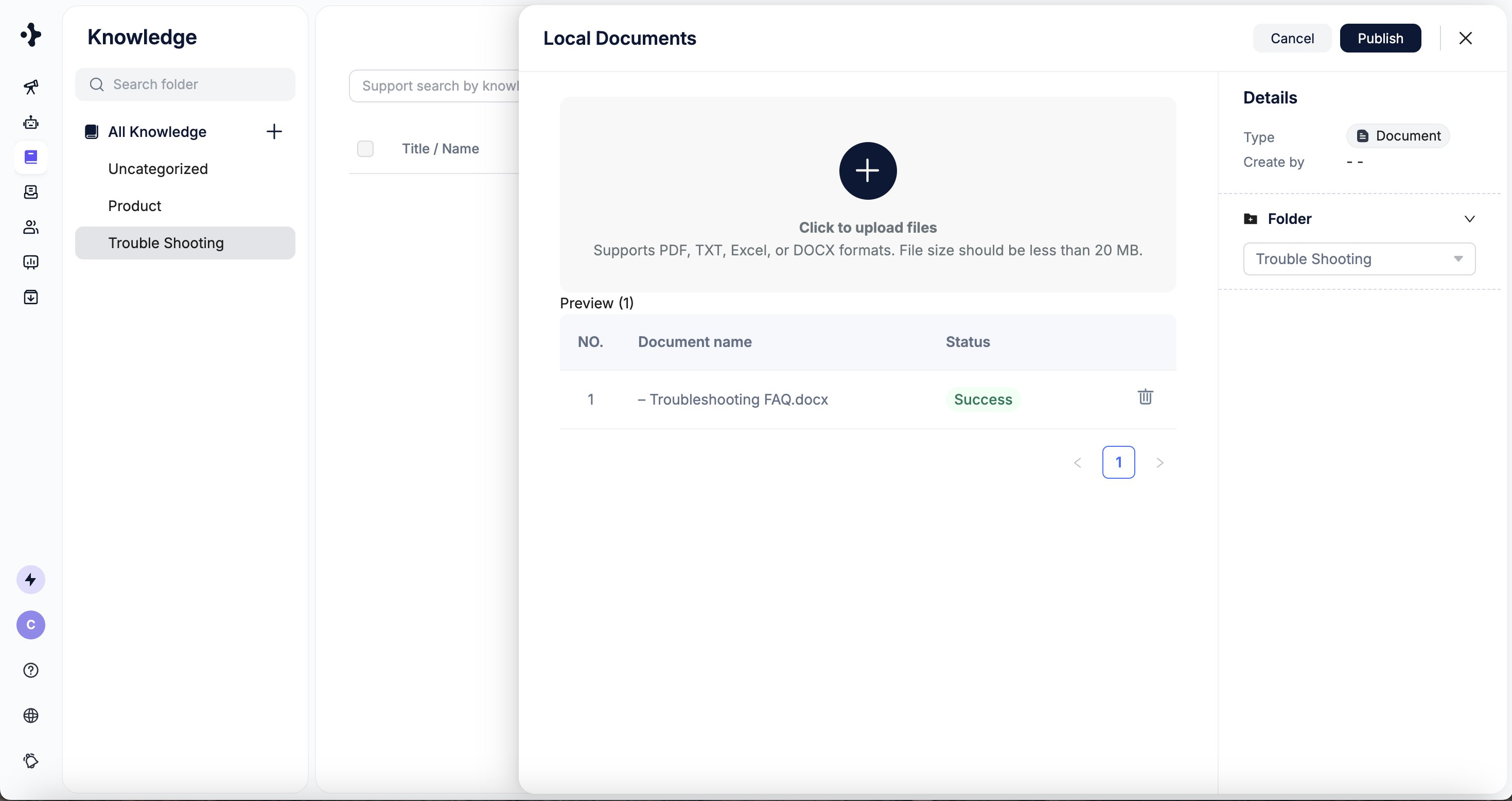
    The system checks file size automatically. Retry if any upload fails.
    <Frame>
      <img src="https://mintcdn.com/solvea-a5b10e8e/rx-Gqu60Sp7nIe7o/images/image-25.png?fit=max&auto=format&n=rx-Gqu60Sp7nIe7o&q=85&s=c9626f99b56f12cfffafc4d22a158f57" alt="Image" width="2938" height="1556" data-path="images/image-25.png" />
    </Frame>
  </Step>

  <Step title="">
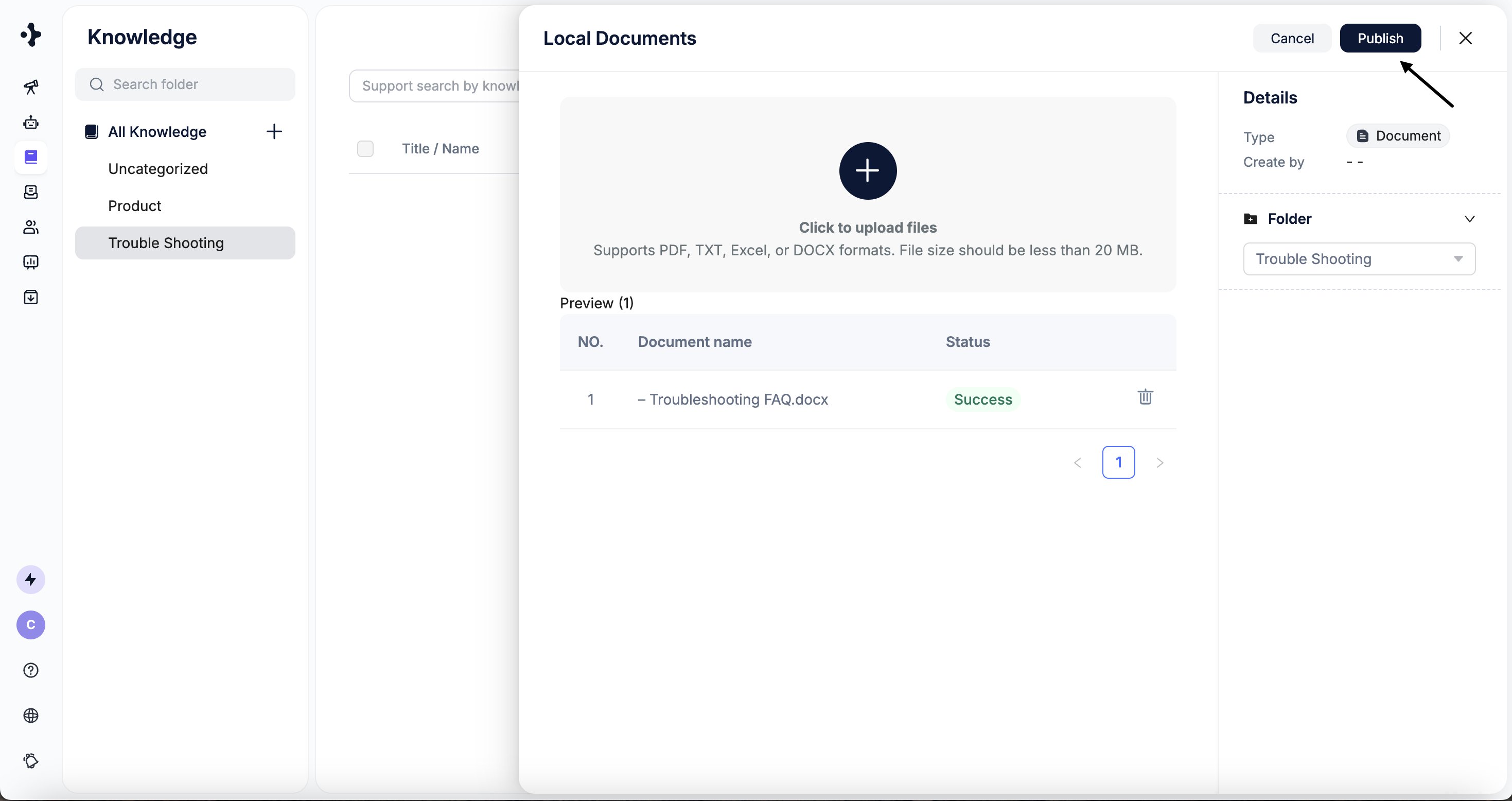
    Click **Publish** to start the upload.
    <Frame>
      <img src="https://mintcdn.com/solvea-a5b10e8e/rx-Gqu60Sp7nIe7o/images/image-26.png?fit=max&auto=format&n=rx-Gqu60Sp7nIe7o&q=85&s=0c3bcc4d9099ad1e97cf71d27be791ec" alt="Image" width="2938" height="1556" data-path="images/image-26.png" />
    </Frame>
  </Step>

  <Step title="">
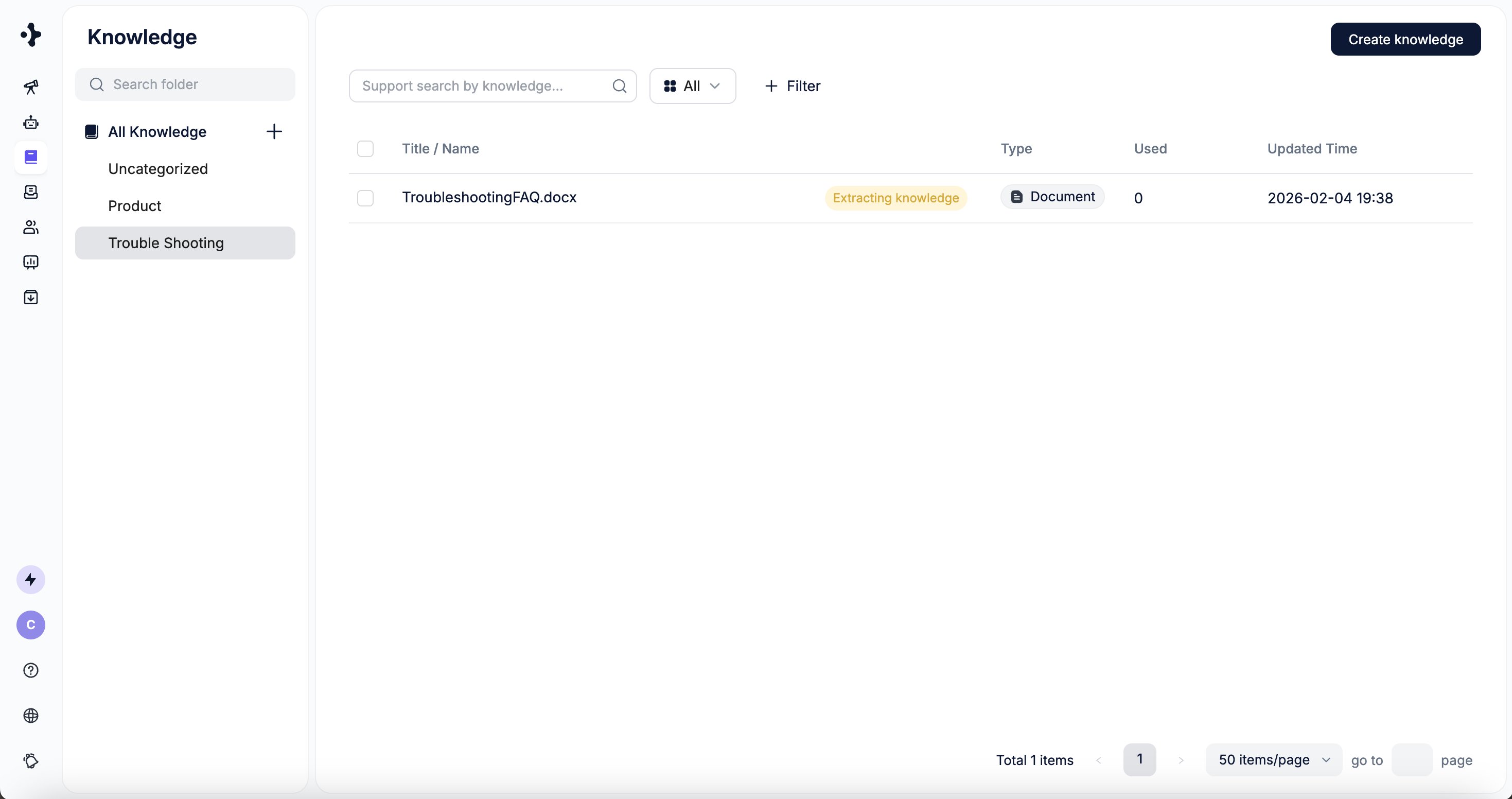
    The system parses the content and adds it to the selected folder.
    <Frame>
      <img src="https://mintcdn.com/solvea-a5b10e8e/rx-Gqu60Sp7nIe7o/images/image-27.png?fit=max&auto=format&n=rx-Gqu60Sp7nIe7o&q=85&s=7428ba1c9c29f2edf0b60c00c043415e" alt="Image" width="2938" height="1552" data-path="images/image-27.png" />
    </Frame>
  </Step>
</Steps>

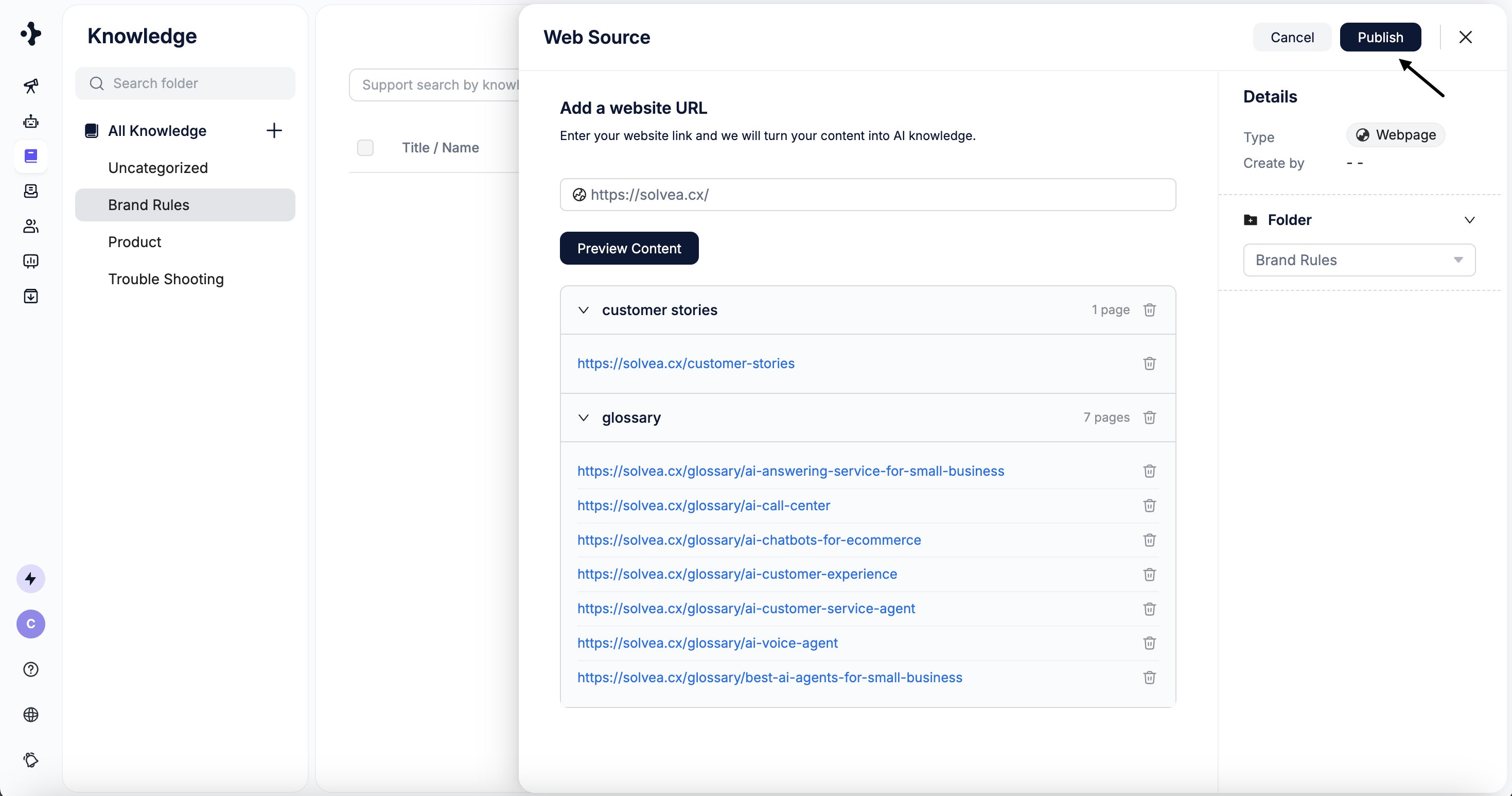
## Sync Website Content

You can sync content directly from your website by providing a main URL. The system uses the site’s sitemap to automatically discover and categorize subpages.

### Steps

<Steps>
  <Step title="">
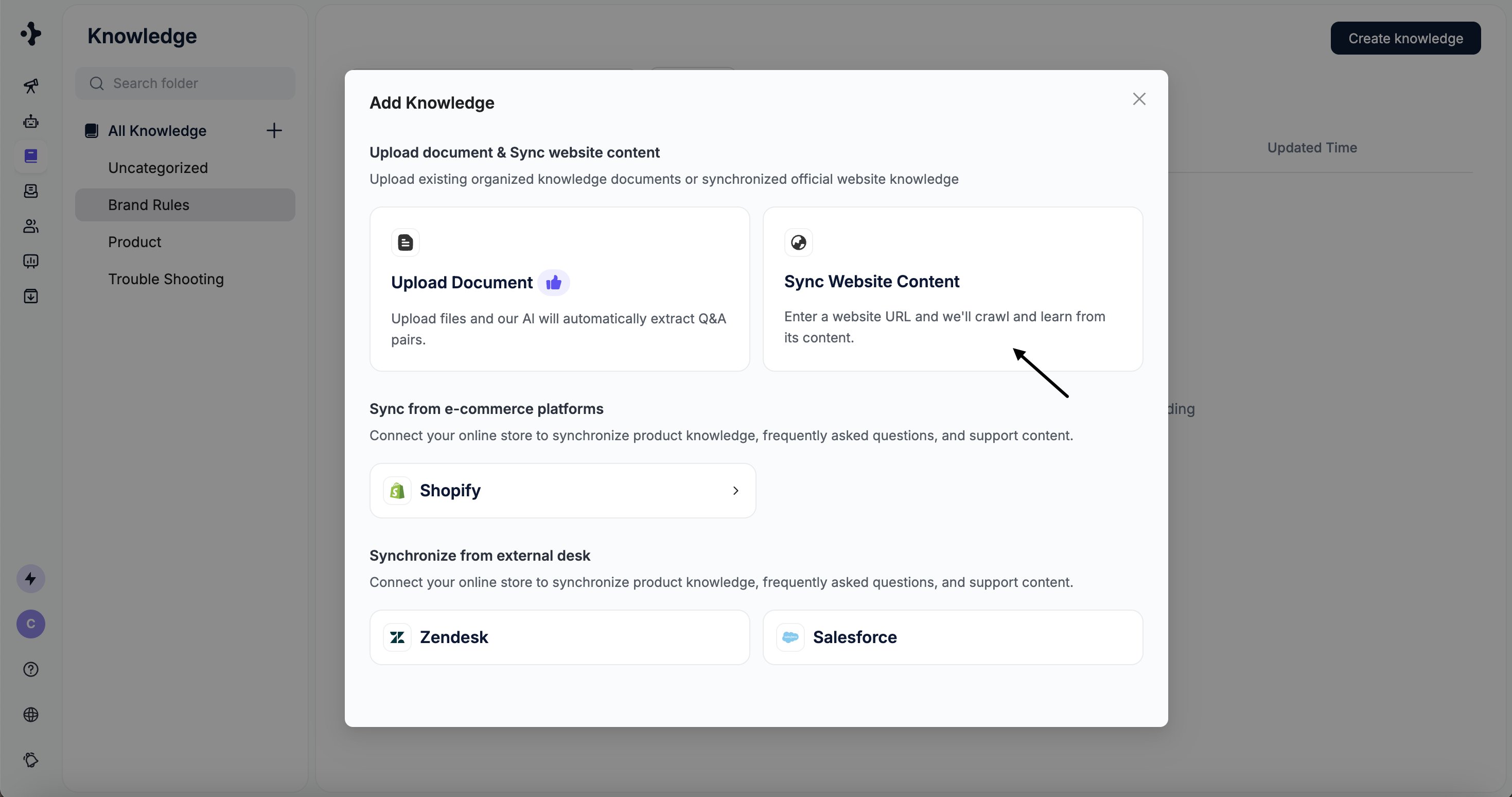
    Select the folder where the knowledge should be stored. \
    Click **Add Knowledge** → **Sync Website Content**.
    <Frame>
      <img src="https://mintcdn.com/solvea-a5b10e8e/oMaHAKObppBqIbXl/images/image-28.png?fit=max&auto=format&n=oMaHAKObppBqIbXl&q=85&s=3ce3dabec5d5d3dd54060b1de59633fc" alt="Image" width="2938" height="1548" data-path="images/image-28.png" />
    </Frame>
  </Step>

  <Step title="">
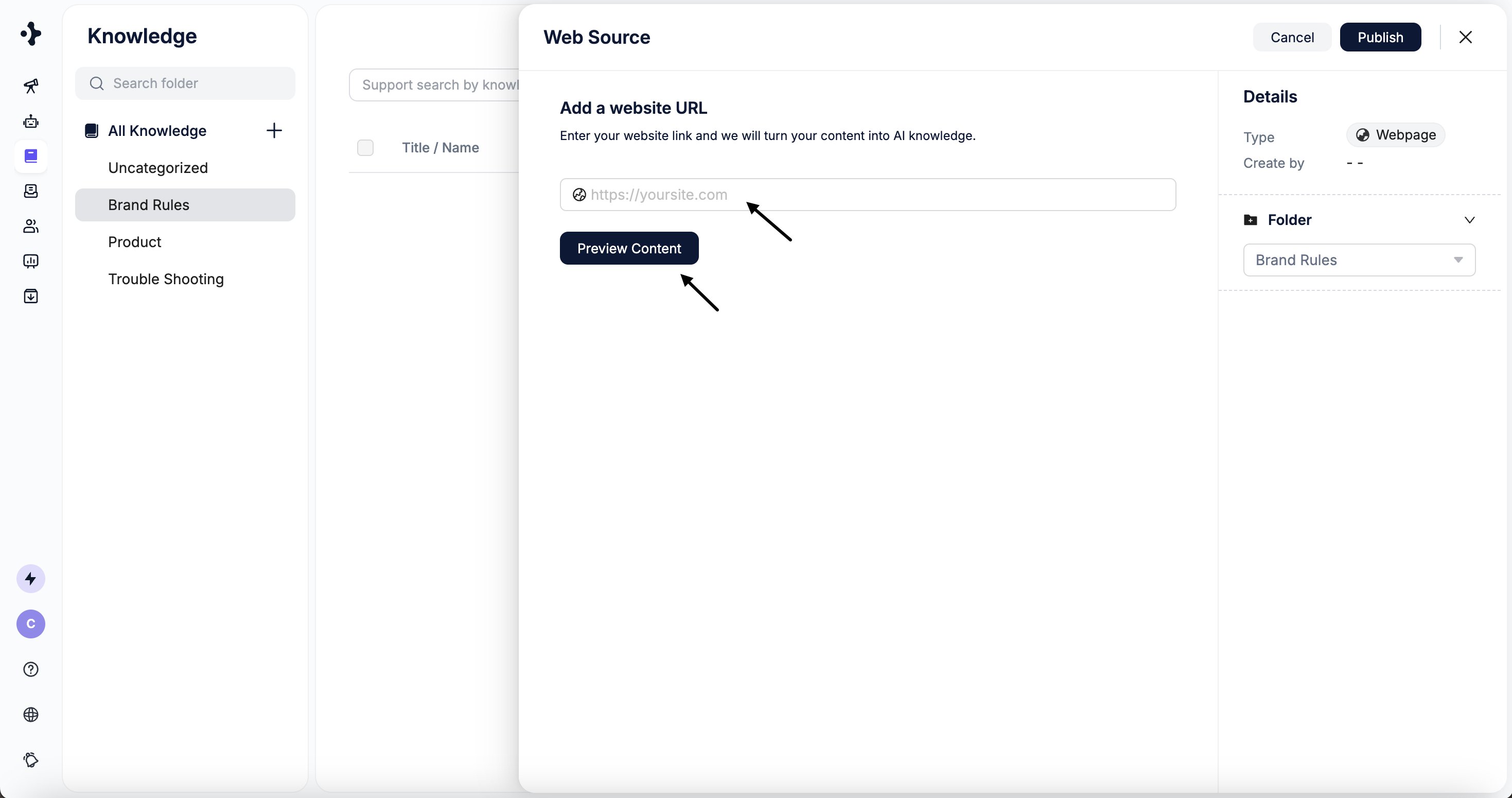
    Enter the website URL and click **Preview Content**.
    <Frame>
      <img src="https://mintcdn.com/solvea-a5b10e8e/oMaHAKObppBqIbXl/images/image-29.png?fit=max&auto=format&n=oMaHAKObppBqIbXl&q=85&s=dec516c5b5ce2dbca1db5000dcf9f1fe" alt="Image" width="2938" height="1550" data-path="images/image-29.png" />
    </Frame>
  </Step>

  <Step title="">
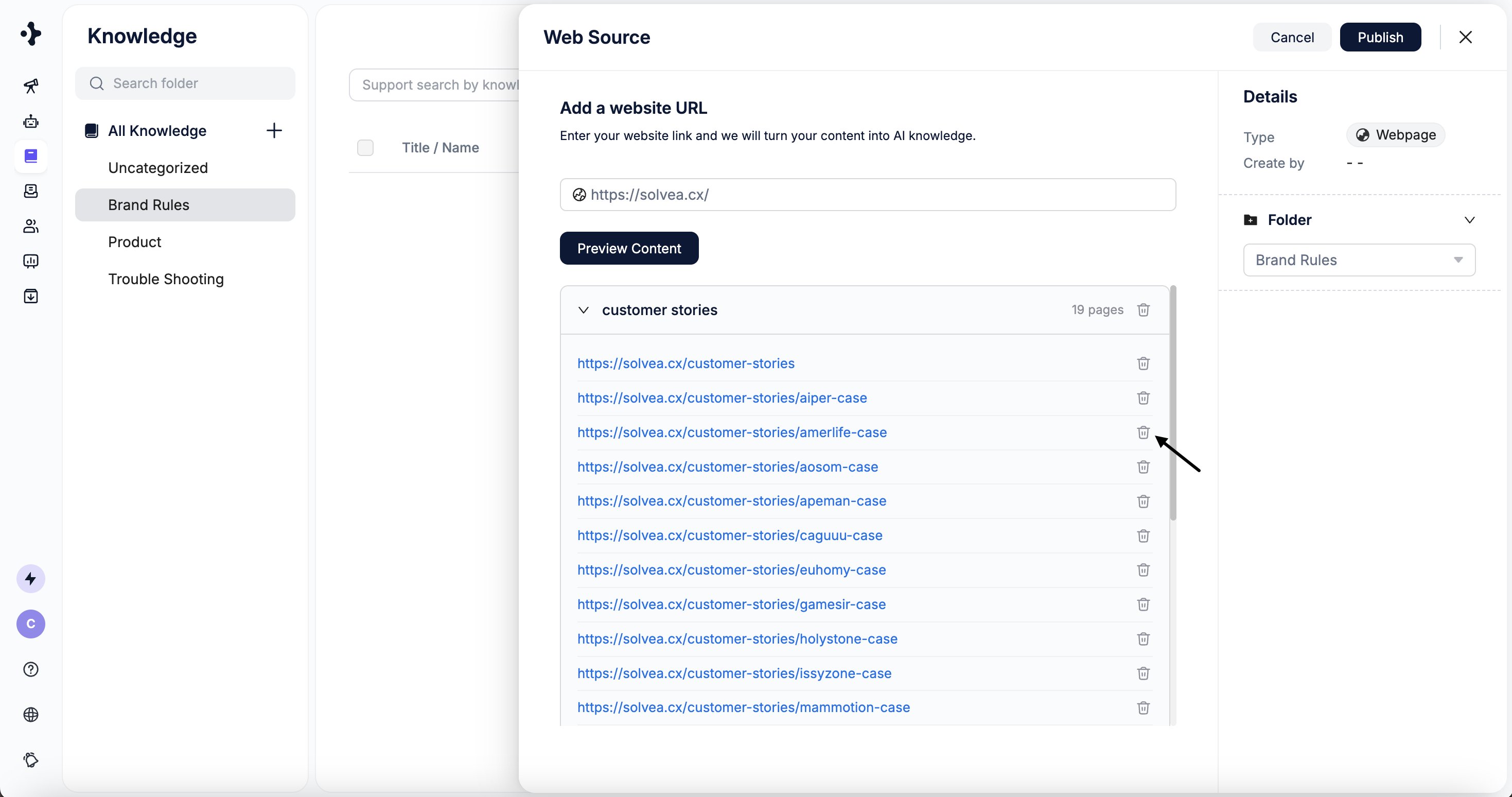
    Preview detected pages and select the target directory.
    <Frame>
      <img src="https://mintcdn.com/solvea-a5b10e8e/oMaHAKObppBqIbXl/images/image-30.png?fit=max&auto=format&n=oMaHAKObppBqIbXl&q=85&s=7f9e145f23906fd0239167bfb5988902" alt="Image" width="2938" height="1548" data-path="images/image-30.png" />
    </Frame>
  </Step>

  <Step title="">
    Click **Publish** to start learning.

    <Frame>
      <img src="https://mintcdn.com/solvea-a5b10e8e/oMaHAKObppBqIbXl/images/image-31.png?fit=max&auto=format&n=oMaHAKObppBqIbXl&q=85&s=cb314b50fda74d1dc2591800e1956777" alt="Image" width="2938" height="1546" data-path="images/image-31.png" />
    </Frame>
  </Step>

  <Step title="">
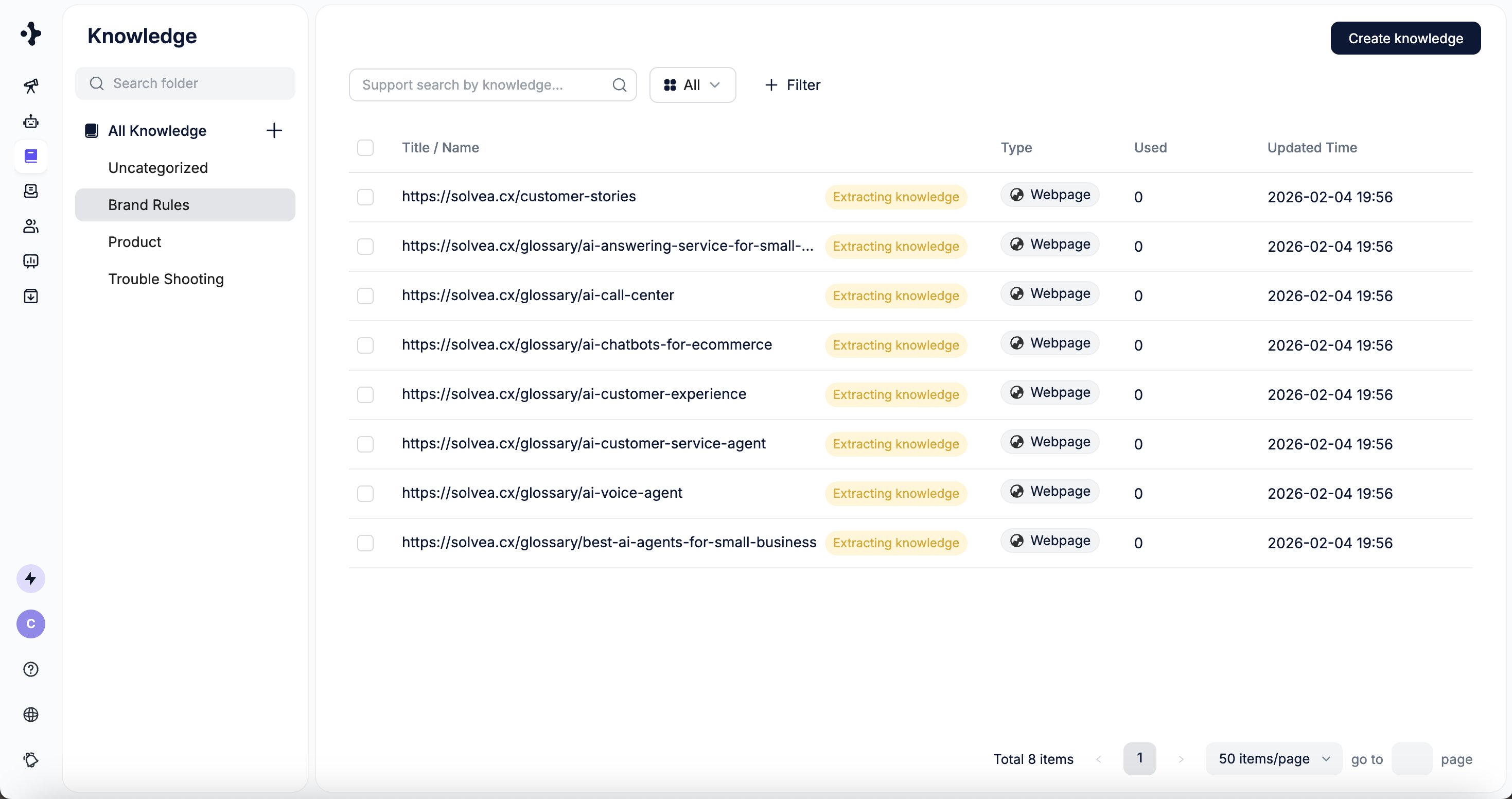
    The parsed website content appears in the selected folder.
    <Frame>
      <img src="https://mintcdn.com/solvea-a5b10e8e/oMaHAKObppBqIbXl/images/image-32.png?fit=max&auto=format&n=oMaHAKObppBqIbXl&q=85&s=4d0fdf0097aae437845df32018dee279" alt="Image" width="2938" height="1552" data-path="images/image-32.png" />
    </Frame>
  </Step>
</Steps>