> ## Documentation Index
> Fetch the complete documentation index at: https://solvea.cx/docs/llms.txt
> Use this file to discover all available pages before exploring further.
# Agent Overview
> Understand what an AI agent is and how it works in Solvea.
An **AI agent** is a role-based AI receptionist built for a specific business scenario. It is designed to handle specific tasks and customer interactions autonomously.
*For example, a Retail Customer Specialist Agent can manage common e-commerce inquiries such as product recommendations, order tracking, and product usage questions.*
## How an Agent Works
**AI Agent think and act like human staff.** A Solvea agent can:
* Understand customer intent
* Retrieve relevant knowledge from the knowledge base
* Use connected tools and communication channels
* Execute the correct task workflow
* Escalate to a human agent when needed
For example:
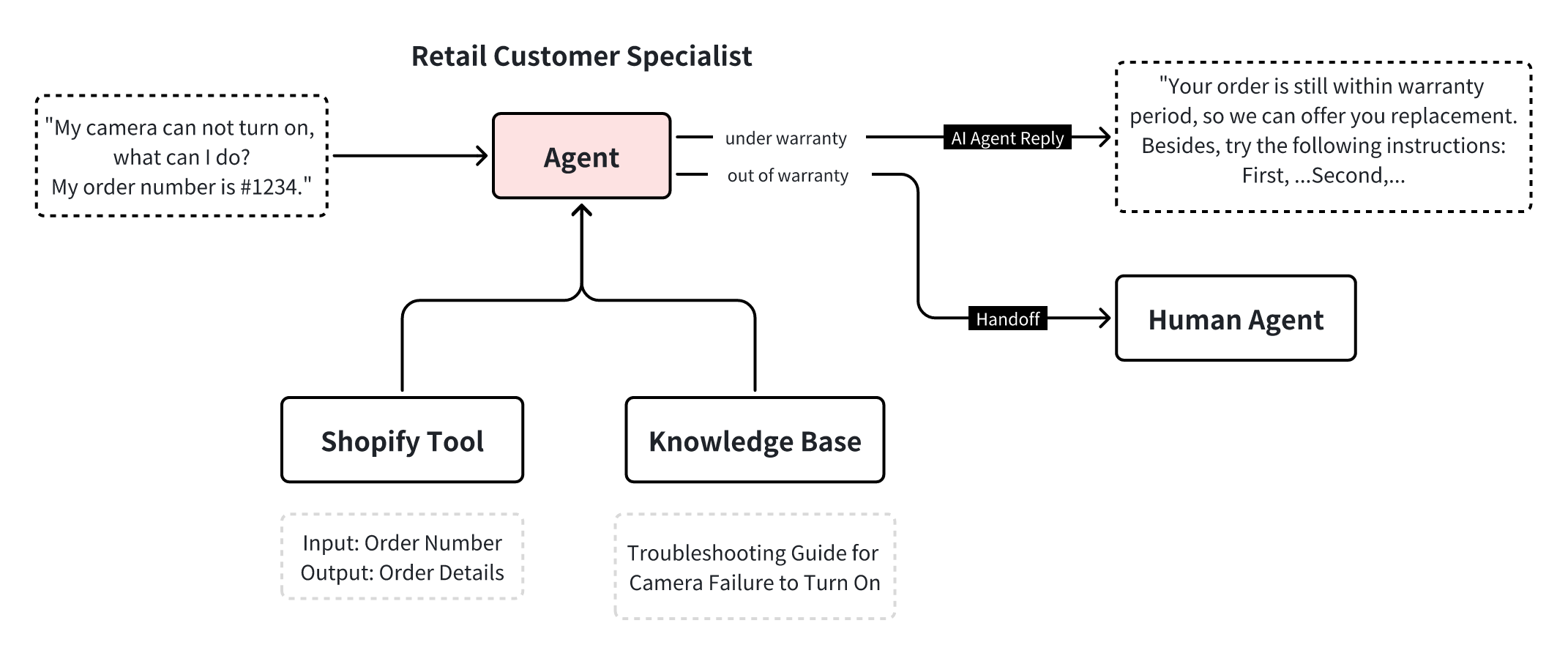 This allows the agent to handle both conversations and workflows, not just reply to messages.
## Build your Agents
You can create multiple agents for different industries or business scenarios.
Each agent operates independently and can be deployed across different channels without interfering with one another.
## What You’ll Learn
In this section, you will learn how to:
Create agents using AI chatting or pre-built templates.
Set up profiles, channels, handoffs, tools, knowledge, and customization options.
Refine your agents through testing and training.
Build a custom agent from scratch by writing your own agent prompt.
This allows the agent to handle both conversations and workflows, not just reply to messages.
## Build your Agents
You can create multiple agents for different industries or business scenarios.
Each agent operates independently and can be deployed across different channels without interfering with one another.
## What You’ll Learn
In this section, you will learn how to:
Create agents using AI chatting or pre-built templates.
Set up profiles, channels, handoffs, tools, knowledge, and customization options.
Refine your agents through testing and training.
Build a custom agent from scratch by writing your own agent prompt.